
Imagine crafting a stunning website with ease, where every element fits together seamlessly, and you have the creative freedom to make your vision come to life without any coding headaches. That’s the power of Wonder Blocks in WordPress.
If you’ve ever felt overwhelmed by the complexities of website design, or frustrated by limited options that keep you from achieving the perfect look for your site, Wonder Blocks are here to change that. They promise a simple yet powerful solution to transform your website into a masterpiece, with intuitive tools that even a beginner can master.
Curious to know more? Dive into this article and discover how Wonder Blocks can revolutionize your WordPress experience, offering you the ultimate toolkit to design with confidence and creativity. Whether you’re a seasoned web designer or just starting your digital journey, you won’t want to miss out on what Wonder Blocks have to offer.
Wonder Blocks Basics
Wonder Blocks are special tools in WordPress. They help build web pages. Each block is a piece of content. It can be text, images, or buttons. You can move blocks around easily. They make page design simple and fun. Their purpose is to create beautiful pages. Even beginners can use them. There is no need for coding skills. Just drag, drop, and design.
Wonder Blocks have many useful features. First, they are customizable. Change colors, sizes, and styles. Next, they are responsive. This means they look good on phones and computers. Also, they save time. You can build pages fast. Blocks are easy to use. Just click and edit. They help make websites look great. Many people use Wonder Blocks today.
Installation And Setup
Wonder Blocks need a few things to work right. WordPress version should be 5.0 or higher. Ensure PHP version is at least 7.3. MySQL version must be 5.6 or above. Your web server should support these. These are crucial for smooth operation. Update your system if needed.
Begin by logging into your WordPress dashboard. Navigate to the Plugins section. Select Add New. Use the search bar to find Wonder Blocks. Click on Install Now. After installation, press Activate. The plugin is now ready. You can start using it. Customize your site with ease. Enjoy the new features.
Customization Options
Wonder Blocks in WordPress offer various customization options. Users can easily adjust layouts, colors, and fonts to fit their website’s style. These blocks provide flexibility for creating unique and visually appealing content.
Styling And Design
Wonder Blocks make your website look pretty. You can change colors easily. Choose from many fonts to make text clear. Add pictures to show your ideas. Arrange them in grids or lists. Use borders to separate sections. Change the size of blocks to fit your needs. Move blocks around by dragging them. It’s all simple and fun.
Advanced Settings
Some settings let you do more. You can add special effects to your blocks. Make them slide or fade. Use custom code to add unique features. Change how blocks behave on different devices. Check how your site looks on phones. Turn blocks on or off with one click. Control who can see your content. It’s easy to manage.
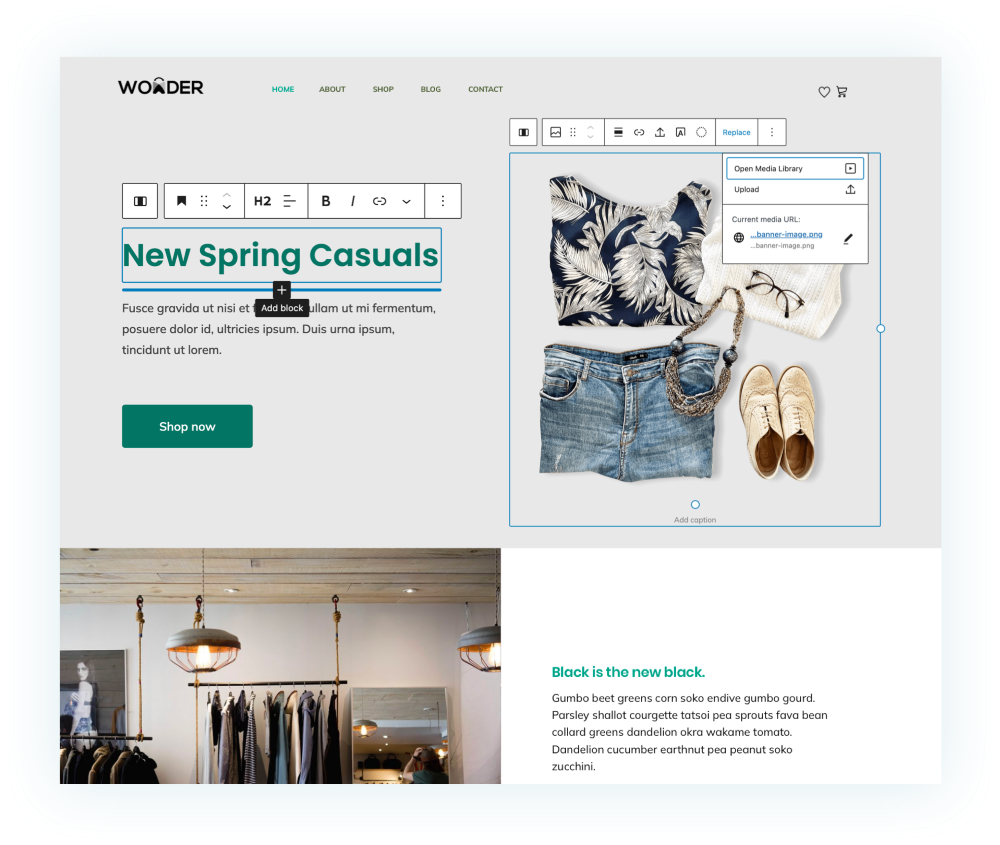
Credit: wonder.yithemes.com
Integration With Other Plugins
Wonder Blocks in WordPress enhance functionality by seamlessly integrating with other plugins. This integration supports diverse features, enabling users to customize and expand their websites effortlessly. Compatibility with popular plugins ensures easy access to tools for improved website performance.
Compatible Plugins
Wonder Blocks work well with many plugins. They fit with WooCommerce, enhancing online stores. They also pair with Yoast SEO, helping sites rank better. Contact Form 7 can be used easily with Wonder Blocks. This helps in creating forms. Users find Wonder Blocks smooth with Elementor for design. Compatibility ensures that sites function without trouble. Users enjoy more features with ease.
Troubleshooting Integration Issues
Sometimes plugins don’t work well together. Users might see errors or slowdowns. Check plugin settings first. Ensure all plugins are updated. Updates fix many issues. If problems persist, disable other plugins. Enable them one by one. This finds the problem plugin. Check forums for help. Many users share fixes. Contact support if needed. They offer expert help.
Benefits For Content Creators
Wonder Blocks in WordPress make things easy for creators. They help to make pages look better. These blocks let users see text and images clearly. This is called Enhanced User Experience. Creators can make their pages colorful and fun. People stay longer on pages they like.
Wonder Blocks help with Increased Engagement. Visitors click more when they see interesting things. Users enjoy reading and watching when the content is good. Creators can use blocks to add videos and pictures. This makes the content exciting and lively. Blocks help bring more visitors to the site.

Credit: wordpress.org
Case Studies And Examples
Explore Wonder Blocks in WordPress through real case studies and examples. These tools help users create customizable layouts effortlessly. Discover practical applications that showcase their versatility in enhancing website designs.
Successful Implementations
Many websites use Wonder Blocks to enhance their design. A travel blog used them to showcase beautiful photos. Each block had a unique image and story. This made the site attractive and engaging.
An online store used Wonder Blocks to highlight products. Customers could see details by clicking on blocks. This made shopping easy and fun. A school website used blocks for events. Parents could find dates and details quickly.
Creative Use Cases
Artists use Wonder Blocks to display portfolios. Each block shows a different art piece. This setup catches visitor attention. Musicians use blocks for albums. Fans can listen to songs directly from the site.
Writers use blocks for book previews. Each block shows a book cover and a short review. This helps readers decide what to read next. Teachers use blocks to organize lessons. Students find materials fast and simple.
Tips And Best Practices
Wonder Blocks can make sites slow. Regular updates help with speed. Unused blocks should be removed. Image sizes need checking. Large files can slow down pages. Compress images to make them smaller. Caching plugins help speed too. They save pages for easy loading. Test speed often to see changes. Use tools to check load times.
Updates keep Wonder Blocks working well. Check for updates each week. Install new updates right away. Backup data before updating. Sometimes updates can cause issues. Test site after updates. Look for problems. Fix any errors quickly. Stay informed about changes. Follow news about Wonder Blocks. Join forums to learn from others. They share tips and tricks.

Credit: mobile.twitter.com
Future Of Wonder Blocks
Wonder Blocks in WordPress transform the page-building experience by offering flexible design elements. They allow users to create visually appealing layouts with ease. As WordPress evolves, these blocks promise more customization options, enhancing creativity for developers and beginners alike.
Upcoming Features
Wonder Blocks are getting more interesting. Developers plan to add new tools. These tools will help build websites faster. Expect more design choices. Users will get new templates. Templates make building easy.
Editing will be simpler. Drag and drop options will improve. Users can change colors easily. More fonts will be available. These updates will save time.
Community And Support
Community support is growing. Users share tips and tricks. Forums help solve problems. Many tutorials are available. Beginners can learn quickly. Experts offer guidance.
Support is active. Developers listen to feedback. Updates fix bugs. Help is always close. Users feel confident using Wonder Blocks. The community is friendly. Everyone helps each other.
Frequently Asked Questions
What Are Wonder Blocks In WordPress?
Wonder Blocks are versatile, customizable blocks for WordPress. They enhance design flexibility and functionality. Ideal for creating unique layouts without coding. They integrate seamlessly with the Gutenberg editor, offering a user-friendly experience. By using Wonder Blocks, users can craft visually appealing and responsive web pages efficiently.
How Do Wonder Blocks Improve Website Design?
Wonder Blocks offer a wide range of design options. They allow users to customize layouts easily. With responsive features, they ensure websites look great on all devices. These blocks save time and effort by providing pre-designed templates. This results in a more efficient and appealing design process.
Can Beginners Use Wonder Blocks Easily?
Yes, Wonder Blocks are beginner-friendly. They integrate with the Gutenberg editor for simplicity. Users can drag and drop blocks without coding skills. The intuitive interface makes customization straightforward. Even novices can create professional-looking pages. Wonder Blocks provide an accessible way to enhance WordPress site design.
Do Wonder Blocks Support Responsive Design?
Absolutely, Wonder Blocks ensure responsive design for all devices. They automatically adjust layouts for different screen sizes. This feature enhances user experience and site accessibility. Users can preview how their site looks on various devices. Wonder Blocks make creating mobile-friendly websites effortless and effective.
Conclusion
Wonder Blocks in WordPress offer simplicity and creativity. They enhance website design efficiently. Users can easily customize content with their intuitive features. These blocks save time and effort. Beginners find them user-friendly and adaptable. Advanced users appreciate their flexibility. Overall, Wonder Blocks improve site functionality and aesthetics.
Their integration into WordPress is seamless. This makes them a valuable tool for any WordPress user. Consider using Wonder Blocks to enhance your website today. They provide both visual appeal and ease of use. Perfect for any skill level.


