
You’ve found a WordPress theme you love, but there’s just one thing nagging at you—what’s that perfect font it’s using? Fonts play a crucial role in setting the tone of your website, and knowing the exact typeface can help you maintain a consistent brand identity.
But don’t worry, you’re not alone in this quest to uncover the mystery font. Imagine the satisfaction of knowing exactly what font gives your site that professional edge or creative flair. This article will guide you through simple steps to identify the font used in your WordPress theme, allowing you to take full control of your website’s aesthetic.
Are you ready to unlock the secret to your theme’s typography? Let’s dive in and discover how you can do it effortlessly.
Credit: www.wpbeginner.com
Identifying Fonts With Browser Tools
The Inspect Element tool is a handy feature in browsers. It helps find out which font your WordPress theme uses. Right-click on any text. Choose “Inspect” from the menu. A side panel will appear. It shows many details about the text. Look for the “Fonts” section. Here, you can see the name of the font. It also shows the font size and weight. This is a simple way to identify fonts.
CSS styles also show font information. In the Inspect panel, find the CSS tab. This tab lists all styles applied to the text. Search for “font-family” in the styles. It will display the font name used. You can also see other font properties. This method helps understand how fonts are styled on your site.
Credit: studiomommy.com
Using Online Font Identifiers
Font identification websites help find font names. Upload a picture of the font you want to know. These sites compare your picture to their database. In seconds, you see the font name. It’s simple and fast. WhatTheFont and FontSquirrel are popular choices. They are easy to use for everyone. Even kids can use them. You just need a clear image of the text. Make sure the text is easy to read in the picture. Then, you can find out which font your theme uses.
Browser extensions are handy tools for finding fonts. Add these to your browser. They help you see font names directly on web pages. With a click, you can detect the font. WhatFont is a famous extension. It shows the font name when you hover over text. This makes it easy to find fonts on different sites. Extensions work quickly. They are perfect for anyone using WordPress themes. Even beginners find them useful. You can try different extensions to see which one works best for you.
Exploring Theme Settings
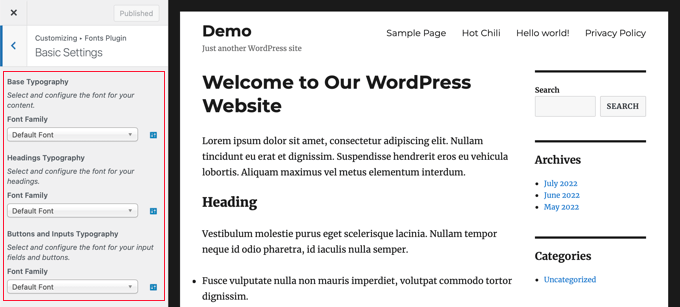
The Theme Customizer is a useful tool. It allows you to see what font your theme uses. Access it from the WordPress dashboard. Click on “Appearance,” then “Customize.” Look for the “Typography” section. You may find font names here. Some themes show font types directly. Others may require a deeper search. Fonts might be under “General Settings” or similar tabs. Not all themes have this option. Check the settings carefully. They can vary between themes. This tool makes font identification easier.
Theme documentation can be helpful. It often lists the fonts used. Find it on the theme’s official page. Look for “Documentation” or “Support” sections. These sections provide valuable information. Some themes include font lists. Others may have guides on changing fonts. Read through the documentation carefully. You might find font details in FAQs. This resource can clarify font choices. It helps understand theme design better.
Plugins For Font Detection
Discovering the font used in your WordPress theme is easy with font detection plugins. These tools identify fonts quickly, enhancing your design process. Perfect for non-designers wanting to understand their site’s typography.
Popular WordPress Plugins
WordPress plugins make font detection easy. Some of the popular plugins include “WhatFont” and “Fontanello”. They help you find the exact font used in your theme. They are easy to use and require no coding.
These plugins are available for free and are very user-friendly. You can see the font name and size with a click. You may also get details like font color and weight.
Plugin Installation And Use
First, go to your WordPress dashboard. Click on “Plugins” and then “Add New”. Search for your desired plugin like “WhatFont”. Click “Install” and then “Activate”.
Once activated, use the plugin to detect fonts. Simply hover over text on your site. The plugin will show the font details. It’s that simple!
Contacting Theme Support
Discovering the font in your WordPress theme is simple. Inspect the page using your browser’s developer tools. Look for the font details in the CSS files. If you still have questions, contact theme support for guidance.
Reaching Out For Assistance
Contact the support team of your theme. They know all details. Use the contact form on their website. You can also send an email. Be polite and clear. Mention the theme name. Ask about the font type used. They will help you. Support teams are friendly. They answer your questions. You may need to wait a bit. Sometimes they reply fast. Other times it takes longer. Be patient. They have many users to assist.
Include screenshots if possible. They help identify your theme. Describe your issue well. This makes it easier for them. They appreciate clear communication. You may get extra tips. They sometimes offer suggestions. These can be helpful. Keep follow-up notes. You might need them later.
Manually Checking Theme Files
Inspect theme files to find your WordPress font. Access the theme editor in WordPress dashboard. Navigate to “style. css” or “custom. css” files. Look for “@font-face” or “font-family” declarations. This reveals the fonts used in your theme.
Accessing Theme Editor
First, open your WordPress dashboard. Find the Appearance menu on the left. Click on it. Then click on Theme Editor. A new page will open. You will see many files here. These files control how your site looks. Be careful not to change anything by mistake.
Locating Font References In Code
Search for the style.css file in the list. Click on it to open. Use Ctrl + F to find fonts. Type “font” in the search box. Check for lines like font-family. These lines tell which fonts are used. You might see names like Arial or Helvetica. Remember, changes here affect your site’s look. Always make a backup first.
Considerations For Font Changes
Changing fonts can affect design. Fonts must match your theme style. A new font might break the look. It may clash with existing colors. Check readability first. Fonts must be easy to read. They should work well on all screens. Choose fonts that keep the design consistent.
Impact On Design Consistency
Design consistency is key. Fonts should match the theme’s vibe. Consistent fonts create harmony. They make the site look neat. Different fonts can confuse users. They may disrupt the flow of your site. Stick to one or two fonts. This keeps things simple.
Best Practices For Font Customization
Use fonts wisely. Test them before making changes. Check if they fit the theme. Preview how they look on mobile. Ensure they work on all browsers. This helps avoid problems later. Pick fonts that enhance readability. Your content should be clear. Use web-safe fonts for best results.
Credit: wcanvas.com
Frequently Asked Questions
How Do I Find My Theme’s Font?
To identify your WordPress theme’s font, inspect the site using browser developer tools. Right-click on your page, select “Inspect,” and navigate to the “Styles” tab. Look for the “font-family” property under the CSS rules to see the fonts used.
Can I Change My WordPress Theme Font?
Yes, you can change the font by modifying the theme’s CSS file or using a font plugin. Access your WordPress dashboard, navigate to “Appearance,” then “Customize. ” From there, you can edit fonts and preview changes before saving.
What Are Common WordPress Fonts?
Common fonts for WordPress themes include Arial, Times New Roman, and Helvetica. Many themes also support Google Fonts, offering a wide range of options. Check your theme’s documentation or customization settings to see which fonts are available.
Why Is Font Important In Themes?
Fonts impact readability, aesthetics, and user experience on your website. Choosing the right font enhances your site’s design and communicates your brand effectively. Ensure your fonts are consistent and appropriate for your site’s purpose and audience.
Conclusion
Identifying your WordPress theme’s font is simple with the right tools. Remember to check your theme’s settings first. Browser extensions can help identify fonts quickly. Google Chrome’s Developer Tools is another useful option. Knowing your font can help with branding and design.
It ensures consistency across your site. Adjusting fonts can enhance readability and user experience. Don’t be afraid to experiment with new fonts. Just ensure they align with your site’s style. Understanding fonts is a small step. But it makes a big difference in website aesthetics.
Keep exploring and improving your site’s design.


