
Are you tired of scrolling through countless WordPress themes, only to find that none of them feel quite right for your unique vision? Imagine having a website that perfectly reflects your brand, with every detail tailored to your taste.
Creating your own custom WordPress theme not only gives you complete control over the look and functionality of your site but also sets you apart in the crowded digital landscape. In this guide, you’ll discover how to craft a bespoke theme that meets your specific needs and stands out to your audience.
Whether you’re a seasoned developer or a curious beginner, you’ll find the tools and tips you need to bring your ideas to life. Ready to unleash your creativity and design a theme that’s truly yours? Let’s dive in!
Getting Started
Understanding of HTML, CSS, and PHP is necessary. These are the basic building blocks. Knowledge of WordPress structure is key. Familiarize yourself with template hierarchy. This will help you organize files. A code editor, like Visual Studio Code, is recommended. You’ll also need a local server. Tools like XAMPP or MAMP are popular choices.
Start by installing XAMPP or MAMP on your computer. Create a new folder in the wp-content/themes directory. This is where your theme will live. Open your code editor and connect it to the folder. You can now start coding. Ensure WordPress is installed on your local server. Test your theme as you build. This helps catch errors early.
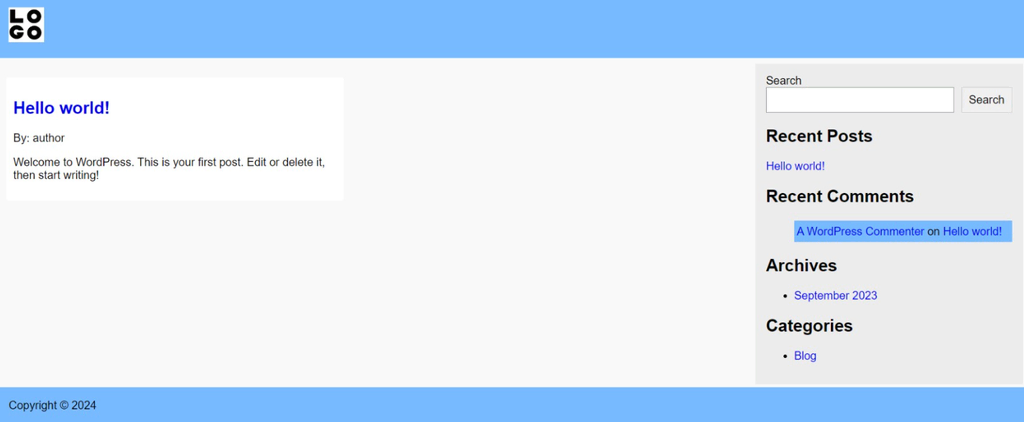
Credit: www.hostinger.com
Designing Your Theme
Start by drawing your theme on paper. Use simple shapes like boxes. Decide where the header and footer go. Think about where menus will be. Make sure every part fits well. The layout should be clear and easy to follow. Keep the design simple. Too much detail can be confusing. Make a few sketches to see what looks best.
Pick colors that are easy on the eyes. Bright colors can be fun but use them carefully. Choose one or two main colors. This keeps the theme from looking messy. Select a font that is easy to read. Simple fonts work best. Make sure the text is big enough. Test different colors and fonts together. Find what looks right.
Building The Theme Structure
Start by making a folder for your theme. Name it wisely. Add style.css for your theme’s style. Use functions.php to add custom features. Make index.php as the main file. These are the basic files needed.
Template files shape your theme. They define the layout. Use header.php for the top part. footer.php handles the bottom. sidebar.php is for the sidebar area. Each file has its role. Keep them organized. This makes coding easy.

Credit: www.paradigmmarketinganddesign.com
Developing Custom Features
Crafting your own custom WordPress theme allows for unique website design tailored to your needs. Start with basic HTML, CSS, and PHP knowledge. This approach offers flexibility in layout and functionality, ensuring your site stands out.
Adding Custom Widgets
Custom widgets make your site unique. They let you add special features. To create one, go to the WordPress dashboard. Find the “Appearance” section. Click on “Widgets”. Choose the area for your widget. This could be a sidebar or footer. After that, add your content. You can use text, images, or links. Widgets can enhance user experience. They make your site more interactive. Always preview the changes. Ensure they look good on all devices.
Integrating Custom Menus
Custom menus help users navigate. First, go to “Appearance” in your dashboard. Click on “Menus”. Create a new menu. Name it something easy. Add the pages you want. You can include links to other sites. Arrange them in a clear order. Keep it simple. Too many items can confuse users. Save your menu once done. Now, assign it to a location. This could be the header or footer. Check how it looks on your site.
Styling With Css
Writing the Stylesheet is essential for your WordPress theme. Begin by creating a new CSS file. This file will hold all your styles. Use simple selectors to target HTML elements. Colors, fonts, and spacing are easy to change here. Remember, styles make your site unique.
Responsive Design Considerations are crucial. Websites must look good on all devices. Use media queries to adjust styles for different screen sizes. Keep text readable on small screens. Images should resize properly. A responsive design ensures everyone enjoys your site. Make sure buttons and links are easy to tap. This helps users with phones or tablets. Test your design on various devices. Happy users will return to your site often.
Using WordPress Functions
Theme functions help your site work better. They add special features. Use them to create menus and widgets. Theme functions can also help with image sizes. This makes your theme look good. You can write these functions in a file. That file is called functions.php. This file is in your theme folder. It’s important to use WordPress functions because they make updates easy. They also keep your theme safe.
Hooks let you add code to your theme. They are like points in your code. Filters change content before it shows on your site. Use them to change text or styles. Hooks and filters make your theme flexible. They work with actions and filters. Hooks have two types: action hooks and filter hooks. Action hooks let you add code. Filter hooks let you change data. They are very helpful for developers.
Testing Your Theme
Checking your theme for errors is key. Use tools like WP_DEBUG to spot problems. Look for missing files or broken links. Fix errors quickly to keep your theme working.
Test all features. Ensure each part of your theme works. If something fails, find the error source. Correct it to make your theme strong. Regular checks help avoid problems.
Your theme must work in all browsers. Try testing on Chrome, Firefox, and Safari. Ensure the theme looks good everywhere. Different browsers may show your theme differently. Adjust settings for each browser.
Use tools to check compatibility. These tools help fix browser issues. Ensure your theme is user-friendly. Everyone should enjoy your theme on any browser.
Credit: purpleplanet.com
Finalizing And Publishing
Creating a custom WordPress theme involves finalizing and publishing your design. Ensure all elements work smoothly and check compatibility with plugins. Publish the theme to make it live, allowing users to experience your unique design and functionality.
Preparing For Launch
Your theme is ready to go live. Test it thoroughly. Check every page. Ensure all links work. Fix any errors found. Make sure your theme is responsive. It should look good on phones and computers. Test your theme on different browsers. Chrome, Safari, Firefox, and Edge. Each one displays things differently. Remember to keep your site secure. Strong passwords are important. Update plugins regularly. Do not forget to back up your site. This saves your data.
Submitting To WordPress Repository
Want to share your theme with others? Submit it to the WordPress repository. First, read the guidelines. Follow all rules for approval. Prepare a clear description. Explain what your theme does. Include screenshots. People love visuals. Show your theme’s best features. Use simple words. Make it easy to understand. Check your code. It should be clean and organized. Keep it simple. Good code gets approved faster. Once approved, your theme is ready for download.
Frequently Asked Questions
What Are The Basics Of A WordPress Theme?
A WordPress theme is a collection of templates and stylesheets. It dictates the appearance and functionality of a WordPress site. Themes control layout, color, typography, and more. To create a custom theme, you need knowledge of HTML, CSS, and PHP.
This forms the foundation of theme development.
How Do I Start Creating A Custom Theme?
Begin by setting up a local development environment. Use software like XAMPP or MAMP. Familiarize yourself with WordPress theme files. These include style. css, index. php, and functions. php. Use a starter theme or blank theme to get started. This accelerates the development process and helps maintain best practices.
What Tools Are Needed For Theme Development?
For theme development, you’ll need a code editor and local server software. Popular editors include Visual Studio Code and Sublime Text. Local server software like XAMPP or MAMP is essential. Additionally, a browser with developer tools will aid in debugging and testing.
These tools streamline theme creation.
Can I Use Page Builders For Custom Themes?
Yes, page builders can be integrated into custom themes. Builders like Elementor or Beaver Builder simplify layout creation. They offer drag-and-drop functionality. This allows for easy customization without coding. However, for full control, coding knowledge is still beneficial. Page builders enhance flexibility and design options.
Conclusion
Creating your own WordPress theme is an exciting journey. It empowers you to design a unique site. First, plan your layout and features. Next, start coding your theme files. Use HTML, CSS, and PHP. Customize every detail to fit your style.
Test your theme regularly for any issues. Remember to keep your code clean and organized. With patience and practice, you’ll develop a theme you love. Share your creation with the world. Enjoy the process and learn new skills along the way.
Designing a custom theme can be rewarding and fun. Happy coding!


