
Creating your own WordPress theme might seem daunting at first, but imagine the satisfaction of designing a site that perfectly reflects your vision. It’s not just about aesthetics; it’s about crafting an experience that is uniquely yours.
You’ll have the freedom to control every pixel, tailor every feature, and ensure that your site stands out in a crowded digital landscape. As you dive into this guide, you’ll discover that building a WordPress theme isn’t just for tech wizards.
With the right guidance, you can do it too. By the end of this article, you’ll be ready to turn your creative ideas into a fully functional, personalized theme that captivates your audience. Are you ready to unlock the potential of your WordPress site and make it truly one-of-a-kind? Let’s get started.
Getting Started
Begin by installing a local server like XAMPP or WAMP. These tools help run WordPress on your computer. Set up a new database for your WordPress site. Download and install WordPress from the official site. Ensure your server is running before you start. This setup allows you to test your theme safely.
Pick a good code editor like Visual Studio Code or Sublime Text. These editors help you write and edit code easily. Install a browser like Google Chrome for testing. Use browser developer tools to see how your theme works. A version control system like Git is also useful. It keeps track of your changes.
Credit: blog.templatetoaster.com
Theme Anatomy
Crafting a WordPress theme involves understanding theme anatomy, including template files and style sheets. Start by designing the layout and customizing features to fit your needs. Familiarize yourself with WordPress’s coding standards to ensure compatibility and functionality.
Understanding Theme Files
Creating a WordPress theme involves understanding its core files. These files control how your site looks. They also manage how it behaves. The main file is style.css. It defines the theme’s design and layout. Another crucial file is functions.php. This file adds special features to your theme. You may also need a index.php file. It acts as the main template file. To make your theme unique, edit these files carefully. Use simple code. This helps beginners understand and learn. Always test your theme files. Ensure they work correctly.
Core WordPress Templates
WordPress uses template files to build pages. Core templates include header.php, footer.php, and sidebar.php. Each template has a specific role. header.php shows the top part of a page. footer.php displays the bottom. sidebar.php adds extra information. Use these templates to create a complete theme. Customize them to fit your design. Make sure each template works well together. This ensures a smooth user experience. Practice editing these files often. It helps in improving your skills.
Design Elements
Creating your own WordPress theme involves understanding design elements like color, typography, and layout. Focus on simplicity and functionality. Experiment with different styles to match your brand.
Creating A Style Guide
A style guide helps to keep your theme consistent. Start by choosing colors and fonts that match your vision. Use colors that are easy on the eyes. Select fonts that are easy to read. Make sure these elements fit well together. A good style guide acts like a map. It shows how your theme should look. This makes the design process easier and faster.
Designing Layouts And Visuals
Layouts decide where things go on a page. A good layout is simple and clear. Place important items where users see them first. Use visuals like images and icons to make your site look better. These visuals should help tell your story. Keep them related to your content. Don’t use too many colors or images. This keeps your theme neat and tidy.

Credit: www.greengeeks.com
Coding The Theme
Start with basic HTML. Create a simple layout. Use div and section tags. Add a header. Include a footer. Design a sidebar. Structure is important. Keep code clean. Make it readable. Use comments wisely. Organize elements logically. This helps in maintaining your theme.
Style your theme using CSS. Choose colors carefully. Set fonts that are easy to read. Use media queries for responsive design. Add margins and padding. Style your header and footer. Use classes and IDs for specific styling. Make sure buttons look good. Ensure links are clear and visible. Keep styles simple and clean.
Add interactive features with JavaScript. Use event listeners. Make a menu that drops down. Create a slider for images. Add dynamic content. Validate forms. Use JavaScript libraries for complex tasks. Ensure scripts do not slow down your site. Test features in different browsers. Keep functions simple and efficient.
Integrating WordPress Functions
Template tags help you display data on your WordPress site. They are simple codes you place in your theme files. Each tag has a specific function. Some tags show post titles. Others show author names. Template tags make your site dynamic. You can change how your site looks. You can change what your site shows. This is customization. You use tags to make your site unique.
The Loop is a powerful tool. It shows posts on your site. It can be customized. You choose what posts to show. You choose how many posts to show. You choose the order of posts. Customizing the Loop lets you control your site’s look. It lets you control your site’s feel. You can filter posts. You can show only specific categories. You can show posts by date. This makes your site more interactive.
Responsive Design
Creating your own WordPress theme involves mastering responsive design. This ensures your site looks great on all devices. Start by learning basic HTML, CSS, and PHP to build a flexible framework.
Mobile Optimization
Mobile Optimization is important for a good website. Most people use phones to browse. A theme must look good on phones. It should load quickly. Images should fit the screen. Text must be easy to read. Buttons need to be big enough to tap. A well-optimized site works better. More people will stay on your site.
Testing Across Devices
Different devices can show a site in many ways. Test your theme on phones and tablets. Try it on different brands. Make sure everything works. Check buttons and links. See if images load well. Test on different browsers too. Chrome and Safari can show things differently. Fix issues you find. Testing helps keep visitors happy. A good theme works everywhere.
Customizing Theme Options
Craft your own WordPress theme by exploring theme options. Personalize colors, fonts, and layouts to match your style. Create a unique look for your site with easy-to-use tools.
Adding Theme Settings
Creating your own theme settings adds a personal touch. Users can change colors and fonts. Use the customizer API to make these settings. Start by defining your options. Each setting needs a unique name. Use descriptive names for clarity. Next, register these settings in functions.php. This connects them to your theme. Don’t forget to add controls. Controls let users change settings. Test each setting before sharing your theme.
Creating Custom Widgets
Custom widgets give extra features to your theme. Widgets can show social links or recent posts. Start by registering a new widget. Use the widget API to do this. Each widget needs a unique class. This class holds the widget code. Write the code in a simple way. Make sure the widget works on different devices. Test its display on mobile and desktop. Add styles to make widgets look good. Styles can change background colors and text size.
Testing And Debugging
Crafting a WordPress theme involves testing and debugging to ensure smooth functionality. Detect errors early to enhance user experience. Use tools like browser developer consoles for effective troubleshooting.
Debugging Tools
Debugging tools help find problems in your WordPress theme. They can show errors in your code. Using these tools can make your theme better. One popular tool is WP_DEBUG. It shows errors on your WordPress site. Another tool is Query Monitor. It helps you see database queries and scripts. Install it as a plugin. Both tools are easy to use. They help you fix mistakes quickly.
User Testing
User testing is important for your theme. Ask friends to test your site. They can find problems you missed. Watch how they use your theme. This helps you improve it. Check if buttons work right. Make sure links go to the right pages. Ask testers if they find the theme easy. Their feedback helps you make it better.
Deployment
Preparing for Launch is an exciting step. First, double-check every detail. Ensure your theme looks great. Test all features. Fix any errors found. Make sure everything works smoothly. This includes images and links.
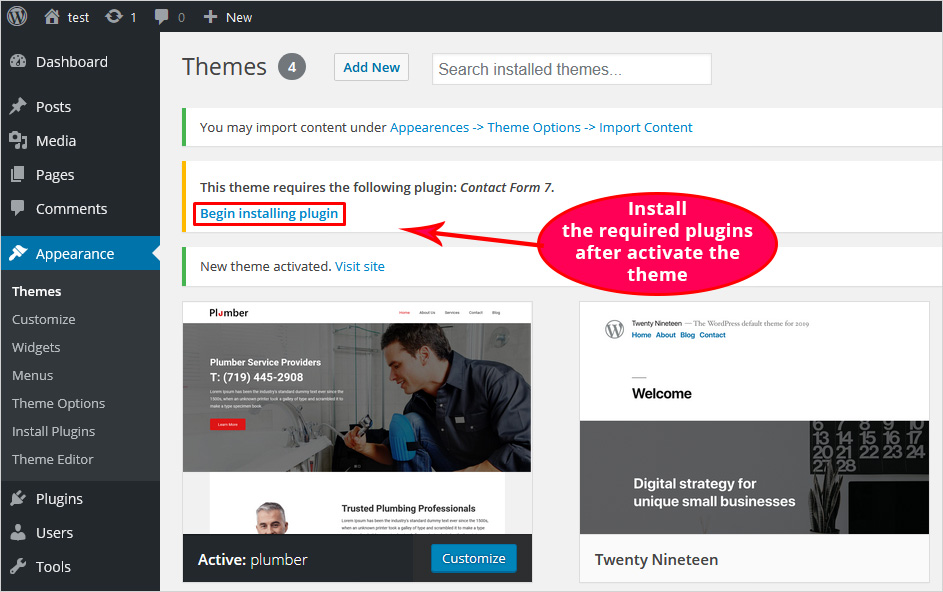
Uploading to WordPress is the next task. Use the WordPress dashboard. Go to the “Themes” section. Click “Add New.” Choose “Upload Theme.” Select your theme file. Click “Install Now.” Once installed, activate the theme. Check how it looks live.
Finally, review your website again. Ensure all pages display correctly. Ask friends to test the site. Gather feedback for improvements. Your theme is now ready for everyone to see.
Maintaining Your Theme
Creating a custom theme for WordPress involves balancing creativity and functionality. Start with a simple design. Add features step by step. Focus on responsive layouts and user-friendly navigation for a seamless experience.
Updates And Improvements
Keeping your WordPress theme up-to-date is vital. Updates fix bugs and improve security. Always check for new updates regularly. Developers often release these updates to fix issues. Improved features make the theme more user-friendly. Regular updates help your site run smoothly. They also enhance the user experience.
Handling User Feedback
User feedback is important for theme improvement. Listen to what users say about your theme. Collect feedback through surveys or emails. Pay attention to common issues users face. Fixing these issues can make your theme better. Feedback helps you understand user needs. Use it to make the theme more effective.

Credit: www.youtube.com
Frequently Asked Questions
How Do I Start Creating A WordPress Theme?
To start, choose a code editor and set up a local development environment. Familiarize yourself with WordPress theme structure, including essential files like `style. css`, `index. php`, and `functions. php`. Explore existing themes for inspiration and reference. Begin coding your theme by customizing templates and adding unique styles.
What Are The Essential Files For A WordPress Theme?
A WordPress theme requires `style. css`, `index. php`, and `functions. php`. The `style. css` defines theme details and styles. The `index. php` serves as the main template file. The `functions. php` file contains theme-specific functionalities. Additional template files like `header.
php` and `footer. php` enhance customization.
How Can I Test My Custom WordPress Theme?
Testing a custom theme involves activating it in the WordPress dashboard. Navigate to Appearance > Themes and select your theme. Review the site’s appearance and functionality. Use developer tools to identify and fix issues. Test on different devices and browsers for compatibility.
What Tools Are Useful For WordPress Theme Development?
Useful tools include a code editor like Visual Studio Code, a local server like XAMPP or MAMP, and browser developer tools. WordPress plugins like Theme Check help validate code quality. Version control systems like Git track changes and collaborate with others.
Conclusion
Creating a WordPress theme is simpler than it seems. With patience, anyone can build a unique site. Learning basic coding boosts confidence and skills. Experiment with different designs to discover what fits best. Remember, practice improves your abilities. Don’t hesitate to seek help from online communities.
Many resources are available for beginners. Keep your design clean and user-friendly. Always focus on enhancing the user experience. Enjoy the process of building something personal. Your efforts will lead to a distinctive and functional theme. Celebrate your creativity and hard work.


