
Are you ready to showcase your Flutter web app to the world? Hosting your app on a server is the crucial step that transforms your creation from a local project to a global sensation.
Imagine the thrill of users from different corners of the world accessing your app with a simple click. It’s not just about making your app accessible; it’s about unleashing its full potential. You might be wondering how to do this efficiently without getting lost in a sea of technical jargon.
Don’t worry; we’ve got you covered. In this guide, you’ll discover straightforward steps to host your Flutter web app on a server. Say goodbye to complicated processes and hello to simplicity. Ready to dive in and learn how to make your Flutter app shine online? Let’s get started!

Credit: medium.com
Preparing Flutter Web App
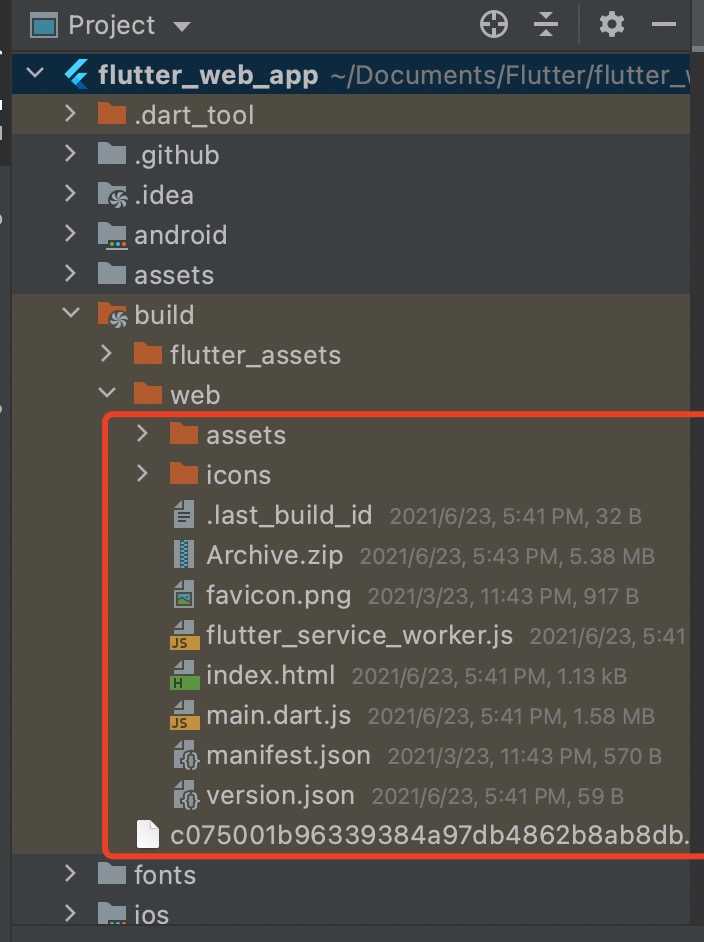
Start by checking your Flutter version. Update it to the latest. Next, set the build mode to release. This helps in better performance. Use the command flutter build web. It creates a folder named build. Inside, find the web folder. This has all files needed for hosting.
Reduce the size of your images. This speeds up loading. Use tools like TinyPNG. Keep CSS and JavaScript files clean. Remove unused code. Minify these files for faster load times. Check your HTML for errors. Correct them to avoid issues. A clean site keeps users happy.
Selecting A Web Server
Running a Flutter web app needs a good server. Choose one that meets all the technical needs. A server must have enough storage and good speed. It should support HTTPS for security. Linux servers are often a popular choice. They are reliable and easy to use. Always check the server’s uptime. This tells how often the server is up and running. A good server has high uptime.
There are many hosting options for Flutter web apps. AWS, Google Cloud, and Azure are popular. These services offer scalability and flexibility. Netlify and Vercel are great for static sites. They are easy to set up and use. Firebase Hosting is also a good choice. It integrates well with Flutter apps. Choose the one that best fits your needs and budget.
Deploying Flutter Web App
First, compile your Flutter web app. Use the build command. This creates the necessary files. Then, connect to your server. Use an FTP client for this. Upload the compiled files to the server. Place them in the public_html folder. Make sure all files are uploaded. Check for missing files. This ensures everything works smoothly.
Configure the server for Flutter. Ensure Node.js is installed. This is important for Flutter apps. Set up a web server like Apache or Nginx. Adjust server settings. Allow for serving static files. Use the server to host your app. Check server compatibility. Make sure it supports Flutter web. Test the app on the server. Verify everything runs well.

Credit: www.youtube.com
Configuring Server For Flutter
Routes help users find pages. For Flutter web apps, configuring routes is key. Use a server that supports URL rewriting. This ensures the app handles the paths correctly. Apache and Nginx are great choices. They allow route management easily. Make sure to set rewrite rules. These rules guide users to the right pages.
SSL certificates keep data safe. They ensure secure connections between users and your app. To get an SSL, use services like Let’s Encrypt. They offer free certificates. Once you have an SSL, install it on your server. This protects user information. Always check the certificate’s validity. Renew it before it expires.
Testing Deployment
Always check if the web app works correctly. Click all buttons. Ensure all pages open. Test every link. Look for any bugs. Fix errors right away. Use different browsers. Try on Chrome and Firefox. This helps find hidden issues. Make sure forms submit data. Check if users can log in. Logging out should work too.
Monitor the app’s speed and loading time. Fast apps keep users happy. Slow apps might lose users. Use tools to check speed. Google PageSpeed Insights is a good tool. Look for areas to improve. Check server response times. Ensure the server handles traffic well. Keep an eye on uptime. Downtime can hurt user trust.
Credit: www.dbestech.com
Troubleshooting Common Issues
Deploying a Flutter web app on a server can face challenges. Ensure your server supports necessary software and configurations. Check for common issues like incorrect file paths or server permission errors to ensure smooth hosting.
Debugging Errors
Errors can stop your app. First, check the console for any error messages. These messages help find the problem. Next, ensure all dependencies are correct. Sometimes, an update can cause issues. Lastly, try running a clean build. This can solve unexpected errors.
Fixing Load Times
Long load times are frustrating. Start by checking the image sizes. Large images slow down the app. Next, look at the code. Remove any unused parts. They can make the app heavy. Then, compress your files. Smaller files load faster.
Frequently Asked Questions
How Do I Host A Flutter Web Server?
To host a Flutter web app, build it using `flutter build web`. Deploy the generated `build/web` folder to a web server like Apache, Nginx, or Firebase Hosting. Ensure your server is configured to serve static files.
How To Deploy Flutter Web App On Iis Server?
To deploy a Flutter web app on IIS, build the app using `flutter build web`. Copy the contents from the `build/web` directory to the IIS server root. Configure IIS to serve these static files. Set the default document to `index.
html`. Ensure all necessary permissions are set on the server.
How To Deploy A Web Application On A Server?
Deploy a web application by uploading files via FTP or using a deployment tool. Configure the server settings. Ensure database connectivity. Test the application. Monitor for issues and perform regular updates.
Can I Run The Flutter App On The Web?
Yes, you can run Flutter apps on the web. Flutter offers web support, allowing apps to run on browsers. Ensure you use Flutter’s web capabilities and tools for optimal performance. Check compatibility and update Flutter versions regularly to maintain functionality.
Web integration expands app accessibility and user reach.
Conclusion
Hosting a Flutter web app on a server is straightforward. Follow the steps closely. Choose the right server. Ensure it supports your app’s requirements. Deploy your app using clear guidelines. Test thoroughly to prevent issues. Monitor performance regularly. Optimize resources for better efficiency.
Troubleshoot any problems promptly. Keep your server secure. Regular updates are crucial. Understand server settings to adjust them properly. Explore community forums for additional insights. Start small, then scale up as needed. This approach ensures your app runs smoothly. Your Flutter web app is now ready for users.
Enjoy the journey of hosting and managing your app.


