
Are you ready to give your WordPress site a fresh, new look? Choosing the right theme can transform your website from ordinary to extraordinary.
But where do you start, and how can you ensure the process is smooth and hassle-free? Whether you’re a seasoned blogger or just launching your first site, learning how to download WordPress themes is a crucial skill. In this guide, you’ll discover easy-to-follow steps and insider tips to make your theme selection a breeze.
Imagine the satisfaction of seeing your site come alive with the perfect theme. Stick around, and you’ll be one step closer to creating the website of your dreams!
Credit: www.namecheap.com
Choosing The Right Theme
Know what your website is for. Is it a blog, a store, or a portfolio? Different themes serve different purposes. A blog needs good text display. A store needs product pages. A portfolio showcases your work. Choose based on your site’s purpose.
Select a theme with a clean design. It should look good and work well. Make sure it has the features you need. Maybe a contact form or a photo gallery. Your site should look nice and be easy to use.
Responsive themes adapt to all devices. This means your site looks good on phones and tablets. Test the theme on different screens. A good theme should adjust itself. This keeps visitors happy on any device.
Exploring Theme Sources
The Official WordPress Repository is a safe place. It hosts many free themes. These themes are checked for quality. You can find themes for different needs. Search by features or popularity. Each theme has user reviews. This helps in choosing the best one.
Many websites sell themes. They often have premium features. Quality support is usually offered. Some popular sites are ThemeForest and Elegant Themes. They provide many options. Check customer reviews before buying. Compare prices and features. Choose what suits your needs best.
Custom designers make unique themes. These are tailor-made for your site. They reflect your brand’s identity. Custom themes can be costly. But they offer a personal touch. You can hire freelancers or agencies. Look for experienced designers. Ensure they understand your vision.
Downloading From The WordPress Repository
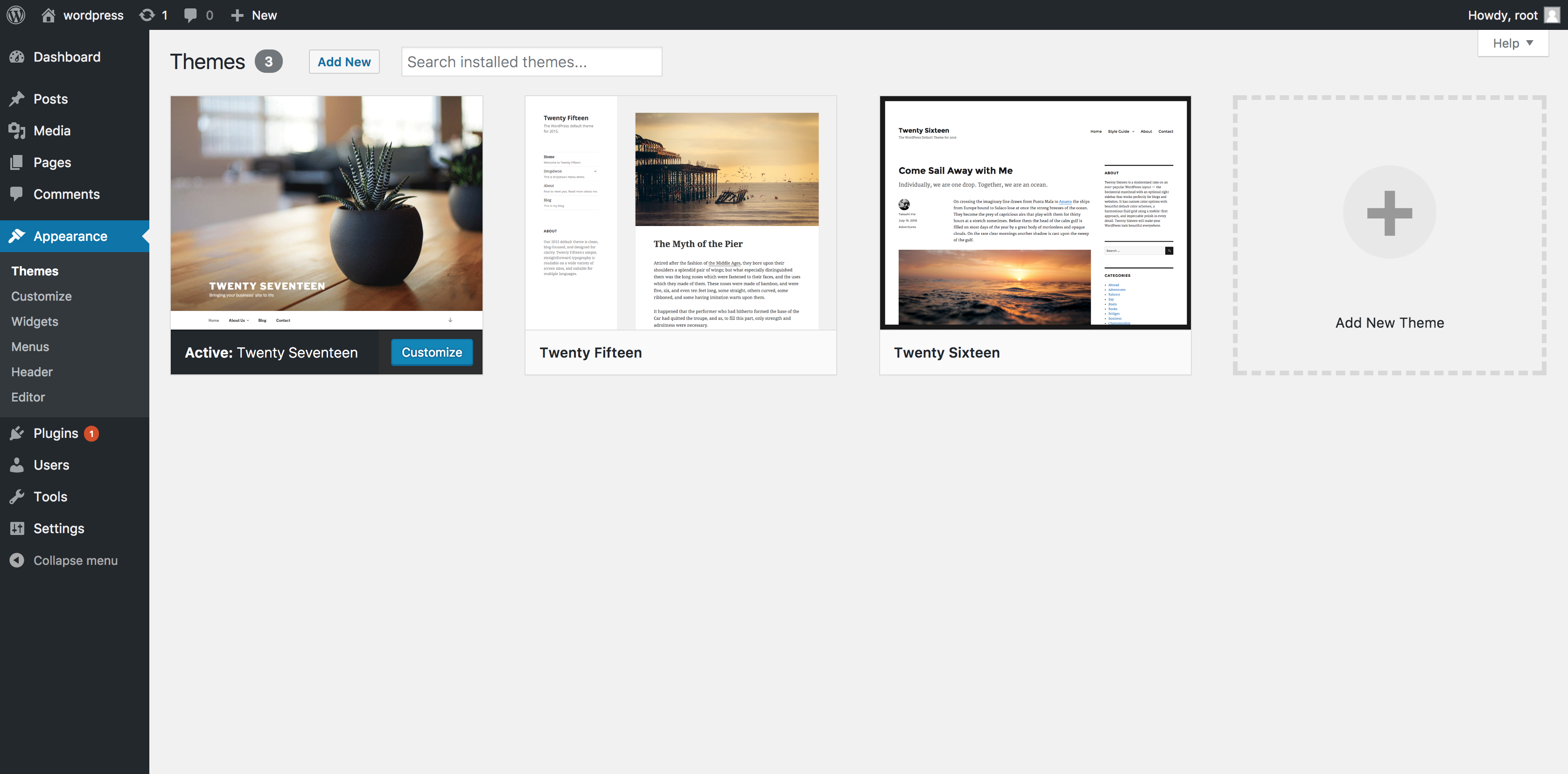
Visit the WordPress dashboard. Find the Appearance tab. Click on Themes. This opens the theme library. The library holds thousands of themes. It’s easy to explore. Everything is neatly organized. You will see many options.
Use the search bar for specific themes. Type the theme name. Results appear quickly. Filters help narrow choices. Choose options like layout and features. This makes finding themes simple. Filters save time. They help find the best match.
Preview themes before download. Click on the theme thumbnail. A preview button appears. See how the theme looks. Check layout and design. Make sure it meets needs. Previews show real examples. They help decide if a theme is right. Easy and useful.
Installing A Theme Via WordPress Dashboard
First, log in to your WordPress Dashboard. Look for the Appearance option on the left menu. Click on it. You will see the Themes option. Select it to view available themes.
To add a new theme, click on the Add New button. You can search for free themes here. For a purchased theme, click Upload Theme. Choose the file from your computer. After uploading, click Activate to use the theme.
Errors might happen during theme installation. A common error is a broken theme. This occurs if files are missing. Check the theme documentation for help. Another error is upload size limit. Increase this limit in your hosting settings.
Manual Theme Installation
First, find a theme you like. Click the download button. Save the file on your computer. Make sure you know the folder location. This file is often a .zip format.
Open your FTP client. Connect to your server. Go to the wp-content/themes folder. Upload the theme file here. Use the unzip command if needed. Ensure all files are in the right place.
Log into your WordPress dashboard. Click on Appearance. Select Themes. Find your new theme. Click Activate. Your website now uses the new theme. Refresh to see changes.
Credit: wpthemego.com
Evaluating Theme Quality
User reviews give honest feedback about themes. They show what people like. They also show what people do not like. Look for themes with many good reviews. Read some of the negative reviews too. They can tell you about possible problems. User feedback is important. It helps you decide if a theme is right for you.
Themes that are updated often are usually better. Frequent updates mean the theme is secure. They also mean the theme works well with new WordPress versions. Check the update history. If a theme has not been updated in a long time, it might not be a good choice. Updates keep the theme fresh and safe.
Good developer support is important. It helps when you have problems. Check if the developer offers help. See if they answer questions quickly. Support forums are also useful. They provide answers to common issues. If a theme has strong support, it can be easier to use. Developer help makes the theme experience better.
Customizing Your Theme
Explore the vast library of WordPress themes to find your perfect match. Downloading a theme involves visiting the WordPress theme directory, selecting your desired theme, and following simple steps to install it. Transform your website’s look effortlessly with thousands of options available.
Using The WordPress Customizer
The WordPress Customizer is your toolbox for theme changes. You can change colors easily. You can also adjust fonts. Want a new header image? Do it here. Preview changes before saving. This helps you see the look first. Keep experimenting until you are happy with the design.
Incorporating Widgets And Plugins
Widgets add extra features to your site. They can be placed in sidebars. They can also be placed in footers. Plugins are mini-programs for your website. They add new options for your theme. Use them for social media buttons. Use them for contact forms, too. Both widgets and plugins help improve your site.
Editing Theme Code Safely
Editing code can change your theme. Always make a backup first. This saves your original design. Use a child theme for safety. This protects the parent theme. Never edit the main theme directly. Use simple codes for small changes. Test changes before going live. This avoids mistakes.
Credit: m.youtube.com
Frequently Asked Questions
How Do I Download WordPress Themes For Free?
You can download free WordPress themes from the official WordPress repository. Visit wordpress. org/themes, browse the categories, and click ‘Download’ on your chosen theme. Alternatively, access themes directly from your WordPress dashboard by navigating to Appearance > Themes > Add New.
Where Can I Find Premium WordPress Themes?
Premium WordPress themes are available on marketplaces like ThemeForest, Elegant Themes, and StudioPress. These platforms offer a wide range of high-quality themes. Ensure to review theme features, user ratings, and support options before purchasing. Investing in a premium theme can enhance your website’s functionality and design.
Can I Customize Downloaded WordPress Themes?
Yes, most WordPress themes are customizable. You can use the WordPress Customizer to change colors, fonts, and layouts. Many themes also offer additional options through theme settings. For advanced customization, you might need some coding knowledge or a page builder plugin.
Are WordPress Themes Safe To Download?
WordPress themes from reputable sources are generally safe. Always download themes from trusted websites like the WordPress repository or well-known marketplaces. Check user reviews and update themes regularly to avoid security vulnerabilities. Avoid downloading themes from unofficial sources to prevent potential malware risks.
Conclusion
Downloading WordPress themes is simple and straightforward. Follow the steps carefully. Choose a theme that matches your site’s purpose. Check reviews and ratings before downloading. Always download from trusted sources. This ensures safety and quality. Customize your theme to fit your brand.
Experiment with different themes. Find the best look for your site. Keep your website updated for security. Enjoy the new look and feel of your site. Happy blogging!


