
Have you ever eagerly awaited a blog post’s publication on your WordPress site, only to find that it didn’t appear as planned? The dreaded “Missed Schedule” notification can be a real headache for bloggers and site owners.
But what does “Missed Schedule” actually mean, and more importantly, how can you prevent it from happening again? Understanding this common issue can save you time, reduce frustration, and ensure your content reaches your audience exactly when you want it to.
Stick around, and you’ll discover the ins and outs of WordPress scheduling, why these hiccups occur, and simple steps you can take to keep your publishing calendar on track. Don’t let a missed schedule dampen your digital momentum—let’s get to the bottom of this together!
Missed Schedule In WordPress
WordPress sometimes has a missed schedule problem. This happens when a post does not publish on time. Several things can cause this issue. One common cause is server problems. A busy server might delay tasks. Another reason is plugin conflicts. Some plugins do not work well together. WordPress settings can also affect schedules. Incorrect time zone settings might lead to errors. Checking these factors can help fix missed schedules.
Missed schedules can be a big problem. They can affect content publishing plans. A post not published on time can confuse readers. Regular readers expect new content at certain times. If it is not there, they might leave the site. This can lower site traffic. Missed schedules can also affect site credibility. Visitors may think the site is not reliable. Keeping a regular publishing schedule is important.
Credit: humanmade.com
Technical Reasons
Cron jobs are like timers for your WordPress. They tell your website when to do things. Sometimes, these timers do not work right. This can happen if the cron job is broken. Then, the WordPress schedule can be missed. Fixing cron jobs can help your site run better. Always check the cron jobs if there is a problem. This keeps everything on time.
A server is like a computer that holds your website. If the server is not set up right, it can cause issues. Your WordPress might miss tasks. This happens if the server is too slow. Or, if it is not working well. Checking server settings can help. Make sure everything is correct. This helps your site stay on track.
Identifying Missed Schedules
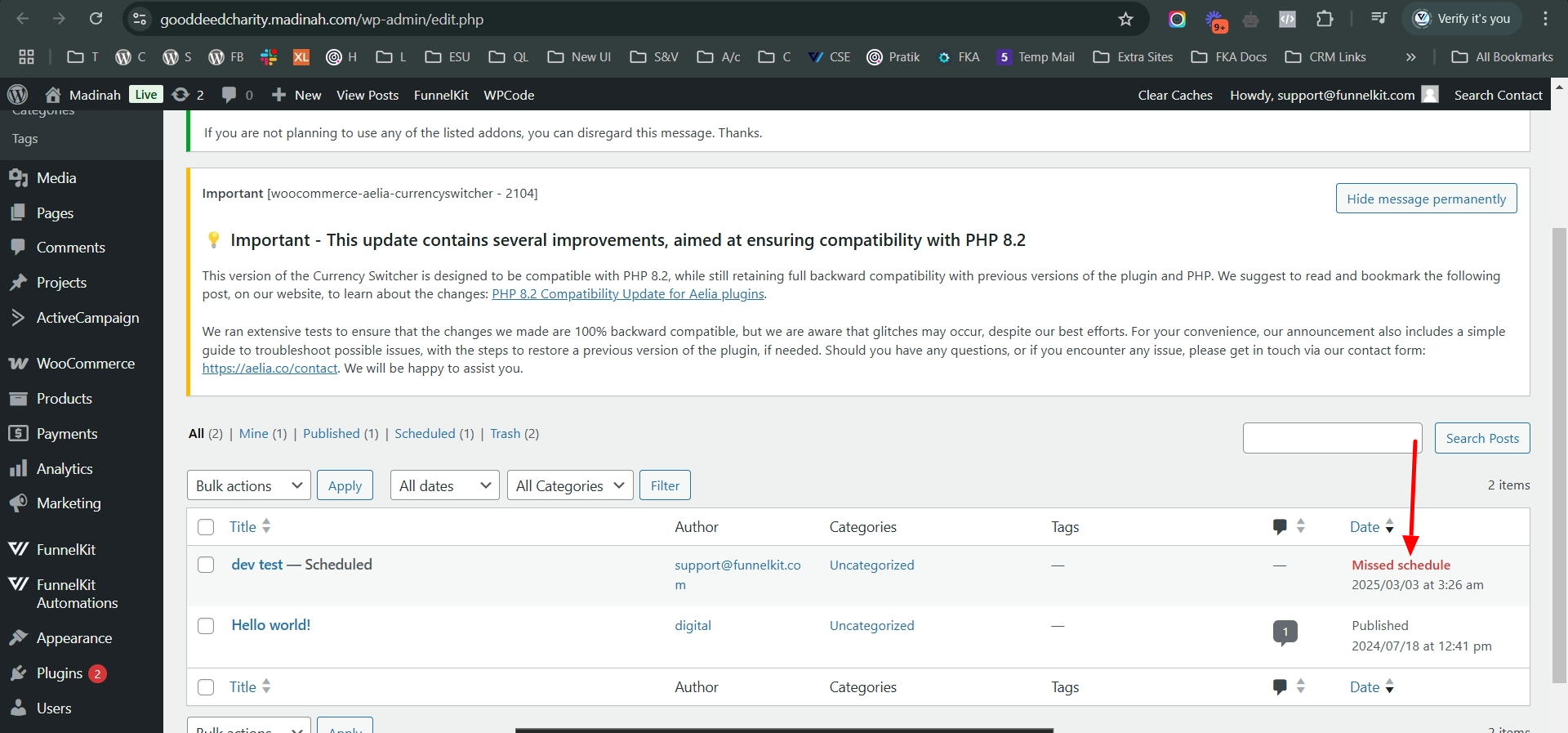
Sometimes, WordPress shows an error. This error says “Missed Schedule”. It appears when a post does not publish on time. This can happen due to server issues. Plugins may also cause this problem. It is important to fix it. Otherwise, posts stay unpublished.
In the WordPress dashboard, there are signs. These signs show missed schedules. You might see a red notice. It says a post is not live. This helps users know there is a problem. It allows them to take action fast.

Credit: www.facebook.com
Troubleshooting Strategies
Missed Schedule in WordPress means a post didn’t publish on time. Common causes include server time zone issues or plugin conflicts. Solutions involve checking server settings, updating plugins, or using scheduling plugins for reliable post management.
Plugin Conflicts
Plugins sometimes do not work well together. This can cause a missed schedule. Try to disable one plugin at a time. Check if the problem is fixed. If the issue goes away, you found the problem plugin. Update or find a replacement for that plugin.
Theme Compatibility
Themes might not work with all plugins. Check if your theme is updated. Sometimes, themes need updates to work well. Try changing your theme. Use a basic theme like Twenty Twenty-One. See if the schedule works then. You can also contact the theme maker. They might offer a fix.
Preventive Measures
Updating WordPress is essential. Updates keep your site secure. They fix bugs and improve performance. New features are added too. Without updates, your site may face problems. Always check for updates. Install them as soon as possible. This prevents missed schedules. Make it a habit. Your site will run smoothly.
Choosing a good host is important. A reliable host keeps your site online. It handles traffic well. Problems like missed schedules happen less. Look for hosts with good support. They should offer fast servers. This helps your site stay active. A good host is worth the investment. It ensures your site’s success.
Using Plugins For Solutions
Missed schedule in WordPress means scheduled posts fail to publish on time. Plugins can offer solutions to automate and fix these errors, ensuring timely content delivery. Streamlining the publishing process, they enhance site performance and maintain audience engagement.
Popular Plugins
Many plugins help with WordPress schedule issues. WP Missed Schedule is well-known. It fixes missed posts easily. Schedule Posts Calendar is another choice. It shows all posts in a calendar. WP Cron Control lets you manage tasks better. Each plugin has different features.
Installation And Setup Guide
Installing plugins is simple. First, log into your WordPress account. Go to the dashboard. Click on “Plugins,” then “Add New.” Search for the plugin name. Click “Install” and wait. After installing, click “Activate.” Follow any setup steps if needed. Most plugins have guides. You can find them on their websites. Some plugins need extra settings. Check instructions carefully.
Best Practices For Scheduling
Timing is key for your posts. Posts should go live when readers are active. Morning and evening times work well. Always check your audience’s time zone. Make sure posts align with it. Use tools to find the best time. Analytics can show you the way. Always test different timings. See which one gets more views.
Testing helps to avoid missed schedules. Create a draft and set the time. Check if it goes live as planned. If not, there might be an issue. Plugins can sometimes cause problems. Disable them and test again. If still not working, check your WordPress settings. Sometimes the server’s clock is off. Fixing that can solve the problem.
Credit: funnelkit.com
Frequently Asked Questions
What Is ‘missed Schedule’ In WordPress?
‘Missed Schedule’ is a common issue in WordPress where scheduled posts fail to publish at the intended time. This can happen due to server overload or plugin conflicts. Addressing this issue involves checking your server’s performance and ensuring that your plugins and themes are up-to-date and compatible.
Why Do WordPress Schedules Get Missed?
WordPress schedules may get missed due to server overload, plugin conflicts, or cron job failures. These issues can disrupt the normal scheduling process. Regular maintenance, including monitoring server performance and ensuring plugin compatibility, can help prevent missed schedules and ensure timely publication of content.
How Can I Fix Missed Schedules In WordPress?
To fix missed schedules, check server performance and update plugins and themes. You might also consider using plugins designed to handle missed schedules. These tools can automatically check for missed posts and attempt to publish them, ensuring your content goes live as intended.
Are There Plugins To Help With Missed Schedules?
Yes, several plugins can help manage missed schedules in WordPress. These plugins automate the process of checking and publishing missed posts. They are useful for ensuring that your scheduled content is published on time, improving site reliability and user experience.
Conclusion
Missed schedule in WordPress can confuse many users. It’s common but fixable. Check your site’s time settings first. Ensure your plugins and themes are updated. Regularly monitor scheduled posts for issues. Use reliable plugins to manage scheduling. Understanding this helps maintain a smooth workflow.
Consistent checks ensure your content goes live as planned. Troubleshooting missed schedules saves time and effort. It keeps your audience engaged with timely posts. So, keep an eye on your schedule. With these tips, you can ensure your content reaches readers on time.
Happy blogging!


