
Imagine transforming your website into a stunning digital masterpiece. With WordPress, you have the power to create a theme that reflects your unique style and vision.
Whether you’re a seasoned developer or a curious beginner, crafting your own theme can be an exciting and rewarding experience. Are you wondering how to start? You’re not alone. Many people feel overwhelmed by the idea of creating a theme from scratch.
But don’t worry — you’re in the right place. This guide will simplify the process, breaking it down into manageable steps that anyone can follow. You’ll discover how to unleash your creativity and bring your ideas to life, without getting lost in technical jargon. By the end of this article, you’ll have the confidence and skills to design a WordPress theme that’s truly yours. So, why wait? Dive in and let’s get started on creating something amazing together!
Credit: blog.templatetoaster.com
Getting Started With WordPress Themes
WordPress themes are like clothes for a website. They change how it looks. Themes make your site look unique. Templates control the structure of pages. They help show content in different ways. You can have a template for a blog post or a gallery. Each template is like a different piece of clothing.
First, install WordPress on your computer. This is called a local setup. You need XAMPP or WAMP for this. They help run WordPress locally. Next, choose a code editor. Visual Studio Code is a good choice. It helps write code easily. Finally, create a folder for your theme. This is where you will save your files. Now, you are ready to start coding your theme!
Core Files For Theme Creation
Every WordPress theme needs some essential files. These files help the theme work well. The first one is style.css. This file gives the theme its look. It controls colors and fonts. Another important file is index.php. It shows the main layout. Then, we have functions.php. This file adds special features. It helps the theme do more things.
There are also files like header.php and footer.php. They help with the top and bottom of the page. Lastly, single.php is for single posts. It makes each post look nice. These files work together. They make a theme complete.
A WordPress theme has a special directory structure. This structure keeps files organized. At the top, there is the theme folder. Inside, you find important files. The style.css and index.php are there. Also, there are folders for images and scripts. These keep assets tidy. Having a clear structure helps in managing the theme. It makes updates easier too.
Creating A Basic Theme
A style sheet is like clothing for your theme. It makes things look good. You write styles in a file called style.css. This file tells your theme how to look. Add colors, fonts, and spacing. The style sheet is easy to change. Use it to match your website’s unique style.
The functions file is like a toolbox. It adds special features to your theme. This file is named functions.php. You can add things like menus and widgets. This file lets you control how your theme works. It helps make the website do new things.
Template files are the building blocks of your theme. These files tell WordPress what to show on the screen. Each page has its own template file. Examples are index.php and single.php. These files help to arrange text, images, and more. They make each page look different and special.
Customizing Theme Appearance
CSS changes how your theme looks. Use colors and fonts to make it unique. Adjust margins and padding for spacing. You can make elements larger or smaller. Change backgrounds to add style. It’s fun to see your theme change!
JavaScript adds cool features to your theme. It makes things move. Buttons can do special actions. Add animations to bring pages to life. You can make pop-ups appear. JavaScript helps you build interactive elements. It’s exciting to use.
Adding Dynamic Features
WordPress hooks are like magic tools. They let you add or change things in your theme. There are two types: actions and filters. Actions are like adding new features. Filters change existing content. You use these hooks in your theme’s functions.php file. It’s like giving instructions to WordPress. With hooks, your theme can do more and be unique. Hooks help in customizing the theme without changing core files. This makes updates easy. Remember, hooks make your theme flexible and fun.
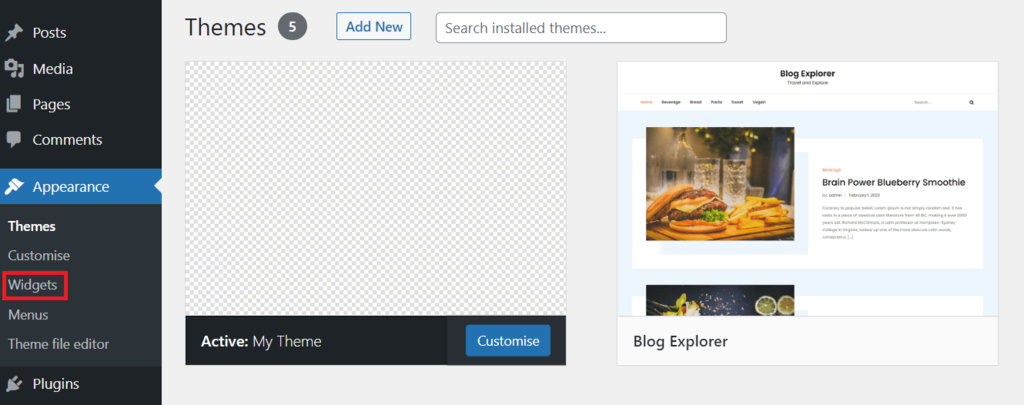
Widgets add cool things to your site. You can create your own widgets. This makes your site special. First, register your widget with a simple code. Use functions.php to add this code. Then, define what your widget does. It might show text, images, or other things. Finally, add your widget to a sidebar or footer. Widgets give users control and customization. They make your site look great and work better.
Credit: www.hostinger.com
Testing And Debugging Your Theme
Testing and debugging are essential steps in creating a WordPress theme. Ensure the theme functions correctly by checking for errors. This process helps improve user experience and site performance.
Using Debugging Tools
Debugging tools help find errors in themes. Firebug and Chrome Developer Tools are popular choices. They show issues in code. Use them to check CSS and JavaScript. These tools help fix problems fast. Always check your theme in different browsers. This ensures it looks right everywhere. Debugging tools can speed up your work. Use them often to keep your theme error-free. Errors are easy to find with these tools. They save time in theme development.
Ensuring Compatibility
Your theme must work on all devices. Check it on phones, tablets, and computers. Make sure it looks good on each device. Themes should work with different plugins. Test them to make sure there are no issues. Compatibility is key for a good user experience. Users will leave if the theme breaks. Always test your theme before sharing. Compatibility keeps users happy and your theme popular. Use tools to test compatibility easily.
Publishing Your Theme
Test your theme for bugs and errors. Check all features work well. Make sure designs look good on all devices. Prepare detailed documentation. Users need to understand how it works. Write clear instructions for installation. Include screenshots and examples.
Keep your code clean and organized. Remove any unnecessary files. Double-check for security. Ensure your theme is safe for users. This builds trust in your theme.
Visit the WordPress Theme Review page. Create a free account if needed. Upload your theme’s ZIP file. Fill in all required information. Describe your theme clearly. Include details like features and purpose. This helps users find your theme easily.
Wait for the review process to complete. This may take some time. Be patient and ready to make changes. Once approved, your theme will be live. Users can download and use it.
Credit: www.wpzoom.com
Frequently Asked Questions
How Do I Create My Own Theme In WordPress?
To create a WordPress theme, set up a local development environment. Develop and structure theme files. Use HTML, CSS, PHP, and JavaScript. Incorporate WordPress functions and template hierarchy. Test for compatibility and responsiveness. Upload your theme to WordPress, activate it, and customize it further using the WordPress Customizer.
Which Theme Builder Is Best For WordPress?
Elementor is widely regarded as the best WordPress theme builder. It offers a user-friendly interface and versatile customization options. Users can design responsive pages without coding. Its extensive template library and compatibility with popular plugins enhance functionality. Elementor’s frequent updates ensure performance improvements and new features, making it a top choice for WordPress users.
Which Language Is Used To Develop A Theme In WordPress?
WordPress themes are developed using PHP, HTML, CSS, and JavaScript. PHP handles dynamic content, HTML structures the layout, CSS styles it, and JavaScript adds interactivity. These languages work together to create responsive and customizable designs that enhance user experience and functionality.
Can You Create Your Own Template In WordPress?
Yes, you can create your own template in WordPress. Use the WordPress Theme Development guide to start. Customize templates using HTML, CSS, and PHP to match your design preferences. Ensure your template is responsive and SEO-friendly for optimal performance.
Conclusion
Creating a WordPress theme can be fun and rewarding. Start with understanding the basics of HTML, CSS, and PHP. These are the building blocks. Use WordPress Codex for guidance. Follow the steps carefully. Don’t rush. Take your time. Test your theme often.
Make sure it works on different devices. Keep learning. Explore new design ideas. Practice regularly to improve your skills. Share your theme with others. Get feedback. This helps refine your work. Enjoy the creative process. Themes let you express your ideas uniquely.
Dive in and start creating today.


