
You’re ready to take your WordPress site to the next level, but there’s one thing holding you back—understanding fonts. With so many options and terms like H1 and H2, it can feel overwhelming.
But don’t worry! This guide is here to simplify everything for you. Imagine crafting a website where each font choice not only complements your design but also boosts your SEO. Fonts aren’t just about style; they play a crucial role in how your content is perceived and ranked.
By the end of this guide, you’ll not only understand what H1 and H2 are but also how to use them effectively to captivate your audience and climb search engine rankings. Ready to transform your WordPress site into a visual and SEO powerhouse? Let’s dive in!

Credit: wordpress.com
Importance Of Typography In WordPress
Typography helps make a website look nice and easy to read. Fonts matter a lot. They can make text clear or messy. WordPress uses different fonts like H1 and H2. These fonts help to organize content. H1 is the main title. It tells people what the page is about. H2 is a sub-title. It gives more details. Using the right fonts helps users understand the message. Good typography keeps readers interested. It makes them stay longer on the website. Bad fonts can confuse readers. They might leave the page quickly. Choose fonts wisely. This makes a big difference in user experience. It can also help with SEO. Search engines like websites with good typography. They rank them higher.
Basics Of Font Hierarchy
Font hierarchy is like a ladder for words. Each step has its role. H1 is the biggest step. We use it for titles. It grabs attention. H2 is a bit smaller. It is for important sections. It tells what the section is about. H3 is even smaller. It helps with subsections. Sometimes, we use H4 or even H5. These are for smaller details. Each font level helps in organizing ideas. It makes reading easy. Readers know where they are. The eye follows the structure. It’s like a map for text. This hierarchy is important. Without it, reading can be hard.
Understanding H1 To H6 Tags
H1 to H6 tags are important in web design. They help organize content. H1 is the most important. It usually shows the main title. H2 is for main sections. H3 is for sub-sections. H4, H5, and H6 are used for smaller parts.
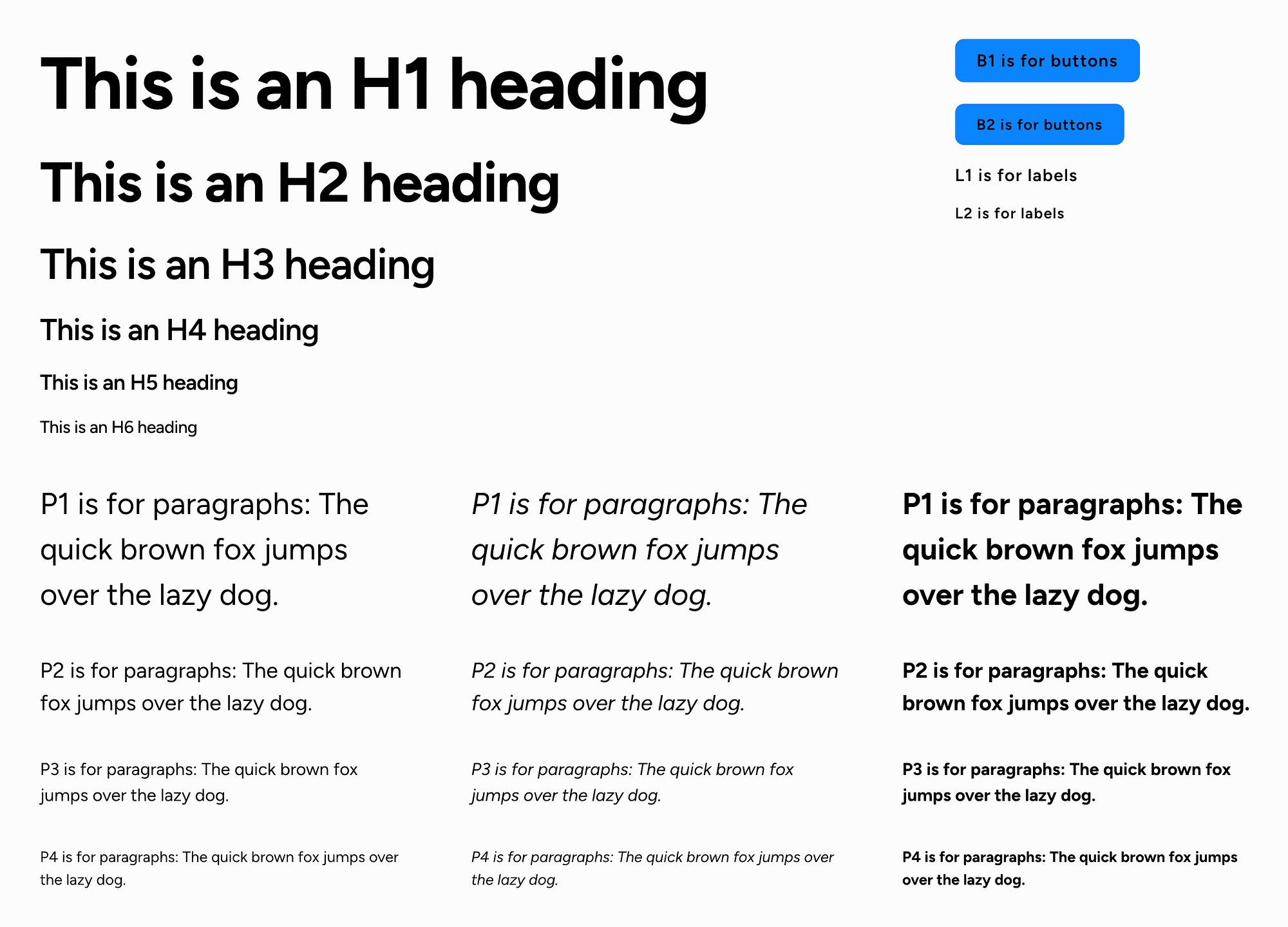
H1 tag is large and bold. It grabs attention. H2 tag is smaller than H1. But still bold. H3 and H4 tags are smaller. They are less bold. H5 and H6 tags are the smallest. They are least bold.
These tags guide readers. They make text easy to read. Search engines like these tags. They help in ranking pages. Use them wisely.

Credit: www.facebook.com
Role Of H1 In Seo
H1 is the main title on a webpage. It is very important for SEO. Search engines use H1 to understand the topic of the page. It helps them rank the page in search results. The H1 should be clear and relevant. It should include important keywords. This makes the page easier to find. A good H1 improves the page’s visibility. It attracts more visitors. It gives them a clear idea of the page content. H1 is usually larger than other texts. This makes it stand out. It catches the reader’s attention. Always use one H1 per page. It keeps the focus clear.
Proper use of H1 can boost page ranking. It makes the page more user-friendly. It also helps search engines like Google. These engines understand the page better. This can lead to higher visibility in search results.
Crafting Effective H2 Headings
H2 headings play a big role in content. They help readers find key points. Clear and concise headings guide users smoothly. They also improve SEO by using relevant keywords. This boosts your page’s visibility. Each heading should be descriptive yet short. It must fit the content it leads. Use simple words for easy understanding. This aids non-native readers. Structure is vital for flow. Readers will follow your message better. Consistency in style is key. It keeps your content neat. H2 headings should be larger than body text. This makes them stand out. Remember to use bold font for emphasis. This catches the reader’s eye.
Visual Impact Of Font Choices
Fonts make websites look interesting. Big H1 fonts catch the eye first. They are used for main titles. Smaller H2 fonts help organize content. They break it down into sections. Choosing the right font size is important. It affects how people read your site.
Different fonts show different feelings. Some fonts look fun. Others look serious. Bold fonts are strong and clear. Italic fonts add style and emphasis. Mixing fonts can make a site look messy. Stick to two or three fonts for a clean look.
Font color matters too. Dark colors stand out on light backgrounds. Light colors work well on dark backgrounds. Choose colors that match your site’s theme. This keeps the design consistent. Make sure text is easy to read. This helps visitors stay longer.
Choosing Fonts For Readability
Picking the right font is very important. Fonts should be easy to read. Some fonts can be hard to see. This can make reading difficult. Choose simple and clean fonts. Sans-serif fonts are a good choice. They look clear on screens. Serif fonts are also nice. They work well for printed text. Check if the font size is big enough. Readers should not strain their eyes. Line spacing is also key. It makes text look neat. Adjust it to give text room to breathe.
Colors matter too. Dark text on a light background is best. Avoid using too many colors. It can confuse readers. Try to keep it simple. This helps keep the focus on the text.
Credit: medium.com
Customizing Fonts In WordPress
Fonts make text look special. They can be big, small, or colorful. In WordPress, you can change fonts easily. This helps your website look nice and neat. Use H1 for big titles. It is the most important text. Use H2 for smaller titles. They help to organize ideas.
First, go to your WordPress dashboard. Find the section for fonts. Pick the font you like. Try different sizes. You can also change colors. Make sure your text is easy to read.
To make text bold, select the bold option. Bold text stands out. It is good for important words. People will notice them more. Always check how your text looks on your site.
Tools For Font Optimization
Many tools help improve font appearance on your website. Google Fonts is popular. It offers many free fonts. Easy to use and fast. Adobe Fonts also offers a wide selection. They have high-quality fonts for various designs. Some tools let you test fonts. Font Squirrel has a font generator. It helps create web-friendly fonts. You can also use Typekit. It lets you sync fonts across devices. This keeps your site looking good everywhere.
Font size matters. Tools like WhatFont help identify font details. This tool shows size and style quickly. Some plugins can also optimize fonts. Use WordPress plugins like Easy Google Fonts. It lets you change fonts easily. You can preview changes live. This helps make sure fonts look great before publishing.
Best Practices For Font Use
Choosing the right font is key. Fonts help your content look nice. Use H1 for titles. It grabs attention. H2 is for subheadings. They guide readers. Avoid too many font styles. It gets confusing. Stick to two or three styles. Font size matters. Large fonts are easy to read. Small fonts can be hard. Make sure text is clear. Contrast is important. Dark text on light background works best. Test your site. See how fonts look on phones and computers. Always check readability. It helps users enjoy your site.
Frequently Asked Questions
What Are H1 And H2 Tags In WordPress?
H1 and H2 tags are HTML elements used to define headings in WordPress. H1 is the primary heading, often the title, while H2 is a subheading. They help organize content, improve readability, and enhance SEO by signaling the importance of text to search engines.
How Do H1 And H2 Tags Affect Seo?
H1 and H2 tags improve SEO by structuring content hierarchically. They help search engines understand topic relevance and context. Proper usage can enhance keyword visibility and ranking. An H1 tag should be unique per page, while multiple H2 tags can organize sections.
Can I Use Multiple H1 Tags In WordPress?
Using multiple H1 tags on a single page is not recommended. It can confuse search engines about the page’s main topic. Stick to one H1 tag for the primary heading. Use H2 tags for subheadings to maintain a clear content hierarchy and improve SEO.
How To Change Font Size For H1 And H2 In WordPress?
To change the font size for H1 and H2 in WordPress, use custom CSS. Access the WordPress Customizer, navigate to “Additional CSS,” and add CSS code specifying the desired font size for H1 and H2 tags. Save changes to apply them site-wide.
Conclusion
Understanding H1 and H2 tags in WordPress is essential. They organize your content. Search engines use them to rank your site. Clear headings guide readers through your posts. They improve readability and SEO. Choose fonts that enhance your site’s design.
The right font makes your content more engaging. Consistency in font style is key. It maintains a professional look. Experiment with different font sizes and styles. Find what fits best for your audience. A well-structured post keeps readers interested. It also helps your website stand out.
Happy blogging!


