
Are you wondering if ClickFunnels can host your domain? You’re not alone.
When building your online presence, understanding where your domain lives and how it connects to your sales funnel is crucial. Imagine having everything in one place—your domain, your pages, and your sales tools—all working smoothly together. You’ll discover exactly how ClickFunnels handles domain hosting, what it means for your website, and the simple steps you can take to get your domain up and running.
Stick with me, and by the end, you’ll know if ClickFunnels is the right home for your domain.
Clickfunnels Domain Hosting Basics
ClickFunnels offers a way to manage your domain and host your website easily. Understanding the basics of domain hosting with ClickFunnels helps you decide if it fits your needs. It simplifies the process for people who want to build sales funnels without technical hassle.
This section explains what domain hosting means in ClickFunnels and highlights its key features. The goal is to give you clear and simple information.
What Is Domain Hosting In Clickfunnels
Domain hosting in ClickFunnels means storing your website files on their servers. This lets your site be accessible on the internet through your domain name. ClickFunnels manages the technical side, so you don’t need extra hosting services.
You can connect your own domain or buy a new one through ClickFunnels. After setting it up, your funnel pages show under your custom web address. The platform keeps your site live and running smoothly.
Key Features Of Clickfunnels Hosting
ClickFunnels hosting includes secure servers that protect your site from attacks. It offers fast loading times to keep visitors engaged. The platform supports unlimited traffic, so your site handles many visitors at once.
It also includes SSL certificates, which secure data and boost trust with visitors. You get easy domain management tools within the ClickFunnels dashboard. This makes it simple to update or change your domain settings anytime.
Connecting Your Domain To Clickfunnels
Connecting your domain to ClickFunnels lets you create a professional website. It helps you use your own web address instead of a ClickFunnels URL. This improves your brand trust and makes your site easy to find.
Setting up your domain is simple. ClickFunnels provides tools to link your domain quickly. Follow clear steps to connect your custom domain without hassle.
Steps To Link A Custom Domain
First, log in to your ClickFunnels account. Go to the domain section in settings. Click “Add New Domain” and choose “Use an existing domain.”
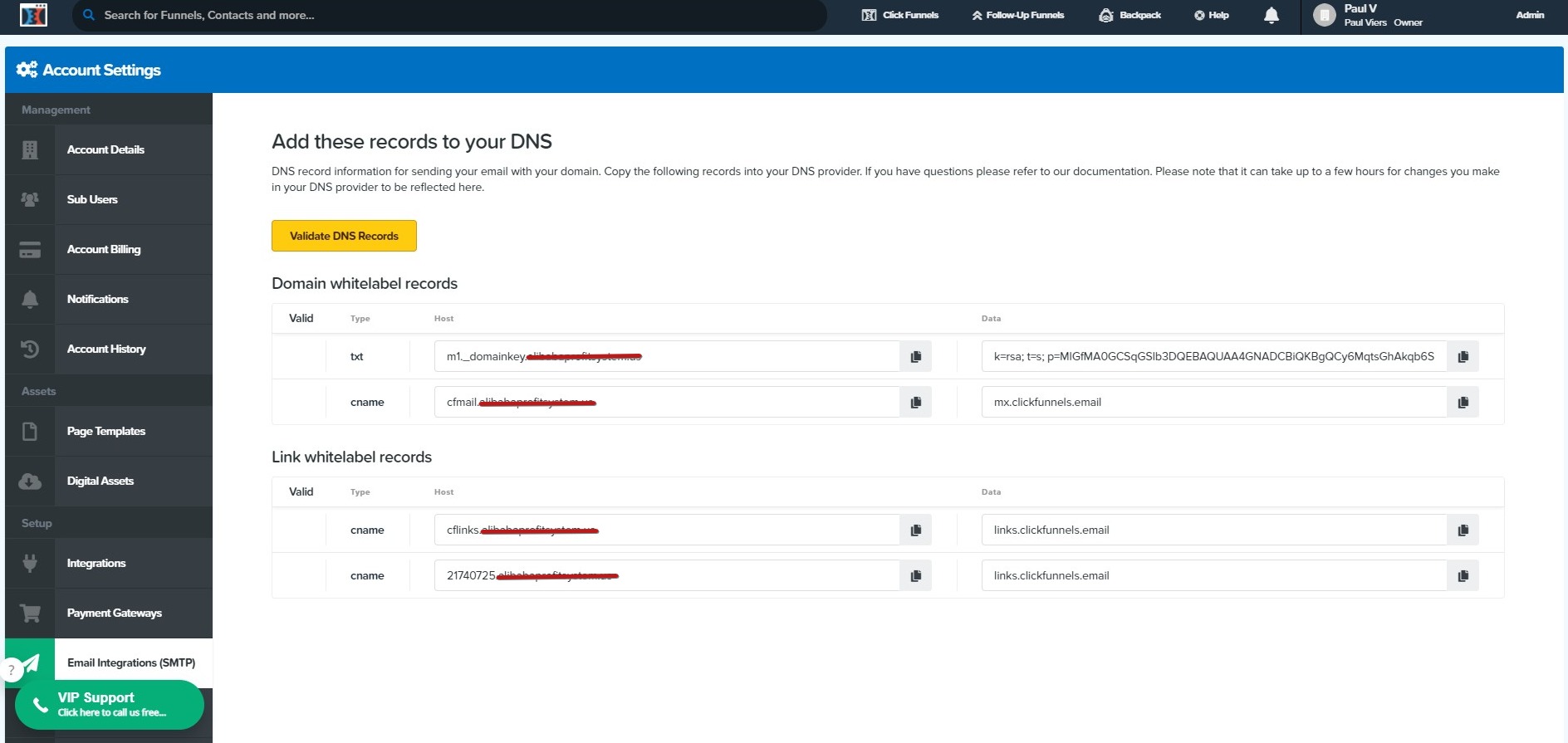
Next, enter your domain name. ClickFunnels will give you DNS records. These records must be added to your domain provider’s dashboard.
Update your DNS settings by adding the CNAME record. This points your domain to ClickFunnels servers. Wait for DNS changes to take effect. This can take a few hours.
Finally, verify the domain in ClickFunnels. Once confirmed, your domain links to your funnel pages. Visitors can now access your site using your custom URL.
Common Domain Providers Compatible With Clickfunnels
ClickFunnels works well with popular domain providers. GoDaddy is widely used and easy to manage. Namecheap offers simple DNS controls suitable for linking domains.
Bluehost and HostGator users can also connect their domains. These providers support quick DNS updates. Google Domains is another option with clear DNS settings.
Using these providers reduces setup problems. They support the DNS changes ClickFunnels requires. Your domain connection will be smooth and reliable.
Managing Dns Settings
Managing DNS settings is an important part of using ClickFunnels with your own domain. DNS controls how your domain name connects to the internet. Proper settings ensure your website loads correctly on ClickFunnels.
Changing DNS records might seem tricky. It involves updating values like A records or CNAME records. These changes tell the internet where to find your ClickFunnels pages. Doing this right avoids errors and downtime.
Updating Dns Records For Clickfunnels
Start by logging into your domain registrar’s control panel. Look for the DNS management or DNS settings area. You will need to update the A record or CNAME record to point to ClickFunnels servers.
For example, set the A record to the IP address provided by ClickFunnels. Or update the CNAME record to the domain ClickFunnels gives you. Save the changes and wait for them to take effect.
DNS changes can take a few minutes to 48 hours to update globally. Be patient and check your website after some time.
Troubleshooting Dns Issues
Sometimes, DNS settings do not update correctly. Your website may not load or show an error message. Check if you entered the records exactly as ClickFunnels instructs.
Clear your browser cache or try another device to see if the problem persists. Use online DNS tools to verify your records are correct. If you see old data, the DNS change might still be propagating.
Contact your domain provider’s support if you cannot fix the issue. They can help check your DNS settings and guide you on the next steps.
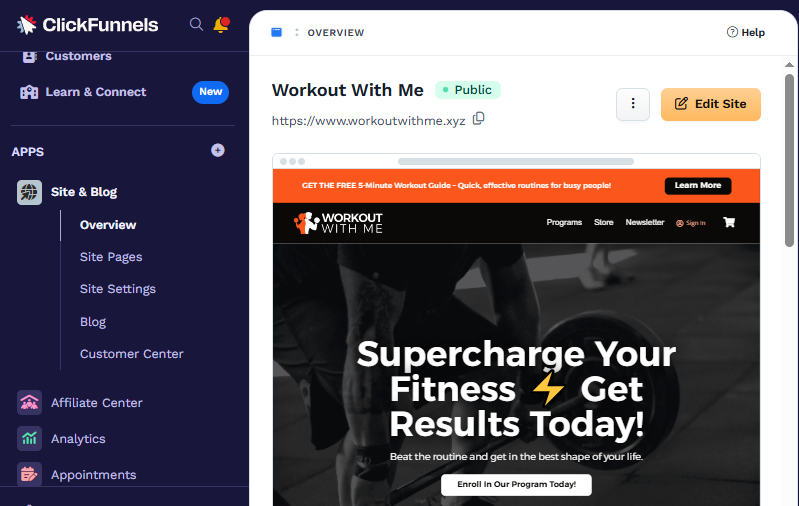
Credit: support.myclickfunnels.com
Limitations And Considerations
ClickFunnels offers domain hosting services, but it has some limits. Knowing these limits helps avoid issues. It also helps choose the best setup for your website.
Domain Types Supported
ClickFunnels supports most common domain types. These include .com, .net, .org, and a few others. It does not support all country-specific domains. Some special domains may not work well. Always check if your domain type is supported before buying.
Restrictions On Domain Hosting
ClickFunnels only hosts domains linked to funnels on its platform. You cannot use it to host full websites outside funnels. Also, it does not provide email hosting with your domain. You must use other services for email setup.
Domain transfers to ClickFunnels are not allowed. You can connect your domain by changing DNS settings. This means your domain stays with your original registrar. Changing settings needs some technical knowledge.
Using Clickfunnels Subdomains
Using ClickFunnels subdomains offers a simple way to host your sales funnels without buying a separate domain. This option lets you create professional-looking pages quickly. It suits users who want to start fast and avoid complex setup steps.
Subdomains from ClickFunnels use the main ClickFunnels domain but add your custom name before it. This makes your funnel URL unique and easy to share. It also helps you keep your brand visible online.
How Subdomains Work In Clickfunnels
ClickFunnels gives you a subdomain under their main domain. For example, your funnel might use yourname.clickfunnels.com. You choose the subdomain name during setup. ClickFunnels then links it to your funnel pages automatically.
This means you do not need to buy or manage a domain separately. The subdomain stays under ClickFunnels control. You just create and publish your funnels inside their platform.
Advantages Of Subdomain Usage
Using a ClickFunnels subdomain is quick and easy. There is no need to handle DNS records or domain settings. It saves time and reduces technical issues.
This option is also free with your ClickFunnels plan. You avoid extra costs for domain registration or hosting. It suits beginners who want to test funnels fast.
Subdomains keep your funnel URLs consistent and branded. Visitors see your chosen name in the link. This can build trust and improve click rates.
Credit: support.clickfunnels.com
Security And Ssl Certificates
Security is a key part of hosting your domain with ClickFunnels. SSL certificates keep your website safe. They protect your visitors’ data from hackers. Secure sites also build trust and improve search rankings. Understanding how ClickFunnels handles SSL helps you keep your site secure.
Ssl Setup For Custom Domains
ClickFunnels offers free SSL certificates for custom domains. You need to connect your domain to ClickFunnels first. After connection, ClickFunnels automatically generates and installs the SSL certificate. This process may take some time, usually a few hours. No extra cost or manual work is needed for SSL setup. Your domain will then show a secure “https://” URL.
Ensuring Secure Connections
SSL encrypts data between your visitor and your website. This prevents hackers from stealing sensitive information. ClickFunnels renews SSL certificates automatically. Your site remains secure without interruptions. Always check for the padlock icon in the browser address bar. It confirms your site uses a secure connection. Secure connections improve user confidence and can boost sales.
Alternatives To Clickfunnels Domain Hosting
ClickFunnels offers domain hosting as part of its service. Yet, some users want other options for hosting their domains. Choosing an alternative host can give more control or better prices. It also allows using features not available in ClickFunnels. Exploring alternatives helps find what suits your needs best.
Third-party Domain Hosting Options
Many companies provide domain hosting outside ClickFunnels. Popular choices include GoDaddy, Namecheap, and Google Domains. These services often offer easy domain management tools. They may also provide extra features like email hosting or security services. Using a third-party host means you keep your domain separate from your funnel platform. This can make transfers or changes easier.
When To Use External Hosting
Use external hosting if you want more control over your domain. It helps when you need custom DNS settings or advanced email options. External hosting suits users who manage multiple websites or funnels. It also works well if you plan to switch funnel platforms in the future. Keeping your domain separate avoids potential downtime during changes.
Credit: getwpfunnels.com
Tips For Smooth Domain Integration
Integrating your domain with ClickFunnels can be a smooth process. Clear steps help avoid delays and confusion. The right setup ensures your website runs without issues. Follow simple tips for easy domain integration.
Proper domain integration lets you build trust and improve site visibility. Careful attention to details saves time and effort. These tips guide you through the process with confidence.
Best Practices For Domain Setup
Start by choosing a domain that matches your brand. Use a reliable domain registrar for easy management. Update DNS settings carefully to point to ClickFunnels servers. Keep your domain registrar login details handy. Verify domain ownership as required by ClickFunnels. Use HTTPS for secure connections. Check propagation status after changes. Allow up to 48 hours for full DNS update. Test your site on different devices and browsers. Keep backups of your site and settings.
Avoiding Common Mistakes
Do not skip verifying your domain with ClickFunnels. Avoid incorrect DNS records that cause site downtime. Do not mix up CNAME and A records. Avoid changing settings without a backup. Do not ignore SSL setup for security. Avoid delays in updating your domain settings. Do not forget to clear your browser cache after setup. Avoid using complicated domain names with special characters. Do not overlook testing your domain after changes. Avoid rushing the process; patience is key.
Frequently Asked Questions
Does Click Funnels Provide Domain Hosting Services?
Click Funnels does not directly host your domain. Instead, it allows you to connect an existing domain purchased from a registrar. You must manage your domain’s DNS settings through your domain provider to link it with Click Funnels.
Can I Use My Custom Domain With Click Funnels?
Yes, Click Funnels supports custom domains. You can link your purchased domain to your funnels by updating the DNS records. This enables your funnels to appear under your branded domain, enhancing professionalism and trust.
How Do I Connect My Domain To Click Funnels?
To connect your domain, update the CNAME and A records in your domain registrar’s DNS settings. Click Funnels provides clear instructions to guide you through this process, ensuring your domain points correctly to your funnel.
Is Domain Registration Included With Click Funnels?
No, Click Funnels does not include domain registration. You need to buy your domain from a third-party provider such as GoDaddy or Namecheap before connecting it to Click Funnels.
Conclusion
ClickFunnels allows you to connect your own domain easily. You keep full control over your website address. The process is straightforward and does not require advanced skills. This helps you build a professional online presence. Your brand looks trustworthy with a custom domain name.
Remember to follow the setup steps carefully for best results. Domain hosting stays with your current provider, while ClickFunnels manages your sales funnels. This setup keeps things simple and effective. Choose ClickFunnels if you want a smooth way to link your domain.


