
Have you ever wondered who is actually hosting your website’s domain? Knowing the hosting company behind your domain is crucial.
It affects your site’s speed, security, and reliability. If you don’t know who hosts your domain, you might miss out on important updates or face unexpected downtime. You’ll discover simple ways to find out exactly who is hosting your domain.
Understanding this can give you more control over your website and help you make smarter decisions for your online presence. Keep reading to unlock this essential knowledge!
What Hosting Company Means
A hosting company is a service provider that stores websites on servers. It makes websites accessible on the internet 24/7. Without hosting, a website cannot be found online.
Web hosting companies offer space on powerful computers called servers. These servers keep all the website files safe and ready to send to visitors. Hosting companies also manage the technology that connects websites to the internet.
What Does A Hosting Company Do?
A hosting company stores your website’s files and data. It ensures fast loading times and constant availability. It also provides security to protect the website from attacks and data loss.
Types Of Hosting Services
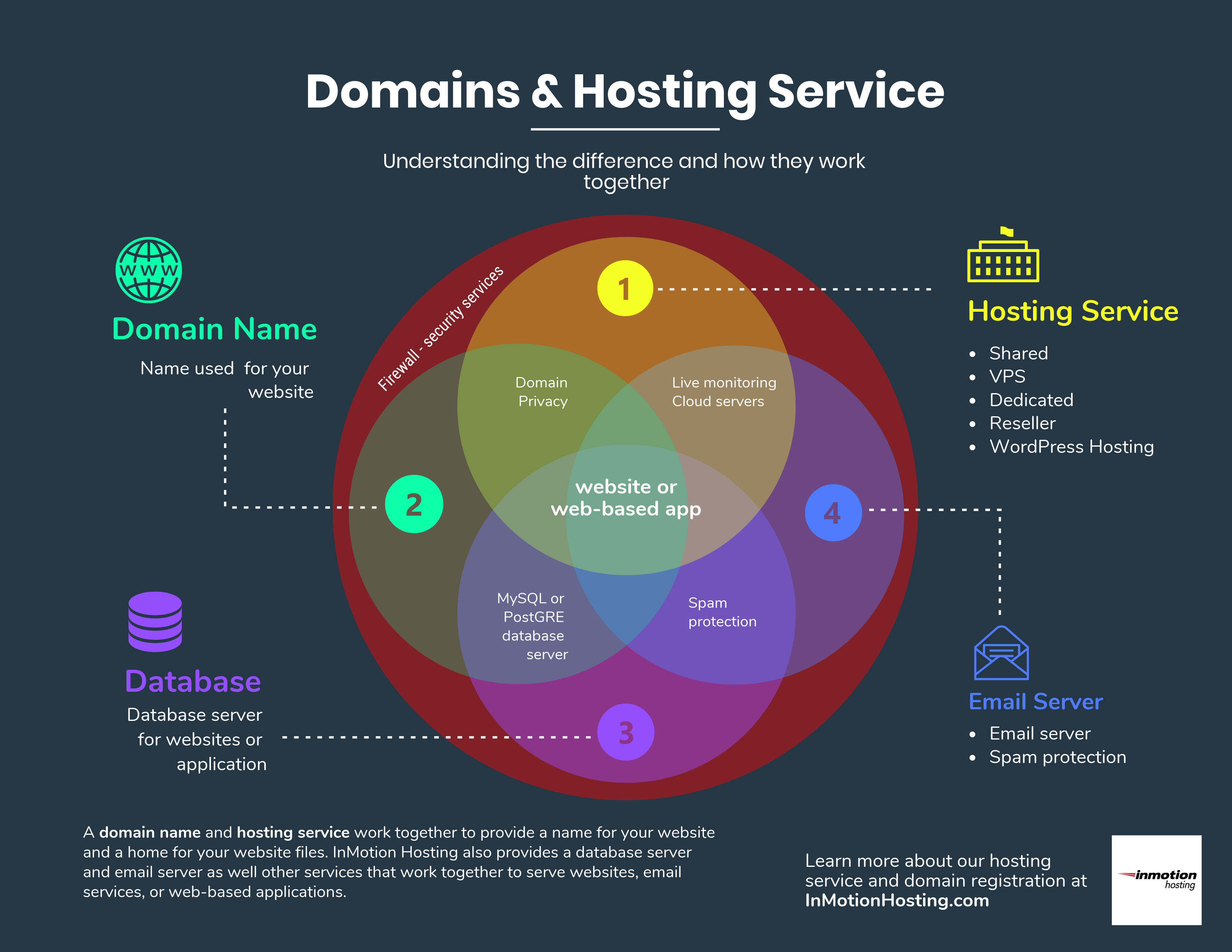
There are many hosting types. Shared hosting means many websites share one server. VPS hosting offers more resources for growing sites. Dedicated hosting gives a whole server to one site.
Why Choose A Good Hosting Company?
A reliable host keeps your site online without interruptions. It offers support to fix any problems quickly. Good hosting improves your site’s speed, which helps visitors stay longer.

Credit: www.hostever.com
How To Identify Hosting Provider
Finding out who hosts a domain is useful for many reasons. It helps you understand where a website is stored and managed. You can also check if a hosting service meets your needs. Several simple methods exist to identify a hosting provider.
Using Whois Lookup
WHOIS lookup shows ownership and hosting details of a domain. Enter the domain name in a WHOIS tool online. The results often include the hosting company’s name and contact info. Some domains use privacy protection, which hides some details.
Checking Dns Records
DNS records reveal technical details about a domain. Use a DNS checker tool and enter the domain name. Look for A records or NS records to see hosting server IPs. These IPs can be traced back to the hosting company.
Using Online Hosting Checker Tools
Online hosting checker tools simplify the process. Enter the domain name, and the tool scans for hosting info. It can show the hosting provider, server location, and technologies used. Many of these tools are free and easy to use.
Common Hosting Types
Understanding common hosting types helps identify who hosts a domain. Each hosting type offers different features and performance levels. Choosing the right type depends on your website’s needs and traffic volume. Here are the main hosting types used for domains.
Shared Hosting
Shared hosting means many websites share one server. It is the cheapest hosting type. Resources like memory and bandwidth are divided among users. This option suits small websites and beginners. It requires little technical knowledge to set up.
Vps Hosting
VPS hosting uses a virtual private server. It divides a physical server into smaller virtual servers. Each user gets dedicated resources and more control. VPS offers better performance than shared hosting. It fits medium-sized websites with growing traffic.
Dedicated Servers
Dedicated servers provide an entire physical server for one user. All resources belong exclusively to that user. This hosting type delivers high performance and security. It suits large websites or businesses with heavy traffic. Technical skill is needed to manage the server.
Cloud Hosting
Cloud hosting uses multiple servers in a network. It offers great flexibility and scalability. Resources adjust automatically based on website demand. Cloud hosting provides high uptime and fast load times. This type is ideal for websites expecting variable traffic.

Credit: www.icontact.com
Why Knowing Hosting Provider Matters
Knowing the hosting company behind a domain helps you understand many important things. This knowledge gives clear insights about the website’s performance and reliability. It also helps in fixing problems faster. Plus, it plays a key role in keeping the site safe from threats. Let’s explore why knowing the hosting provider matters.
Performance Insights
The hosting company affects website speed and uptime. A good host means faster loading times. Visitors stay longer when pages load quickly. Slow websites lose visitors and rankings. Knowing the host helps predict website performance. You can choose or switch to better hosting if needed.
Troubleshooting Issues
Technical problems happen often with websites. Knowing the hosting provider makes it easier to find solutions. Support teams understand their own systems best. They can fix errors quickly if you provide hosting details. This reduces downtime and keeps your site running smoothly.
Security Considerations
Websites face constant security threats. Hosting companies have different security levels and measures. Knowing your host helps you understand the risks and protections. You can take steps like backups and updates to stay safe. Security features vary, so choose a host that protects your data well.
Steps To Change Hosting Company
Changing your hosting company involves several clear steps. Each step helps move your website safely and smoothly. Careful planning avoids downtime and data loss. Follow these steps to switch hosts confidently.
Backing Up Your Site
Start by saving all your website files and databases. Use your current host’s backup tools or manual methods. Store the backup on your computer or cloud storage. This backup protects your content during the move.
Selecting A New Host
Choose a hosting company that fits your site’s needs. Consider speed, reliability, support, and price. Read reviews and compare features. Pick a host with good uptime and customer service.
Migrating Your Website
Upload your backup files to the new hosting account. Use the control panel or FTP to transfer files. Import your database using tools like phpMyAdmin. Test your site on the new host before switching DNS.
Updating Domain Settings
Change your domain’s DNS records to point to the new host. Access your domain registrar’s control panel. Replace old nameservers with the new ones. Wait for DNS propagation, which can take up to 48 hours.
Credit: www.inmotionhosting.com
Tools For Fast Hosting Identification
Finding out the hosting company for a domain is easier with the right tools. These tools help you identify the host quickly and accurately. They save time and reduce guesswork. Here are some useful tools for fast hosting identification.
Popular Hosting Lookup Websites
Hosting lookup websites provide quick details about a domain’s host. Enter the domain name, and the site shows the hosting provider. These sites also display IP addresses and server locations. Examples include Whois Lookup, Hosting Checker, and Site24x7. They offer free and easy access to hosting information.
Browser Extensions
Browser extensions help identify hosting companies without leaving the webpage. Install the extension, visit the site, and click the icon. The extension reveals the hosting provider in seconds. Extensions like Wappalyzer and BuiltWith are popular choices. They also show other site technologies, which can be useful.
Command Line Utilities
Command line tools work well for tech-savvy users. Use commands like “whois” or “nslookup” to find hosting details. These tools provide raw data about domain registration and DNS records. They are fast and do not require a browser. They work on Windows, Mac, and Linux systems.
Frequently Asked Questions
How Can I Find The Hosting Company For A Domain?
You can identify a domain’s hosting company using online WHOIS lookup tools or hosting checker websites. These tools reveal the hosting provider by analyzing DNS records and IP addresses linked to the domain.
Does Domain Registrar Always Equal Hosting Provider?
No, a domain registrar registers your domain name, but the hosting provider stores your website files. These services can be separate companies.
Can I Change My Hosting Company For A Domain?
Yes, you can switch hosting companies by migrating your website files and updating the domain’s DNS settings to point to the new host.
What Information Does Whois Provide About Hosting?
WHOIS shows domain registration details and sometimes reveals hosting provider info through nameservers or IP addresses linked to the domain.
Conclusion
Finding the hosting company for a domain helps you understand your website better. It shows where your website lives on the internet. This knowledge can help solve issues or improve your site’s speed. You can also learn about the company’s services and support.
Use tools online to check hosting details quickly and easily. Knowing who hosts your domain gives you control and confidence. Keep this information handy for future website needs. Simple steps lead to better website management.


