
Are you tired of manually typing in contact details from business cards? Imagine having a tool that instantly scans and organizes those cards into your CRM, saving you time and avoiding mistakes.
But with so many CRM options out there, which one actually offers this powerful feature? You’ll discover the best CRM software that can scan business cards effortlessly, helping you stay organized and focused on growing your business. Keep reading to find the perfect solution that fits your needs.
Benefits Of Business Card Scanning
Business card scanning offers clear advantages for managing contacts. It simplifies the process of adding new connections to your CRM. This technology saves time, reduces mistakes, and improves how you organize business information.
Saving Time And Effort
Scanning business cards eliminates manual typing. You quickly capture contact details with a few clicks. This speeds up data entry and lets you focus on other tasks. No more sorting through piles of cards or writing down names and numbers.
Reducing Data Entry Errors
Manual input can cause errors in names, numbers, and emails. Scanning uses technology to capture data accurately. This lowers the chance of mistakes that may lead to lost contacts. Reliable information means better communication and fewer follow-up problems.
Enhancing Contact Management
Scanned cards integrate directly into CRM systems. You can categorize and search contacts easily. This helps keep your network organized and accessible. Updated contact lists improve follow-ups and build stronger business relationships.

Credit: blinq.me
Key Features To Look For
Choosing CRM software that scans business cards saves time and reduces errors. Not all CRM tools have the same features. Some are better at reading card details, while others connect well with your other tools. Knowing the key features helps pick the right CRM for your needs.
Accuracy Of Ocr Technology
OCR means Optical Character Recognition. It reads text from images like business cards. High accuracy in OCR means fewer mistakes in names and numbers. Good OCR handles different fonts and layouts easily. Poor OCR can cause wrong contacts and lost data.
Integration With Other Tools
CRM software should work well with email, calendars, and marketing apps. Integration saves time by syncing information automatically. It helps keep your contacts updated everywhere. Without integration, managing data becomes slow and error-prone.
Mobile App Support
A mobile app lets you scan cards anytime and anywhere. It adds convenience for users on the go. Mobile support means you can add contacts right after meetings. Look for apps that work well on both Android and iOS devices.
Data Security Measures
Business contacts are important and private. CRM software must protect this data from theft or loss. Look for features like encryption and secure login. Regular backups and privacy policies also keep data safe.
Top Crm Software With Business Card Scanning
Business card scanning is a handy feature for many sales and marketing teams. It saves time and effort by quickly capturing contact details. Several CRM software options include this feature to help manage leads easily.
Here are some top CRM software that offer reliable business card scanning capabilities.
Hubspot Crm
HubSpot CRM provides a simple way to scan business cards using its mobile app. The app captures contact information and adds it directly to the CRM. This feature helps keep your contacts organized without manual entry.
Zoho Crm
Zoho CRM includes a built-in business card scanner in its mobile app. It reads the card details and saves them as new contacts automatically. Zoho supports multiple languages, making it useful worldwide.
Salesforce
Salesforce offers business card scanning through third-party apps integrated with its platform. These apps extract contact info and sync it with Salesforce records. This method suits users who want extra scanning options.
Pipedrive
Pipedrive’s mobile app features a business card scanner that quickly imports contacts. It reduces manual typing and speeds up lead entry. The scanned contacts are stored safely for easy follow-up.
Nimble
Nimble CRM provides a smart business card scanner within its app. It uses AI to capture contact details accurately and adds them to your database. Nimble also links social profiles for better contact insights.

Credit: zapier.com
Comparing Pricing And Plans
Choosing the right CRM software with business card scanning features depends on pricing and plans. Costs vary widely among providers. Some offer free versions with limited features. Others provide full access through paid subscriptions. Understanding these differences helps you pick the best option for your needs.
Free Vs Paid Versions
Free versions often include basic card scanning. They allow entry of a limited number of contacts. Paid versions offer more scans and storage. They also come with extra tools like contact management and integration. Free plans suit small needs. Paid plans work better for growing businesses.
Subscription Models
Most CRM software uses monthly or yearly subscriptions. Monthly plans give flexibility to cancel anytime. Yearly plans usually cost less per month. Some providers offer tiered pricing. Higher tiers unlock more features and scans. Choose a model that fits your budget and usage.
Additional Costs
Watch for extra fees beyond the base price. Some software charges for extra users or contacts. Others charge for advanced features like analytics or support. Add-ons can increase the total cost quickly. Always check the full pricing details before deciding.
User Experience And Interface
User experience and interface play a big role in choosing CRM software that can scan business cards. A clean and simple design helps users work faster. It reduces errors and makes the scanning process smooth. Good software should be easy to navigate and clear in its functions.
Users spend less time learning the software. They focus more on managing contacts and growing their business. The right interface keeps users happy and productive.
Ease Of Use
The best CRM software offers a simple way to scan and save business cards. Clear buttons and easy menus guide users step-by-step. The scanning feature should work fast and accurately. Users should not struggle with complicated settings. Quick access to saved contacts helps users find information without delay.
Customization Options
Customization helps users tailor the software to their needs. Some CRMs let users change layouts and fields. This makes it easier to store specific details from business cards. Users can create categories or tags for better organization. Custom options improve how users manage and use their contacts.
Customer Support
Good customer support makes a big difference. Users can get help with scanning issues or software questions. Support teams should be easy to reach by chat, email, or phone. Clear guides and tutorials help users learn fast. Reliable support lowers frustration and keeps users confident in the software.
Tips For Maximizing Business Card Scanning
Scanning business cards into CRM software saves time and keeps contacts organized. Use simple tips to get the best results. Follow these steps to make your scanning process smooth and accurate.
Good habits help keep your contact list clean and useful. Use CRM tools to get the most from your scanned cards. These tips help you stay productive and professional.
Best Practices For Scanning
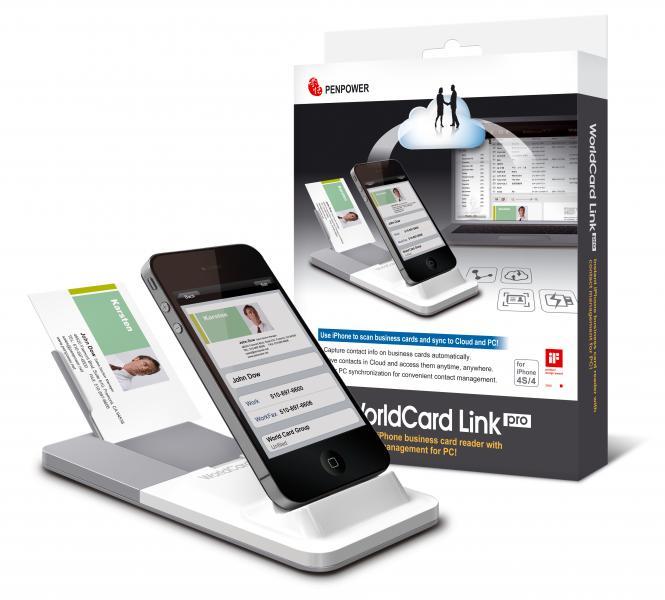
Place cards on a flat, well-lit surface before scanning. Avoid shadows or glare on the card. Hold your device steady to capture clear images. Scan one card at a time for accuracy. Check the scan for mistakes before saving.
Maintaining Clean Contact Data
Review scanned details for spelling or format errors. Remove duplicate contacts regularly to avoid clutter. Update old information as soon as you find new details. Use consistent formats for phone numbers and email addresses. Keep notes to add context to each contact.
Leveraging Crm Features
Use tags or categories to organize contacts by type or event. Set reminders to follow up with new connections. Sync scanned contacts across devices for easy access. Export contact lists for email campaigns or reports. Use CRM analytics to track networking success.
Credit: www.ebay.com
Frequently Asked Questions
Which Crm Software Offers Business Card Scanning Features?
Several CRM platforms like HubSpot, Zoho CRM, and Salesforce offer integrated business card scanning tools. These features allow easy contact capture, improving lead management and follow-ups efficiently.
How Accurate Are Crm Business Card Scanners?
Modern CRM scanners use advanced OCR technology, providing high accuracy in digitizing contact details. Accuracy varies by software but typically exceeds 90%, reducing manual entry errors.
Can Business Card Scanning Crm Integrate With Mobile Apps?
Yes, many CRM systems support mobile apps with business card scanning capabilities. This enables on-the-go contact capture and seamless syncing with your CRM database anytime, anywhere.
Are Business Card Scanning Features Included In Free Crm Plans?
Some free CRM plans include basic business card scanning, but advanced features often require paid subscriptions. Check each CRM’s plan details for specific scanning feature availability.
Conclusion
Choosing CRM software that scans business cards saves time and effort. It helps keep contacts organized and easy to find. Many options offer this feature, so pick one that fits your needs. This tool reduces manual entry and errors. It makes follow-ups faster and improves customer connections.
Try a few to see which works best for you. Simple, smart, and effective – that’s what good CRM software offers.


