
Have you ever wondered where your domain actually lives on the internet? Understanding where your domain is hosted is key to making sure your website runs smoothly and stays online.
Whether you’re building a new site or managing an existing one, knowing the basics of domain hosting can save you time, money, and headaches. You’ll discover exactly where your domain is hosted and why it matters for your online presence.
Keep reading—you’ll be surprised at how simple it really is!
What Domain Hosting Means
Domain hosting means the place where your website lives on the internet. It is where all your website files and data are stored. Without domain hosting, no one can see your website online.
When you buy a domain name, you need a hosting service to connect that name to your website files. Hosting makes your website available to visitors 24/7. It keeps your website safe and running smoothly.
What Is Domain Hosting?
Domain hosting is a service that stores your website’s files. These files include images, texts, and videos. The hosting provider keeps these files on powerful computers called servers. Servers send your website to visitors when they type your domain name.
How Domain Hosting Works
When someone enters your domain name, the internet asks the server for your website files. The server sends these files back to the visitor’s browser. This process happens in seconds. It makes your website visible on any device with internet.
There are different types of hosting services. Shared hosting means many websites share one server. It is cheaper but slower. Dedicated hosting means your website has its own server. It is faster and more secure but costs more.
Why Domain Hosting Is Important
Good hosting keeps your website fast and online all the time. It protects your site from attacks and loss of data. It also helps your website rank better on search engines. Hosting affects how users see and use your site.
Types Of Domain Hosting
Domain hosting means storing your website files on a server. Different types of hosting offer various features and prices. Choosing the right type helps your site run well and stay secure.
Shared Hosting
Shared hosting means many websites share one server. It is the cheapest option. It works well for small sites with low traffic. Resources like memory and bandwidth are shared. Performance can slow if other sites use too much.
Dedicated Hosting
Dedicated hosting gives you a whole server alone. It is more expensive but offers high performance. You get full control over server settings. Good for big websites or those with high traffic. Security is stronger since no one else uses the server.
Cloud Hosting
Cloud hosting stores your site on many servers linked together. It scales easily if your site grows fast. You pay only for the resources you use. It offers great uptime and speed. If one server fails, others keep your site online.
Virtual Private Server (vps)
VPS hosting splits one server into parts. Each part acts like a small dedicated server. You get more control than shared hosting. It is cheaper than a full dedicated server. Good for medium-sized sites needing better performance and security.
How To Find Your Domain Host
Finding your domain host is important for managing your website. Your domain host stores your website files and makes your site visible online. Knowing where your domain is hosted helps with updates, security, and support. Here are simple ways to find your domain host quickly.
Using Whois Lookup
WHOIS lookup shows details about a domain name. It reveals the owner, registration date, and hosting company. Visit a WHOIS website and enter your domain name. The results often include the hosting provider’s name. This method is free and easy to use.
Checking Dns Records
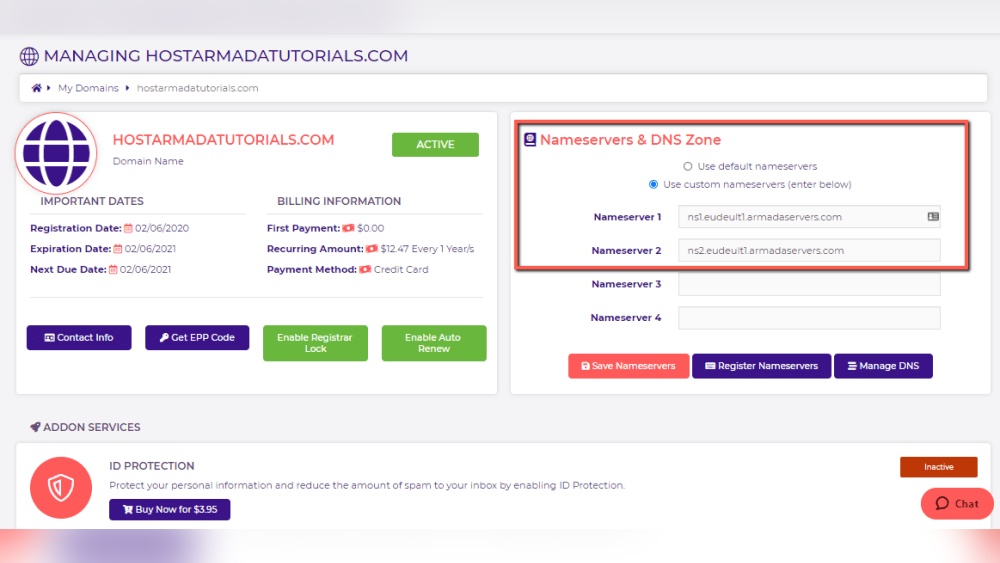
DNS records connect your domain to the host server. You can check DNS records with online tools. Look for records like A, MX, or NS records. These show where your domain points. The host’s name usually appears in these records.
Using Hosting Checker Tools
Hosting checker tools scan your domain and find hosting details. These tools provide quick results about your host provider. Enter your domain into a hosting checker website. The report shows the hosting company and server location. Many of these tools are free and user-friendly.

Credit: support.intermedia.com
Interpreting Hosting Information
Understanding where a domain is hosted requires interpreting specific hosting information. This information reveals the company that provides the hosting service, the server’s location, and technical details like IP addresses. Knowing these details helps you learn about site performance, security, and reliability.
Interpreting hosting information is simple once you know what to look for. Different tools and websites can show you these details quickly. Let’s explore how to identify hosting providers, understand IP addresses, and find where servers are located.
Identifying Hosting Providers
Hosting providers manage the servers where websites live. You can find the hosting provider by using WHOIS lookup tools. These tools show the name of the company hosting the domain. Sometimes, the hosting provider’s name appears in the domain’s DNS records. Knowing the provider helps you understand the site’s hosting quality and support options.
Understanding Ip Addresses
An IP address is a unique number assigned to each server. It looks like a series of numbers separated by dots. This number helps locate the server on the internet. IP addresses can tell you if the server is shared or dedicated. They also show the hosting provider’s network and can hint at the server’s speed and security.
Locating Server Geographically
Servers are located in data centers worldwide. The server’s physical location affects site speed and user experience. You can find the geographic location by checking the IP address. Online tools show the city and country of the server. Knowing the location helps understand how fast a website loads for different users.
Reasons To Know Your Domain Host
Changing your domain hosting means moving your website from one hosting provider to another. This process can improve your website’s speed, security, or support. It requires careful planning to avoid problems during the switch.
Hosting change is common when your current host cannot meet your needs. Knowing the right time and steps helps make the move smooth and safe.
When To Switch Hosts
Switch hosts if your website loads slowly or often breaks. Poor customer support is another reason to change. If your site grows and needs more space, a new host might be better. Also, consider switching if your current host is too expensive.
Steps To Migrate Domain Hosting
Start by backing up all website files and databases. Next, choose a new hosting provider and sign up. Then, transfer your website files to the new host. Update your domain’s DNS settings to point to the new server. Finally, test your website to ensure everything works.
Avoiding Downtime During Transfer
Keep your old hosting active until the new site works perfectly. Change DNS settings during low traffic times, like late night. Use a temporary URL to check your site on the new host. Notify users about possible brief downtime. These steps reduce interruptions for visitors and keep your site live.

Credit: www.temok.com
Changing Your Domain Hosting
Finding out where a domain is hosted helps you understand its performance and security. Various tools and resources offer quick and accurate hosting insights. These resources suit beginners and experts. They provide details like hosting provider, server location, and IP address. Exploring these options saves time and helps make informed decisions.
Popular Hosting Lookup Websites
Several websites let you check hosting information easily. Sites like Whois.net and HostingChecker.com provide detailed hosting data. Enter the domain name to see the hosting provider and server details. These sites also show DNS records and IP addresses. They are free and user-friendly, perfect for quick checks.
Browser Extensions For Quick Checks
Browser extensions offer instant hosting info without leaving the page. Extensions like Wappalyzer and BuiltWith reveal hosting and technology details. They display server type, CMS, and hosting location. One click gives you a snapshot of the site’s setup. Extensions save time and work on popular browsers like Chrome and Firefox.
Professional Services For Hosting Analysis
Professional tools give deeper insights for businesses and developers. Services like Pingdom and GTmetrix analyze hosting speed and uptime. They offer reports on server response and performance. These tools help optimize websites by identifying hosting issues. Paid plans provide advanced features and detailed analytics reports.
Credit: www.paubox.com
Frequently Asked Questions
Where Is A Domain Usually Hosted?
A domain is hosted on a web server managed by a hosting provider. This server stores your website files and makes them accessible online. Hosting ensures your domain’s website is live and reachable 24/7 through the internet.
How To Check Where A Domain Is Hosted?
You can use online tools like WHOIS lookup or hosting checker websites. These tools reveal the domain registrar, hosting provider, and server location. They help identify where your domain’s website data physically resides.
Can A Domain Be Hosted And Registered Separately?
Yes, a domain can be registered with one company and hosted with another. Registration manages the domain name, while hosting manages website files. This separation offers flexibility in managing domains and website services independently.
What Affects Domain Hosting Location Choice?
Factors include server speed, security, uptime, and geographic proximity to users. Choosing a hosting location close to your audience improves website performance and loading times. Hosting providers also offer different features and support levels.
Conclusion
Domain hosting stores your website files on a server. This server connects your site to the internet. Choosing the right host affects your site’s speed and uptime. Knowing where your domain is hosted helps manage your online presence. It also makes updating and securing your site easier.
Always check your hosting details regularly to avoid surprises. Understanding domain hosting keeps your website running smoothly. Simple steps lead to better website control and performance.


