
Choosing the best PHP version for your WordPress site can feel like a daunting task. You might wonder which version will offer the most speed, security, and compatibility for your website.
If you’re looking for ways to optimize your site’s performance, improve your user experience, and ensure robust security, this question is critical. The right PHP version can make a significant difference, not just in how your site runs, but also in how it’s perceived by your visitors.
In this post, we’ll cut through the technical jargon and give you clear, actionable insights to help you make the best choice for your WordPress site. Get ready to unlock the potential of your website like never before.

Credit: www.hostarmada.com
Why Php Version Matters For WordPress
Choosing the right PHP version for WordPress is important. It affects speed and security. Older versions can make your site slow. They also miss out on new features. Newer versions offer better performance. They fix bugs and improve security.
PHP updates help your site run smoothly. They make your site more efficient. Using the latest version can help avoid errors. It supports new plugins and themes. Many hosts recommend updating PHP. It’s important to keep your website safe and fast.
Performance Benefits
Choosing the right PHP version for WordPress matters. PHP 8 offers faster speed. It makes websites load quicker. This means a better experience for visitors. Faster sites can also help with search rankings. PHP 7 is still a good choice. It is better than older versions. But PHP 8 is the fastest now.
New versions also fix bugs. This helps keep your site safe. Security is very important. Always make sure to use a supported version. Older versions can have risks. Updates help protect your site from attacks. Both speed and security matter a lot.
Security Enhancements
PHP updates often bring better security. WordPress sites need strong security. Using the latest PHP version helps prevent hacks. Older PHP versions have more security holes. Hackers can find these holes. They can then attack your site. New versions fix these issues. They make your site safer.
Always choose the newest stable PHP version. This ensures you have the best security. Developers add new safety measures in updates. These protect sensitive data and site information. Running the latest version also helps with bug fixes. Bugs can cause problems. They make your site vulnerable.
Check PHP updates often. Stay alert for new versions. Update as soon as possible. This keeps your WordPress site secure. It also ensures smooth performance. A secure site is a safe site. Protect your site. Use the best PHP version.
Compatibility With Themes And Plugins
Choosing the right PHP version is crucial for WordPress sites. Themes and plugins need to work smoothly. Using an old PHP version might cause issues. Newer themes often require the latest PHP. This ensures all features work well. Some plugins might not support older PHP versions. This can lead to errors or even crashes. Always check the PHP version requirements for each theme. Do the same for plugins. Keeping PHP up-to-date helps with security too. It also boosts site speed. Faster sites mean happier visitors. Make sure to test everything before going live.
Features In Latest Php Versions
PHP updates come with exciting features. Speed is improved in newer versions. This means your website can load faster. Security is another big feature. New updates help keep your site safe. Error handling is also better now. This makes fixing mistakes easier. The syntax has become cleaner. This helps developers write code more easily. Compatibility with WordPress is a key aspect. New PHP versions work well with it. Using the latest version is wise. It brings many benefits to your site.
Common Challenges And Solutions
Php versions can cause trouble with plugins. Some plugins need a specific Php version. Updates might not work with older Php. Speed can be a problem. Slow sites lose visitors. Security is key. Old Php versions are risky. Hackers find easy targets. Compatibility issues arise often. Not all themes support every Php version. Solutions are simple. Always update Php. Check plugin requirements. Test site speed after updates. Choose a Php version that fits your theme. Always backup before changes.
Use the latest stable Php version. This helps with security and speed. Check WordPress recommendations. They guide you to the best Php version. Problems can be fixed with planning. Avoid risks by staying informed.
How To Upgrade Php For WordPress
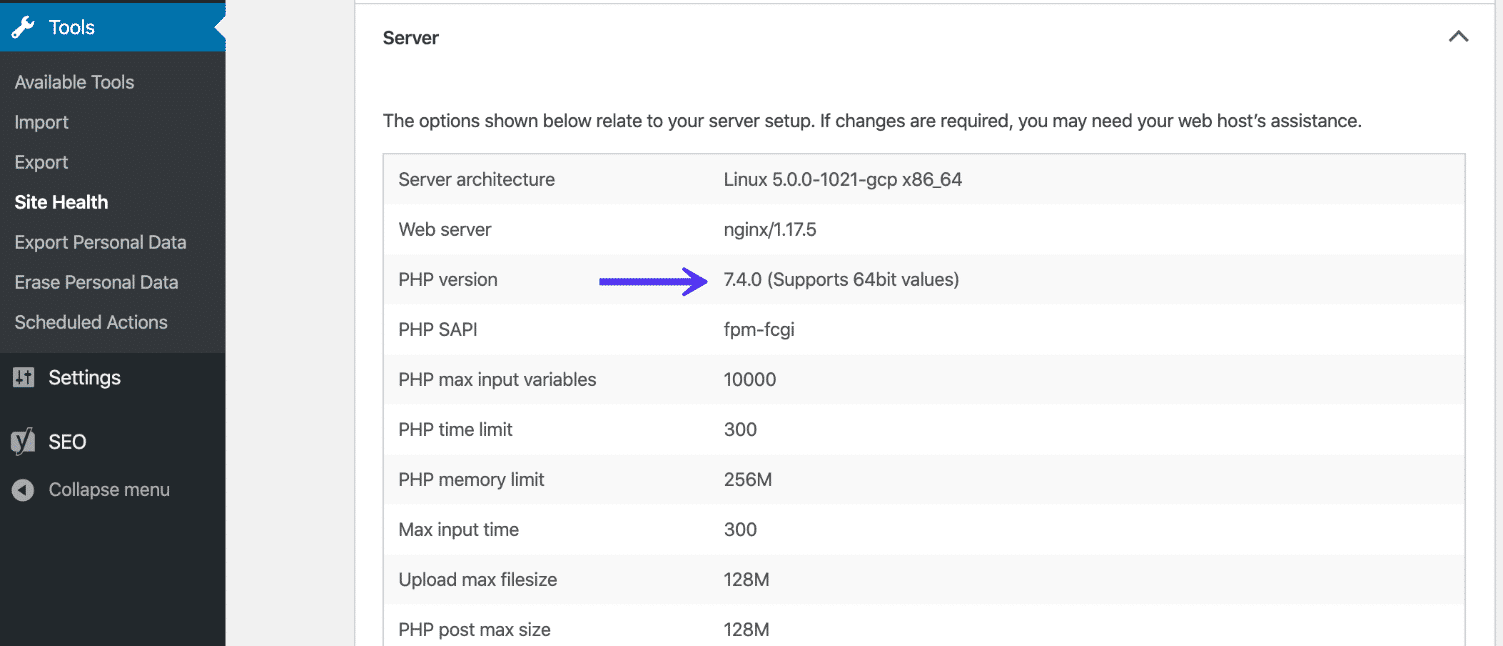
Begin by finding out your current PHP version. Log in to your WordPress dashboard. Go to the “Tools” section. Look for “Site Health”. Click on “Info”. Scroll to the “Server” tab. Here, you will see your PHP version. Knowing this is important. It helps in planning your upgrade.
Before changing anything, always back up your site. Use a plugin or your hosting service. Make sure every file is saved. Then, test your site. Use a staging environment if possible. This is like a copy of your site. You can test changes without risks. Ensure everything works fine after upgrading.
Different hosts have different ways. Some have easy control panels. You might find a “PHP version” section there. Click to update. Other hosts may require a support ticket. Check their help pages for guidance. Follow their steps carefully. If unsure, ask for help from your host. They can guide you through the process.
Credit: wpastra.com
Community And Expert Recommendations
Many people prefer PHP 8.0 for WordPress. It offers better speed than older versions. Experts say PHP 8.0 is more secure. More users are switching to PHP 8.0. Some still use PHP 7.4 for compatibility. PHP 7.4 is stable and well-tested. PHP 8.0 is the future, say experts. Community votes for PHP 8.0 too. They like its new features. Speed and security matter most to them.
Future Trends In Php Development
PHP is always changing and getting better. Developers want faster and safer codes. PHP 8 is the latest version. It has new features. JIT compiler makes PHP faster. It helps your website run smoother. Improved error handling keeps your site safe.
PHP 8 has lots of cool tools. Attributes give more control to coders. Union types make the code flexible. These updates help developers do more. Asynchronous programming is another trend. It lets tasks run at the same time. This means less waiting. Your website loads quickly.
Many developers are excited. They see better performance in the future. They want to make sites faster and safer. PHP is the key to this. Learning PHP 8 is smart. It prepares coders for new challenges. Stay updated. Be ready for change.
Credit: kinsta.com
Frequently Asked Questions
What Is The Best Php Version For WordPress?
The best PHP version for WordPress is the latest stable release. Currently, PHP 8. 2 is recommended for optimal performance and security. Updating to the latest version ensures compatibility with new plugins and themes, enhancing website speed and efficiency. Always check WordPress compatibility before upgrading PHP versions.
Why Upgrade Php For WordPress?
Upgrading PHP improves WordPress performance, security, and support for the latest features. Each PHP update brings significant speed enhancements, better resource management, and patches for vulnerabilities. Staying updated minimizes the risk of exploits and ensures compatibility with modern web technologies.
How Does Php Version Affect WordPress Speed?
PHP version significantly impacts WordPress speed and performance. Newer versions execute code faster and handle requests more efficiently. This results in quicker page load times and improved user experience. Updating PHP can lead to noticeable speed improvements, especially for larger WordPress sites.
Is Php 8 Compatible With WordPress?
Yes, PHP 8 is compatible with WordPress, though some plugins may need updates. It’s crucial to ensure that your themes and plugins support PHP 8 before upgrading. Compatibility checks help prevent potential issues and ensure a smooth transition to the latest PHP version.
Conclusion
Choosing the right PHP version boosts WordPress performance. PHP 8. 0 offers speed and security. Older versions may lack support and updates. Newer versions ensure better compatibility with plugins and themes. Always check with your hosting provider. Regular updates keep your site running smoothly.
Consider your specific needs and hosting environment. Testing on a staging site helps avoid issues. Staying updated with PHP releases benefits your WordPress site. It’s crucial for a seamless and secure experience. Keep your WordPress site optimized and efficient. Happy blogging with the right PHP version!


