
Have you ever stumbled upon a WordPress site and wondered about the magic behind its smooth functionality and stunning design? You’re not alone.
The secret often lies in the plugins the site uses. These tiny powerhouses can transform a basic WordPress site into a dynamic, feature-rich platform. But how do you uncover which plugins are being used? This article is your gateway to unlocking those secrets.
Get ready to dive into the world of WordPress plugins, and discover how you can enhance your own website with the right tools. Keep reading, and empower yourself with the knowledge to take your site to the next level!
Credit: fluentforms.com
Importance Of Detecting Plugins
Knowing which plugins a website uses is important. It helps in understanding the site’s features. Plugins add special functions to a website. They can make a site faster, safer, or more fun. Detecting plugins can help in improving your own site. You can learn from others’ choices. It’s like peeking into a toolbox. You see what tools are used. This helps you choose the best tools for your site. Some plugins are for security. Others are for speed. Choosing the right ones can make a big difference. It’s all about making your site better.
Common Methods To Identify Plugins
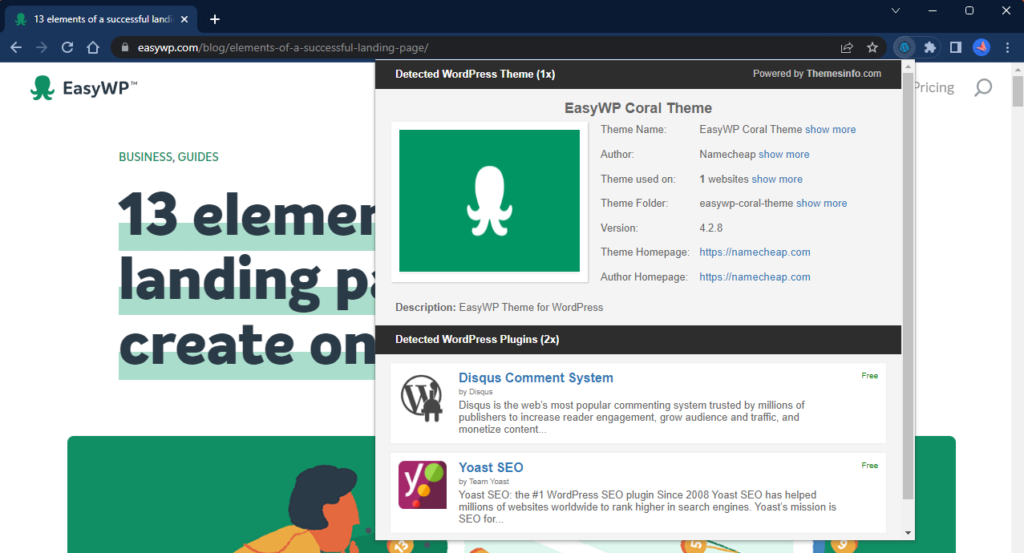
Many online tools can help find WordPress plugins. Tools like WPThemeDetector are quite popular. They scan the website and list the plugins. Another tool is BuiltWith. It provides detailed reports. These tools are often free. Some may require an account.
Browser extensions can also help. Wappalyzer is a well-known extension. It shows the technologies behind a site. Another option is WhatRuns. It detects plugins and themes. Extensions are easy to use. Just install and click to analyze.
Check the website’s source code. Right-click on the page and select “View Page Source”. Look for clues like wp-content/plugins. This might show plugin names. Another method is to check the website’s footer. Sometimes plugin names appear there. It requires some patience.
Using Source Code Analysis
Open the web page using your browser. Right-click and select “View Page Source.” Look at the HTML and CSS files. Search for words like “plugin” or “wp-content/plugins.” These phrases can show which plugins are active. Sometimes, plugin names appear in HTML comments. Checking these can give clues about the plugins used.
JavaScript files often hold important information. Right-click on the page and choose “Inspect.” Go to the “Sources” tab. Here, find the JavaScript files. Look for folders named “plugins”. They might tell which plugins are being used. Sometimes, file names include plugin names. This can make it easy to identify them.
Plugins may have unique URLs. Look in the browser’s address bar. If you see a URL with “/wp-content/plugins/”, it might show plugin usage. Open the page and check for these special URLs. They can lead to plugin files. Knowing the URL path can help you find out which plugin is in use.
Exploring Server-side Techniques
Discover which WordPress plugins a site uses with server-side techniques. Learn to identify plugins effortlessly. Gain insights for better web development and optimization.
Accessing Plugin Directories
Websites use plugins to add features. Finding plugins on a WordPress site can be tricky. Plugins are stored in directories. Accessing these directories can reveal which plugins are used. The wp-content/plugins directory is key. Most plugins install here. By looking at this directory, you can see plugin names. This helps identify what plugins are active on a site.
Identifying Common File Paths
Plugins often have common file paths. These paths show where files are stored. Knowing these paths helps locate plugins quickly. The wp-content/plugins directory is a common path. This path usually holds plugin files. Some plugins create unique folders. These folders can be found in the same directory. By checking these folders, you can find specific plugin files. This method is simple and effective for identifying plugins.
Limitations And Challenges
Hidden and Obfuscated Plugins can be tricky to find. Some plugins hide themselves. They might change their names. This makes them hard to detect. Websites can use many plugins. Some plugins might be secret. Others may be disguised. Finding these needs special tools.
Impact of Security Measures is another challenge. Security tools can block plugin searches. They protect sites from threats. But they also hide plugins. This makes detection tough. Security can be strong. It stops unwanted access. It also hides plugins from view.
Credit: www.easywp.com
Ethical Considerations
Exploring WordPress plugins requires careful ethical consideration. Accessing plugin information should respect privacy and adhere to legal guidelines. Ethical research ensures user trust and a safe digital environment.
Respecting Privacy And Security
Privacy is very important. We must be careful with user data. Always protect personal information from being misused. Websites have sensitive information. Sharing it without permission is wrong. So, we must handle data with care.
Seeking Permission Before Analyzing
Asking for permission is important. Respect website owners’ rights. Never analyze without asking. This keeps trust and respect. Always inform about the analysis process. Explain why you want to analyze. Make sure everyone is comfortable.

Credit: stackcrawler.com
Frequently Asked Questions
How To Identify WordPress Plugins On A Website?
Identifying WordPress plugins can be done using browser extensions or online tools. These tools scan the site’s source code for plugin references. Alternatively, you can inspect the page’s source code manually. Look for plugin-specific CSS or JavaScript files that might indicate which plugins are in use.
Can Plugins Affect Website Performance?
Yes, plugins can impact website performance. Some may slow down page load times due to excessive resource usage. It’s essential to choose optimized plugins and regularly update them. Minimizing the number of plugins and using caching plugins can help maintain site speed and overall performance.
Are WordPress Plugins Safe To Use?
WordPress plugins are generally safe when sourced from reputable developers. Check for regular updates and positive reviews before installing. Poorly coded or outdated plugins can pose security risks. It’s crucial to keep plugins updated to protect against vulnerabilities and ensure compatibility with WordPress core updates.
How Do Plugins Enhance WordPress Functionality?
Plugins extend WordPress functionality by adding features without coding knowledge. They offer solutions for SEO, security, e-commerce, and more. You can customize your site extensively by choosing appropriate plugins. This flexibility allows users to tailor their sites to specific needs and improve user experience.
Conclusion
Discovering WordPress plugins used by a site can be insightful. It helps improve your own website’s functionality. Explore tools like “WhatRuns” or “Wappalyzer” for easy analysis. Use this knowledge to enhance your site’s user experience. Choose plugins that suit your site’s needs best.
Keep your website smooth and efficient. Regularly update plugins for security and performance. Stay informed about new plugin features. Your website visitors will appreciate the improvements. Enjoy the process of making your site better. Happy blogging!


