
Imagine having a fantastic business idea or a personal project that you’re excited to share with the world. You’ve got the vision, the creativity, and the passion.
But there’s one big question: what do you do with web hosting? This might sound technical or overwhelming, but it’s easier than you think. Web hosting is the backbone of your online presence. Without it, your brilliant ideas might never reach the audience they deserve.
But don’t worry, you’re not alone in figuring this out. This guide will show you how web hosting can be your secret weapon in launching and maintaining a successful website. Keep reading to discover how you can leverage web hosting to not only launch but also scale your online presence effectively. Your journey to mastering web hosting starts now, and it’s simpler than you’ve ever imagined.

Credit: www.hostgator.com
Choosing The Right Web Hosting
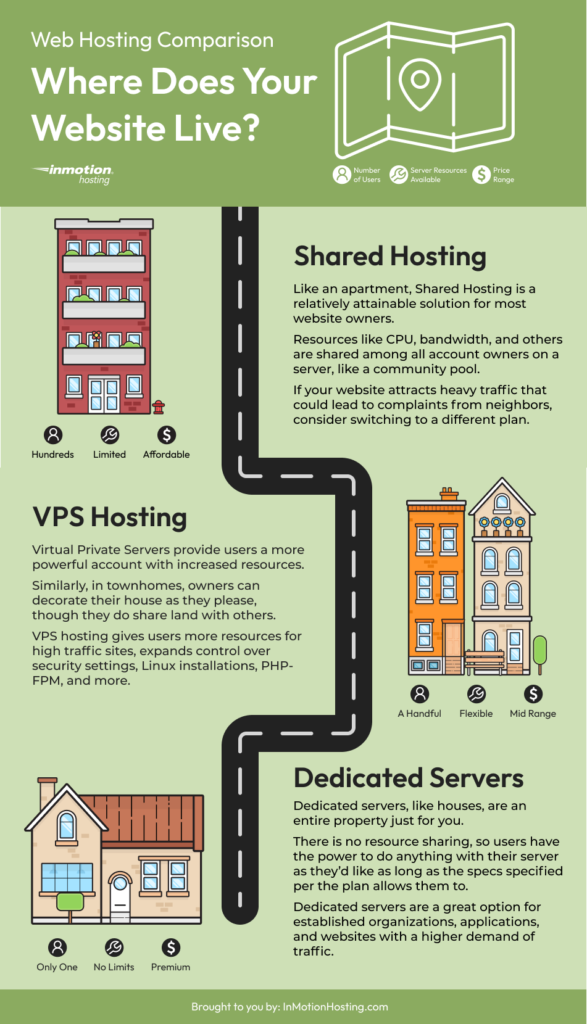
Web hosting comes in different types. Shared hosting is basic and cheap. Many websites use one server. VPS hosting gives more space and control. It costs more but offers better performance. Dedicated hosting is for big websites. You get your own server. It’s expensive but fast. Cloud hosting is flexible. It uses many servers. If one fails, others help.
Speed is crucial. Slow sites lose visitors. Check uptime. Good hosts offer 99.9% uptime. Security matters. Protect data from hackers. Look for SSL certificates. Support is key. Choose hosts with 24/7 help. Cost affects choice. Compare prices and features. Bandwidth is needed for traffic. More visitors need more bandwidth. Ease of use is important. Beginners need simple tools.
Setting Up Your Website
Choose a domain name that is easy to remember. It should match your website’s topic. Visit a domain registrar to register your domain. This is like buying your online address. You need to pay a yearly fee to keep it. Keep your domain name short and simple. Avoid numbers and special symbols. It should be easy to spell. This helps people find your site easily.
After you register your domain, connect it to your web hosting. This lets your website go live. Login to your hosting account. Find the DNS settings area. Here, enter your domain name servers. This links the domain to the hosting. Wait for a few hours for changes to take effect. Now, your site is ready to be seen by others.
Managing Your Hosting Account
Your hosting account has a control panel. It helps you manage your website. To access it, use your login details. These are your username and password. Once logged in, you see many options. Each option helps you do different tasks. Some options let you create emails. Others help you manage databases. Explore these options to learn more. This will help you control your website better.
FTP is a tool for moving files. It stands for File Transfer Protocol. Use it to upload or download files. You need an FTP client to use it. FileZilla is a popular choice. Connect the client to your hosting account. You will need your FTP username and password. Once connected, you can manage your files easily. Move, delete, or update files with a few clicks.
Optimizing Website Performance
Fast websites keep users happy. Slow ones don’t. Reduce image sizes. Use fewer plugins. Choose a lightweight theme. Minimize CSS and JavaScript files. These steps help pages load quicker.
Caching stores data for quick access. It helps pages load faster. Use browser caching for frequent visitors. Server caching improves speed too. Consider using a Content Delivery Network (CDN). A CDN distributes data globally. It reduces server load. This results in faster page loads.
Securing Your Website
Choose a reliable web hosting provider to protect your site. Regular updates and strong passwords help maintain security. Consider SSL certificates for encrypting data and safeguarding user information.
Enabling Ssl Certificates
SSL certificates keep websites safe. They create a secure link. This link protects data. Users feel safe when they see it. Encrypting data is vital. Hackers can’t steal encrypted data. SSL boosts trust. Users trust secure sites more. Trust leads to more visits. More visits mean more success.
Protecting Against Cyber Threats
Websites face many threats. Hackers want to steal data. Use strong passwords to protect your site. Change them often. Keep software up to date. Old software has bugs. Bugs let hackers in. Install firewalls to block attacks. Firewalls stop dangerous traffic. Educate staff on cyber safety. Teach them to spot threats. Train them to report issues quickly.
Credit: www.inmotionhosting.com
Scaling Your Hosting
Bandwidth is how much data your site can send. More visitors need more bandwidth. Think of it like a water pipe. A bigger pipe means more water can pass through. So, more people can visit your site at once. Always check your current usage. See how much bandwidth your site uses now. This helps you know if you need more.
Sometimes, you need a better hosting plan. Upgrading can give you more space and bandwidth. With more resources, your site runs faster. Check your hosting provider’s options. They often have plans for growing sites. Compare the costs and benefits. Pick a plan that fits your needs. Choose wisely, as this affects your site’s performance.
Troubleshooting Common Issues
Downtime can be frustrating for website owners. Checking your server status is a good start. If the server is down, contact your hosting provider quickly. Sometimes, a simple reboot can fix the issue. Keep your software updated to prevent bugs. Use a website monitoring tool to alert you when your site goes down.
Email issues can disrupt communication. Check your email settings first. Ensure your password is correct. Look for any error messages that can guide you. Confirm that your internet connection is stable. Sometimes, server settings need updating. Contact your email service provider if problems persist.
Exploring Hosting Alternatives
Cloud hosting is a great choice. It offers flexibility and scalability. You pay for what you use. No need to buy extra space. This is a cost-effective solution. It suits small businesses well. It can grow as your needs grow. No worries about physical servers. Your data is spread across many machines. This means better security and reliability.
VPS stands for Virtual Private Server. It is like a shared server. But it acts like a dedicated server. You get more control and flexibility. Dedicated servers are different. They offer full control over the server. No sharing with others. This means better performance. It costs more than VPS. But it gives you full power over resources.

Credit: www.godaddy.com
Frequently Asked Questions
What Can I Do With Web Hosting?
Web hosting allows you to publish your website online. You can store files, manage domains, and run applications. It provides tools for email hosting, security, and backups. You control site accessibility and performance. Hosting supports business growth and online presence through reliable infrastructure.
What Do You Need Web Hosting For?
Web hosting stores your website data on servers, ensuring it’s accessible online. It provides necessary resources for website functionality. Hosting supports domain connection, site management, and security features. Choosing reliable web hosting improves site performance and user experience, crucial for online presence and business growth.
What Is The Purpose Of Web Hosting?
Web hosting stores and serves website files online, making them accessible to users worldwide. It ensures reliable performance, security, and support for your site. Hosting providers offer various plans to suit different needs, enabling businesses and individuals to establish a strong online presence efficiently.
How Do I Use Web Hosting?
To use web hosting, choose a reliable provider, sign up for a plan, and configure your domain. Upload website files using a control panel or FTP client. Ensure regular updates and backups for security and performance.
Conclusion
Exploring web hosting options can enhance your online presence. Choose a reliable provider for smooth website operations. Understand your needs before selecting hosting plans. Consider factors like bandwidth, storage, and customer support. Secure your website with SSL certificates for safety.
Regular backups prevent data loss. Optimizing server performance boosts site speed. Responsive customer support resolves issues promptly. Keep learning about web hosting trends and updates. Stay informed to make smart decisions. Web hosting is a crucial part of your digital journey.
Proper management ensures a successful online experience.


