
Are you struggling to find the perfect size for your WordPress homepage image? You’re not alone.
Choosing the right image size is crucial for your website’s performance and aesthetic appeal. A poorly-sized image can slow down your site, ruin your design, and even drive visitors away. But don’t worry—you’re about to discover the secrets to selecting the ideal image size that will captivate your audience and keep them browsing.
Imagine your homepage loading swiftly, with every picture crisp and clear, drawing your visitors in with its visual allure. Curious about how to achieve this? Keep reading to unlock the key to a perfectly optimized WordPress homepage image.
Importance Of Image Size
Large images can slow down your website. Slow sites annoy users. They may leave your page. Fast loading images keep users happy. Images should be small but clear. This balance is key. Compress images without losing quality. Use tools like TinyPNG or ImageOptim. This helps the page load faster.
Users love clear images. Blurry images look bad. They confuse viewers. A crisp image is pleasing. It keeps users on your site. The right size keeps text readable. It also keeps the page tidy. A good user experience means happy visitors. Happy visitors stay longer.
Search engines love fast sites. Fast sites rank higher. Good images help with this. Properly sized images improve SEO. They reduce page load times. Use alt text for images. This helps search engines understand them. Better SEO brings more visitors. More visitors mean more success.
Standard Image Dimensions
A common resolution for a WordPress homepage image is 1920 x 1080 pixels. This size fits most screens well. It is also known as full HD. Another option is 1280 x 720 pixels. This is called HD resolution.
Images should be clear. Blurry images look bad. They make your site look unprofessional. Keep file size small. Large files slow down your site. Use JPEG or PNG formats. They keep quality and reduce size.
The aspect ratio is the width to height of an image. Common aspect ratios are 16:9 and 4:3. A 16:9 ratio is wide. It is great for landscape images. A 4:3 ratio is more square. It suits portraits or square images.
Keeping a consistent aspect ratio is important. It ensures images look good. They should fit different devices. Test your images on a phone, tablet, and computer. Ensure they appear properly everywhere.
File Formats And Their Implications
JPEG files are great for photos. They make files smaller. This means pages load faster. But, JPEGs can lose some quality. PNGs are different. They keep all the details. This makes them good for logos and graphics. But, PNGs are bigger in size. They can slow down a webpage.
WebP is a newer format. It combines the best of JPEG and PNG. It keeps quality like PNG but is smaller like JPEG. This makes WebP a good choice for fast websites. Not all browsers support WebP yet. It’s important to check if it works on your site.
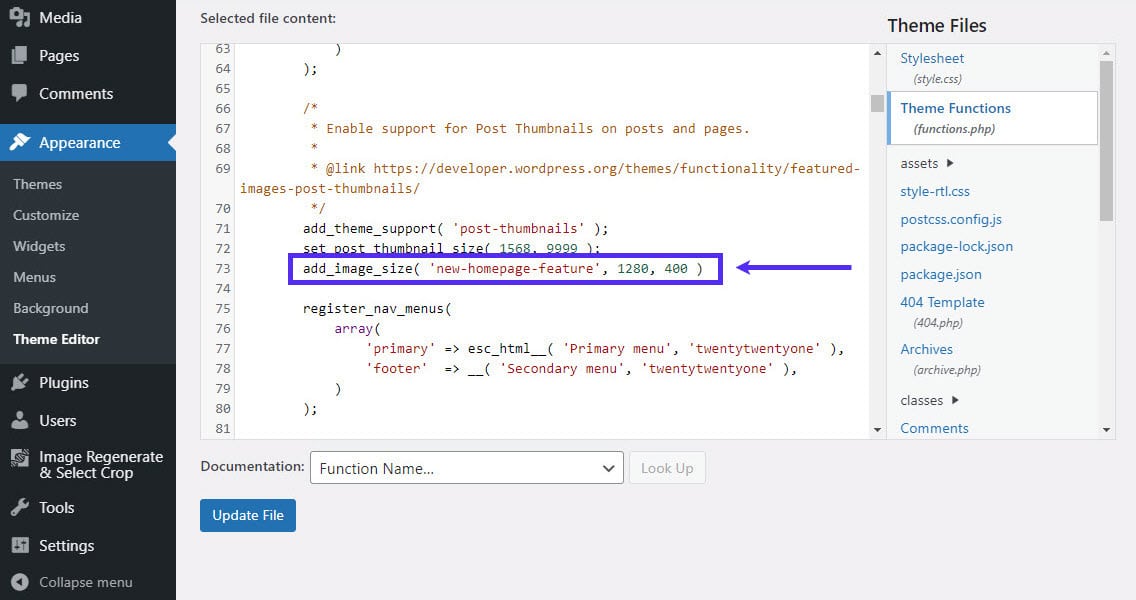
Credit: kinsta.com
Responsive Design Techniques
Adaptive images help your website look good on all devices. They change size depending on the screen. This makes websites more user-friendly. Big images can slow down a site. So, choosing the right size is important. Images should be clear but not too big.
CSS media queries are smart tools. They help change how a webpage looks on different devices. With media queries, you can set rules for how things display. This means your website adapts to screens. It can look good on phones, tablets, and computers. For instance, a homepage image can be small on phones. But it can be larger on desktops. This makes sure the site is responsive and easy to use.
Tools For Image Optimization
Selecting the right size for a WordPress homepage image enhances website performance. Recommended dimensions are typically 1200×628 pixels. Optimize images to ensure quick loading and a better user experience.
Online Compressors
Online tools help reduce image size quickly. They make images smaller. This improves website speed. Some popular tools are TinyPNG and JPEG Optimizer. These tools are free and easy to use. Upload your image to compress it. Download the smaller version. Many websites use these tools. They save time and effort.
WordPress Plugins
Plugins optimize images directly in WordPress. They work automatically. Some popular ones are Smush and EWWW Image Optimizer. These plugins help keep image quality high. They reduce file size without losing detail. Install them from the WordPress plugin store. Activate to start optimizing images. They are very helpful for large websites. Plugins make optimization easy.
Credit: enginescout.com.au
Testing And Adjustments
Always test images on different devices. Phones, tablets, and computers show images differently. Try to check the image size on each device. This helps in making sure the image looks good everywhere. Many people use phones for browsing. So, phone testing is very important. Adjust images based on the device. This keeps your website looking great.
Check how images affect page speed. Slow pages can make visitors leave. Use tools to measure loading time. Make images smaller if pages are slow. Compress images without losing quality. Fast pages keep visitors happy. Good performance improves user experience. Always aim for quick loading times.
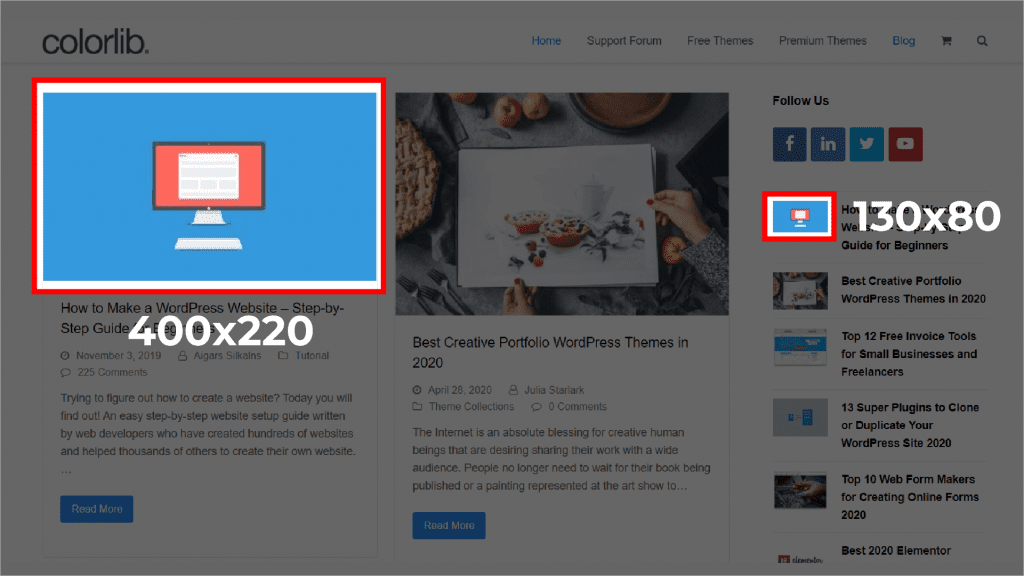
Credit: enginescout.com.au
Frequently Asked Questions
What Is The Ideal Size For A WordPress Homepage Image?
The ideal size for a WordPress homepage image is 1200×800 pixels. This size balances quality and loading speed. It ensures clarity on most devices. Always optimize images for web performance. This helps in maintaining fast loading times. Proper sizing also enhances user experience and SEO.
How To Optimize WordPress Homepage Images?
Optimize images by compressing them using tools like TinyPNG. Ensure they are in JPEG or PNG format. Use responsive design techniques to adapt images for different devices. Properly named files and alt tags improve SEO. Regularly update and check image performance.
This ensures your site remains fast.
Why Is Image Size Important For WordPress?
Image size affects website loading speed and user experience. Larger images slow down page load times. This can lead to higher bounce rates. Properly sized images enhance SEO. They improve site performance and user engagement. Consistent image sizing maintains a professional appearance across the site.
Can Large Images Slow Down My WordPress Site?
Yes, large images can significantly slow down your WordPress site. They increase page load time, affecting user experience. This can lead to higher bounce rates and lower search engine rankings. Optimizing image size helps improve site speed. Faster sites retain more visitors and rank better on search engines.
Conclusion
Choosing the right image size for your WordPress homepage is vital. It ensures your site looks professional and loads quickly. Large images can slow your site. Small images may appear blurry. Aim for a balance. Keep your file sizes optimized.
This helps your site speed and user experience. Remember, your homepage is the first impression. Make it count with clear and well-sized images. Test and adjust as needed. Find what works best for your site. Enhance your site’s appearance and performance with the right image size.
Happy designing!


