
Are you ready to take your WordPress site to the next level? Imagine having a website that not only looks stunning but also functions like a dream.
The secret to achieving this lies in choosing the right plugins. But with thousands of options available, how do you know which ones are truly essential? In this post, you’ll discover the must-have plugins that can transform your site from ordinary to extraordinary.
Whether you want to enhance security, boost speed, or improve SEO, we’ve got you covered. Stick around to learn how these tools can make managing your WordPress site easier and more effective, ultimately saving you time and effort. Ready to optimize your site and wow your visitors? Let’s dive in!
Essential Security Plugins
Firewalls guard your site from bad guys. They stop hackers. They block harmful traffic. A good firewall is like a strong wall. It keeps your website safe. Wordfence is popular. It offers a strong firewall. Sucuri is another choice. It protects your website. Choose wisely. Keep your site secure.
Malware is like a virus for websites. It can harm your site. Scanning tools find and remove malware. MalCare is one such tool. It scans deeply. It cleans malware fast. iThemes Security is also good. It offers easy scans. Protect your site from malware. Stay safe online.
Performance Optimization Plugins
Caching tools help your site load faster. They store parts of your site. This means your site doesn’t have to load everything each time. Visitors get a quick experience. Popular plugins like W3 Total Cache and WP Super Cache are great choices. These tools are easy to set up. They help save server resources. Your site runs smoother.
Images can slow a site down. Compressing images makes them smaller. This helps your site load faster. Use plugins like Smush or EWWW Image Optimizer. They reduce image size without losing quality. This keeps your site looking sharp. Users enjoy faster loading times. Your site performs better overall.
Seo Enhancement Plugins
Keyword tools help find the best words for your site. They show which words people search most. Choose plugins like Yoast SEO or All in One SEO. These plugins give tips for better keyword use. They make sure your content is easy to find. Good keywords bring more visitors. They help your site rank higher on search engines.
Sitemap generators create maps of your site. These maps help search engines find all pages. Plugins like Google XML Sitemaps are useful. They update when new pages are added. This ensures search engines always have the latest map. With a sitemap, your site is more organized. This makes it easier for people to find your content.
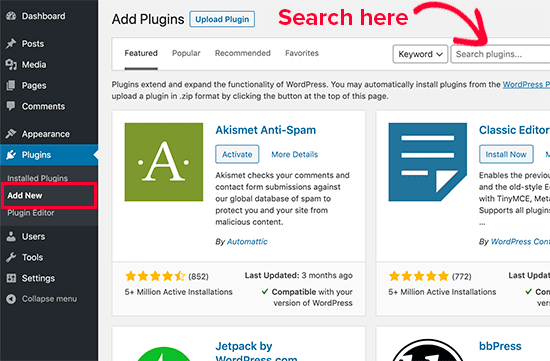
Credit: accessibility-helper.co.il
Content Management Plugins
Explore essential WordPress plugins for effective content management. Enhance your site with Yoast SEO for search optimization and Akismet to block spam comments. Install WP Super Cache to improve site speed, and use Elementor for easy page building.
Visual Page Builders
Visual Page Builders make creating pages easy. Drag and drop elements to design. No coding needed. These tools help build beautiful sites. Elementor and Beaver Builder are popular choices. They offer many features. Users can customize layout and design. Simple interface helps beginners. These plugins save time. Boost creativity and productivity. Choose the best for your needs.
Custom Post Type Creators
Custom Post Type Creators let you add new post types. They increase site flexibility. Types and Pods are well-known plugins. Use them to make unique content structures. Add custom fields and taxonomies. Enhance site’s functionality. These tools are user-friendly. Ideal for expanding your WordPress site. Make your content more organized. Deliver a better user experience.
Social Media Integration Plugins
Adding share buttons to your site is very helpful. Visitors can easily share your content. This brings more people to your site. Popular plugins like AddToAny or ShareThis work well. They support many social platforms. These buttons are simple to set up. They fit into any design. Your site will look good and work well. Sharing spreads your message far and wide.
Show your social media posts directly on your site. This keeps your content fresh. Plugins like Smash Balloon or Social Feed make this easy. They connect your site with Facebook, Instagram, or Twitter. Visitors see your latest posts. They stay updated without leaving your site. Displaying feeds is a smart way to engage users. It builds a lively and dynamic site atmosphere.
Credit: www.wpbeginner.com
Analytics And Tracking Plugins
Explore essential analytics and tracking plugins for your WordPress site. Install tools like Google Analytics Dashboard to monitor visitor data effectively. Consider Jetpack for comprehensive insights and enhanced site performance tracking.
Visitor Tracking Tools
Tracking helps to know what people do on your site. These tools show you where visitors click. You can see which pages are popular. This helps to make your site better. Some tools can even show how long someone stays on a page. Knowing this can help make your site more interesting.
Conversion Rate Analysis
Conversion rate tools check how many visitors buy things. They show how many people sign up for newsletters. You can see which pages make people buy more. This helps to make changes that increase sales. Understanding these numbers is key to success. You can then make smart choices for your site.
E-commerce Plugins
Choose a payment gateway that fits your needs. Many plugins offer secure options. Common choices include PayPal, Stripe, and Square. These gateways are reliable. They ensure your transactions are safe. Customers appreciate safety in payments. Set up is easy. Just follow simple steps. Be sure to test the payment process. This ensures everything works well.
Keep your product catalog organized. Use plugins that help manage items. These plugins let you add, edit, and remove products easily. Product details matter. Ensure your descriptions are clear. Good images attract buyers. Organize products by category. This helps customers find items quickly. Update your catalog often. Add new products when available. Keep prices current too.
Backup And Restore Plugins
Automated Backup Solutions are essential for every WordPress site. They save your work without you needing to do anything. Plugins like UpdraftPlus and BackupBuddy run backups automatically. You choose how often they save your site. Daily, weekly, or monthly options are available. This keeps your data safe and secure.
Restore Options are important for fixing problems. They allow you to bring back your site if something goes wrong. Many plugins offer easy restore steps. You can restore with just a few clicks. This feature helps protect your site from data loss. Always check if your plugin has restore options before using it.
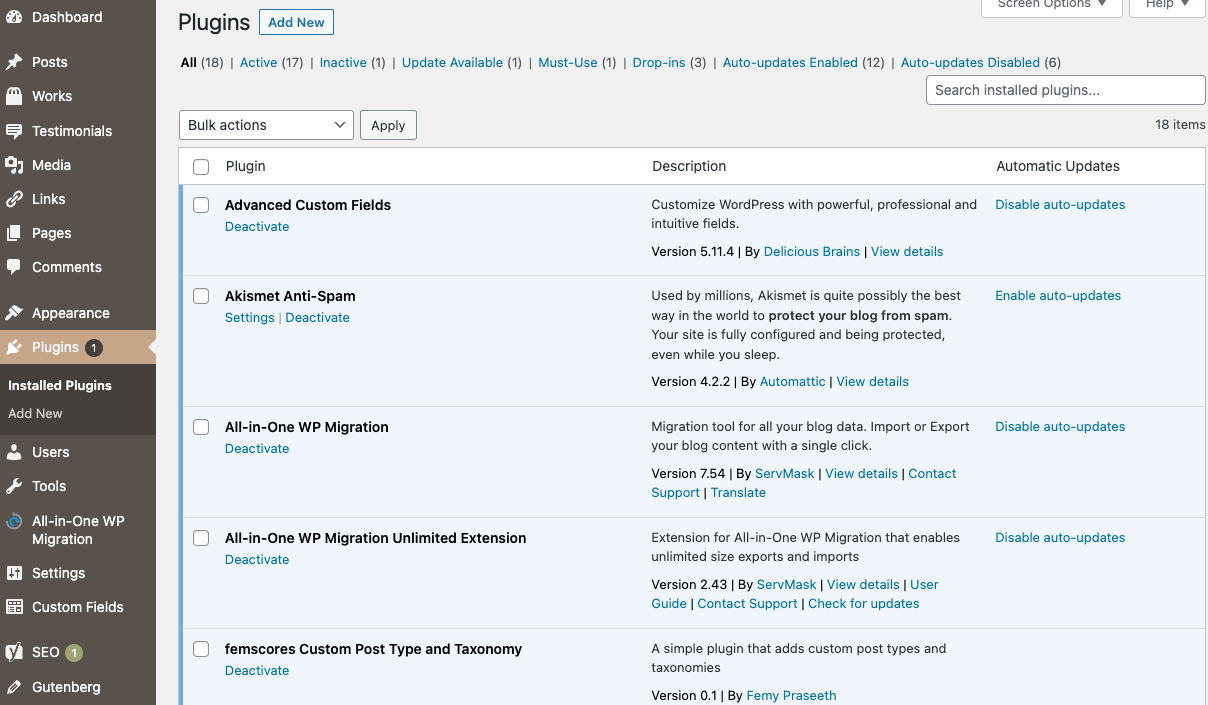
Credit: wordpress.org
Frequently Asked Questions
What Are Essential Plugins For WordPress?
Essential plugins enhance functionality and security. Consider installing Yoast SEO for optimization, Akismet for spam protection, and WooCommerce for e-commerce features. These plugins are widely trusted and improve your site’s performance and user experience.
How Do Plugins Affect Site Performance?
Plugins can impact performance by adding features or slowing down load times. Choose lightweight, well-coded plugins to maintain speed. Regularly update and review plugins to ensure they don’t negatively affect your site’s efficiency.
Can Plugins Improve Seo On WordPress?
Yes, plugins like Yoast SEO optimize content and improve site visibility. They offer features like meta tags, sitemaps, and readability analysis. Using SEO plugins helps enhance search engine rankings and attract more visitors.
Are Plugins Necessary For WordPress Security?
Plugins like Wordfence and Sucuri Security are crucial for protecting against threats. They offer features like firewall protection and malware scanning. Installing security plugins is essential to safeguard your site from vulnerabilities.
Conclusion
Choosing the right plugins boosts your WordPress site’s efficiency. Start with essential plugins that enhance security and speed. Consider plugins for SEO to improve search rankings. Don’t forget tools for contact forms and analytics. Each plugin serves a unique purpose.
Select those that align with your site’s goals. Regular updates keep plugins running smoothly. Test plugins before installing them to avoid conflicts. Less is often more; avoid overloading your site. With careful selection, your site can run efficiently and serve visitors well.
Remember, plugins are tools that enhance your site’s performance and user experience.


