
Imagine you’ve just launched your WordPress site. It looks fantastic, and you can’t wait for the world to see it.
But there’s a problem. Your site isn’t showing up in search results as much as you’d hoped. What’s missing? The answer might lie in metadata. Metadata is the silent hero of your website, playing a crucial role in how search engines understand and rank your pages.
By adding the right metadata, you can significantly boost your visibility and attract more visitors. But what exactly should you add? We’ll uncover the essential metadata elements you need to include on your WordPress site. You’ll discover how to enhance your site’s SEO effortlessly, ensuring that your content reaches the audience it deserves. Ready to transform your site’s performance? Let’s dive in!
Credit: www.hostpapa.com
Importance Of Metadata
Metadata helps search engines understand your content. It includes titles, descriptions, and keywords. These elements improve your site’s visibility. People find your website easily with good metadata.
Titles should be clear and concise. Descriptions must explain your content briefly. Keywords are essential. They must be relevant to your topic. This increases your site’s rank.
Use unique titles and descriptions. Avoid using the same ones for different pages. This helps in better search results. Well-written metadata attracts more visitors. It also boosts engagement.
Metadata is crucial for SEO. It helps your site stand out. Properly structured metadata is the key.
Basic Metadata Elements
Title tags are key for search engines. They help users know what your page is about. Keep them short, around 60 characters. Use keywords to make them effective. Each page should have its own title tag. Avoid using the same title tag for different pages.
Meta descriptions give a summary of your page. They show up in search results. This helps users decide if your page is relevant. Keep it under 160 characters. Include important keywords. Make it engaging to draw users in. Each page needs a unique meta description.
Header tags organize your content. They help readers understand your page. Use
Seo Metadata
Choose words people search. Add these words in your content. Focus keywords help search engines find your site. Use them in your title and headings. Keep them simple and related to your topic. This helps your site appear in search results.
Describe images with words. This helps people who can’t see pictures. Alt text also helps search engines understand images. Use clear and simple words. Describe what the image shows. This adds value to your content.
Canonical tags tell search engines the main page. They help avoid duplicate content issues. Place them in your site’s HTML code. Use them to guide search engines to your preferred link. This helps improve your site’s ranking.
Credit: www.wpbeginner.com
Social Media Metadata
Open Graph Tags make your site look good on social media. These tags help platforms like Facebook show the right image and description. Adding these tags can help more people click on your links. They show a clear title, description, and image. This helps your posts stand out.
Twitter Cards are like Open Graph Tags but for Twitter. They make your tweets more engaging. With these cards, you can show a large image, a title, and a short text. This makes your tweet more interesting. People might click and visit your site. Using Twitter Cards can increase engagement.
Schema Markup helps search engines understand your content better. It adds extra details to your site. This can be ratings, events, or reviews. These details show up in search results. It makes your site more visible. More people might visit if they see these extra details. Schema Markup is important for better search visibility.
Technical Metadata
The robots.txt file guides search engines. It tells them what to crawl. Some pages may stay hidden. This file keeps them private. Search engines follow its rules. It helps with SEO.
XML sitemaps are maps for search engines. They show all site pages. This helps engines find every page. It is a list of links. Easy for search engines to read. They improve site visibility.
Charset declarations tell browsers about text characters. They show how text should display. UTF-8 is a common choice. It supports many languages. Proper charset avoids text errors. It ensures text looks right.
Tools For Managing Metadata
SEO plugins help with metadata. They are easy to use. Yoast SEO and All in One SEO are popular. These plugins make metadata simple. They guide you step-by-step. You can add titles and descriptions quickly. These tools are great for beginners. They help you improve your site’s visibility. Metadata is important for search engines. It helps people find your site.
Online tools can help with metadata. Google Keyword Planner is one such tool. It suggests keywords you might need. These tools are often free. They help you find the right words to use. This makes your site more searchable. Metadata tools save you time. They offer suggestions for better words. Using the right words is key. They help your site reach more people.
Always write clear and concise metadata. Keep your titles short. Use keywords wisely. They should match your content. Descriptions should be engaging. They should tell what the page is about. This helps readers and search engines. Use consistent language across your site. Regular updates are important. Fresh metadata keeps your site relevant. Following best practices improves site performance.
Common Metadata Mistakes
Adding too many keywords can harm your site. Search engines may see it as spam. This can lower your site’s ranking. Use keywords wisely. Ensure they fit naturally in your content. Quality over quantity is key.
Each page needs unique meta tags. Duplicate tags confuse search engines. They don’t know which page is more relevant. This can affect your site’s visibility. Ensure each page has its own meta tags. Focus on unique and relevant content.
Alt text helps describe images. It is important for accessibility. It also helps search engines understand images. Ignoring alt text is a missed opportunity. Always add descriptive alt text to your images. It benefits both users and search engines.

Credit: www.templatemonster.com
Frequently Asked Questions
What Is Metadata In WordPress?
Metadata in WordPress refers to the data that describes other data on your site. It includes elements like titles, descriptions, and keywords. These elements help search engines understand your content, improving search visibility. Proper metadata ensures your WordPress site is better indexed and more likely to rank well in search results.
Why Is Metadata Important For Seo?
Metadata is crucial for SEO as it helps search engines understand your content. Properly optimized metadata can improve click-through rates from search engine results. It enhances your site’s visibility and relevance. Without metadata, your site may struggle to rank well, reducing organic traffic and potential engagement.
How To Add Metadata In WordPress?
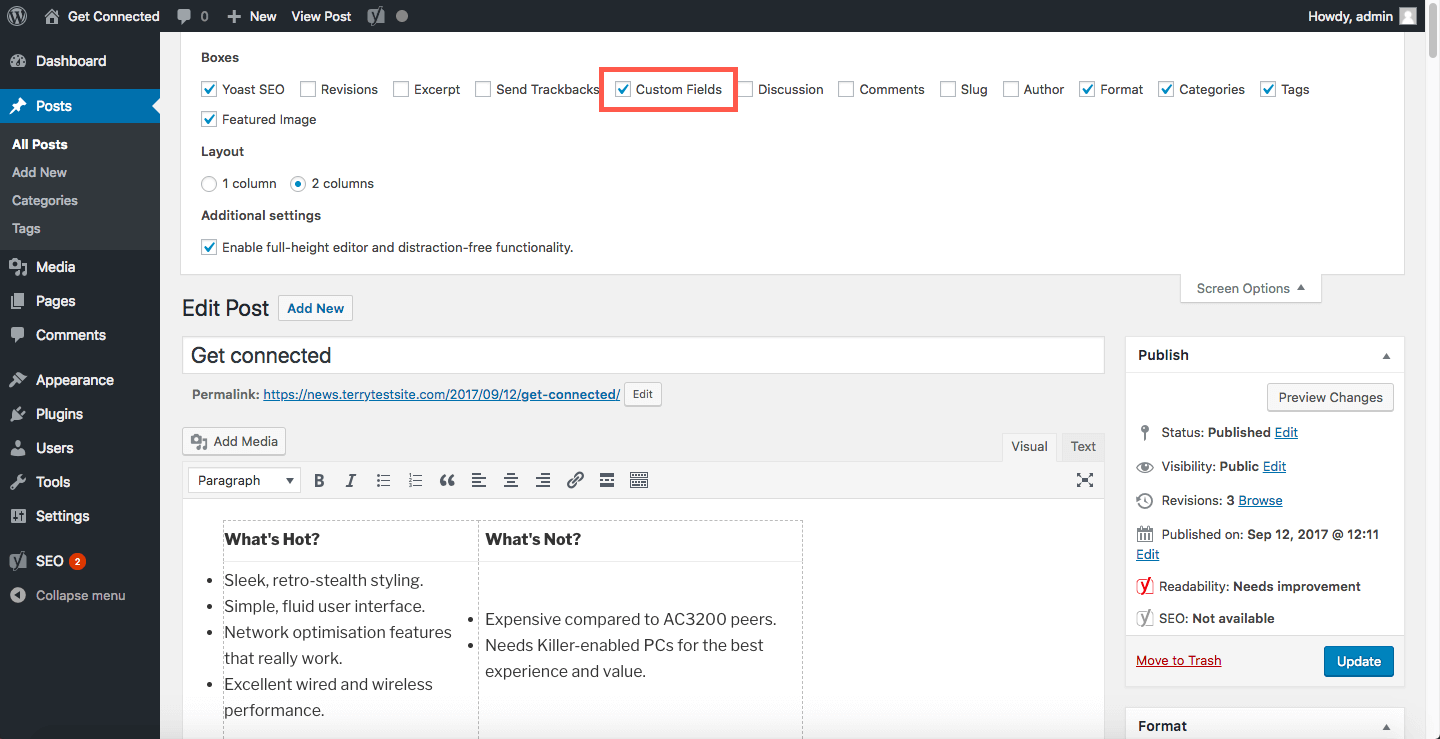
Adding metadata in WordPress is simple with plugins like Yoast SEO or All in One SEO. These plugins offer user-friendly interfaces to add and edit metadata. You can customize titles, descriptions, and keywords for each post or page. This enhances your site’s SEO performance and visibility.
What Are Meta Tags In WordPress?
Meta tags are snippets of text that describe a page’s content. They don’t appear on the page itself but in the page’s code. Search engines use them to understand a webpage’s content. In WordPress, plugins like Yoast SEO help easily manage and optimize these tags for better search engine performance.
Conclusion
Metadata enhances your WordPress site’s visibility. It guides search engines effectively. Use clear titles and precise descriptions. These elements attract more visitors. Keywords play a crucial role too. They help in ranking higher. Alt text boosts image search results. Schema markup improves rich snippets.
Always optimize metadata regularly. It keeps your site updated. Better metadata means better user engagement. This leads to increased traffic. Remember, simplicity is key. Avoid complex terms. Make your content accessible. Engage your audience with straightforward information. Follow these tips.
Your site can thrive with effective metadata.


