
Have you ever stumbled upon the term “Xmlrpc” while tinkering with your WordPress site and wondered what it actually means? You’re not alone.
Xmlrpc might sound like tech jargon, but understanding it can significantly boost your WordPress game. Whether you’re looking to enhance your site’s functionality or simply satisfy your curiosity, getting a grasp on Xmlrpc is a smart move. We’ll demystify Xmlrpc in WordPress, explaining its role, benefits, and why it matters to you as a site owner.
Stick around to discover how this often-overlooked feature can impact your website’s performance and security. Ready to dive in? Let’s get started!
Xmlrpc Basics
Xmlrpc is a way to talk with WordPress. It helps software connect to your site. This means you can control your site without logging in. You can write posts, change settings, or read comments. All from a different place.
It uses XML to send data. This makes it easy for computers to understand. Xmlrpc can be helpful for many tasks. But it also has some risks. Some people use it to attack websites. So, be careful and keep your site safe.
Role In WordPress
Xmlrpc helps with remote communication in WordPress. It allows apps to talk with your website. This makes it easy to manage content from far away. You can post, edit, or delete content without opening the WordPress site. It helps connect different tools and websites. This way, everything works smoothly together.
Many plugins depend on Xmlrpc. They use it to add features to your site. For example, apps for blogging need it to update posts. Security is important with Xmlrpc. Sometimes, bad people try to misuse it. This can lead to attacks. So, keep your site safe by updating regularly.
Common Uses
Xmlrpc helps in publishing posts from far away. You don’t need to be at your computer. It lets you post from different places. This is helpful for busy writers. They can share stories quickly.
Mobile apps use Xmlrpc to talk to WordPress. It helps apps get data from the website. This makes the app show new posts. It keeps everything up-to-date. Users love seeing fresh content.
Xmlrpc helps in moving data from one place to another. It does it safely and fast. Websites need to share data often. This tool makes sharing easy. It helps keep data correct and secure.
Credit: kinsta.com
Security Concerns
Xmlrpc in WordPress connects external applications and your site, allowing remote publishing. It raises security concerns due to potential vulnerabilities. Hackers may exploit these to launch attacks, making it crucial to understand and secure this feature.
Vulnerability Issues
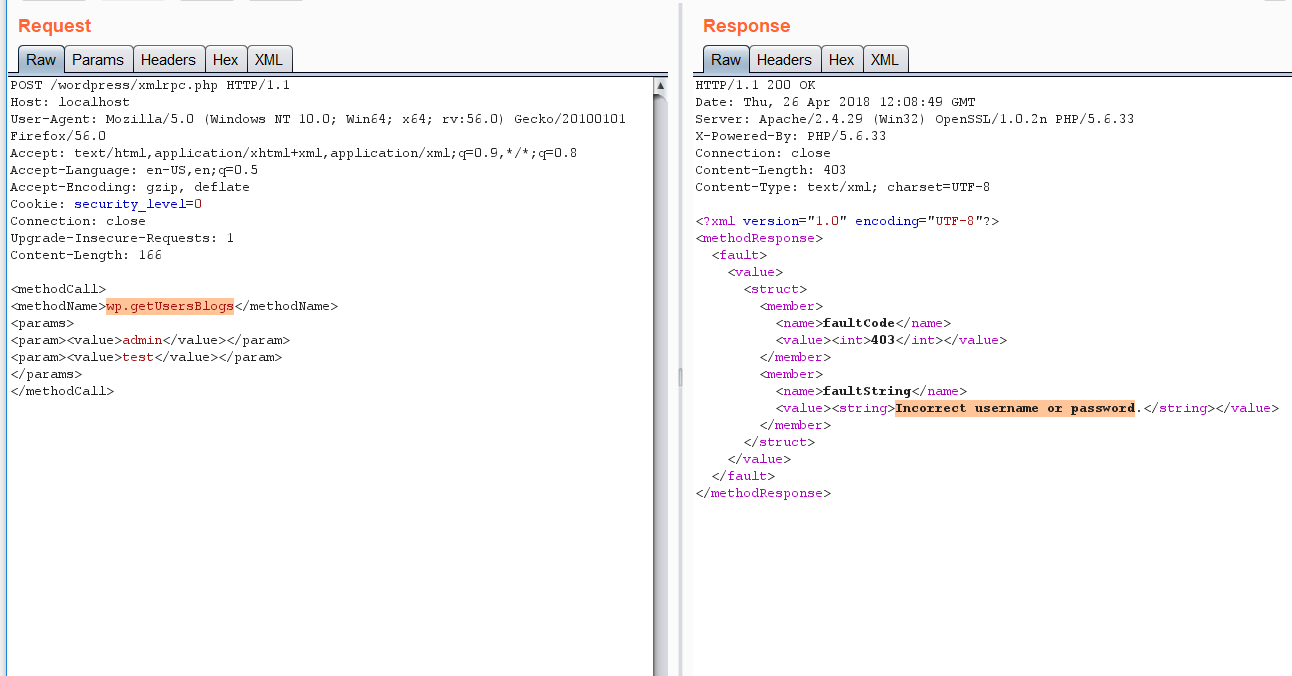
Xmlrpc can be a target for hackers. Bad people might use it to control your site. This can cause harm and make your site unsafe. Hackers might try to guess passwords through Xmlrpc. They send many requests to find the right password. This is called a brute force attack. Your site might slow down or stop working. Xmlrpc can also be used to send spam. This fills your site with bad content. It’s important to keep Xmlrpc safe.
Preventative Measures
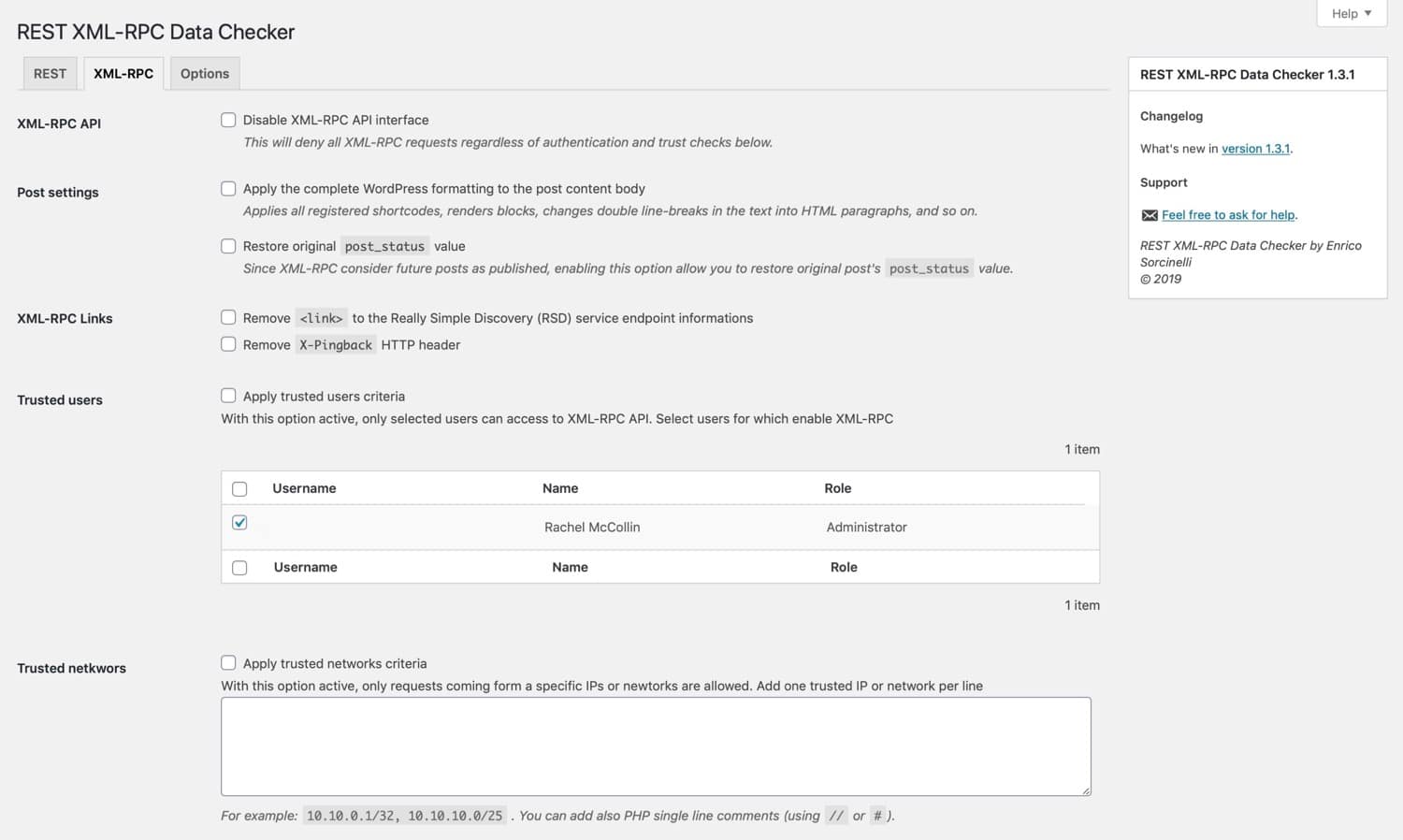
Make Xmlrpc safe by using plugins. Plugins can block bad requests. This helps keep hackers out. Limit login attempts to protect your site. This stops brute force attacks. Always use strong passwords. Strong passwords are hard to guess. Update your WordPress often. Updates fix security issues. They make your site safer. Check logs for strange activity. Logs show if hackers try to get in. Disable Xmlrpc if not needed. This can stop many attacks. Follow these steps to protect your site.
Performance Impact
XML-RPC can affect your site’s speed. It handles remote requests. This can slow down your server. Many requests can make your site lag. Some hackers use XML-RPC for attacks. They send many requests quickly. This is called a DDoS attack. It can make your site very slow. XML-RPC can also use up server resources. This might lead to downtime. If the server is busy, users can’t access your site. This impacts performance. It might be wise to disable XML-RPC. This can help keep your site fast. Some plugins can help with this. They block unwanted requests. This keeps your site safe and efficient.
Alternatives
Xmlrpc in WordPress allows for remote publishing and data exchange. It connects external applications with WordPress, enabling features like posting from mobile apps. For those seeking alternatives, REST API offers a more modern and secure option for interacting with WordPress sites.
Rest Api
REST API is a great option for WordPress users. It is faster and more secure than Xmlrpc. REST API helps websites communicate with other apps. It uses JSON format, which is easy to read and understand. Developers love it because it is flexible. It allows them to create custom solutions. REST API supports various functions. It can fetch data, update posts, and manage users. Many plugins use REST API to enhance functionality. REST API is becoming the preferred choice for many. It is a modern approach to handling data.
Other Protocols
There are other protocols besides Xmlrpc and REST API. One example is SOAP. It is older and less popular but still useful. SOAP uses XML, which can be complex. Another option is GraphQL. It is newer and gaining attention. GraphQL allows asking for specific data. This means less data transfer. It is efficient for large applications. These protocols offer different features. Each has its strengths and weaknesses. Choosing the right one depends on needs. Consider security, speed, and ease of use.
Future Prospects
Xmlrpc in WordPress has seen many changes. Security is a big concern. Developers work hard to make it safer. New updates come often. These updates fix problems. They also bring new features.
Xmlrpc is important for mobile apps. Apps use it to talk to WordPress. This makes managing blogs easy from phones. Many people like this feature. It saves time and effort.
The future looks bright for Xmlrpc. Developers plan more updates. They aim to improve speed. They also want to add more tools. These tools will help users. Xmlrpc will continue to grow. It will meet new needs of users. The focus will be on security and efficiency.
Credit: the-bilal-rizwan.medium.com
Credit: blog.wpsec.com
Frequently Asked Questions
How Does Xmlrpc Work In WordPress?
Xmlrpc allows remote communication with WordPress sites via HTTP. It uses XML formatted data to perform tasks like publishing posts, editing pages, or handling comments. This protocol is essential for mobile apps and third-party services accessing WordPress functionality, ensuring seamless integration and automation of various processes.
Why Is Xmlrpc Important For WordPress?
Xmlrpc is crucial for WordPress because it enables remote content management. It facilitates mobile app interactions and third-party integrations, enhancing flexibility and automation. This protocol supports users in managing posts, comments, and pages from outside the WordPress admin interface, streamlining operations and extending functionality.
Is Xmlrpc Secure On WordPress Sites?
Xmlrpc can be secure, but it has vulnerabilities if not managed properly. Hackers may exploit it for brute-force attacks or DDoS. To protect your site, use strong passwords, limit access, and consider disabling Xmlrpc if unnecessary. Regular updates and security plugins can also enhance safety.
Can Xmlrpc Be Disabled In WordPress?
Yes, Xmlrpc can be disabled in WordPress. If not required, you can disable it using plugins or server configurations. This reduces potential security risks associated with Xmlrpc exploitation. However, ensure no essential services rely on it before disabling, as it might affect remote functionality.
Conclusion
Xmlrpc in WordPress offers unique benefits and some risks. It allows remote access, which can be useful. But it also opens doors for potential security threats. Understanding its functions helps you make informed decisions. You can choose to enable or disable it based on your needs.
Always prioritize security and keep WordPress updated. This ensures a smooth experience for your site. Knowledge of xmlrpc empowers your WordPress management. Stay informed, and maintain control over your site’s features. Your site will thank you with improved performance and security.


