
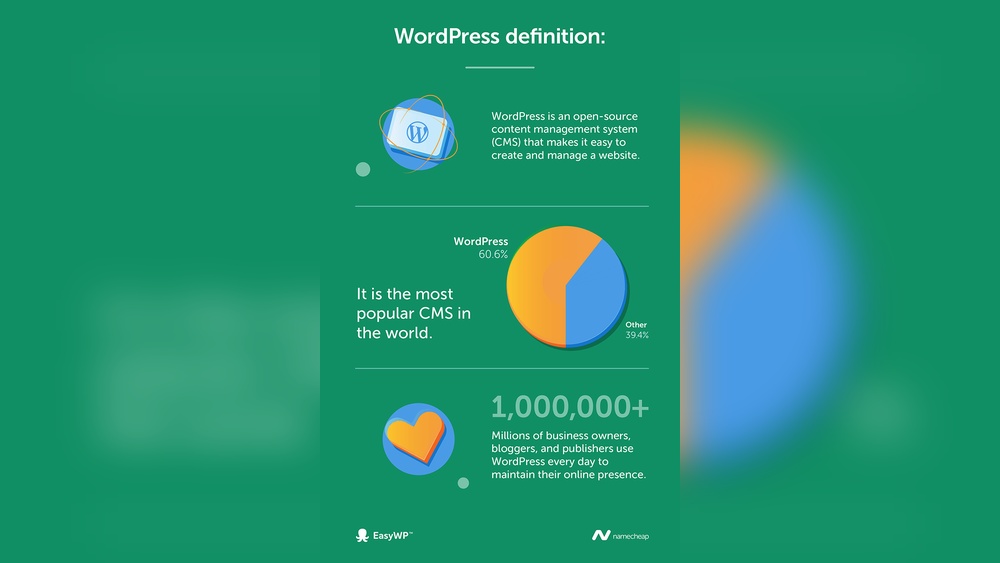
Are you wondering what WordPress is really used for and how it could fit your needs? Whether you want to start a simple blog, build a professional website, or even launch an online store, WordPress offers the tools to make it happen.
This platform began as a blogging tool but has grown into a powerful system that supports all kinds of websites. By the end of this article, you’ll understand exactly how WordPress can help you create, manage, and grow your online presence with ease.
Ready to discover the possibilities? Let’s dive in.
Credit: olixlab.com
WordPress Origins
WordPress began as a simple tool for publishing blogs. Over time, it grew into a powerful system for building many types of websites. Its journey from a basic blogging platform to a full website builder shows its flexibility and strength.
Blogging Platform Roots
WordPress started in 2003 as a platform for bloggers. It was easy to use and allowed people to share their thoughts online. Many users liked the clean design and simple setup. This made WordPress popular quickly among writers and hobbyists.
The focus was on content and user experience. Bloggers could publish posts, add images, and manage comments. WordPress made blogging accessible without technical skills. It gave voice to many who had no web design knowledge.
Expansion To Diverse Websites
Over the years, WordPress added new features and tools. It became more than just a blogging platform. Now, people use it to create business sites, online stores, portfolios, and forums.
Plugins and themes allowed users to customize their sites easily. This flexibility attracted developers and designers. WordPress turned into a full website solution for many industries.
Today, millions of websites run on WordPress. It supports simple blogs and complex e-commerce stores. Its origins still show in how it focuses on content and user-friendly design.
Common Uses
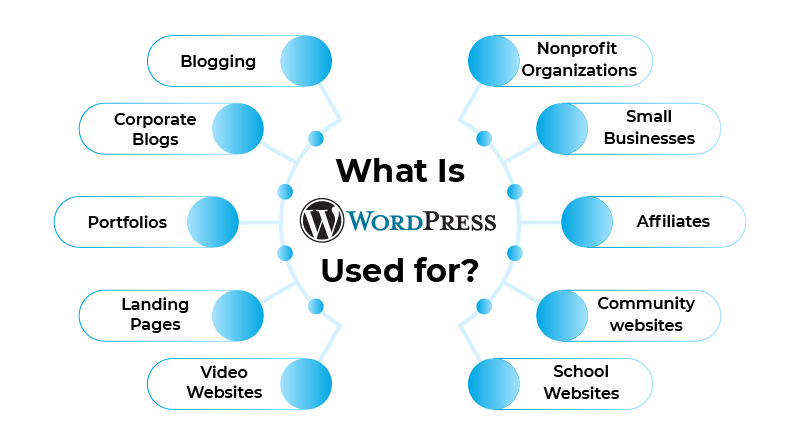
WordPress serves many purposes beyond blogging. Its flexibility allows users to create various types of websites easily. The platform supports different functions through plugins and themes. Many businesses and individuals use WordPress for diverse needs. Below are some common uses of WordPress that show its versatility.
Traditional Websites
Many small businesses and professionals use WordPress to build their websites. These sites provide information about services, contact details, and company history. WordPress themes make it easy to design clean and professional layouts. Users can update content without needing technical skills.
E-commerce Stores
WordPress powers many online stores using WooCommerce and other plugins. Store owners can sell physical or digital products. Features include payment processing, inventory management, and shipping options. WordPress makes e-commerce affordable and customizable for all sizes of businesses.
Media Galleries
Photographers, artists, and creators use WordPress to showcase their work. Media galleries display images, videos, and portfolios attractively. Users can organize content into albums or categories. WordPress supports high-quality media and fast loading speeds.
Membership Sites
WordPress supports membership sites that restrict content to subscribers. These sites offer exclusive articles, videos, or courses. Membership plugins help manage user access and payments. This model works well for clubs, organizations, and content creators.
Learning Management Systems
Online courses and training programs use WordPress with LMS plugins. These tools allow course creation, quizzes, and progress tracking. WordPress helps educators deliver lessons and manage students easily. It supports multimedia content and interactive learning.
Forums And Mailing Lists
WordPress can host community forums and mailing list sign-ups. Forums encourage discussions among users on various topics. Mailing lists help businesses communicate with subscribers via email. Plugins add these features seamlessly to any WordPress site.
WordPress Security
WordPress security is vital for every website owner. It protects sites from hackers and data loss. Understanding common risks helps keep your site safe. Simple steps can reduce threats and secure your content.
Common Vulnerabilities
WordPress sites face risks like outdated software and weak passwords. Hackers exploit these to gain access. SQL injections and cross-site scripting are frequent attacks. Regular updates fix security holes fast.
Plugin And Theme Risks
Plugins and themes add features but can cause problems. Poorly coded or outdated ones create security gaps. Only use trusted sources and keep them updated. Remove unused plugins to lower risks.
Hosting Impact On Security
Your hosting choice affects your site’s protection. Shared hosting may expose your site to attacks from others. Managed WordPress hosting offers better security tools. Choose a host with strong firewalls and backups.
Best Practices To Stay Safe
Use strong passwords and change them regularly. Enable two-factor authentication for extra security. Backup your site often to avoid data loss. Keep WordPress, themes, and plugins up to date. Limit login attempts to stop brute force attacks.
Credit: www.wpbeginner.com
Cost Factors
Understanding the cost factors of WordPress helps plan your website budget. WordPress offers different options and features, each with its own expenses. Knowing these costs lets you choose what fits your needs and wallet. Below are key cost areas to consider.
Self-hosted Vs Hosted Options
WordPress has two main versions: self-hosted and hosted. Self-hosted means you install WordPress on your own server. It gives full control but requires buying hosting and managing updates. Hosted options like WordPress.com handle hosting and updates for you. Hosted plans vary from free to premium prices with more features.
Domain And Hosting Expenses
A domain name is your website’s address online. Domains usually cost $10 to $20 per year. Hosting stores your website files. Hosting prices depend on speed, storage, and traffic. Shared hosting is cheaper, while dedicated hosting costs more. Monthly fees can range from a few dollars to hundreds.
Theme And Plugin Costs
Themes control your site’s look. Many free themes exist, but premium themes offer better design and support. Premium themes cost $30 to $100 one-time or yearly. Plugins add features like contact forms or SEO tools. Free plugins are common, but premium ones can cost $5 to $100 each.
E-commerce Add-ons
Adding online store features raises costs. E-commerce plugins like WooCommerce are free but may need paid extensions. Payment gateways sometimes charge fees. Extra expenses include SSL certificates for security and advanced shipping options. E-commerce sites need reliable hosting, which can cost more.
Maintenance And Support Fees
Maintaining a WordPress site needs regular updates and backups. You can do this yourself or hire help. Managed hosting includes maintenance but costs more monthly. Professional support services charge fees for troubleshooting and updates. Budgeting for maintenance keeps your site secure and running smoothly.
Free Vs Paid Plans
WordPress offers both free and paid plans to meet different user needs. Choosing between them depends on your website goals and budget. Free plans provide basic tools to create simple sites. Paid plans add advanced features and more control. Understanding these options helps you pick the best fit for your project.
Features Of Free Plans
Free plans let you start a website easily. You get a WordPress.com subdomain like yoursite.wordpress.com. Basic themes and customization are available. Hosting and security are managed for you. You can publish blog posts and pages without cost. This plan is great for beginners or small personal sites.
Limitations Of Free Versions
Free plans come with restrictions. You cannot install custom plugins or themes. Storage space is limited, often around 3 GB. Ads may appear on your site, which you cannot remove. There is no option to use your own domain name. Support is limited to online forums and guides only.
Benefits Of Premium Upgrades
Paid plans offer more freedom and power. You can use your own domain name without WordPress branding. Premium themes and plugins become available. Storage space increases to support larger sites. Ads are removed for a cleaner look. You get access to customer support via chat or email. Advanced tools help with SEO and monetization options.
Beginner Experience
WordPress is popular among beginners for website creation. It offers tools that help new users start quickly. The platform’s design supports easy learning and content management. Understanding the beginner experience helps explain why WordPress is widely used.
User-friendly Dashboard
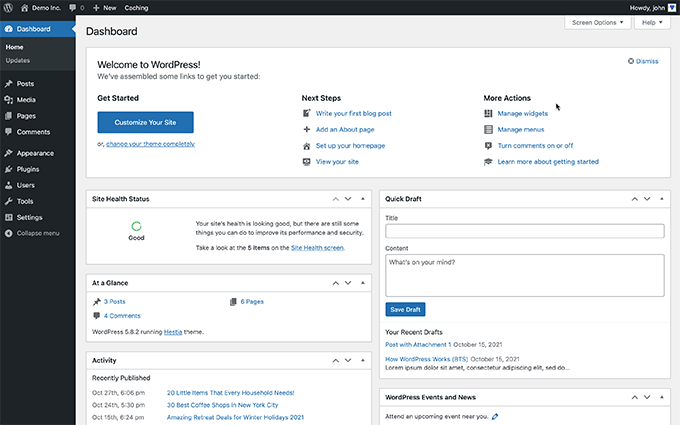
The WordPress dashboard is simple and clear. It shows all main features on one screen. Users can find posts, pages, and settings easily. Icons and menus guide users without confusion. This design saves time and reduces frustration.
Easy Content Creation
Creating content with WordPress is straightforward. The editor works like a word processor. Users add text, images, and videos without coding. Templates help maintain consistent design. Publishing new content takes just a few clicks.
Learning Curve For Advanced Features
Basic tasks are easy, but advanced features need time. Customizing themes or adding plugins may seem complex. Some learning or tutorials can help with these steps. Patience and practice improve skills over time. WordPress grows with user knowledge and needs.
Customization Options
WordPress offers wide customization options that help users create unique websites. These options suit beginners and advanced users alike. Customization lets you control how your site looks and works. It gives your site a personal touch that matches your needs and brand. Explore key areas like themes, plugins, and design capabilities.
Themes And Templates
Themes control the look and feel of your WordPress site. You can choose from thousands of free and paid themes. Each theme offers different styles, colors, and layouts. Templates within themes help you design specific pages easily. Changing a theme is simple and changes your entire website’s appearance quickly. Themes allow your site to stand out without coding skills.
Plugins For Extended Functionality
Plugins add new features and functions to your WordPress site. They can improve SEO, add contact forms, or create online stores. There are over 50,000 plugins available, covering almost any need. Installing plugins is easy and does not require technical knowledge. Use plugins to enhance your site’s performance and user experience. They make your site more powerful and versatile.
Custom Design Capabilities
WordPress supports custom design through code or page builders. You can edit CSS and HTML for precise control. Page builder plugins offer drag-and-drop design tools. These tools let you create custom layouts without coding. Custom design helps tailor your site to specific goals. It ensures your website matches your brand identity perfectly.

Credit: webgaku.net
Maintenance Essentials
Maintaining a WordPress site is crucial for its smooth operation and security. Regular care keeps the site fast and safe for visitors. Neglecting maintenance can lead to broken features and security risks. Below are key maintenance essentials every WordPress user should know.
Regular Updates
WordPress releases updates to fix bugs and improve security. Themes and plugins also need frequent updates. Updating keeps your website protected from hackers. It also ensures compatibility with the latest WordPress version. Skipping updates can cause errors or crashes.
Backup Strategies
Backups save your website data in case of problems. Regular backups allow quick recovery from hacks or mistakes. Use automated backup tools for convenience. Store backups in different locations, such as cloud storage or external drives. Test backups often to ensure they work properly.
Performance Optimization
Fast-loading websites improve user experience and search rankings. Optimize images to reduce file size without losing quality. Use caching plugins to speed up page loading. Clean up your database by removing unused data. Monitor site speed regularly and fix issues promptly.
Frequently Asked Questions
What Is The Main Purpose Of WordPress?
WordPress mainly serves as a platform to create and manage websites and blogs easily. It supports various web content types.
Why Are People Moving Away From WordPress?
People move away from WordPress due to security risks, frequent updates, plugin conflicts, and rising maintenance costs. Some prefer simpler, faster platforms.
How Much Does WordPress Cost Per Month?
WordPress costs vary. WordPress. com offers free plans; paid plans start around $4/month. Self-hosted WordPress. org costs include hosting ($3-$25/month), domain, and premium plugins or themes. Additional features and traffic can increase monthly expenses.
Is WordPress Good For Beginners?
WordPress suits beginners with its user-friendly interface and vast tutorials. It offers easy setup, customization, and plugin support for all skill levels.
Conclusion
WordPress serves many purposes beyond blogging. It helps create websites, online stores, forums, and more. Users appreciate its flexibility and ease of use. Many themes and plugins allow customization without coding. WordPress suits beginners and experts alike. It remains a popular choice worldwide.
Understanding its uses helps make better website decisions. Explore WordPress to see what it offers you.


