
Have you ever come across the term “WordPress PSD file” and wondered what it actually means? You’re not alone.
Navigating the world of web design can sometimes feel like deciphering a complex puzzle. But here’s the good news: understanding WordPress PSD files can unlock a new level of creativity and customization for your website. Whether you’re a seasoned web designer or just starting out, getting to grips with this concept can empower you to craft beautiful, unique websites that stand out.
So, what exactly is a WordPress PSD file, and why should you care? Stick around as we unravel this mystery and explore how it can enhance your web design projects.
WordPress And Psd Files
WordPress is a popular tool for building websites. It is user-friendly. Many people use it to create their blogs or online shops. The design of a WordPress site is very important. A PSD file helps with this. It is a file from Photoshop. Designers use it to plan how a website looks. The PSD file shows the layout of a site. It includes colors, images, and fonts. This helps in making the site look nice. Developers convert the PSD file into WordPress themes. This makes the site function properly. Designers and developers work together for the best results.

Credit: www.freepik.com
Purpose Of Psd Files
PSD files are used by designers to create layouts. They are like a canvas for web design. Photoshop is the tool to make these files. Designers can add pictures and text. They can change colors and shapes too. This helps in planning how a website will look.
PSD files allow layers. Layers help in organizing parts of the design. Each layer can be edited separately. This makes changes easy. Designers can show ideas clearly with PSD files. Developers use them to build the site later. PSD files are important for creating nice websites.
Benefits Of Using Psd Files
PSD files offer great design flexibility. Designers can edit every layer. This allows for precise adjustments to colors, shapes, and effects. The freedom to modify individual elements is a big advantage. Changes can be made without affecting the whole design. This makes the creative process smoother and faster.
Collaboration becomes easier with PSD files. Team members can work together on the same project. Everyone can access layers and make changes. This helps in sharing ideas and integrating feedback. Working together leads to better results. Designers can see what others have done and build upon it.
Graphics in PSD files are high-quality. They maintain their quality even when resized. This is important for clear and sharp images. Designers can create professional-looking graphics with ease. The detail in PSD files is impressive. It allows for stunning visuals that catch the eye.
Converting Psd To WordPress
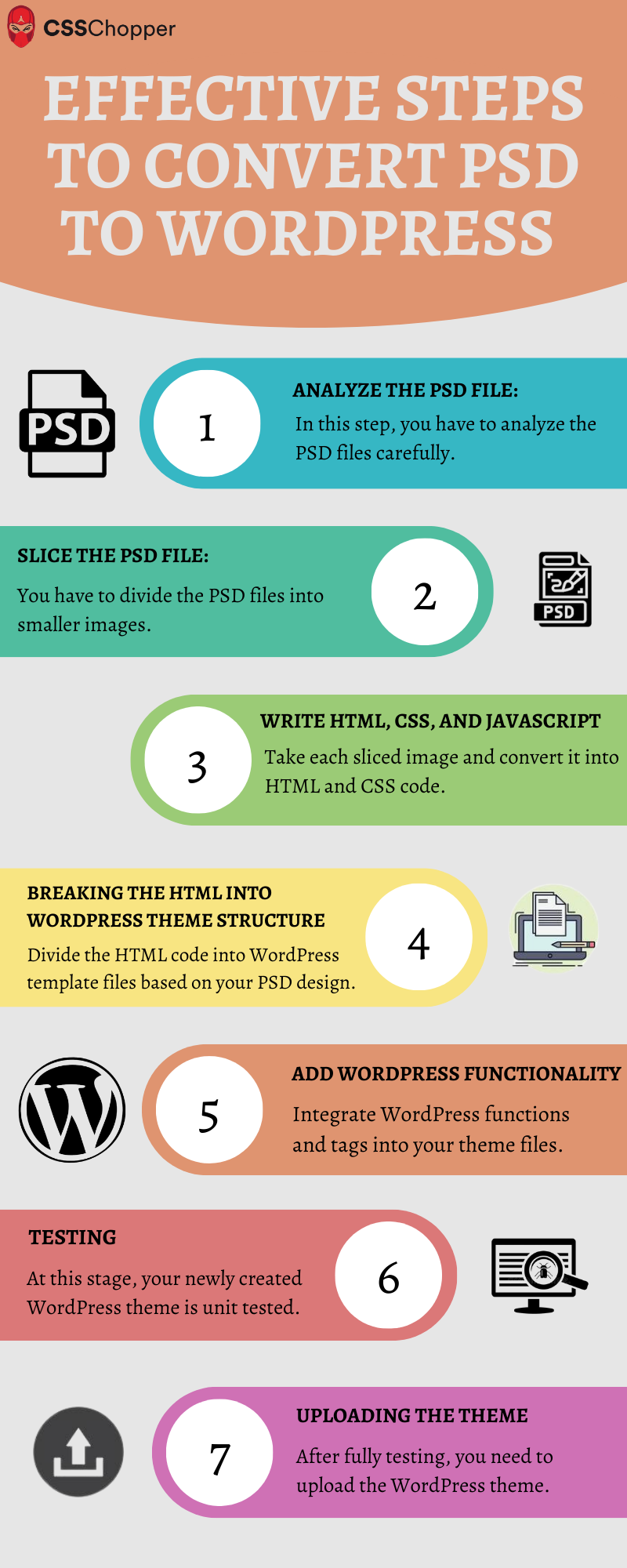
PSD files are design files. They need to be converted to WordPress. This involves several steps. First, slice the design. Then, create HTML and CSS. Finally, integrate it with WordPress. Each step is crucial. It must be done carefully. This ensures the website looks just right.
Many tools help in this process. Adobe Photoshop is used for slicing. Dreamweaver or Brackets can create HTML. For CSS, Bootstrap is helpful. WordPress themes use PHP. PHPStorm or Sublime Text can edit PHP files. These tools make the process easier.
Many face challenges during conversion. One is responsive design. Ensure the site looks good on all devices. Testing on different browsers helps. Another issue is loading speed. Optimize images to fix this. Minimize the use of heavy scripts. These solutions improve site performance.
Role Of Designers And Developers
Designers create the look of a website. They start by making PSD files. These files show how the site should look. Designers choose colors, fonts, and images. They ensure the site is easy to use. Their work must be clear and organized. They pass these files to developers. Designers must make sure the design meets the client’s needs. They often revise designs based on feedback. A great design is like a roadmap for developers. It guides them in building the actual site.
Developers turn PSD files into working websites. They use coding languages to do this. HTML, CSS, and JavaScript are common. Developers follow the designer’s plan. They ensure the site works on all devices. They fix bugs and errors. Developers make sure the site loads fast. They often work with designers to solve problems. Their work is technical but creative. Developers bring the design to life. They make the site interactive and functional.
Credit: www.csschopper.com
Best Practices For Psd To WordPress
Keep your PSD files neat. Use folders and layers for each element. Name them clearly. This makes your work easy. Avoid clutter. Simple is better.
Consistency is key in design. Use the same colors and fonts throughout. It gives a clean look. Check every page. Make sure they match.
Designs must work on all devices. Check on phones, tablets, and computers. Use flexible grids. Images should resize smoothly. This keeps users happy.
Popular Tools For Psd Conversion
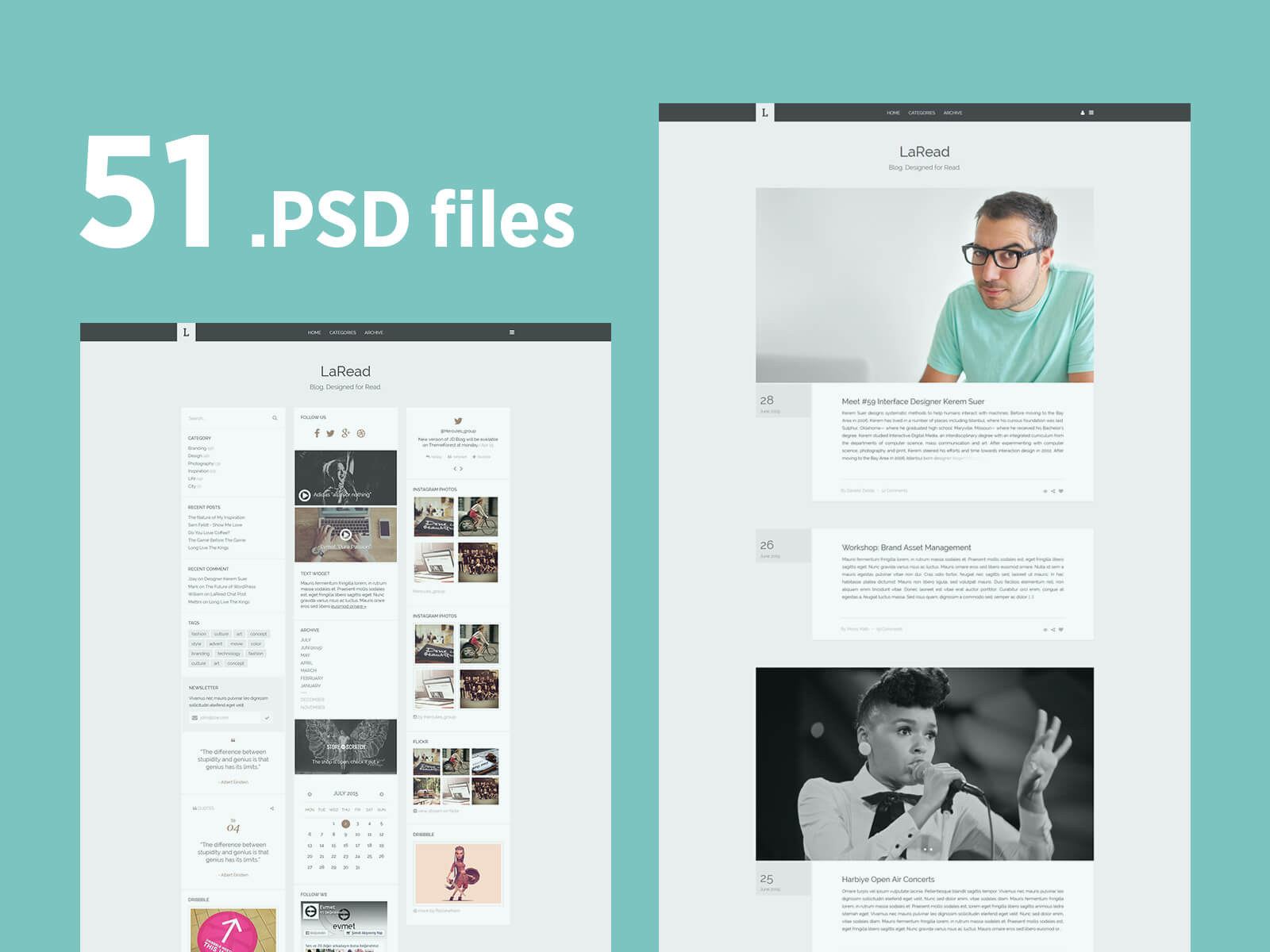
WordPress PSD files represent design templates made in Photoshop, ready for conversion into functional WordPress themes. Popular tools for PSD conversion include Adobe XD, Sketch, and Figma, offering streamlined solutions for web development projects.
Photoshop Plugins
Photoshop plugins can help with PSD conversion. They make the process easy. These plugins work inside Photoshop. They save time and effort. GuideGuide is one popular plugin. It helps with grid systems. Cut&Slice Me is another tool. It exports designs quickly. Both plugins are handy for designers. They make work faster and simpler.
Third-party Applications
Third-party applications convert PSD files too. GIMP is a free tool. It edits and converts PSD files. Photopea is another option. It works in web browsers. No download needed. Both tools support many file types. They are useful alternatives to Photoshop. Easy and accessible for everyone.
Credit: www.uipixels.com
Trends In Psd Design For WordPress
PSD designs today look very sleek. Designers love minimalist layouts. Simple is better. Bright colors catch the eye. They make websites pop. Responsive designs are a must. Screens come in all sizes. Designs need to fit all screens. Flat design is still popular. It keeps things clean and easy to see.
A good design makes users happy. Fast loading times are important. Nobody likes to wait. Easy navigation helps users find things fast. Buttons should be big and clear. Interactive elements engage users. They make websites fun. Good designs think about the user first. Always.
Frequently Asked Questions
What Is A WordPress Psd File?
A WordPress PSD file is a Photoshop design file. It is used to create website layouts for WordPress. Designers use PSD files to visualize the site’s appearance before coding. They contain layers for images, text, and design elements. These files are essential for creating custom WordPress themes.
Why Use Psd Files For WordPress Design?
PSD files provide a visual representation of your WordPress site. They allow designers to experiment with layouts and styles. Using PSD files helps ensure a cohesive design. They facilitate communication between designers and developers. This process helps create a more efficient and accurate website development workflow.
How To Convert Psd To WordPress Theme?
Converting PSD to WordPress involves several steps. First, slice the PSD file into HTML/CSS components. Then, integrate these components into a WordPress theme structure. Use PHP to connect the design with WordPress functionalities. Finally, test the theme for responsiveness and usability.
Many developers use tools or services for conversion.
Are Psd Files Necessary For WordPress?
PSD files aren’t strictly necessary for WordPress. However, they offer significant advantages in design planning. They provide a clear visual guide for developers. PSD files help ensure design consistency and creativity. They are particularly useful for custom themes. Using PSD files can improve collaboration between designers and developers.
Conclusion
Understanding WordPress PSD files is crucial for web design. These files allow designers to create detailed website layouts. They help in visualizing the final website appearance. With PSD files, designers can ensure a seamless transition to WordPress. This makes website development more efficient.
Designers can also communicate their ideas clearly. This leads to better collaboration with developers. Using PSD files saves time and reduces errors in design. For anyone involved in web projects, knowing PSD files is beneficial. It enhances creativity and precision in web design.
Keep exploring WordPress to improve your skills.


