
Are you curious about how you can easily keep your website visitors engaged and informed? Imagine a tool that updates your audience without you lifting a finger.
That’s precisely what a WordPress Feed does for you. Whether you’re running a personal blog, a business website, or an online magazine, understanding WordPress Feed can transform how you deliver content. It’s like having a personal assistant who ensures your readers never miss out on your latest updates.
Keep reading to discover how this tool can enhance your site’s functionality and keep your audience hooked, ensuring they keep coming back for more.
WordPress Feed Basics
A WordPress Feed shares updates from your site. It helps people stay updated. Feeds come in different formats. RSS and Atom are popular. These formats make it easy for readers. They get new posts without visiting your site. Feed readers collect these updates. Users can read them in one place. This saves time.
A feed is a tool for sharing content. It works automatically. Every time you post, the feed updates. Subscribers receive the latest news. They don’t need to check your site often. This keeps your audience engaged. They stay connected with ease.
Credit: 10web.io
Types Of WordPress Feeds
RSS Feeds are popular for sharing updates. They help people get news fast. WordPress uses RSS to send posts to readers. It is simple and easy to use. Many websites use RSS for updates. Readers can follow many sites with RSS. It saves time and keeps people informed.
Atom Feeds are another type of feed. They offer more features than RSS. WordPress supports Atom feeds too. They are newer and more flexible. Atom feeds can include more details. Many bloggers choose Atom for their sites. Atom helps share rich content with ease.
RDF Feeds are less common today. They were used before RSS and Atom. RDF stands for Resource Description Framework. They are part of web standards. RDF feeds help share structured data. WordPress can still use RDF feeds. They are useful for specific tasks.
Benefits Of Using WordPress Feeds
WordPress feeds make sharing content easy. They send updates to subscribers. Readers get new posts quickly. No need to visit each site. Automatic delivery saves time. It helps connect with more people. Spread your message far and wide. A great tool for publishers and bloggers.
Feeds keep audiences engaged. People love fresh and timely updates. They feel more connected to your site. This builds trust and loyalty. Regular updates keep them coming back. Interactive content keeps interest high. Engagement leads to more visits and shares. It’s all about keeping them involved.
Feeds help with SEO. They improve search rankings. Fresh content gets noticed by search engines. More links to your site boost visibility. Keywords are used well in feeds. Regular updates make your site active. Higher visibility means more traffic. SEO helps your site grow.
How To Access WordPress Feeds
Finding feed URLs is simple. Every WordPress site has them. Usually, they end with /feed/. You can add this after your site’s URL. For example, mysite.com/feed. This will show the feed of posts. Pages have feeds too. Use /page/feed/ for them.
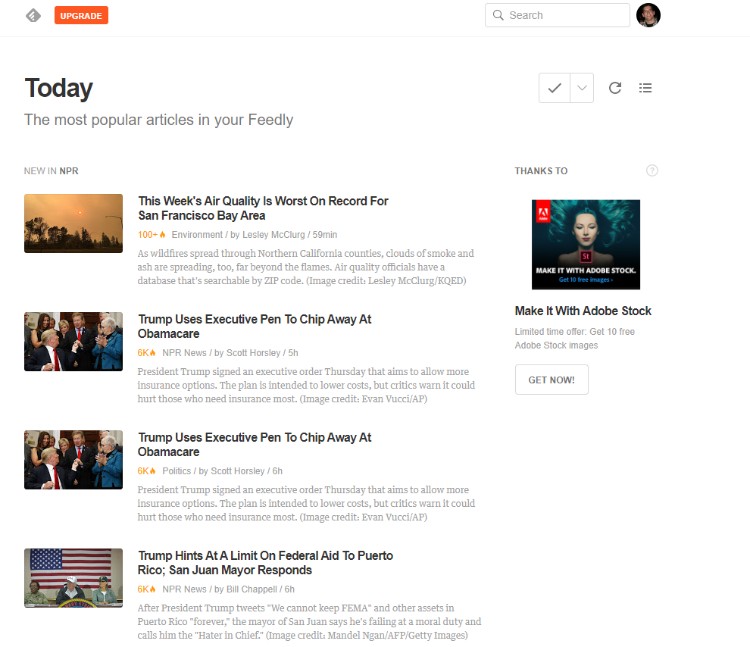
Feed readers help you read feeds easily. RSS readers are popular. They save time. You get updates from many sites. Some examples are Feedly and Inoreader. These tools organize your feeds. You see new posts fast. Just add the feed URL to your reader. Then, enjoy reading all in one place.
Customizing WordPress Feeds
Plugins make feeds look special. They let you add or remove parts. Some plugins are easy to use. Just click a few buttons. Others need more setup. RSS Importer is a popular plugin. It helps to manage feeds. Feedzy is another one. It can show feeds in posts. It helps with images too. WP RSS Aggregator collects many feeds in one place.
Changing code can make feeds better. It gives you more control. Use functions.php to change feed settings. You can add or remove items. Custom templates can change feed looks. They need some coding skills. CSS changes feed style. It makes feeds look nice. JavaScript can add effects. It makes feeds interactive.
Credit: www.fixrunner.com
Common Issues With WordPress Feeds
WordPress feeds can sometimes show errors. These errors confuse users. One common error is the 404 error. This error means the feed is missing. Another issue is the XML parsing error. It shows when the feed has a problem. Sometimes, feeds have broken links. These links do not work.
Fixing feed errors can be easy. First, check your URL. Make sure it is correct. Next, look at your plugins. Some plugins cause issues. Try deactivating them. Clear your cache often. This helps update feeds. Validate your feed using online tools. These tools find errors. Always update WordPress. Updates fix many problems. If all fails, ask for help in forums. Many experts can assist.
Enhancing WordPress Feeds
Pictures and videos make your feed more fun. They keep people interested. Adding multimedia is simple. Upload photos directly to WordPress. Use the media library for this task. Videos can be embedded from platforms like YouTube. They add excitement to your content. Make sure your images are clear and bright. Videos should be short and engaging.
Social media helps share your feed. Connect your WordPress to Facebook and Twitter. This attracts more visitors. Use plugins to make sharing easy. Share buttons let people spread your posts. Social media can grow your audience. It makes your feed more popular. Engaging with followers brings more traffic. Keep your posts interesting and fun.
Future Of WordPress Feeds
WordPress feeds are getting smarter. Artificial intelligence is a big part of this. It helps show the right content to the right people. Personalization is another trend. Feeds now give users what they like most. This makes users happy. Mobile-friendly designs are also important. More people use phones to read feeds. So, feeds must look good on small screens. Interactive content is getting popular. Users want to do more than just read. They want to click, watch, and listen.
Security risks are a big worry for feeds. Bad people try to break into them. This can cause problems. Privacy issues are also a concern. Users want to keep their data safe. Performance problems can happen too. Feeds may become slow if they have too much information. This frustrates users. Compatibility is another challenge. Feeds must work well with all devices and browsers.
Credit: www.wpexplorer.com
Frequently Asked Questions
What Is A WordPress Feed?
A WordPress feed is a way to syndicate site content. It allows users to subscribe and receive updates automatically. Feeds can be in formats like RSS or Atom, enabling easy content sharing across platforms. They are essential for keeping readers informed about new posts and updates.
How Do I Find My WordPress Feed Url?
Your WordPress feed URL is usually your domain followed by `/feed`. For example, `yourwebsite. com/feed`. You can also find it in the WordPress dashboard under “Settings”. If you use plugins, they might change this URL. Always check plugin settings for modifications.
Can I Customize My WordPress Feed?
Yes, you can customize your WordPress feed using plugins or code. Plugins like WP RSS Aggregator offer customization options. You can also modify feed templates directly in your theme files. Customization allows you to control what content appears in your feed.
Why Should I Use WordPress Feeds?
WordPress feeds keep your audience updated automatically. They enhance user engagement by providing easy access to your content. Feeds help increase traffic by distributing content across platforms. They are essential for building a loyal readership and improving site visibility.
Conclusion
WordPress Feed offers simplicity in managing content. It keeps your audience updated effortlessly. Easy setup ensures seamless integration with your website. Customize your feed to match your site’s theme. Readers can follow your updates without much hassle. It’s a valuable tool for bloggers and businesses alike.
Stay connected with your audience. Share news, posts, and updates smoothly. Boost engagement with regular and timely content delivery. Enhance user experience with a well-organized feed. WordPress Feed makes content management straightforward. Keep your audience informed and engaged. Simple, efficient, and effective for content distribution.


