
Imagine having the power to create a stunning website that captivates your audience without needing to be a coding genius. That’s what WordPress development offers you.
Whether you’re dreaming of launching a personal blog, setting up an online store, or establishing a professional portfolio, WordPress opens up a world of possibilities with its user-friendly platform. But what exactly is WordPress development, and why should you care?
By understanding the basics, you can tap into a versatile tool that puts you in control of your online presence. You’ll uncover the secrets of WordPress development, discover how it can transform your ideas into reality, and learn why it’s the go-to choice for millions of users around the globe. Get ready to dive into a world where creativity meets technology, and find out how WordPress can be your ticket to a successful online venture.
WordPress Basics
WordPress is a tool for building websites. It is easy to use. Beginners love it. Themes change how your site looks. Plugins add new features. You can make a blog. Or a shop. It is flexible. Many people use it. It is open source. This means it is free. You can learn it fast. It works with many designs. Your site can be simple or fancy.
WordPress started in 2003. It began as a blog tool. Over time, it grew. Updates came often. Each update added new tools. Today, it is used by millions. It is popular worldwide. Many sites rely on it. It keeps improving. The community helps it grow. It is now more than a blog tool. It can build any kind of website. From small sites to big ones. It adapts to new trends. Its journey is inspiring.
Setting Up A WordPress Site
Choosing a domain name is the first step. It should be simple. Easy to remember. The domain represents your website. After choosing a domain, the next step is hosting. Hosting is where your site lives on the internet. Many companies offer hosting plans. Compare their features and prices. Some popular choices are Bluehost and SiteGround. Hosting services provide space for your website. They also offer technical support. Secure your hosting and domain to begin.
WordPress installation is easy. Most hosts offer a one-click install option. This tool helps set up WordPress fast. Follow the instructions given. You will get access to the WordPress dashboard. From there, you can start building your site. Choose a theme for your site. Themes change how your site looks. Many themes are free. Some themes cost money. Pick one that suits your needs.
Themes And Templates
Choosing the Right Theme is important. Themes change how your site looks. They can be simple or fancy. Some themes are free. Others cost money. Pick a theme that fits your style. Make sure it works well on phones. Check if it loads fast. A slow theme can make users leave.
Customizing Templates is fun. Templates are the layout of your site. You can change colors and fonts. Add pictures and text easily. Some templates let you add videos. You can make your site unique. Try different styles. See what looks best. Always save your changes.
Credit: www.coursera.org
Plugins And Extensions
WordPress plugins are tools to add features. Some plugins are necessary for every site. They help with security, speed, and SEO. Security plugins protect websites from attacks. SEO plugins improve site visibility on search engines. Speed plugins make sites load faster. Many plugins are free. Some have premium versions with extra features. Choosing the right plugins is important for site performance. Popular choices include Yoast SEO and Wordfence Security. Each plugin has its own function. They are easy to install and use.
Custom plugins are made for specific needs. They are not available in the WordPress plugin directory. Developers create them to add unique features. These plugins can be simple or complex. Sometimes, sites need a special function. Custom plugins can make it happen. Developers write code for these plugins. They must test them well. Custom plugins need updates to stay secure. They should be compatible with WordPress updates. Some businesses hire developers to build custom plugins. It helps their site stand out.
WordPress Security
WordPress development involves creating and managing websites using the WordPress platform. It focuses on building secure, functional sites. Ensuring WordPress security is crucial to protect data and maintain site integrity.
Common Security Risks
WordPress sites face many security risks. Hackers might try to steal data. They can install malicious software on your site. Weak passwords make it easy for them to break in. Outdated plugins pose a serious risk too. A security breach can damage your site. It may also harm your reputation. Protecting your site is crucial. Regular updates are very important. They fix known vulnerabilities. Strong passwords help protect your site. Using a security plugin adds extra protection. Monitor your site regularly for unusual activity.
Enhancing Security Measures
Enhancing security involves several steps. First, always use strong passwords. They are hard to guess. Update them often. Second, keep WordPress updated. This includes themes and plugins. Third, install a security plugin. It helps block threats. Fourth, back up your site regularly. This ensures data safety. Fifth, limit login attempts. It stops brute force attacks. Finally, use a secure hosting provider. They offer better protection. These steps help keep your site safe.
Seo Best Practices
Plugins make websites better. Some plugins help with SEO. They make search engines like your site more. Popular plugins are Yoast SEO and All in One SEO Pack. They help with titles and descriptions. They guide you with keywords. These tools are simple to use. Even beginners can try them. Choose plugins wisely. Avoid too many. They can slow your site.
Content is key for SEO. Make sure it is clear and simple. Use keywords naturally. Do not stuff them everywhere. Add images with alt text. This helps search engines understand them. Write short sentences. Keep paragraphs small. This makes reading easy. Update content often. Fresh content is loved by search engines.
E-commerce Integration
WooCommerce is a popular plugin for WordPress. It helps create online stores. You can easily sell products. Both digital and physical items. The setup is simple. Just install and activate. Choose a theme that fits. Add your products. You can also manage stock. Set shipping options. Update prices anytime.
Payment gateways are important. They help you get paid online. WooCommerce supports many options. PayPal and Stripe are popular. These are easy to set up. They also offer secure transactions. Other options include Square and Authorize.Net. Choose what works best for your needs. Make sure it is easy for customers. You want them to complete their purchase.
Credit: gracethemes.com
Multisite And Multilingual
WordPress lets you create many sites with just one setup. This feature is called Multisite. You can manage many websites from one dashboard. This saves time and effort. Each site can have its own theme. You can also give different people access to different sites. This helps in keeping everything organized. Multisite is great for schools, companies, and communities. They can keep everything in one place.
WordPress can support many languages. This is called Multilingual Support. It helps people understand your website in their language. Plugins like WPML make this easy. You can translate posts, pages, and themes. This helps your website reach more people. A multilingual site can attract visitors from all over the world. It also improves user experience for everyone.
Troubleshooting Common Issues
Error messages can be confusing. They stop your work. Many errors happen due to plugin problems. Sometimes, themes cause errors. Checking the error code helps. It shows where the problem is. Plugins often need updates. Updating solves many issues. Themes also need updates. Keep them updated. Errors can also come from the server. Contact your host if needed. They fix server errors. Always check your WordPress settings. Incorrect settings cause issues too.
Slow websites can be frustrating. They lose visitors. Image size affects speed. Compress images for better speed. Plugins also slow websites. Use necessary plugins only. Too many plugins cause delay. A good host boosts speed. Choose reliable hosting services. Caching improves performance too. It stores data for faster access. Clean your database regularly. A clean database runs faster. Optimize your website for better results. Speed matters for user experience.
Future Of WordPress Development
WordPress is changing fast. New trends are coming up. These trends make websites better. AI tools help make writing easy. Voice search is popular now. People talk to their devices. Websites must listen too. Mobile-first designs are a must. Phones are everywhere. Websites must fit small screens. These trends help users. They make websites fun and easy.
Technology is growing daily. WordPress uses new tools. Gutenberg editor is a cool tool. It makes page building simple. REST API lets websites talk. They share data easily. Security is very important. New ways keep data safe. Plugins help with this. These advancements make WordPress strong. Websites become fast and safe. Everyone loves a good website.
Credit: www.uplers.com
Frequently Asked Questions
What Is WordPress Development?
WordPress development involves creating and customizing websites using the WordPress platform. It includes designing themes, building plugins, and managing site functionality. Developers use HTML, CSS, PHP, and JavaScript to enhance website performance. WordPress development is popular for its flexibility and user-friendly interface, making it ideal for beginners and professionals.
How Does WordPress Differ From Other Platforms?
WordPress stands out for its open-source nature and vast plugin ecosystem. It offers extensive customization options and a user-friendly dashboard. Unlike other platforms, WordPress provides complete control over website design and functionality. Its large community ensures continuous updates and support, making it a preferred choice for many businesses.
Is WordPress Development Suitable For Beginners?
Yes, WordPress development is beginner-friendly. It offers intuitive interfaces and extensive documentation. Many tutorials and forums are available for guidance. Beginners can start with pre-designed themes and gradually learn customization. The platform’s drag-and-drop builders make it easier for non-technical users to create professional websites.
What Skills Are Needed For WordPress Development?
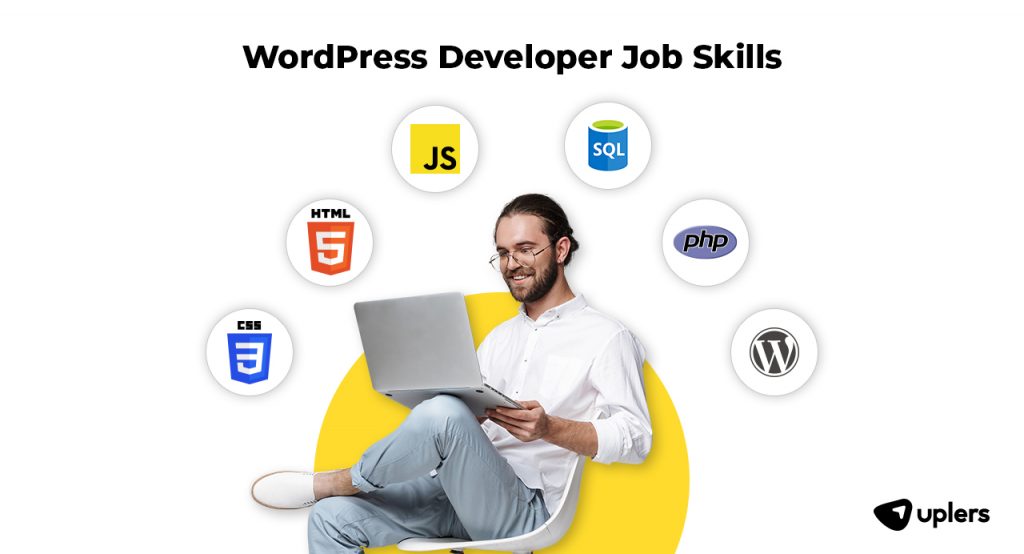
Essential skills for WordPress development include HTML, CSS, and PHP. Understanding JavaScript and MySQL is beneficial. Familiarity with WordPress themes and plugins is crucial. Basic knowledge of SEO and website security is also important. Continuous learning is essential due to frequent updates and new features in WordPress.
Conclusion
WordPress development opens doors to creating dynamic websites. It’s flexible, user-friendly, and adaptable for various needs. Beginners find it approachable. Experts appreciate its robust capabilities. Understanding WordPress enriches your web skills. You can customize, optimize, and maintain your site effectively.
It’s a valuable tool for bloggers, businesses, and developers alike. Dive into its endless possibilities. Learn and grow with WordPress. Building beautiful websites is within reach. No matter your skill level, WordPress offers solutions. Start exploring today. Your digital presence can thrive with WordPress development.


