
Have you ever found yourself lost in the digital maze while trying to manage your WordPress website? You’re not alone.
One key piece of this puzzle is understanding the WordPress Admin URL. This seemingly simple link serves as your gateway to the control center of your website, where you can customize, update, and oversee every detail. But where exactly do you find it, and how can you use it to streamline your site management?
By the end of this article, you’ll not only know the answer but also feel empowered to navigate your WordPress site with confidence. Ready to unlock the full potential of your WordPress experience? Let’s dive in.
Credit: www.ionos.com
Basics Of WordPress Admin Url
The WordPress Admin URL is a special link. It lets you manage your website. You use it to log in to the admin area. This area is like the control center. You can change settings, add content, and more.
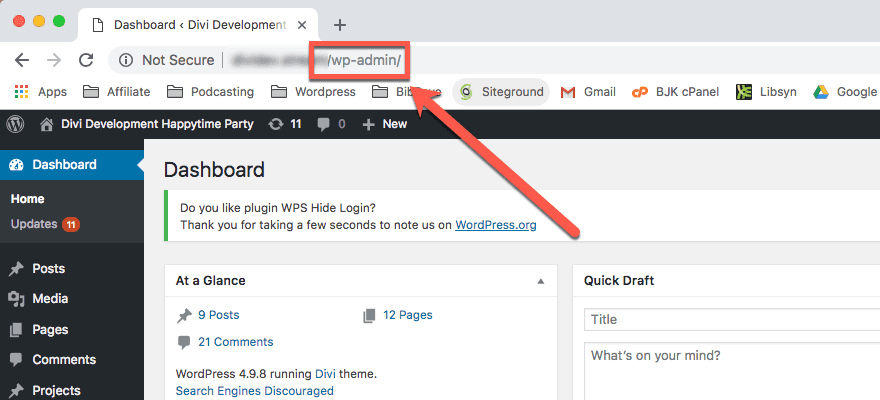
Each WordPress site has an Admin URL. It is usually yoursite.com/wp-admin. Knowing this URL is important. It helps you access your website’s dashboard. Only people with a password can use it. This keeps your site safe.
The Admin URL has a big role. It helps in website management. You can make changes to your site easily. Add new posts, pages, or images. Modify themes and plugins.
The Admin URL is like a key. It opens the door to your site’s backend. From here, you can see how many people visit your site. Fix any problems. And even improve your site’s look and feel. It’s a vital tool for webmasters.
Credit: www.elegantthemes.com
Accessing WordPress Admin Url
To access the WordPress admin panel, type the default login URL in your browser. This URL is usually /wp-admin or /wp-login.php after your website domain. For example, if your website is example.com, the login URL is example.com/wp-admin. This brings you to the login page where you enter your username and password. Remember this URL for easy access next time.
Sometimes, websites have a custom login URL for added security. This URL is different from the default. You might find it in your website settings or from the person who set up your site. If you have a custom URL, save it somewhere safe. This helps keep your website secure. Always use this URL to log in. Never share it with people you don’t trust.
Security Of WordPress Admin Url
The WordPress admin URL is a common target. Hackers seek to gain control. They use brute force attacks to guess passwords. Many sites face these threats daily. Always ensure passwords are strong. Use a mix of letters, numbers, and symbols. Avoid using simple words or phrases. Keep your WordPress updated. Updates fix known bugs and vulnerabilities. Be mindful of plugin security too. Some plugins can be risky. Choose plugins from trusted sources.
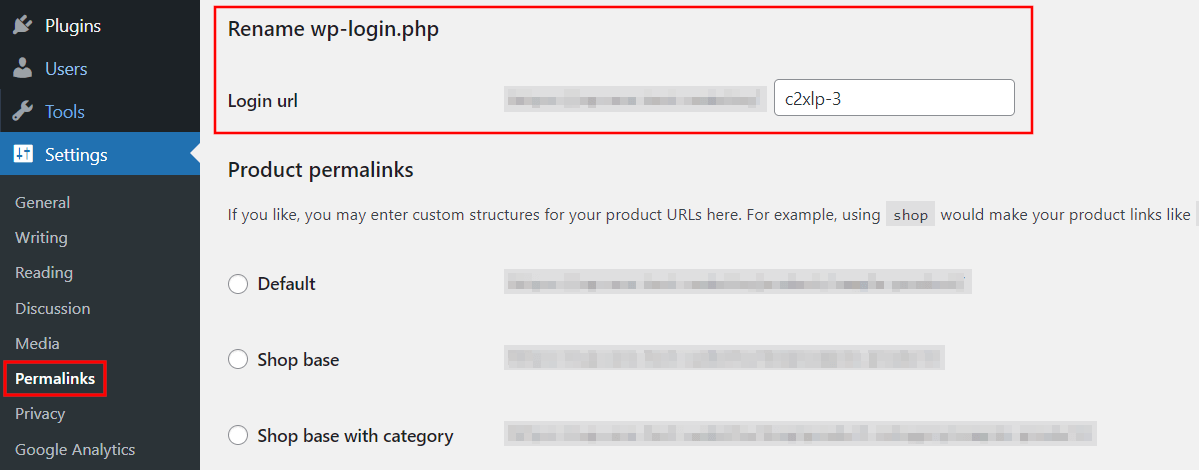
Protect the admin URL with extra steps. Change the default URL. This makes it harder for hackers to find. Use security plugins for added protection. These plugins can hide the login page. Limit login attempts to prevent brute force attacks. Two-factor authentication adds another layer of security. It requires a code sent to your phone. Keep your website safe with regular checks. Always back up your data. Backups help if something goes wrong.

Credit: www.youtube.com
Common Issues With Admin Url
Many face login errors with the WordPress Admin URL. Sometimes, the page does not load. Other times, users see a blank screen. This can be confusing. It happens due to wrong login details. Always check the username and password. Sometimes, the browser cache causes issues. Clear the cache and try again.
URL redirects can be a headache. Users often end up on the wrong page. This usually happens after a site migration. The URL changes, but links stay old. Update all links to avoid this. Another reason could be a plugin conflict. Check if any plugin is causing the problem. Disable plugins one by one to find the culprit.
Best Practices For Admin Url
WordPress admin URL is the web address to access your website’s dashboard. Ensure it’s secure to prevent unauthorized access. Regular updates and strong passwords enhance safety.
Regular Updates
Regular updates keep your site safe. Updates fix bugs and improve security. Always update WordPress when new versions come out. Plugins need updates too. Check for updates often. Update themes regularly. Outdated themes can be a risk. Make backups before updating. Backup helps if something goes wrong.
Using Secure Passwords
Secure passwords are important. Use strong passwords to protect your site. Mix letters, numbers, and symbols. Avoid common words or easy guesses. Change passwords often. Don’t share passwords with others. Store passwords safely. Use a password manager if needed. This keeps passwords safe and organized.
Troubleshooting Admin Url Problems
Many face access issues with the WordPress Admin URL. First, check the URL you typed. It should be correct and complete. Sometimes, browser settings block access. Clear your browser cache. Firewall settings might also restrict entry. Check those settings too. Internet connection can be slow or interrupted. Ensure your connection is stable. If these steps fail, contact your hosting provider. They can offer help and solutions. Follow their advice to fix the problem.
Error messages can be confusing. Incorrect login details cause many problems. Ensure your username and password are correct. Sometimes, plugins and themes conflict. Deactivate plugins one by one. Check if the error is resolved. Update themes to the latest version. Older themes may cause issues. Server issues can also lead to errors. Contact your hosting provider for help. They can check server problems and provide solutions.
Frequently Asked Questions
What Is The Default WordPress Admin Url?
The default WordPress admin URL is typically yourdomain. com/wp-admin. This URL allows you to access the WordPress dashboard. From the dashboard, you can manage your site’s content, plugins, and settings. Always ensure you’re logged in securely to protect your site.
How Do I Change My WordPress Admin Url?
To change your WordPress admin URL, you can use plugins like WPS Hide Login. These plugins allow you to customize your admin URL. Changing the URL enhances security by protecting against unauthorized access. Always back up your site before making changes.
Why Can’t I Access My WordPress Admin Url?
If you can’t access your admin URL, it might be due to plugin conflicts or incorrect URL settings. Ensure your site URL is correct in the settings. Disable conflicting plugins by renaming the plugin folder via FTP. Contact your hosting provider if the issue persists.
How Do I Secure My WordPress Admin Url?
To secure your WordPress admin URL, change it using security plugins. Use strong passwords and enable two-factor authentication. Regularly update your WordPress and plugins. Limiting login attempts and IP whitelisting also enhance security. Always back up your site to prevent data loss.
Conclusion
Understanding the WordPress Admin URL is essential. It serves as your gateway. Access your website’s backend with ease. Keep your Admin URL secure and private. This prevents unauthorized access. Regularly update your WordPress site. Maintain a strong password. It’s vital for security.
Knowing this URL empowers your management skills. It simplifies your website tasks. Also, it enhances your overall WordPress experience. Remember, secure access is the key. Stay informed and proactive. This ensures your website runs smoothly. Happy managing your WordPress site!


