
Imagine your favorite website. Whether it’s where you shop, learn, or connect, it wouldn’t exist without a web server host.
If you’ve ever wondered how websites are accessible at any time and from anywhere, you’re about to unravel the mystery. Understanding web server hosting is crucial, whether you’re a curious internet user or planning to launch your own site. This knowledge empowers you, helping you make informed decisions that can elevate your digital experiences.
Dive into this article to discover what a web server host is and how it impacts your online world. You might find it simpler than you think—and surprisingly vital. Are you ready to uncover the secrets behind the internet’s backbone? Let’s explore together.
Web Server Host Basics
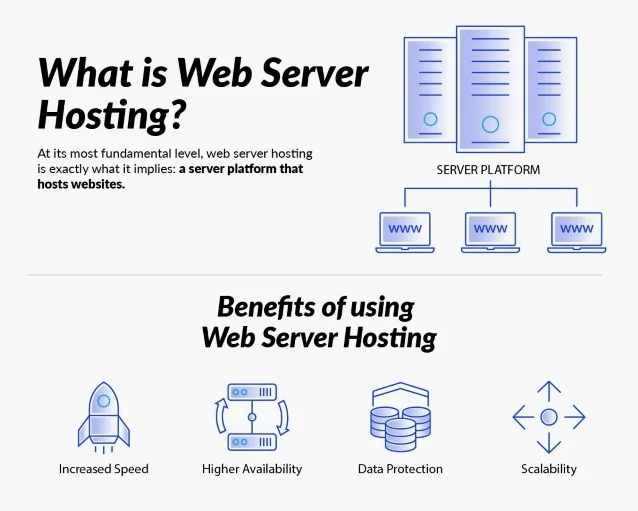
A web server host is like a computer. It stores websites. When you visit a website, your computer talks to this host. It asks for pages to show.
Think of it as a library. A library keeps books safe. A web server host keeps websites safe. It sends them to people who ask.
Hosts have a strong connection to the internet. This makes them fast. Speed is important for websites.
Some hosts are shared. Many websites use the same host. This saves money. But it can slow things down.
Other hosts are private. Only one website uses it. This costs more. But it can be faster.
Choosing the right host is important. It affects how your website works. Good hosts make websites fast and safe.
Remember, a web server host is the home for your website. It keeps it running smoothly.

Credit: en.wikipedia.org
Functions Of A Web Server Host
A web server host manages many tasks. It listens to requests from users. Each request comes from a browser. The host processes these requests quickly. It decides where to send the request. This is called routing. The server makes sure the right data is found. Then, it sends the answer back to the browser.
The host provides content to users. This includes web pages, images, and videos. It must do this efficiently. Fast content delivery means a better user experience. The server stores content in a database. It fetches the data when needed. This keeps the website up-to-date.
Resource management is a key task. The server must use resources wisely. This includes memory and storage. It also involves bandwidth. Too many requests can slow down a server. Efficient management ensures smooth operation. The host monitors all activities. It adjusts resources as required. This keeps the service reliable.
Types Of Web Server Hosting
Shared hosting is like sharing a room with friends. Many websites use the same server. Costs are lower because you share resources. Websites may load slower if traffic is high. Good for small websites.
A Virtual Private Server (VPS) gives more control. You have your own space on a server. It is more secure than shared hosting. Costs are higher than shared hosting. Good for growing websites.
Dedicated hosting means you get the whole server. Best for big websites. It offers more power and speed. Costs are high but worth it for large needs. Ideal for heavy traffic sites.
Cloud hosting uses many servers. It is like renting space in the sky. Websites stay fast even with high traffic. Costs depend on usage. Flexible and scalable for changing needs.

Credit: www.hostinger.com
Choosing The Right Web Server Host
Know what your website needs. Is it a small blog or a big store? Different needs mean different servers. A small blog might need less space. A big store might need more. Think about traffic too. Many visitors need a strong server. Few visitors need a simple one. Be smart. Choose wisely.
Look at the features of each host. Does it offer enough storage? How fast is it? Does it have security features? Compare customer support too. Good support helps when things go wrong. Some hosts offer free domains. Some offer easy site builders. Pick the features you need most.
Think about your budget. Some hosts are cheap but offer less. Some are costly but offer more. Balance cost and quality. Cheap is good, but not always best. Spend wisely. Get the most for your money. Remember, the right host helps your site grow.
Popular Web Server Hosting Providers
Amazon Web Services is huge. It offers many cloud services. Google Cloud Platform provides powerful hosting. It’s fast and reliable. Microsoft Azure is popular for businesses. It integrates well with Windows. Bluehost offers affordable plans. It’s great for beginners. SiteGround has excellent support. It ensures websites run smoothly.
Liquid Web specializes in managed hosting. It handles complex websites. Kinsta is known for WordPress hosting. It speeds up WordPress sites. A2 Hosting offers turbo servers. It’s perfect for fast loading. InMotion Hosting provides business hosting. It supports growth and security. DreamHost is developer-friendly. It offers flexibility and control.
Credit: www.atlantic.net
Security In Web Server Hosting
Web servers face many security threats. Hackers want to steal data. They can use malware to attack. Some hackers try to guess passwords. Others send fake emails to trick users. These emails can lead to phishing attacks. Phishing can harm personal data. Viruses can also affect web servers. They slow down the server. Hackers use viruses to harm websites. Protecting data is very important.
Web servers need strong security measures. Firewalls help block attacks. They keep bad traffic away. Antivirus software detects and removes viruses. It scans the server regularly. Encryption makes data safe. Only certain people can see it. Strong passwords protect accounts. Change them often. Regular updates are important. They fix security gaps. Secure web servers keep data safe.
Future Trends In Web Server Hosting
New technologies are changing web server hosting. Cloud hosting is popular now. It is fast and scalable. Edge computing is also growing. It brings data closer to users. This makes websites faster. Artificial intelligence helps in managing servers. AI can fix problems quickly. It makes hosting more reliable.
Users want faster and more secure websites. They need 24/7 support. Hosting services are adapting to these needs. Green hosting is becoming important. People care about the environment. They prefer eco-friendly options. Custom solutions are in demand. Users want hosting that fits their needs. This trend is growing fast.
Frequently Asked Questions
What Does A Web Server Host?
A web server hosts website files, including HTML, CSS, and JavaScript. It handles client requests and delivers content. Databases, images, and application data can also be hosted. Web servers ensure websites are accessible online by managing traffic and security.
How Do I Know My Web Host?
Check your hosting provider by logging into your domain registrar account. Look under the domain settings or DNS records. Alternatively, use online tools like “WhoIs” to find host details. Your website’s control panel also displays hosting information. Contact your IT department if needed for assistance.
Is Google Chrome A Web Server?
Google Chrome is not a web server. It is a web browser designed to access and display websites. Web servers host websites and serve them to browsers like Chrome for user interaction and viewing.
What Is An Example Of A Web Server?
An example of a web server is Apache HTTP Server. It is widely used for hosting websites. Apache offers flexibility, support for various programming languages, and reliable performance. It powers a significant portion of the internet, making it popular among developers and businesses for web hosting solutions.
Conclusion
Web server hosting is crucial for online presence. It stores your website files. Allows users to access your site. Different types suit varied needs. Shared hosting is budget-friendly. Dedicated hosting offers more control. VPS balances both options. Consider speed, security, and support.
Choose wisely for optimal performance. Reliable hosting enhances user experience. It impacts your site’s success. Invest time to select the best fit. A good host ensures smooth operation. Your website deserves quality hosting. Simple decisions make a big difference. Keep these insights in mind.
Make informed choices for your online journey.


