
Are you curious about web hosting with cPanel and how it can simplify your online presence? If you’re looking to launch a website without the technical headaches, you’re in the right place.
Imagine having a user-friendly control panel that makes managing your site as easy as pie. With cPanel, you can handle everything from adding email accounts to installing WordPress, all with just a few clicks. But what exactly is cPanel, and why should it matter to you?
By understanding its features, you can transform the way you manage your website and focus on what truly matters—growing your online business. Keep reading to discover how cPanel can be the key to unlocking your website’s full potential.
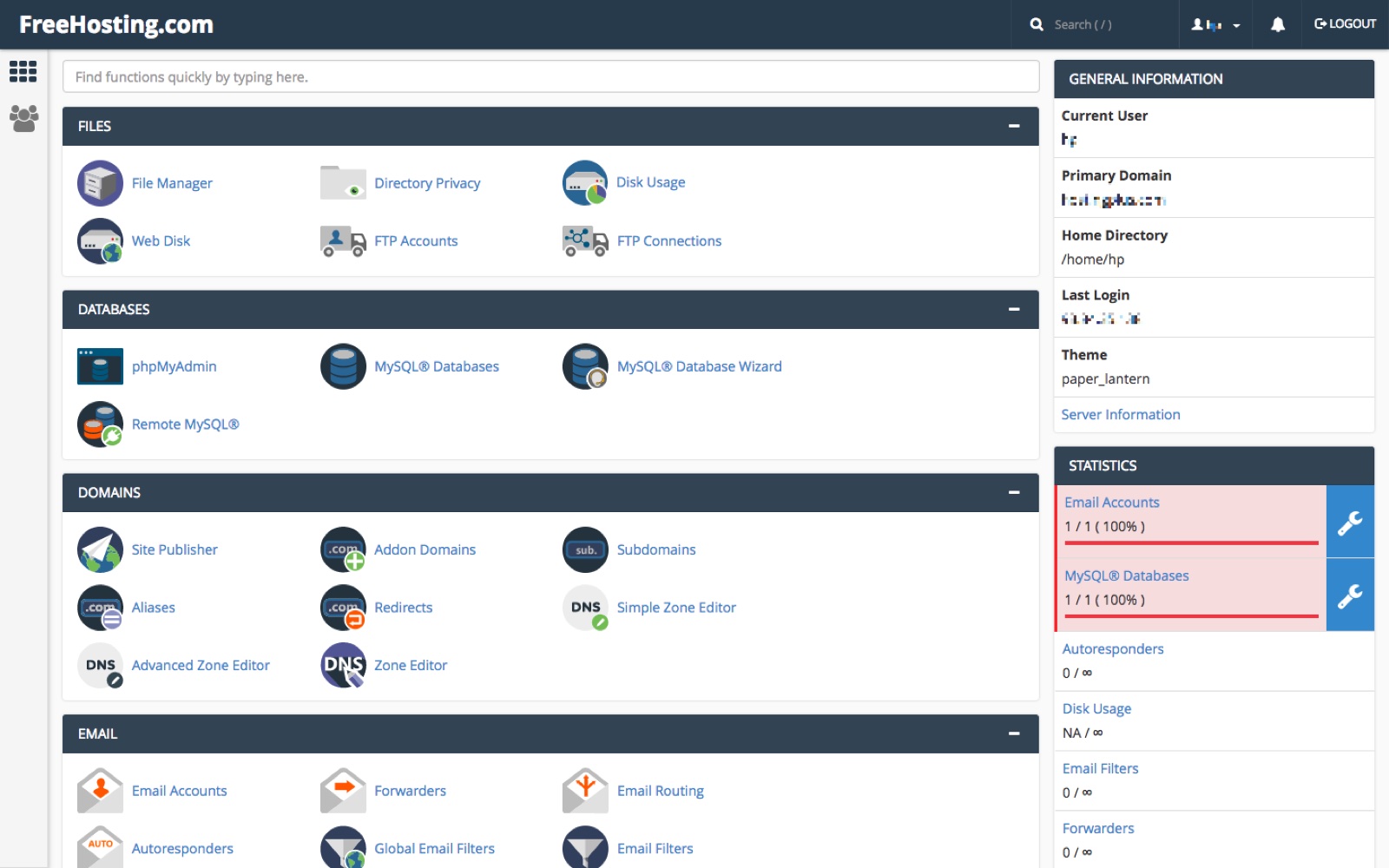
Credit: www.freehosting.com
Understanding Web Hosting
Web hosting is like renting a space on the internet. It lets people see your website online. Think of it like a home for your site. Servers store your website files. Hosting connects your site to the internet. Without it, no one can visit your site.
| Type | Description |
|---|---|
| Shared Hosting | Many websites share one server. It’s cheap but slower. |
| VPS Hosting | Virtual private server. More control and speed. |
| Dedicated Hosting | One server for one site. Fast and powerful. |
| Cloud Hosting | Uses many servers. Flexible and reliable. |
Introduction To Cpanel
cPanel is a popular tool in web hosting. It helps users manage their websites easily. This tool offers a graphical interface. Users can navigate it without much hassle. It simplifies many tasks for website owners. Users can handle files, emails, and databases. All in one place!
Role In Web Hosting
cPanel makes web hosting easier for everyone. It gives users the ability to manage their websites without coding. Users can install applications with a few clicks. This includes popular apps like WordPress. cPanel also helps in managing security settings. Users can protect their sites from threats.
User-friendly Interface
The interface of cPanel is very simple. Even beginners can use it comfortably. Icons and menus are clear and intuitive. Users can find what they need quickly. This saves time and effort. The simplicity ensures more people can create and manage websites.
Features Of Cpanel
CPanel simplifies web hosting with an easy-to-use interface. It allows users to manage domains, emails, and files effortlessly. With its intuitive design, even beginners can control website settings and monitor performance without hassle.
Domain Management
cPanel helps manage your domains easily. You can add or remove domains. Control subdomains with simple clicks. Redirect websites smoothly. Change DNS settings without hassle.
File Management
Organize your files with cPanel’s file manager. Upload files quickly. Move or delete files with ease. Create backups to keep data safe. Access files from anywhere.
Email Configuration
Set up emails in no time. Create new email accounts swiftly. Use filters to sort emails. Protect your inbox from spam. Check emails from any device.
Database Tools
cPanel offers strong database tools. Create and manage databases fast. Use MySQL for database needs. Back up databases safely. Access databases from different places.
Security Options
Keep your site safe with cPanel’s security features. Use SSL for secure data. Block suspicious IPs quickly. Scan for malware easily. Protect files with passwords.

Credit: www.interserver.net
Benefits Of Using Cpanel
cPanel is very easy to use. It has a simple interface. Even beginners find it friendly. You can manage your website easily. No need for special skills. Just click and manage. It’s like using a simple app.
cPanel gives you full control over your site. You can manage files and databases. You can also handle emails and domains. It is all in one place. This makes managing your site easy. You feel like the boss of your website.
cPanel grows with your needs. Start small and scale up. Add more features as you grow. It supports many users and websites. Your website can get bigger. cPanel will handle it with ease. It’s a good choice for growing businesses.
Choosing A Web Host With Cpanel
Price matters. Check the cost of hosting plans. Features are important. Look for storage and bandwidth. Support is crucial. Find out if help is available 24/7. Security is key. Make sure protection is strong. Ease of use matters. cPanel should be simple to navigate. Performance is vital. Your site should load fast. Reputation counts. Read reviews from other users.
| Provider | Price | Features | Support |
|---|---|---|---|
| Host A | Low | Basic | 24/7 |
| Host B | Medium | Advanced | Limited |
| Host C | High | Premium | 24/7 |

Credit: www.gigde.com
Setting Up Your Website With Cpanel
Begin by logging into your cPanel account. Look for the Setup Wizard. This helps with the first steps. Choose your domain name. Set a secure password. Always remember to save your settings. This keeps your site safe.
Open the File Manager tool in cPanel. Click on the public_html folder. This is where your files go. Use the Upload button. Select your website files from your computer. Wait for the upload to finish. Check that all files are in the right place. This makes sure your site works well.
Go to the Domains section in cPanel. Here, you can add a new domain. Use the DNS Manager to edit DNS settings. Make sure your domain points to your site. This lets people find your website online. Always double-check your entries. Correct DNS settings are crucial.
Troubleshooting Common Issues
Discover web hosting with cPanel, a user-friendly control panel simplifying website management. Troubleshoot common issues like file access errors or email setup problems effortlessly. Gain control over your site with intuitive tools and a straightforward interface.
Common Error Messages
Web hosting with cPanel sometimes shows error messages. “500 Internal Server Error” is common. It means something is wrong on the server. Check your files and permissions. “404 Not Found” appears when a page is missing. Ensure your URL is correct. The “403 Forbidden” error blocks access. It happens due to wrong permissions.
Support Resources
Online forums help solve cPanel issues. Many users share tips there. Official cPanel documentation is another good resource. It offers detailed guides. Video tutorials can also be useful. Visual steps make learning easier. Don’t forget your hosting provider’s support team. They offer direct help for server issues.
Future Of Web Hosting And Cpanel
Web hosting with cPanel offers an easy way to manage websites. It provides a user-friendly interface, making tasks like file management and email setup simple. The future of web hosting will likely see cPanel evolving to include more automation and enhanced security features.
Emerging Trends
Web hosting with cPanel is changing fast. Companies look for new ways to host websites. Cloud hosting is popular. It offers flexibility and speed. More websites use cloud hosting now. Security is a big focus too. Safe servers protect data better. Hosting providers add more security features.
Green hosting is another trend. It helps the planet. Companies use less energy. This saves money and reduces pollution. Automation in hosting is growing. Tasks are easier with automation. Updates happen fast. Websites run smoothly. AI helps in hosting too. It fixes problems quickly. Sites stay online.
Advancements In Technology
Technology in web hosting is advancing. cPanel tools are smarter now. They help manage sites easily. Upgrades make cPanel faster. SSD storage improves speed. It loads sites quickly. 5G networks will change hosting. They promise faster internet. Websites will load in seconds.
Server virtualization is growing. It creates virtual servers. This saves space and money. Hosting becomes more affordable. Machine learning in hosting improves performance. It predicts issues. Fixes are automatic. Hosting becomes reliable. These advancements shape the future of web hosting.
Frequently Asked Questions
What Is The Difference Between Web Hosting And Cpanel Hosting?
Web hosting provides server space for websites. CPanel hosting includes a control panel for managing website tasks easily. CPanel simplifies tasks like domain management and email setup. Both offer hosting services, but cPanel adds user-friendly management tools.
Do I Need Cpanel Hosting?
CPanel hosting simplifies website management, making it ideal for beginners. It offers an intuitive interface and essential features. If you prefer ease of use over technical complexity, cPanel hosting is beneficial. For experienced users, other options might be more suitable.
Consider your technical skills and hosting needs before deciding.
What Is Web Hosting And Why Do I Need It?
Web hosting stores your website files on servers, making them accessible online. It ensures your site is live, reliable, and secure. Without web hosting, your website won’t appear online for users to visit. Choose a hosting service that fits your site’s needs for optimal performance and support.
Why Is A Cpanel Required?
CPanel simplifies website management. It offers a user-friendly interface for managing files, emails, and databases. It enhances security, provides backups, and supports easy software installations. With cPanel, you efficiently control server resources and monitor website performance. It is essential for optimizing web hosting tasks and improving user experience.
Conclusion
Web hosting with cPanel simplifies managing your website. It’s user-friendly and efficient. With cPanel, you can control files, emails, and databases. A few clicks make tasks easy. Non-technical users find it helpful. CPanel hosting saves time and reduces effort. You gain more focus on growing your site.
Choosing cPanel hosting offers peace of mind. It’s a reliable option for many. Make your website journey smoother. Consider cPanel for your hosting needs.


