
Have you ever wondered how your emails travel across the internet and land safely in your inbox? If you’re using Web Hosting Hub, understanding their mail server and port settings is crucial for seamless communication.
Whether you’re setting up a new email account or troubleshooting an existing one, knowing what these terms mean and how they function can save you time and frustration. Imagine effortlessly sending and receiving emails without glitches or delays. By the end of this article, you will not only grasp the concept of Web Hosting Hub’s mail server and port but also gain the confidence to manage your email settings with ease.
Let’s unravel the mystery together and enhance your emailing experience.
Web Hosting Hub Mail Server Basics
Mail servers help send and receive emails. Web Hosting Hub provides these mail servers. They keep email safe and reliable. SMTP is a common server for sending emails. POP3 or IMAP are used for receiving emails. Each server needs a port number to work. Port numbers are like doors for emails.
Common port numbers include 25 and 587 for SMTP. 110 and 995 are for POP3. 143 and 993 are for IMAP. Choosing the right port is important. It makes your email work better. Web Hosting Hub uses secure ports. These keep emails safe from hackers.
| Server Type | Port Number |
|---|---|
| SMTP | 25 or 587 |
| POP3 | 110 or 995 |
| IMAP | 143 or 993 |
Credit: www.webhostinghub.com
Types Of Mail Servers
Incoming mail servers store your emails. They let you read them. POP3 and IMAP are common types. POP3 downloads emails to your computer. IMAP keeps emails on the server. You can read them from anywhere. IMAP is more flexible. Many people prefer it.
Outgoing mail servers send your emails. You need them to share messages. SMTP is the main type. It stands for Simple Mail Transfer Protocol. SMTP helps deliver emails to other servers. It makes sure your message gets sent. SMTP is important for email communication.
Configuring Mail Server Settings
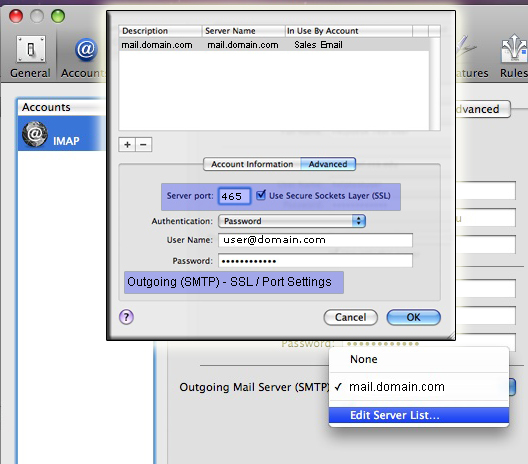
Open the mail application. Locate the settings option. Click on it. Find the server settings tab. Click to access server details. Look for the incoming mail server info. Check the outgoing mail server details. Ensure server names are correct. Verify port numbers for each. Important to use correct ports.
Security is key. Enable SSL encryption. Protect your emails. Look for security options. Check if two-factor authentication is available. Use it for safety. Review password settings. Change passwords if needed. Keep them strong. Avoid simple passwords. Regular updates are vital. Stay secure always.
Credit: www.webhostinghub.com
Common Mail Server Ports
SMTP stands for Simple Mail Transfer Protocol. It helps send emails. The most common port is Port 25. It is used for sending emails. But, some networks block it. So, Port 587 is often used instead. This port is secure and reliable. It also supports encryption. Another option is Port 465. It is used for SMTP over SSL. This means emails are safe. Choose the best port for your needs.
IMAP and POP3 help receive emails. IMAP uses Port 143. It lets you read emails from different devices. It is best for users with many gadgets. For a more secure connection, use Port 993. It has SSL encryption. POP3 uses Port 110. It downloads emails to your device. A secure POP3 port is Port 995. It also uses SSL. Choose the right port to keep emails safe.
Troubleshooting Common Issues
Web Hosting Hub Mail Server manages emails for hosting accounts, using specific ports for sending and receiving messages. Common ports include 25 or 587 for SMTP, and 993 for IMAP, ensuring smooth email communication. Troubleshooting involves checking these settings for errors to maintain efficient email service.
Connection Problems
Connection problems are common with email servers. Check the internet connection first. Ensure it is stable. Sometimes, firewalls block connections. Turn off the firewall temporarily. Verify the server settings. Correct server name and port number are crucial. Use the default port if unsure. Incorrect settings often cause issues. Try restarting your device. A simple restart can fix many problems. If issues persist, contact support. They can guide you better.
Authentication Errors
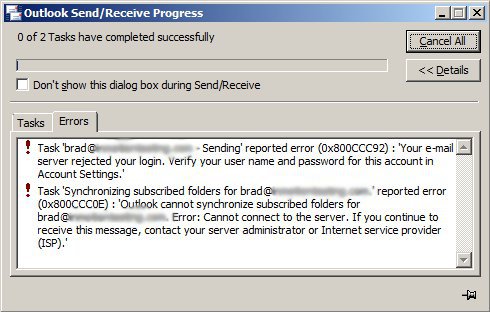
Authentication errors occur due to wrong login details. Ensure username and password are correct. Caps lock can cause mistakes. Check if it’s on. Update your password regularly. Avoid using easy passwords. Ensure SSL settings are correct. Wrong SSL settings cause errors. Double-check them. Sometimes, server issues cause authentication errors. Server updates can help. Contact support if errors continue. They offer professional help.

Credit: jaapwesselius.com
Best Practices For Mail Server Management
Keeping mail servers updated is important. Security patches keep data safe. New features improve performance. Updates must be scheduled regularly. Automatic updates can help. Always check settings after updates. This ensures mail server runs smoothly.
Mail servers need monitoring. Check server health daily. Look for unusual activities. These might be warnings. Maintenance keeps servers healthy. Clean up old data often. Remove unwanted files regularly. This helps servers work well. Backups are important too. Save data in safe places.
Benefits Of Using Web Hosting Hub Mail Servers
Web Hosting Hub mail servers offer strong reliability. Emails are sent and received without delay. Users rarely face downtime. Your messages reach the recipient every time. This builds trust. You can rely on these servers for important communications. No more worrying about lost emails.
Security is top-notch with Web Hosting Hub mail servers. Your data stays safe from threats. Encryption protects your emails. Unwanted access is blocked. Spam is reduced significantly. Your inbox is clean and secure. This keeps your personal information safe. Peace of mind for all users.
Frequently Asked Questions
What Is Mail Server And Web Server?
A mail server manages and delivers emails over a network. A web server hosts websites, serving web pages to users via HTTP requests. Both servers play crucial roles in internet communication and access.
What Is The Difference Between Web Hosting And Email Hosting?
Web hosting stores website files on servers, allowing online access. Email hosting manages email servers, storing and delivering emails.
How Do I Find My Mail Host Server?
Check your email provider’s documentation or settings. Use online tools like MX Lookup to identify your mail host server. Access your email account’s DNS settings to find server details. Contact your email service provider for assistance.
What Is A Host Email Server?
A host email server stores, sends, and receives emails for users. It manages email communication efficiently. This server ensures messages are delivered to the correct recipients. It supports protocols like SMTP, IMAP, and POP3. Users access their emails through client applications, which connect to the server.
Conclusion
Web Hosting Hub Mail Server and Port details are vital for email setup. They ensure smooth communication and connectivity. Understanding these settings helps in managing emails effectively. Correct configuration prevents issues and improves email delivery. Proper setup saves time and reduces frustration.
It’s crucial for efficient email usage. Check your email client settings regularly. Make sure they match the server and port specifications. This guarantees seamless email operations. With this knowledge, email management becomes easier. Enjoy hassle-free emailing with correct server and port settings.
Remember, accurate setup enhances your email experience.


