
When you venture into the online world, two terms you’ll frequently encounter are “web hosting” and “domain.” These are the building blocks of any website, yet they can often seem elusive and complex.
Imagine you’re about to open a store. Your domain is like the address where people can find you, while web hosting is the physical space where your store exists. Understanding these concepts is crucial for anyone looking to create a website, whether for personal use or business.
You’ll discover the essential details about web hosting and domains, perfectly compiled in a PDF format that you can easily download and refer back to whenever you need. This guide is designed to simplify these technical terms into something you can grasp quickly. By the end, you’ll have a clear picture of what web hosting and domains are, and how they work together to make your website accessible to the world. So, if you’re ready to demystify these concepts, keep reading and take the first step towards mastering your online presence.
Web Hosting Basics
Shared hosting means many websites on one server. It’s cheap. But, it can be slow. Good for small sites.
Dedicated hosting gives you one server. Only your site uses it. It’s fast. It’s costly. Large sites need it.
| Shared Hosting | Dedicated Hosting |
|---|---|
| Cost is low | Cost is high |
| Many sites on one server | One site per server |
| Speed can be slow | Speed is fast |
Cloud hosting uses many servers. It’s fast. It’s flexible. Good for growing sites. You pay for what you use. No waste.
Domain Essentials
A domain name is like an address on the internet. It helps people find your website easily. A domain name has two main parts. The first part is the name you choose. The second part is the extension, like .com or .org. Together, they make a full domain name.
Domains act like phone numbers. They connect users to websites. When someone types a domain name in a browser, it sends a request. This request goes to a Domain Name System (DNS). The DNS finds the correct IP address for the website. Then, it loads the website on the user’s screen.
Pick a short and easy-to-remember name. It should be related to your content. Avoid using numbers or special characters. Check if the name is available before buying. A good domain name helps people find your site quickly.
Web Hosting Services
Many people need a website. They choose hosting providers. Bluehost is popular. HostGator is famous too. SiteGround has fans. These providers offer good services. They help websites stay online. Some are cheap. Others are fast. Picking one can be tricky.
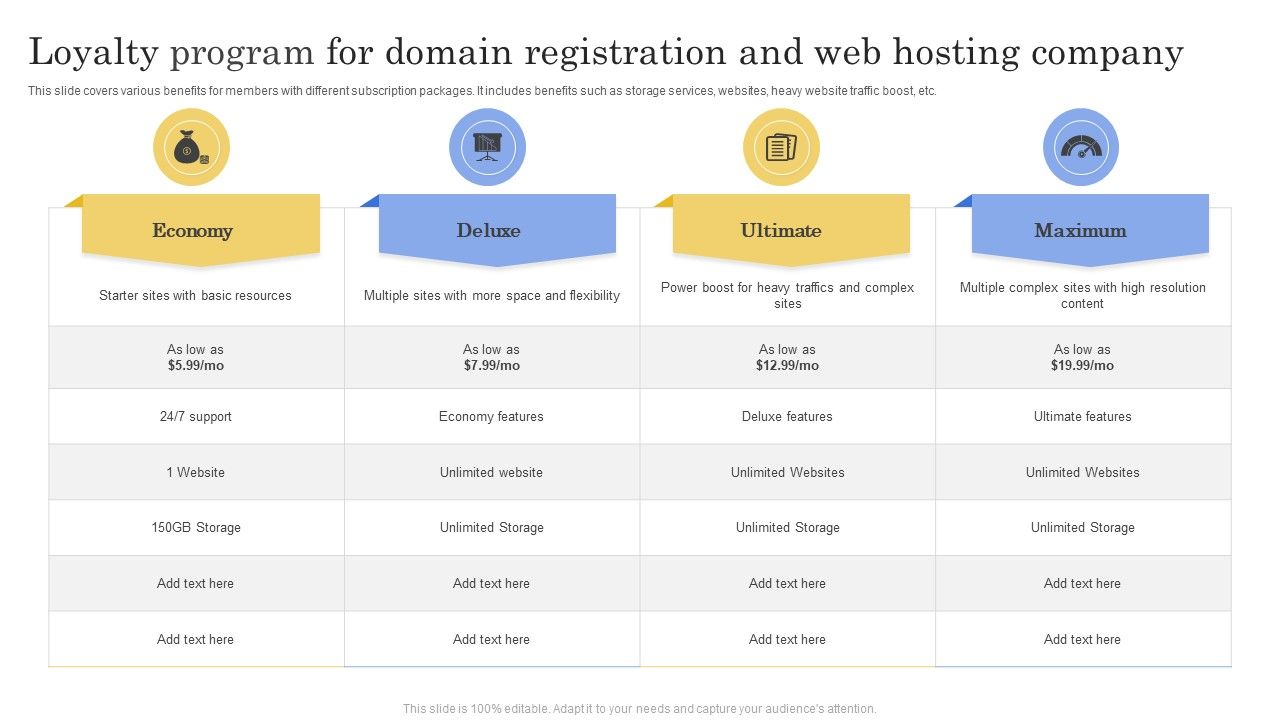
Hosting plans differ. Some are shared. Others are dedicated. Shared plans are cheaper. Dedicated plans are safer. Some plans give more space. Others give more speed. Compare before buying. Think about needs. Budget is important too.
Good hosting has features. Look for security. Speed is key. Customer support helps. Features include control panel. Some give email hosting. Others offer backups. Easy use is vital. Features should match needs.
Credit: www.slidegeeks.com
Domain Registration Process
Understanding the domain registration process is crucial. This involves selecting and registering a unique domain name. A Web Hosting and Domain PDF can guide you through the steps, helping you secure your website’s identity online.
Finding A Domain Registrar
A domain registrar helps you buy a domain name. Choose a trusted company. Look for good customer reviews. Check if they have easy-to-use tools. These tools help you manage your domain. Compare prices before buying. Some registrars offer discounts for the first year. Remember, the cheapest option is not always the best.
Steps To Register A Domain
First, think of a unique name. Make sure it is easy to remember. Check availability using the registrar’s search tool. If available, add it to your cart. Now, fill in your details. Pay for the domain. You will receive a confirmation email. Congratulations! You now own a domain.
Managing Domain Settings
Log in to the registrar’s website. Here, you can see your domain settings. You can update your contact information. Change the DNS settings if needed. This helps in connecting your domain with web hosting. Make sure your details are always up-to-date. Set a reminder for renewal before it expires.
Integrating Hosting And Domain
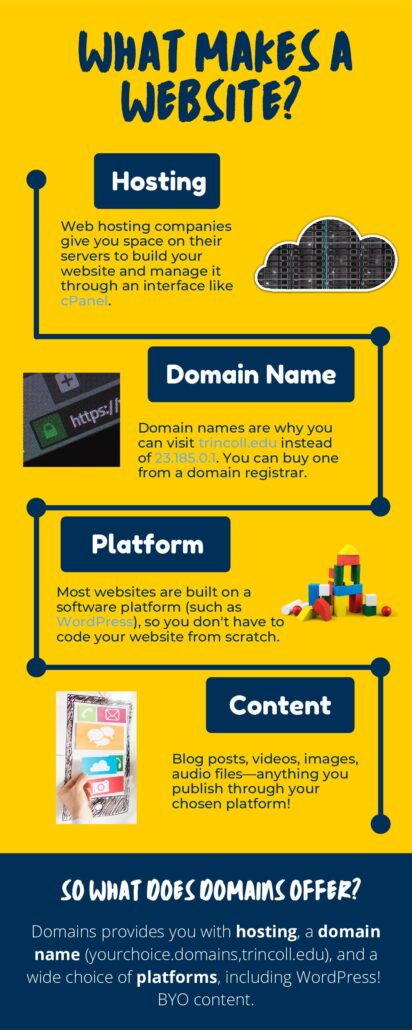
DNS helps connect your domain to your hosting. First, find the DNS settings in your domain account. You need nameservers from your hosting provider. Enter these nameservers in your domain’s DNS settings. This process links your domain to your hosting. It may take a few hours to update.
After setting DNS, go to your hosting account. Look for the domain section. Add your domain to your hosting account. This step makes your website accessible online. Always check your domain status in the hosting panel. Make sure it shows active.
Sometimes, issues occur when linking. Check the DNS settings again. Ensure nameservers match your hosting provider. Clear browser cache if the website doesn’t show. Contact support if issues persist. They can help resolve DNS problems.
Credit: domains.trincoll.edu
Security Considerations
Domains are like your online address. Protect it well. Use strong passwords for your domain account. Change passwords often. Enable two-step verification. This adds an extra layer of security. Be careful of phishing attempts. Always check emails twice before clicking links.
Your website’s safety depends on hosting security. Choose a host with good security features. Regular backups are important. They save your data during attacks. Firewalls help block bad traffic. Use them to protect your site. Keep software updated to prevent hacks.
SSL certificates keep data safe. They encrypt information between user and server. This stops hackers from stealing data. Websites with SSL show a padlock in the browser. This builds trust with visitors. Always ensure your site has an SSL certificate.
Future Trends In Hosting
New technologies change web hosting. Cloud hosting grows fast. It helps websites run smoothly. Edge computing is another new tech. It brings data closer to users. This makes sites load faster. 5G networks will also help hosting. They will make data travel quicker. These technologies make the internet better.
AI helps web hosting. It fixes problems fast. Automation saves time. No need to do things by hand. AI tools make websites run better. They learn from past issues. AI makes hosting smart and easy.
Web hosting can be green. Green hosting uses clean energy. Solar and wind power are popular. They help the Earth stay healthy. Green hosting is growing. It helps save nature. More hosts choose green options now.
Credit: www.slidegeeks.com
Frequently Asked Questions
What Is Web Hosting And Domain?
Web hosting stores your website files on a server, making them accessible online. A domain is your website’s unique address, like a home address, guiding visitors to your site. Both are essential for creating and maintaining a website. They work together to ensure your site’s availability on the internet.
Do I Need Web Hosting If I Have A Domain Name?
Yes, web hosting is essential for your website. A domain name points to your site, while hosting stores its files. Without hosting, your domain won’t display any content online. Web hosting ensures your site is accessible to visitors, providing space and resources for your website’s functionality.
What Are The Three Types Of Web Hosting?
The three types of web hosting are shared hosting, VPS hosting, and dedicated hosting. Shared hosting is affordable and suitable for small websites. VPS hosting offers more control and resources. Dedicated hosting provides maximum performance and security for large websites.
Choose based on your site’s requirements and budget.
What Is Web Hosting Pdf?
A web hosting PDF explains the basics of hosting services. It covers server types, features, and pricing. This document helps beginners understand how websites are stored and accessed online. It serves as a guide for choosing the right hosting provider for your needs.
Conclusion
Web hosting and domain PDFs simplify online presence. They explain key concepts. Easy to follow guides help users choose the right services. Starting a website feels less daunting with proper understanding. Users gain confidence to manage their sites effectively. Reliable hosting ensures smooth operation.
The right domain enhances visibility. Knowledge empowers users to make informed decisions. They can pick services that suit their needs. A solid foundation leads to successful online ventures. As you explore these resources, remember: learning is a journey, not a race.
Take it step by step. Your website dreams are within reach.


