
Are you curious about how websites come to life on the internet? It all starts with a web host.
Whether you’re building a personal blog or launching a business website, understanding what a web host is can be your first step toward a successful online presence. Imagine your favorite website; behind its smooth operation is a powerful web host making everything possible.
You’ll discover what a web host does, why it’s crucial for your website, and how it impacts your online experience. Let’s unravel the mystery of web hosting together and empower you to make informed choices for your digital projects.
Credit: smartedesigners.com
Web Hosting Basics
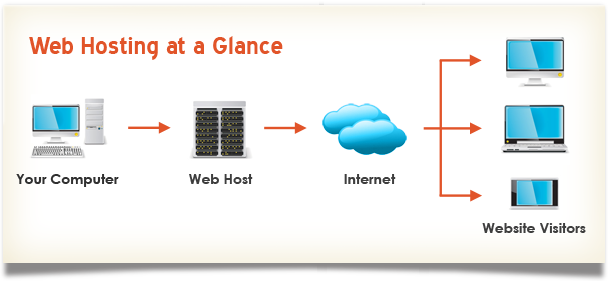
Web hosting is a service. It allows websites to be seen online. Think of it as renting space on the Internet. Servers are the special computers used for hosting. They store all your website data. The main purpose is to make your site accessible. People around the world can see your site.
There are many types of web hosting. Shared hosting is the most common. Many websites share one server. It is budget-friendly but slower. VPS hosting offers more space and speed. It’s like owning a bigger part of the server. Dedicated hosting means you have the whole server to yourself. This is best for very busy websites. Cloud hosting uses many servers at once. It’s very flexible and can handle lots of visitors.
Shared Hosting
Shared hosting is a popular choice for beginners. Many websites use one server. This keeps costs low. Users share resources like CPU and RAM. It is easy to set up. This hosting is perfect for small sites. Limited customization options are available. Support is basic. Backup and security features vary.
| Pros | Cons |
|---|---|
| Cost-effective | Limited resources |
| Easy setup | Less control |
| Good for beginners | Shared security risks |
Virtual Private Server Hosting
Virtual Private Server, or VPS, divides a physical server into smaller parts. Each part is called a virtual server. These servers act like separate computers. Users can run their own software and applications. They get more control than shared hosting. It is like having your own computer in the cloud. You don’t share resources with others. This makes VPS hosting more secure and reliable.
Better performance is a key benefit of VPS. Resources are not shared like in shared hosting. Users have more control over the server. They can customize settings easily. Security is stronger because users have their own space. Scalability is another advantage. You can upgrade resources as needed. VPS is a good choice for growing websites.
Dedicated Hosting
Dedicated hosting allows you to have your own server. You can change settings to fit your needs. It’s like having your own computer. You can install any software you like. Choose the operating system you want. Adjust the server for your business. This hosting is very flexible. You have full control over everything.
Dedicated hosting offers strong security. You don’t share the server with others. This means less chance for hackers. You can set your own firewalls. Add extra layers of protection. Keep your data safe. This is important for businesses. Protecting information is a top priority. Secure servers keep your files safe.
Cloud Hosting
Cloud hosting is very flexible. It grows with your needs. Start small and grow big. Add more resources easily. Handle more visitors. No need for complex changes. Just a few clicks. Keep your site running smoothly. Perfect for growing businesses. No worries about slowdowns. Scale up or down anytime.
Cloud hosting offers great speed. Fast loading times for websites. Better than traditional hosting. Data stored on many servers. Not just one. This means quicker access. Less delay for users. High uptime and reliability. No single point of failure. Keeps websites online. Always ready for visitors. Strong performance even during peak times.
Credit: verpex.com
Choosing The Right Web Host
Web hosts store and manage websites on servers, making them accessible online. Selecting a reliable host ensures fast loading times and minimal downtime, enhancing user experience. Choosing the right service is crucial for website performance and security.
Budgeting
Picking a web host can be tricky. Price is a big factor. Some web hosts are cheap. Others cost more. Cheap hosts might have fewer features. Expensive hosts offer more. Think about what you need.
Monthly fees matter. Some hosts charge every month. Others charge once a year. Be sure to check for hidden costs. Some hosts charge for extra services. Make a list of essential features.
Look for discounts. Many web hosts offer deals. Compare prices before you choose. This helps save money. Ask yourself: is it worth the cost?
Budgeting is about balance. You want good service at a fair price. Don’t rush your decision. Take your time to compare options.
Web Host Providers
Many companies offer web hosting services. Bluehost is a well-known provider. They have good customer support. HostGator is another popular choice. They provide affordable plans. SiteGround is famous for speed. People like their strong security. GoDaddy is also on the list. They have many users worldwide.
| Company | Strength |
|---|---|
| Bluehost | Great support |
| HostGator | Low prices |
| SiteGround | Fast and secure |
| GoDaddy | Wide user base |
Setting Up Web Hosting
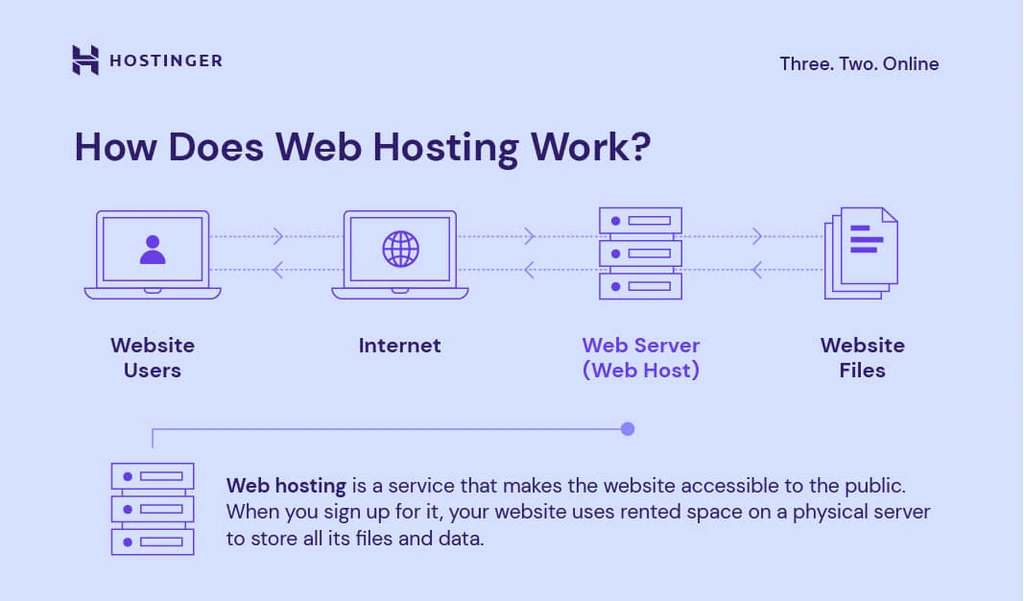
A web host is a service that stores and delivers your website files to visitors online. It’s like renting space on a server for your website. This setup ensures your site is accessible to users worldwide at any time.
Registration Process
To begin, choose a web host provider. They offer different plans. Pick one that suits your needs. Next, create an account. Provide your email and password. This helps keep your account safe. After that, select your domain name. It’s your website’s address. Make it easy to remember. Now, proceed to payment. Use a credit card or PayPal. Once payment is done, you get a confirmation. This means your registration is successful.
Configuring Settings
Start by logging into your web hosting account. Look for the control panel. It’s where you manage settings. Find the section for domain settings. Here, you can set up email accounts. Next, adjust security settings. Secure your site with SSL. This protects your data. You can also set up databases. They store your website info. Lastly, check for backup options. Regular backups keep your data safe.
Troubleshooting Common Issues
Downtime is a big worry for websites. It means your site is not working. This can upset users and lose you money. Check your server status first. Make sure your web host is not having issues. Sometimes, a simple restart fixes the problem. If your site is down often, it might be time to switch hosts. Keeping your software up-to-date helps too. Old software can cause downtime.
Technical support is very important. Good support helps you fix problems fast. Check if your web host offers 24/7 support. This means help is always there. Use chat or phone for quick help. Slow support can cause bigger issues. Choose a host with a good support team. Read reviews before you decide.
Future Of Web Hosting
New technologies are changing web hosting. Cloud hosting is getting popular. It is fast and flexible. Artificial intelligence is also helping. It makes hosting smarter. AI can fix problems quickly.
Green hosting is another trend. It uses less energy. This is good for the planet. Security is always important. Hosting companies work hard to keep data safe.
5G networks are coming. They will make websites load faster. People will expect quick websites. Hosting must adapt. Keep an eye on these trends. The future is exciting!
Credit: www.hostinger.com
Frequently Asked Questions
What Does A Web Host Do?
A web host stores website files and makes them accessible on the internet. It provides server space, security, and support. Web hosts ensure your site is online and handles traffic efficiently. They offer various hosting plans to suit different website needs, including shared, VPS, and dedicated hosting.
What Is An Example Of A Web Host?
An example of a web host is Bluehost. They offer reliable hosting services for websites. Bluehost provides various hosting plans, including shared, VPS, and dedicated hosting. Their user-friendly interface and 24/7 customer support make them a popular choice for individuals and businesses looking to establish an online presence.
How Do I Find My Web Host?
Check your domain registrar for hosting details. Use online tools like WHOIS to find your web host. Contact your website developer or IT support for assistance. Look for hosting information in website backend settings. These methods help you discover your hosting provider quickly.
Do I Really Need A Host For My Website?
Yes, a website host is necessary. It stores your website’s data, ensuring it’s accessible online. Reliable hosting improves site speed, security, and uptime. Choose a host based on your website needs and budget. Quality hosting enhances user experience and boosts SEO rankings.
Conclusion
Understanding web hosting is crucial for website success. It stores your site’s files online. Think of it as renting space on the internet. A reliable host ensures your site runs smoothly. It keeps your website accessible to users worldwide. Choose a host based on your needs and budget.
Different types offer various features. Research is key before deciding. A good web host supports growth and security. Remember, a strong foundation leads to a successful website. Your online presence depends on it. Make an informed choice for lasting benefits.


