
Imagine this: You’re ready to launch your website, but the technical aspects of deploying it onto a hosting server feel overwhelming. You’re not alone in this; many find themselves puzzled by the intricacies of web deployment.
This is where Web Deploy comes to the rescue. It promises a streamlined process, reducing the complexities involved in getting your website live. But what exactly is Web Deploy, and how can it simplify the hosting process for you? By the end of this article, you’ll have a clear understanding of how Web Deploy works and why it’s an essential tool for anyone managing a website.
Stay with us to uncover how this tool can transform your web hosting experience, making it not just easier, but also more efficient.

Credit: serverfault.com
Web Deploy Basics
Web Deploy is a tool. It helps publish web apps to servers. Developers use it often. It makes deployment easy and fast. Files and settings move securely. Web Deploy supports multiple server types.
Hosting servers need tools. Web Deploy is crucial. It ensures apps are updated quickly. Errors decrease with its use. Servers stay reliable and efficient. Users get better experiences. It helps in resource management. Less time is spent on manual tasks.
Key Features
Automated Deployment makes web hosting easy. It saves time. You can update sites quickly. No need to move files by hand. This helps avoid mistakes. Updates happen fast and smooth. This keeps websites running well. Users get a good experience. This boosts satisfaction.
Synchronizing Data ensures all files are current. This means no old versions. All changes are shared. This helps work as a team. Everyone sees the same thing. It is easy to fix errors. This keeps websites up-to-date. Users will always find the latest info.
Remote Management allows control from far away. You do not need to be near the server. This makes work flexible. Changes can be made anytime. Problems can be fixed quickly. This ensures the site runs all the time. Users enjoy a smooth visit.
Installation Process
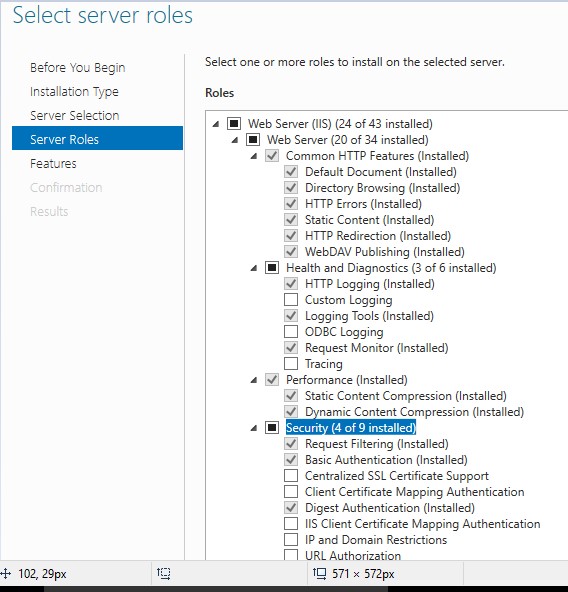
To install Web Deploy, your server needs a few things. Make sure the operating system is Windows. Your server should have Internet Information Services (IIS) installed. Check if .NET Framework is up-to-date. The required version is 4.0 or later. Your server must have enough disk space. At least 1 GB is recommended. Administrator privileges are needed to start the installation. Ensure that your server is connected to the internet.
Begin by downloading the Web Deploy tool. Open the installer file. Follow the on-screen instructions. Choose the correct options. Accept the license agreement. Select the installation folder. Click install to start. Wait for the process to finish. You will see a confirmation message. Restart your server for changes to apply. Now, Web Deploy is ready to use!
Credit: www.c-sharpcorner.com
Configuration Options
Web Deploy helps to move applications to hosting servers. It uses deployment packages for this task. These packages contain all necessary files and settings. First, you need to create a package. This includes your website files and database scripts. You can use tools like Visual Studio for this. Once the package is ready, it is uploaded to the server. Then, Web Deploy installs the package on the server.
Parameters let you control how Web Deploy works. They set rules for the deployment process. For example, you can specify the server’s name or the app’s directory. Parameters also help manage security settings. You can use them to set user permissions. This ensures only authorized users can access the server. Configuring parameters makes the deployment process smooth and safe.
Common Use Cases
Web Deploy helps developers put their apps on servers fast. It makes the process easy and quick. Updating apps becomes simple with Web Deploy. It saves time and effort. No complex steps are needed. Developers can focus on improving apps. Web Deploy takes care of deployment.
Keeping content the same on all servers is crucial. Web Deploy syncs files and data efficiently. It ensures everything is up-to-date. No need to worry about missing updates. Web Deploy handles synchronization smoothly. Users get the latest content always. This makes managing servers easier.
Moving from one server to another is daunting. Web Deploy simplifies server migration. It transfers all data seamlessly. No data loss occurs during migration. Web Deploy ensures everything is intact. It helps in smooth transitions. Server changes become hassle-free. This makes migration stress-free.
Advantages For Hosting Servers
Web Deploy helps servers work faster. It makes tasks quick and easy. Web Deploy saves time by automating processes. This means fewer manual tasks. Servers can do more in less time. It uses less energy, too. This helps save resources.
Mistakes happen less with Web Deploy. It checks for errors before finishing tasks. This helps keep servers safe and sound. Fewer errors mean happy users. It makes everything run smoothly. No more worries about big problems.
Web Deploy keeps things simple. It brings all tools together. This makes server work easy to manage. Operations become smooth and organized. Team members can see changes clearly. Everyone stays on the same page. Work becomes less confusing and more fun.
Troubleshooting
Web Deploy is a tool for managing web servers. It simplifies uploading web applications to hosting servers. Ideal for troubleshooting deployment issues, it ensures smooth server management.
Common Issues
Web Deploy sometimes has connection problems. This happens if the server settings are wrong. Check server IP address and port number. These need to be correct. Firewall settings may block Web Deploy. Ensure the firewall allows it. Some users face authentication errors. Use the correct username and password. Double-check these details.
Solutions And Tips
Always update Web Deploy to the latest version. This solves many problems. Use the IIS Manager for easy configuration. It helps in setting up Web Deploy smoothly. Always back up your files before deploying. This keeps your data safe. Regularly review your logs. Logs show detailed error messages. They help identify issues quickly.
Best Practices
Web Deploy must be secure to protect data. Always use strong passwords for your accounts. These passwords should have numbers and symbols. Keep your Web Deploy software up-to-date. Updates fix bugs and improve security. Use firewalls to block unwanted access. Firewalls keep your servers safe. Also, limit access to only the people who need it. This reduces the risk of unauthorized users.
Performance can improve by using compression. Compression makes files smaller. Smaller files load faster. Also, use caching to store data. This way, data loads quicker next time. Check your server logs for errors. Fix errors to keep everything running smoothly. Lastly, use a content delivery network (CDN). CDNs spread your content across many servers. This helps users access your site faster.
Future Developments
New technologies are changing hosting. Cloud hosting is now very popular. It helps websites work faster.
AI tools can make hosting better. They fix problems quickly. This keeps websites running smoothly.
Changes in technology make hosting services grow. Automation helps with tasks. This saves time. It also reduces mistakes.
Security is improving too. Hosting services are now safer. Data protection is a big focus. This keeps user data secure.
Credit: vschamarti.wordpress.com
Frequently Asked Questions
What Is Web Deploy Used For?
Web Deploy automates the deployment of web applications and websites to IIS servers. It synchronizes content, configuration, and databases efficiently. This tool is essential for developers, facilitating seamless updates and migrations. Web Deploy ensures consistent environments across development, staging, and production.
What Is Web Hosting And Deployment?
Web hosting stores website files on servers, making them accessible online. Deployment involves launching the website live on the internet. Both ensure your site is visible and functional for users.
What Is The Meaning Of Web Deployment?
Web deployment involves transferring a web application from a local environment to a live server. This process makes the application accessible to users via the internet, ensuring it runs smoothly. Deployment includes uploading files, setting up databases, and configuring servers.
Proper deployment enhances performance and user experience.
What Are The Requirements For Web Deploy?
Web deploy requires a compatible server, the latest. NET Framework, IIS, and Web Management Service enabled. Ensure network connectivity and permissions.
Conclusion
Web Deploy simplifies web application deployment. It’s efficient and user-friendly. Ideal for developers and system administrators. Streamlines the process without unnecessary hassles. Boosts productivity with its straightforward features. Makes server management easier and faster. Ensures consistent deployment across environments. Enhances the hosting experience for users.
A reliable choice for web hosting needs. Helps you focus on your core tasks. No need to stress over complex deployment steps. Embrace Web Deploy for smooth operations. Enjoy a seamless deployment journey today.


