
Are you curious about how websites can share the same server without getting tangled up? If you’re diving into the world of web hosting, understanding the concept of virtual hosts in Apache Web Server can be a game-changer.
Imagine running multiple websites efficiently and seamlessly from a single server—sounds like a dream, right? Well, Apache Web Server makes it possible, and it’s simpler than you think. You’ll discover what virtual hosts are, why they matter, and how they can optimize your web hosting experience.
Get ready to unlock the potential of your server and enhance your website management like never before. Keep reading to transform your understanding of web hosting dynamics!

Credit: medium.com
Concept Of Virtual Host
A Virtual Host allows many websites on one server. Each site gets a unique name. It helps save resources and reduces costs. Apache web server uses this feature well. Sites can have different domains or subdomains. This is great for hosting providers. They offer many sites on one machine.
Virtual Hosts make management easy. Each site can have its own settings. This makes it flexible for different needs. It also improves security and organization.
There are two main types. Name-based and IP-based Virtual Hosts. Name-based uses the domain name to identify each site. It is common and efficient. IP-based uses different IP addresses for each site. It suits specific needs. Name-based is preferred for its simplicity. IP-based offers more control. Both types serve different purposes well.
Setting Up Virtual Hosts
Make sure Apache is installed on your server. A domain name is needed. You might use a subdomain. DNS records should point to the server. Root access is needed to make changes. Check Apache configuration files. These files are usually in `/etc/apache2/`.
Apache uses configuration files to manage settings. The main file is `httpd.conf`. Another important file is `apache2.conf`. Check for `sites-available` and `sites-enabled` directories. Use these for setting virtual hosts. Each virtual host needs a separate file. Name the file after the domain. This helps keep things organized.
Directives tell Apache what to do. DocumentRoot shows where the website files are. ServerName tells the domain name. Use ServerAlias for alternate names. ErrorLog and CustomLog keep track of errors and visits. These are important for debugging. Each directive has its own function. They work together to host sites.
Name-based Virtual Hosts
Name-based virtual hosts allow multiple websites to share one server. Each website has a unique domain name. The server checks the domain name to decide which site to show. This saves resources. One server can handle many domains. It’s like having many houses on one street. Each house has its own address. The server acts like the street. It knows where each house is. This is efficient and cost-effective. No need for many servers.
Advantages include saving money. You need fewer servers. It’s easy to set up. Many websites can run on one server. Limitations exist too. If one site fails, others might also fail. SSL certificates can be tricky. Each site needs its own certificate. Some older browsers may have trouble. They may not support name-based hosts. Overall, it’s a good choice for small sites.
Ip-based Virtual Hosts
IP-based virtual hosts use different IP addresses for each website. Each site has its own unique IP. The server listens to requests on these IP addresses. Then, it serves the correct site. This helps in managing traffic for multiple websites. It can be useful for secure connections. Each IP can have its own SSL certificate. This makes sites safer.
One key benefit is better security for websites. Each site can have its own SSL. This keeps data safe. But, there are drawbacks too. More IPs mean more cost. Limited IP addresses can be an issue. Managing many IPs can get complex. It’s important to weigh these factors. Choose based on your needs and budget.
Port-based Virtual Hosts
Apache web server can host multiple websites on one server. Port-based virtual hosts use different ports for each site. First, configure Apache to listen on multiple ports. Specify which ports each website will use. In the configuration file, use tags. Each tag defines a separate site. Set the DocumentRoot to point to the site’s files. Assign ports using Listen directive. Check for port conflicts. Test each site for proper loading.
Port-based hosting helps when IPs are limited. Useful for developing different sites on one machine. Each site must use a unique port. Browsers need port numbers in URLs. This can confuse users. Security settings may block some ports. Ensure firewall allows traffic on chosen ports. Suitable for internal or development environments.
Troubleshooting Virtual Hosts
Virtual Hosts in Apache Web Server allow multiple domain names to be hosted on a single server. They enable different sites to share resources while appearing independent to users. Troubleshooting involves checking configuration files and ensuring correct server directives.
Common Issues
Setting up virtual hosts can be tricky. Sometimes, they don’t work as expected. One common issue is incorrect configuration in the Apache configuration file. Another problem could be a typo in the domain name. Also, make sure the DocumentRoot path is correct. Double-check the file paths and names. Permissions can also cause trouble. Ensure the web server has the right permissions to access files.
Debugging Techniques
Debugging can help find the problem. First, check the Apache error logs. They often show what went wrong. Use the command line to test configurations. The apachectl configtest command is useful. It checks for syntax errors. Another helpful tool is the curl command. It tests if the virtual host is reachable. Lastly, ensure the DNS settings are correct. Make sure the domain points to the right IP address.
Security Considerations
Virtual hosts in Apache Web Server allow multiple websites to run on a single server. Security considerations are crucial, as misconfigurations can expose sensitive data. Ensuring proper access controls and regular updates help protect against vulnerabilities and unauthorized access.
Potential Risks
Virtual Hosts can pose security risks if not set up correctly. Hackers might gain access to sensitive data. They could also redirect traffic to malicious sites. This can harm your website’s reputation. It might also lead to data breaches. Ensure configurations are correct to prevent these risks.
Best Practices
Use strong passwords for all accounts. Regularly update your server software. This helps fix security vulnerabilities. Configure your firewall to block unwanted traffic. Always use HTTPS to encrypt data. Limit access to important files and directories. Regularly back up your data. This helps in case of a security breach.
Performance Optimization
Resource allocation ensures that each website gets enough resources. It helps improve the performance of each site. Apache can set limits on CPU and memory. This keeps one site from using too much. Balanced resources make sure all sites run well. This keeps users happy. Fast sites are good for business.
Caching strategies can speed up websites. They store copies of pages. This means the server doesn’t make pages from scratch each time. Less work for the server. Faster pages for users. Apache has tools to set up caching. Choose the right settings. This can make a big difference. Users like sites that load quickly.
Future Trends In Virtual Hosting
Virtual hosting is changing fast. Cloud computing is growing. It helps websites run better. AI tools make things easier. They help manage servers smartly. Security is improving too. New methods keep data safe. Speed is important for users. Faster servers make happy visitors. Green technology is popular. It saves energy and helps the planet. Edge computing brings data closer to users. This means quicker access.
Web hosting is getting better. Cost is going down. More people can afford websites. Customization is simple now. Users change settings easily. Scalability helps websites grow fast. They handle more users with ease. Collaboration is easier. Teams work together on websites. Mobile access is improving. People use phones to visit sites. User experience matters a lot. Websites focus on easy navigation.
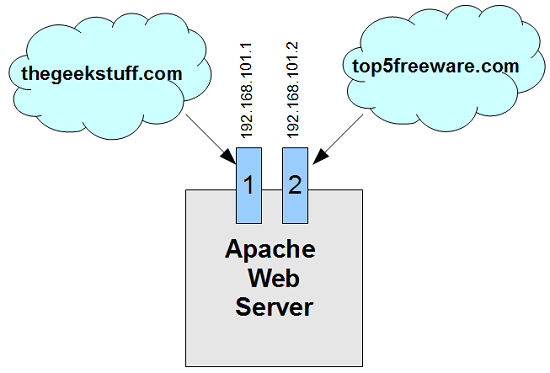
Credit: www.thegeekstuff.com

Credit: www.ricmedia.com
Frequently Asked Questions
What Are Apache Virtual Hosts?
Apache virtual hosts allow multiple websites on a single server. Each site has its own domain and configuration. They enhance server management and resource allocation. Virtual hosts can be IP-based or name-based, offering flexibility. They simplify website hosting, providing efficient and organized server utilization.
What Is The Purpose Of A Virtual Host?
A virtual host allows a server to host multiple domain names on a single IP address. It efficiently manages resources, enabling different websites to operate independently. This helps in optimizing server performance and reducing operational costs while providing users with seamless access to various sites.
What Does Virtualhost : 80 Mean?
VirtualHost *:80 listens on port 80 for any IP address. It handles incoming HTTP requests for web servers. Ensure proper configuration for domain-specific directives to optimize server performance.
What Is The Difference Between A Virtual Host And A Web Server?
A virtual host allows multiple domains on a single web server. A web server delivers website content to users. Virtual hosting enables efficient resource management, while the web server handles requests and serves files. Both work together for seamless website delivery.
Conclusion
Virtual hosts in Apache offer flexibility and organization. They allow multiple websites on a single server. This reduces costs and optimizes resources. Easy setup. Efficient management. Perfect for businesses and developers. By using virtual hosts, you can streamline your web services.
Customize configurations for different sites. Improve user experience and performance. Virtual hosts simplify server management. They provide a practical solution for hosting needs. Understanding this feature empowers you to make informed decisions. It’s a valuable tool in web development. Embrace it for efficient and cost-effective hosting solutions.


