
Imagine transforming your WordPress site into a dynamic powerhouse without writing a single line of code. Sounds intriguing, right?
That’s exactly what the Toolset Plugin can do for you. Whether you’re a seasoned developer or someone just starting out, Toolset offers a treasure trove of features that can elevate your website’s functionality and design. You might be wondering how a single plugin can be so powerful.
Well, by the end of this article, you’ll discover the hidden potential of Toolset and how it can revolutionize the way you manage your WordPress site. Don’t miss out on unlocking the full capabilities of your website—read on to find out how Toolset can be your ultimate game changer.
Credit: toolset.com
Toolset Plugin Overview
Toolset Plugin helps make websites better. It works with WordPress. It allows users to create custom post types. This means more control over website content. Users can also design custom fields. These fields can store extra information. Toolset makes websites more flexible. You can build unique layouts too. No coding needed. It’s great for beginners.
Toolset has many useful features. Custom post types are easy to create. It offers custom fields for extra data. Custom taxonomies help organize posts. Views let you design page layouts. Access control keeps your site secure. With Toolset, you can build advanced websites easily.
Toolset Plugin is user-friendly. It saves time by avoiding coding. It gives more control over content. Websites become more interactive. It helps organize site data. Toolset can make your site look professional. It is suitable for all users. Beginners and experts alike.
Key Features
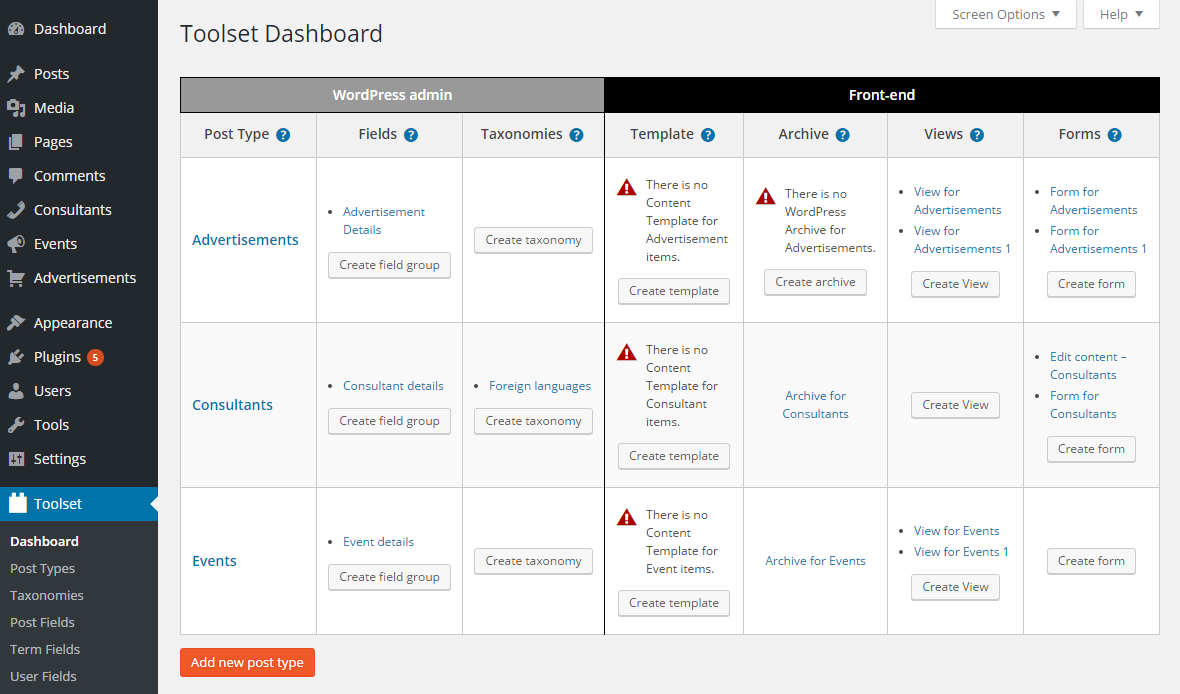
Toolset lets you create custom post types in WordPress. This feature helps organize different types of content. Posts, pages, and products are examples. You can make your own types, like books or movies. These types make your site neat and easy to manage.
Adding custom fields is easy with Toolset. These fields store extra information about your posts. Imagine a book post having fields for author and publication date. These fields make your content richer and more detailed.
Taxonomies categorize your content. They are like tags or categories. Toolset lets you make custom taxonomies. This helps group similar posts together. Users find content faster with clear categories.
Views and templates display content beautifully. Toolset lets you design how your posts look. You can show posts in grids or lists. Templates ensure each post looks consistent. This makes your site look professional.
Benefits Of Using Toolset
Toolset Plugin in WordPress helps create custom content easily. It allows building dynamic websites without coding. Users can design pages with custom fields and post types efficiently.
Flexibility And Customization
Toolset offers great flexibility for building websites. You can create custom post types and fields. This means you can adjust your site to fit any need. It’s a powerful tool for those who want more control.
User-friendly Interface
The interface is easy to understand. Even beginners can use it. No need to learn complicated codes. The layout is simple. Everything is where you expect it to be. This makes learning fast and fun.
Compatibility With Themes
Toolset works well with many WordPress themes. It does not break site design. It keeps your site looking nice. You can switch themes without losing Toolset features. This keeps your website fresh and up-to-date.
Credit: toolset.com
Installation And Setup
Toolset Plugin needs WordPress. Also, it needs PHP version 5.3 or higher. A MySQL version 5.0 or higher is also needed. Ensure your server meets these needs. It will help Toolset run well.
First, go to your WordPress dashboard. Click on “Plugins” and then “Add New”. Search for “Toolset” in the search box. Click “Install Now” next to the Toolset plugin. After installing, click “Activate”. Now, Toolset is ready for you to use. Follow these steps for a smooth setup. Remember to check your plugin settings.
Creating Custom Content Types
Toolset Plugin lets you create custom post types easily. A post type is like a template. It helps manage different content. For example, you can create a “Books” post type. This helps store book details separately. Custom post types keep your site organized. They make content management simple. You can define names, labels, and settings. This way, every post type matches its purpose. Setting up post types is user-friendly. It requires no coding skills. Anyone can learn quickly. Toolset provides clear guides. Follow steps to create any post type.
Custom fields add extra information to posts. They enhance content with specific details. For instance, a “Books” post type can have fields like “Author” and “Publication Date”. Custom fields make data entry easy. They provide structure. Fields can be text, numbers, or dates. Toolset Plugin offers flexible options. You can choose field types based on needs. This helps in displaying detailed content. Custom fields improve user experience. They make websites informative. Easy to set up using Toolset. No coding needed.
Designing Layouts With Views
Toolset Plugin helps in making dynamic views for websites. Users can show different content without coding. It is easy and simple. You can choose what to show and how. No need to be a tech expert. With Toolset, you can add maps, lists, and galleries. Create a view that matches your needs. Change it anytime with ease.
Page builders make websites look good. Toolset works with them well. Builders like Elementor and Divi are popular. Toolset makes them even better. Users can design unique pages. Easily add custom fields and layouts. No coding needed. Change styles fast with Toolset and page builders together. Make your site shine.
Managing Access Control
Toolset Plugin lets you set user roles easily. You can create roles for different users. Each role has specific permissions. You can decide who can see what. This helps keep your site safe. Only trusted users get access.
You can restrict content access with Toolset. Certain users might see certain content. Choose who sees posts, pages, or custom types. This helps manage your site well. Keep important stuff private. Share only with those who need it.

Credit: wpmarmite.com
Common Use Cases
Toolset Plugin helps in creating membership sites with ease. You can make sections for members only. You can protect content from non-members. This way, only subscribers can see special content. It is easy to manage user roles. Members can get access based on their level. This makes the site more organized.
The plugin is great for making online directories. Users can search and find items quickly. The plugin lets you create many custom post types. You can add listings for businesses, jobs, or anything. Each listing can have its own page. This makes the directory very detailed. It is simple to set up and manage.
With Toolset, you can build strong e-commerce stores. You can add products easily. Each product can have a special page. Customers can see all details. The plugin supports different payment methods. It helps to manage orders and inventory. This makes selling online simple and effective.
Troubleshooting And Support
Toolset Plugin in WordPress helps create custom post types, fields, and views without coding. It simplifies complex site designs, allowing users to display content dynamically. This tool enhances site functionality, improving user experience effortlessly.
Common Issues And Solutions
Toolset Plugin might sometimes face compatibility issues with other plugins. Always check plugin updates. Conflicts often arise after updates. Deactivate other plugins to test. Check if Toolset works.
Another issue is slow loading times. This can happen due to many plugins. Optimize your site. Use caching plugins. They help speed up your site.
Sometimes, shortcodes might not display correctly. Ensure you’re using the right ones. Double-check shortcode syntax. They must be correct.
Always back up your site. Do this before making changes. It’s safe. It prevents data loss.
Accessing Support Resources
Toolset offers support forums. Users can ask questions there. Experts and users help each other. Solutions are shared.
Toolset has detailed documentation. It helps in understanding features. Guides are clear and helpful.
Users can access video tutorials. These explain features well. Watching videos can help understand better.
Contact Toolset support team for direct help. They provide assistance. Reach them via email or chat.
Frequently Asked Questions
How Does Toolset Enhance WordPress Functionality?
Toolset enhances WordPress by providing advanced features without coding. It allows users to create custom post types, fields, and taxonomies. You can build complex websites with dynamic content and custom layouts. Toolset also integrates seamlessly with popular WordPress themes, making it a versatile choice for developers and site owners.
Can Toolset Be Used By Beginners?
Yes, Toolset is beginner-friendly with intuitive interfaces and extensive documentation. It provides simple tools for creating custom content types and layouts. Users can leverage its drag-and-drop features for easy setup. Support forums and tutorials further aid beginners in mastering the plugin’s functionalities without coding expertise.
Is Toolset Compatible With All WordPress Themes?
Toolset is compatible with most WordPress themes, offering flexibility in design. It integrates smoothly, allowing users to build custom layouts. The plugin supports popular themes like Divi and Astra. Users can verify compatibility by checking Toolset’s documentation or contacting their theme provider for specific integration details.
Does Toolset Support Woocommerce Integration?
Yes, Toolset supports WooCommerce integration, enhancing e-commerce functionality. Users can create custom product templates and manage fields effectively. It allows for dynamic content display, improving the shopping experience. Toolset’s integration with WooCommerce helps streamline online store management, making it a valuable tool for e-commerce websites.
Conclusion
Toolset Plugin in WordPress offers flexibility for website building. It helps users create custom content types easily. No coding skills? No problem! This plugin makes it simple. You can design complex websites with ease. Its user-friendly interface guides you through the process.
Many features cater to various needs. From beginners to experts, everyone finds it useful. Customize your site without hassle. Explore the possibilities with Toolset Plugin. Boost your WordPress experience today. Enjoy building your site with confidence.


