
Have you ever wondered how to enhance the user experience on your WordPress site with just a simple tweak? The title attribute might be your answer.
It’s a small, often overlooked feature that can make a big difference in how visitors interact with your content. Imagine hovering over a link or image and getting an instant hint about what’s next—that’s the power of the title attribute.
But what exactly is it, and how can you use it to your advantage? Stick around, because you’re about to discover the secrets of using the title attribute effectively in WordPress. You’ll learn not just what it is, but how it can subtly boost your site’s appeal and functionality, making every click more meaningful. Ready to unlock this hidden gem? Let’s dive in.
Title Attribute Basics
Title attributes in WordPress add extra information to elements like links and images. They help with accessibility and provide tooltips when users hover over elements. This feature enhances user experience and is beneficial for search engine optimization.
Definition And Purpose
The Title Attribute is a small piece of text. It adds extra information to a link or image. This text appears when you hover over it. The purpose is to give more details. It helps users understand the link better. It is very useful for accessibility. This makes websites friendly for everyone. It also improves SEO by adding keywords. Keywords help search engines find your content.
Common Uses
Many people use the Title Attribute for links. It gives a brief description of the link. Images also use this attribute. It explains what the image is about. Web developers often use it to improve user experience. It makes the website easier to navigate. A good Title Attribute is short and clear. It should be easy to read. This helps users know what to expect.
Adding Title Attributes
Title attributes in WordPress provide additional information about links and images. They enhance user experience by displaying a tooltip when hovered over. Utilizing title attributes can improve accessibility and SEO by offering context to search engines and users.
Manual Addition In WordPress
Title attributes help in understanding links better. Each link can have a short description. This description pops up when you hover over the link. Adding title attributes manually is simple. First, find the link you want to edit. Then, click on it. A small box will appear. In this box, type your text. Make sure it’s clear and helpful. Keep it short; long descriptions can be confusing. Save your changes. Now, visitors can see your helpful text.
Using Plugins
Plugins make adding title attributes easy. Some plugins are free. Others might cost money. Start by searching for WordPress plugins. Choose one that suits your needs. Install the plugin. Follow the instructions given. Most plugins have guides. They show you how to add title attributes. Plugins save time. You don’t need to edit each link manually. Your site becomes more user-friendly.
Seo Benefits
The title attribute helps users with screen readers. It gives more information about a link or image. This makes it easier for everyone to understand content. Users can know where a link leads. They can also understand an image’s purpose. This improves the overall accessibility of your site.
With the title attribute, users get a better browsing experience. They see a small box with info when hovering over links or images. This helps them decide if they want to click. It makes the site more user-friendly. Users feel more confident navigating the site.
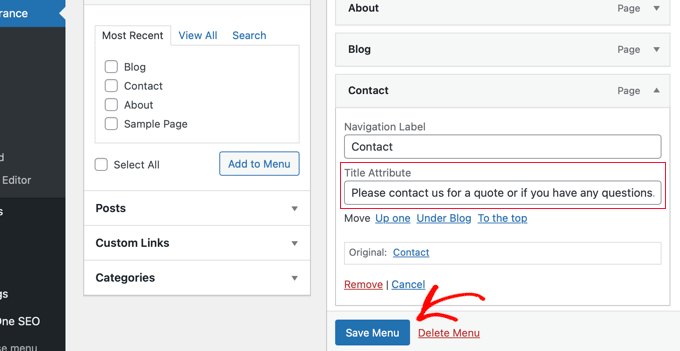
Credit: www.wpbeginner.com
Best Practices
Too many title attributes can confuse users. They may not know which link to click. Use them only when needed. This keeps your site easy to read. Users find what they need faster. This makes them happy.
Titles should be clear and meaningful. They help users understand links. Use simple words. Avoid long titles. Shorter titles are easier to read. They look neat and tidy. This helps your site look better. Users stay longer on sites they understand.
Troubleshooting
Understanding the title attribute in WordPress helps enhance user experience. It provides additional information about links or images when users hover over them. This attribute is an effective way to improve accessibility and SEO on your WordPress site.
Common Issues
Many users face issues with the title attribute in WordPress. Sometimes, the title does not show up. This can confuse visitors. Another problem is the title being too long. It looks messy on small screens.
Some users notice the title changes after updates. This happens because themes change. The title might not be set correctly. Some plugins also interfere. They might overwrite the title attribute.
Solutions And Tips
Check the theme settings. Make sure the title is set right. Use a plugin for better control. SEO plugins help manage titles. Keep titles short and clear. This looks better on all devices.
Update plugins often. This helps avoid conflicts. If issues continue, consult a developer. They can fix tricky problems. Regular checks ensure titles stay neat. This improves site appearance.
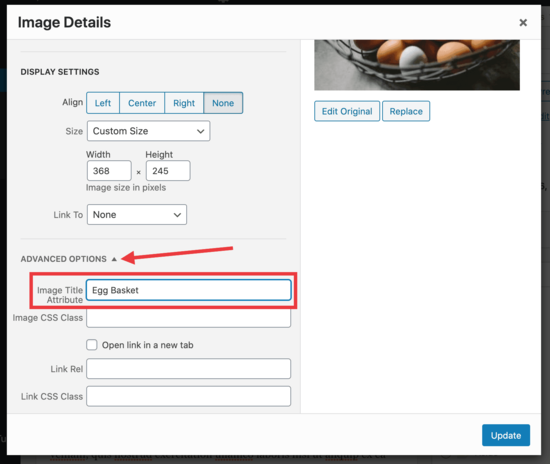
Credit: www.wpbeginner.com

Credit: mrwweb.com
Frequently Asked Questions
What Is The Title Attribute In WordPress?
The title attribute in WordPress provides additional information about a link, image, or other HTML elements. When a user hovers over the element, a tooltip with the title appears. It enhances accessibility and SEO by offering search engines extra context about the content.
Proper use improves user experience and site ranking.
How To Add A Title Attribute In WordPress?
To add a title attribute in WordPress, edit the post or page. In the block editor, select the element you want. Enter the desired text in the title attribute field. Save the changes. This will help provide more context to users and search engines.
Does The Title Attribute Affect Seo?
Yes, the title attribute can affect SEO positively. It provides search engines additional context about the linked content. While it’s not a primary ranking factor, it enhances accessibility and user experience. By offering meaningful descriptions, it can improve click-through rates and indirectly influence SEO performance.
Can I Customize The Title Attribute?
Yes, you can customize the title attribute by editing the HTML code or using plugins. In the WordPress editor, locate the element and modify its title attribute. Use relevant keywords and descriptive text. Customizing it improves user interaction and potentially boosts SEO.
Conclusion
Understanding the title attribute in WordPress is essential. It helps with SEO and accessibility. This attribute provides context about links and images. Users benefit from improved navigation and clarity. Search engines also value this information. Including title attributes can enhance user experience.
It makes your site more informative. Easy to implement and effective. Don’t overlook this simple tool. It adds value to your WordPress site. Keep your audience engaged. Improve your site’s functionality with title attributes. They’re small, but impactful. Make them a regular part of your web design strategy.


