
Are you thinking about starting a website but overwhelmed by the options? You’re not alone.
With so many platforms available, it’s easy to feel lost. But if you’re looking for a user-friendly, versatile, and powerful solution, then you’ve probably heard of WordPress. This platform powers millions of websites worldwide, from small personal blogs to major corporate sites.
But what exactly is a WordPress website, and why should you consider using it for your online presence? Imagine having the ability to design your site exactly how you envision it, without needing to be a tech wizard. Whether you want to share your thoughts, showcase your portfolio, or run an online store, WordPress offers you the tools to make it happen effortlessly. You’ll discover what makes WordPress so special and how it can transform your website-building experience. Stick around, and you might just find the perfect solution for your web needs.
WordPress Basics
WordPress is a website builder. It helps people make websites. Anyone can use it. You do not need to be a tech expert. It is simple and easy. You can create blogs, shops, and more.
WordPress is open source. This means it is free to use. People can change and share it. Many people help make it better. You can find many themes and plugins. These tools make your website look good and work better.
History Of WordPress
WordPress started in 2003. It began as a blog tool. Two people, Matt Mullenweg and Mike Little, created it. They wanted a simple way to make websites. WordPress used the code from another project. This project was called b2/cafelog. They improved this code. Then, they shared it with everyone. This sharing helped WordPress grow.
WordPress changed a lot. It became more than a blog tool. People started using it for business sites. Developers added themes and plugins. These made websites look better. They also added new features. WordPress became very popular. Today, it powers over 40% of websites. Many people use WordPress. It is easy and flexible.
Key Features
WordPress offers many themes. Each theme gives a different look. Some are free, others are paid. You can change colors and fonts easily. This helps make your site unique. Even beginners can do it. No coding needed.
WordPress has thousands of plugins. They add new features to your site. Want a contact form? There’s a plugin. Need to improve site speed? Plugins can help. They are easy to install. Only a few clicks.
Managing users is simple in WordPress. You can add new users easily. Each user has a role. Roles can be admin, editor, or subscriber. Admins have full control. Editors can add content. Subscribers can read posts. This keeps your site organized.
Credit: blog.hubspot.com
Benefits Of WordPress
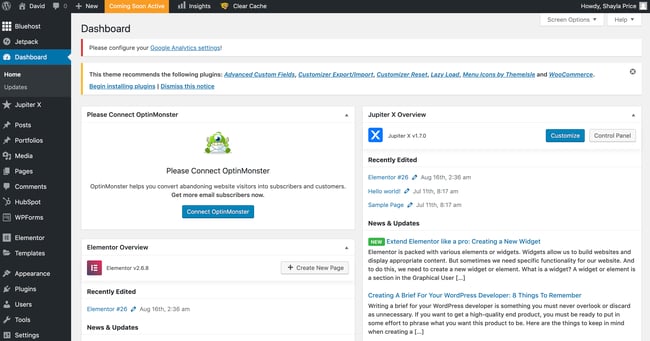
WordPress is very easy to use. Even beginners can build a site. The dashboard is simple. It has clear options. You can add pages or posts quickly. No need for coding. Just click and type. This makes it great for everyone.
WordPress grows with your needs. Start with a small site. Later, add more pages. Install plugins for new features. Your site can expand easily. It handles big traffic too. No need to switch platforms.
WordPress helps with SEO. It has built-in tools. These tools help improve your site’s rank. Use plugins for better results. Write tags and descriptions easily. Search engines love WordPress sites. This means more visitors.
WordPress.org Vs WordPress.com
WordPress.org lets users have full control. They can customize everything. It is free to download. Users need to buy hosting. It is best for advanced users. Beginners might find it hard.
WordPress.com is easier for beginners. It offers hosting and support. It is simple to use. Some features require payment. Users have less control over the site.
Decide based on your needs. Want full control? Choose WordPress.org. Need something simple? Go for WordPress.com.
Consider your skills. Are you tech-savvy? WordPress.org suits you. Need more help? WordPress.com is better.
Think about cost. WordPress.org might cost more. You pay for hosting. WordPress.com can be cheaper. It has free plans.
Look at your goals. Want a big site? Use WordPress.org. Want a small blog? WordPress.com works well.

Credit: blog.hubspot.com
Getting Started
WordPress is a popular tool for building websites. It’s easy and free to use. First, choose a web host to store your site. Many companies offer hosting services. Next, install WordPress on your hosting account. Many hosts offer one-click installation. You can start creating your site quickly. Pick a theme for your site’s design. Themes change how your site looks. There are many free themes available. You can also buy premium themes for more features.
After installing WordPress, configure the basic settings. Set your site title and tagline in settings. Decide if you want comments on your posts. Choose permalink settings for URLs. This helps with search engines. You can add plugins for extra features. Plugins add functionality like contact forms. Keep your WordPress and plugins updated. Updates fix bugs and improve security. Always backup your site before updates. Backups help restore your site if needed.
Common Challenges
WordPress sites face security challenges
Slow websites frustrate users. Speed matters. Large images slow sites down. Optimize them. Too many plugins hurt speed. Choose wisely. Use caching plugins. They boost speed. Clean databases regularly. This improves performance. Choose fast hosting. It helps a lot.
Future Of WordPress
WordPress plans many new features. Better security is one of them. It will protect websites from hackers. Improved performance is another goal. Websites will load faster. Easy updates will keep sites current. Users will find updates simple.
WordPress is popular. Many people use it for blogs. E-commerce is growing on WordPress. More shops are online. Mobile-friendly design is important. Many users visit sites on phones. Customization options will increase. Users can change their sites easily.
Credit: kinsta.com
Frequently Asked Questions
What Is A WordPress Website?
A WordPress website is a site created using the WordPress platform. It’s a popular content management system (CMS) that powers millions of websites worldwide. WordPress is known for its user-friendly interface, flexibility, and extensive plugin ecosystem. It allows users to build websites without extensive coding knowledge.
Why Choose WordPress For Your Website?
Choosing WordPress for your website offers several benefits. It’s open-source, highly customizable, and has a large support community. WordPress provides thousands of themes and plugins to enhance functionality. It’s SEO-friendly and suitable for both beginners and advanced users. Regular updates ensure security and performance improvements.
How Do I Start A WordPress Website?
Starting a WordPress website involves a few simple steps. First, choose a domain name and a hosting provider. Next, install WordPress through your hosting dashboard. Select a theme and customize your site using plugins and widgets. Finally, create and publish content to make your website live.
Is WordPress Suitable For Beginners?
Yes, WordPress is suitable for beginners. It offers an intuitive interface and a wealth of tutorials and resources. Users can easily create and manage content without technical expertise. With a vast library of themes and plugins, WordPress allows users to customize sites without coding.
It’s a great starting point for new web creators.
Conclusion
WordPress website creation offers simplicity and flexibility. It’s ideal for beginners and experts alike. You can easily manage content, design, and features. The platform supports various themes and plugins, enhancing functionality. It’s user-friendly and requires no advanced coding skills. From blogs to business sites, WordPress adapts effortlessly.
You can customize designs to suit your needs. With a vast community, support is readily available. WordPress empowers you to build a strong online presence. Start exploring its features today. Create, manage, and grow your website with ease. WordPress simplifies the web development journey for everyone.


