Have you ever wondered why WordPress websites look and function the way they do? At the heart of every WordPress site lies a powerful mechanism called the WordPress Template Hierarchy.
Understanding this hierarchy can unlock a whole new level of customization and control for your website. Imagine being able to tailor every aspect of your site to perfectly match your vision and needs. Sounds intriguing, right? You’ll discover what the WordPress Template Hierarchy is and why it’s essential for anyone serious about mastering WordPress.
Get ready to dive into the nuts and bolts of your favorite web building tool, and see how you can leverage it to make your website stand out from the crowd. Keep reading, because the secrets to a more dynamic and personalized site are just a scroll away!
Basics Of Template Hierarchy
WordPress uses a system called template hierarchy. This helps to decide which file to use for each page. Different pages need different templates. A home page may use a different template than a blog post. This makes your site look consistent and organized.
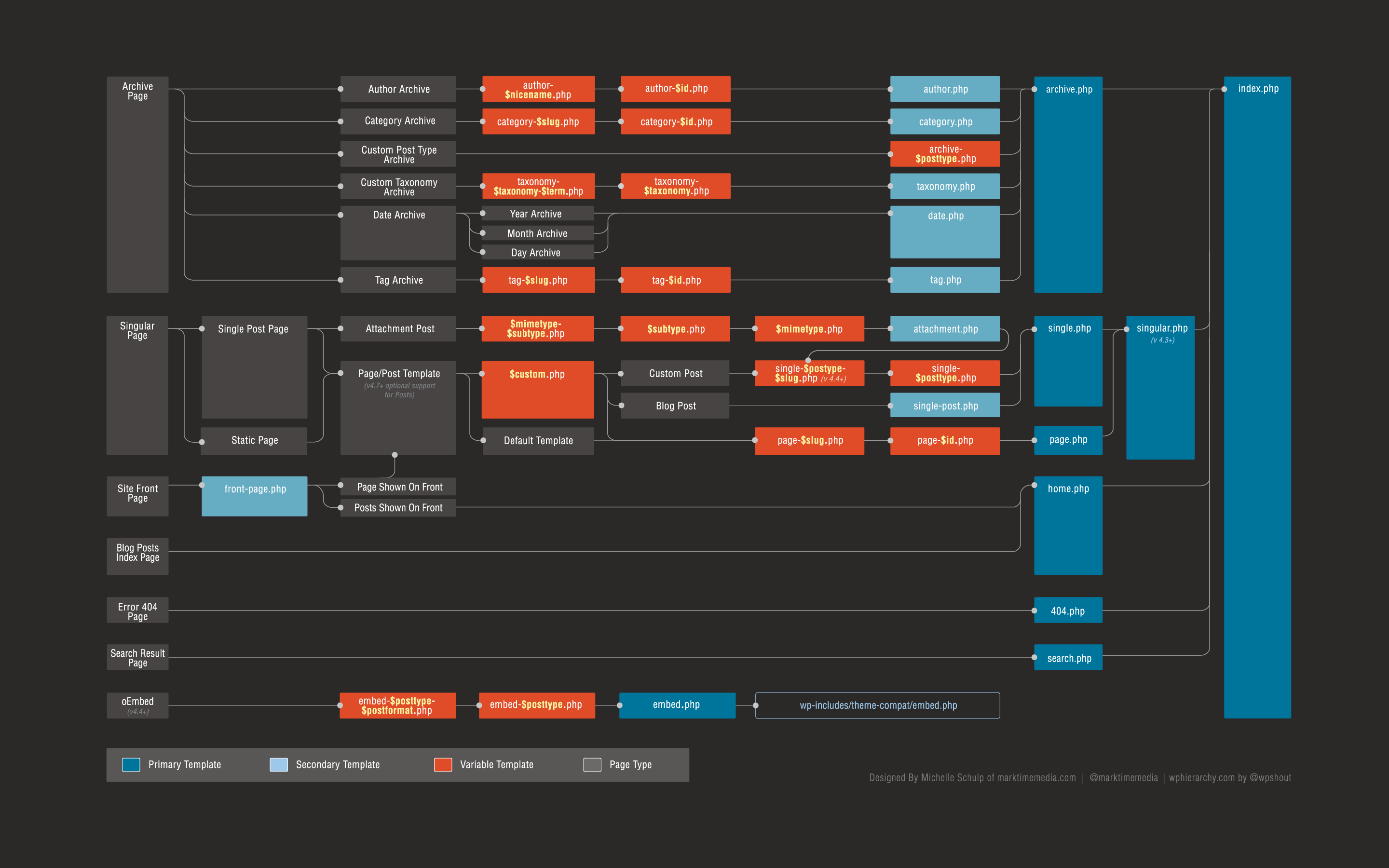
Each template file has a purpose. Some templates show content, others show archives. WordPress checks files in a certain order. It starts with the most specific and moves to the general. This order is the hierarchy.
Templates also help with themes. They ensure your theme works well. Knowing the hierarchy helps you edit your site better. It helps you make smart changes. Understanding these basics is key for good site design.
Role Of Templates In WordPress
WordPress templates shape the look of your website. They control design and layout. Every page uses different templates. Templates decide the appearance of each part. The header, footer, and sidebar have their own templates. These templates help keep the website neat. Content shows up in the right place. This makes websites easy to use. Templates are like building blocks. They let you change parts without breaking the whole site.
Hierarchy Structure
WordPress uses a special file system to show your website. Each page, post, or archive uses a specific file. This helps WordPress decide which template to use. The main file is index.php. It is the base file. If WordPress can’t find a specific template, it uses this file. For example, for a single post, WordPress looks for single.php. If it doesn’t find it, it uses index.php instead.
WordPress has different template files. Each one serves a purpose. Here are some common types:
- index.php: The main template file.
- single.php: Shows single posts.
- page.php: Shows individual pages.
- archive.php: Displays archive pages.
These files make your site work smoothly. They help arrange content properly. Use them to create a nice-looking site.

Credit: wpmudev.com
Template Selection Process
WordPress uses a special method to pick templates. It first checks for the most specific file. If it finds one, it uses it. If not, it checks the next option. This continues until it finds the right template. The system makes sure your site shows the correct layout.
The selection follows an order of precedence. This order helps WordPress know which template to use first. For example, if you have a post, it checks for a single post template. If not available, it might choose a default template. This order keeps the site organized and easy to read.
Common Template Files
The WordPress Template Hierarchy is important for site design. It helps decide which template file will display a page. Index.php is the fallback template. It shows content if no other template matches.
Home.php displays the blog’s main page. It’s used when the front page shows the latest posts. Single.php is for individual posts. It showcases details about one post.
Page.php handles static pages. Static pages include “About” or “Contact”. Archive.php shows lists of posts. It organizes posts by category, date, or tag.

Credit: bobbingwide.com
Customizing Templates
Creating a custom template gives your site a unique look. You can design pages as you like. First, make a copy of an existing template. This helps in understanding the structure. Next, change the HTML and CSS to fit your needs. Save it with a new name. Now, you have a custom template ready to use. Always test your templates on different devices.
Child themes help keep changes safe during updates. They allow you to change parts of your theme. Start by creating a new folder in the themes directory. Add a style.css file. This file must have special comments at the top. These comments tell WordPress about the child theme. Then, make a functions.php file. This file can add more features. Use template overrides to change specific files. Copy the file you want to change to the child theme folder. Now, edit it as you wish.
Best Practices
WordPress template hierarchy is crucial for theme design. It decides how templates are chosen to display pages. Understanding this system helps in customizing themes efficiently, ensuring your website looks and functions as desired.
Organizing Template Files
Template files help your site look good. Organize them well. Name files clearly. Use folders to keep things tidy. A clean setup makes updates easy. Changes are less scary when things are clear. Organizing saves time. It helps find files fast. Use the right file names. Keep them short and clear. Good names help you remember what’s inside.
Maintaining Compatibility
Keep your template compatible. Check for updates often. Old files can break sites. New themes need fresh templates. Change templates with care. Always test before using. Compatibility keeps sites smooth. Problems can annoy visitors. They may leave if things don’t work. Keep your site friendly for all users. Make sure it works everywhere. Compatibility means your site stays happy. Visitors will enjoy it more.
Credit: marktimemedia.com
Frequently Asked Questions
What Is WordPress Template Hierarchy?
WordPress template hierarchy is a system that dictates which template file to use for displaying content. It prioritizes files based on specificity, starting with the most specific and moving to the general. Understanding this hierarchy helps in customizing themes efficiently, ensuring the right template is used for the right page.
How Does Template Hierarchy Affect Theme Design?
Template hierarchy affects theme design by determining how content is displayed. It allows developers to specify different templates for different pages or post types. This ensures a consistent look across the site and helps in customizing individual pages, improving user experience and site functionality.
Why Is Understanding Template Hierarchy Important?
Understanding template hierarchy is crucial for customizing WordPress themes effectively. It helps in identifying which template files are used for specific pages. This knowledge aids in making precise changes, ensuring the site displays content correctly, and enhances the overall user experience and functionality of the website.
Can Template Hierarchy Be Customized?
Yes, template hierarchy can be customized by creating new template files and modifying existing ones. Developers can override default templates to tailor the site’s appearance and functionality. This allows for personalized designs that meet specific needs, enhancing user engagement and satisfaction on the website.
Conclusion
Understanding WordPress template hierarchy is crucial for effective theme design. It guides the display of each page on your site. Developers can customize themes with ease. This hierarchy offers flexibility for unique site designs. It helps control layouts and appearance precisely.
Beginners benefit from clear structure and organized templates. Start simple, then explore complex customizations. This knowledge enhances WordPress site management. It empowers you to create dynamic and tailored websites. Dive into the hierarchy for a more personalized web experience. Unleash your creativity with WordPress templates.
Craft a site that stands out and engages users.