
Are you confused about WordPress.org and WordPress.com? You’re not alone.
Many people mix them up because they sound so similar. But the difference between the two can change how your website looks, works, and grows. If you want to build a blog, business site, or online store, knowing which one fits your needs is key.
Keep reading, and you’ll discover exactly what sets WordPress. org and WordPress. com apart—so you can make the best choice for your online success.

Credit: www.theblogstarter.com
WordPress.org Basics
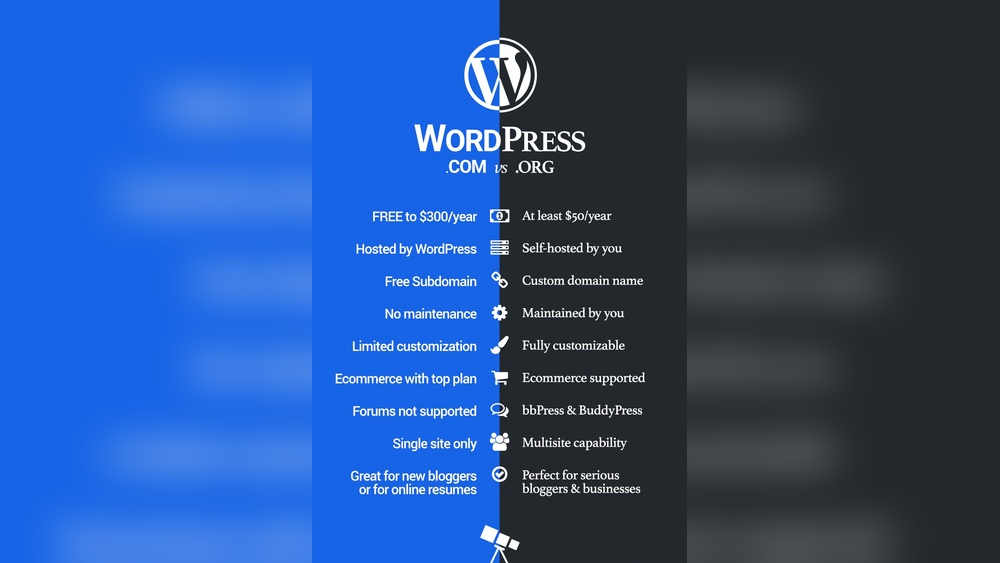
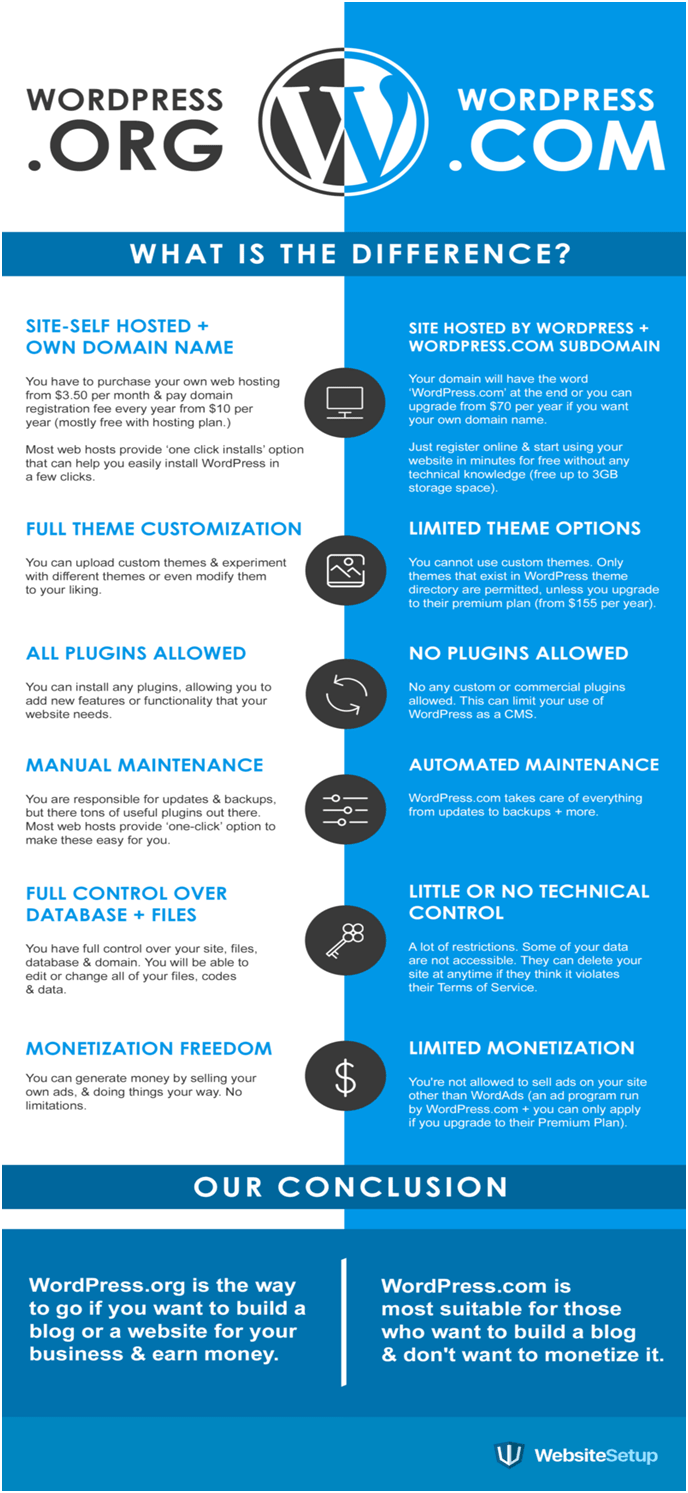
WordPress.org is the platform many people choose to build their websites. It offers full control over your site. You get the software for free, but you host your site yourself. This means you manage your hosting, security, and backups. WordPress.org is ideal for users who want to customize their website deeply.
Self-hosting Explained
With WordPress.org, you must find a web host. This is a company that stores your website files. You pay the host monthly or yearly. The host keeps your website online for visitors. You can choose any host that supports WordPress. This gives you freedom to pick the best service and price.
Customization Options
WordPress.org lets you change every part of your site. You can add themes and plugins to change the look and features. You can also edit the website code. This flexibility helps you create a unique website. You are not limited by the platform’s rules or designs.
Cost Considerations
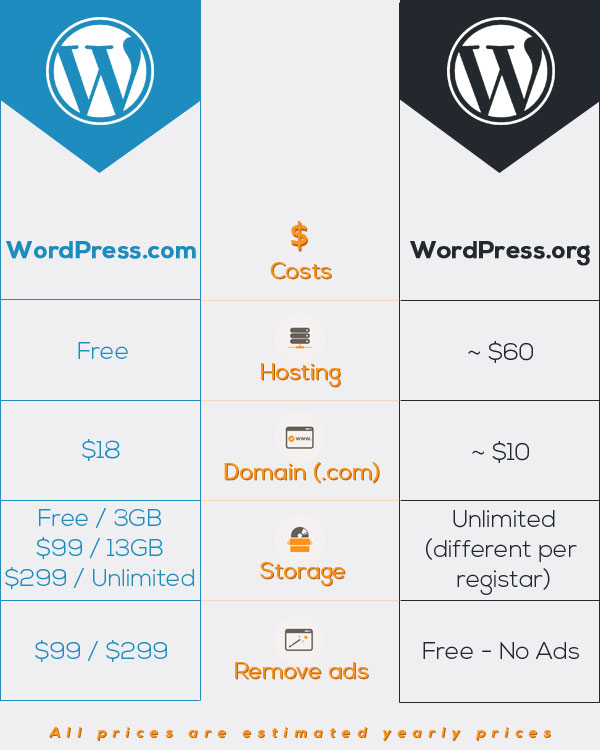
The WordPress.org software is free. You only pay for web hosting and your domain name. Some plugins and themes may cost money. You might also pay for extra services like security or backups. Overall, costs vary based on your website needs and choices.
WordPress.com Essentials
WordPress.com offers a simple way to start a website without managing technical details. It hosts your site for you, so you do not need to buy a server or install software. This makes WordPress.com a popular choice for beginners and small websites.
Hosted Platform Features
WordPress.com provides hosting and handles site security and updates. It includes free themes and basic design tools. You can add simple plugins, but the selection is limited. Automatic backups and spam protection are also part of the service. Your site runs on WordPress.com servers, so you do not manage the backend.
Ease Of Use
The platform is user-friendly with a clean interface. Beginners can create pages and posts easily. Editing works with blocks, making content layout simple. No coding skills are needed. The dashboard guides users through setup and customization. Support is available via forums and basic help articles.
Pricing Plans
WordPress.com offers several plans, including a free option with basic features. Paid plans add more storage, custom domains, and advanced design tools. Business plans allow more plugins and monetization options. Pricing is monthly or yearly, depending on your choice. Each plan fits different website needs and budgets.
Control And Flexibility
SEO and analytics are key for any website’s success. They help you understand how visitors find and use your site. Both WordPress.org and WordPress.com offer tools for SEO and tracking. But they differ in what they provide and how you access these tools.
Seo Tools Availability
WordPress.org lets you install many SEO plugins. Popular options include Yoast SEO and All in One SEO. These plugins help optimize your content for search engines. You can control meta tags, sitemaps, and keywords easily.
WordPress.com has built-in SEO features, but fewer options. The free plan offers basic SEO settings. Paid plans unlock more SEO tools but still limit plugin use. You cannot add third-party SEO plugins on WordPress.com.
Traffic Insights
WordPress.org requires you to add analytics code yourself. Google Analytics is the most common choice. It gives detailed reports on visitors, behavior, and conversions. You need to set it up manually on your site.
WordPress.com provides traffic stats automatically. It shows views, visitors, and referrers in your dashboard. Paid plans offer more detailed insights. No need to install separate analytics tools.
Credit: www.reddit.com
Monetization And Ads
Choosing the right platform between WordPress.org and WordPress.com is important. Each offers different features and suits different needs. Understanding your skills and goals helps pick the best option. This section breaks down key points to consider.
Assessing Technical Skills
WordPress.org requires some technical knowledge. You need to handle web hosting, installation, and updates. Basic coding skills help but are not always necessary. You have full control over design and plugins.
WordPress.com is easier for beginners. Hosting and maintenance are managed for you. No coding is needed. The platform limits customization compared to WordPress.org.
Choose WordPress.org if you want control and can manage technical tasks. Pick WordPress.com for a simpler, hands-off experience.
Project Goals And Scale
Consider the size and purpose of your project. WordPress.org fits large websites or online stores. It supports many plugins and custom themes. It scales well as your site grows.
WordPress.com suits small blogs or personal sites. It offers fewer features but is quick to set up. Perfect for basic websites with low maintenance needs.
Your project’s future plans matter. For growth and flexibility, WordPress.org is better. For simplicity and ease, WordPress.com works well.
Credit: psdtowp.net
Frequently Asked Questions
What Is WordPress.org Used For?
WordPress. org provides free software for building self-hosted websites. It offers full control, customization, and plugin access. Users must arrange hosting and domain registration separately.
How Does WordPress.com Differ From WordPress.org?
WordPress. com is a hosted platform with simplified setup and maintenance. It limits customization and monetization unless you upgrade to paid plans.
Which Platform Is Better For Beginners?
WordPress. com suits beginners seeking easy setup without technical tasks. WordPress. org is ideal for users wanting full control and customization.
Can I Use Plugins On WordPress.com?
Plugins are only available on WordPress. com’s Business and higher plans. WordPress. org allows unlimited plugin installation on all sites.
Conclusion
WordPress. org and WordPress. com serve different needs. One offers full control and customization, while the other is easier to start. Choosing depends on your goals and skills. Both help create websites, but with different tools and limits. Understanding these differences helps pick the best fit.
This way, your website can grow the way you want. Take your time to decide what works for you. The right choice makes building a site simple and effective.


