
Have you ever wondered about the difference between a web server and a host? It’s easy to mix them up.
But understanding the distinction is crucial, especially if you’re diving into the world of websites and online content. Whether you’re building a website from scratch, or simply curious about how the internet works, this topic holds the key to unlocking clearer insights into how your favorite sites are stored and accessed.
Picture this: you click on a link and, in seconds, a website appears on your screen. What happens behind the scenes? The answer lies in the roles of web servers and hosts. Keep reading to discover how each plays a vital part in bringing the digital world to your fingertips. By the end of this article, you’ll not only grasp the difference but also appreciate how they work together to deliver seamless online experiences.
Web Server Basics
A web server is a computer. It stores and delivers web pages. People request pages through their browsers. The server sends these pages back. Web servers use HTTP to communicate. They ensure websites are always available. Servers handle many requests at once. They keep data safe and secure.
There are different types of web servers. Apache is popular and open-source. It is widely used. NGINX is another type. It is fast and efficient. Microsoft IIS is used for Windows servers. Each server has unique features. They suit different needs and preferences.

Credit: www.hostinger.com
Host Fundamentals
Hosts are computers connected to the internet. They store and serve data to users. Each host has a unique IP address. This helps in identifying them on the network. Hosts are vital for internet communication. They allow websites and applications to be accessible online. Without hosts, the internet would not function properly. Hosts ensure data is available anytime users need it. They play a crucial role in internet operations. Hosts make sure websites are always online. This is essential for user experience and reliability.
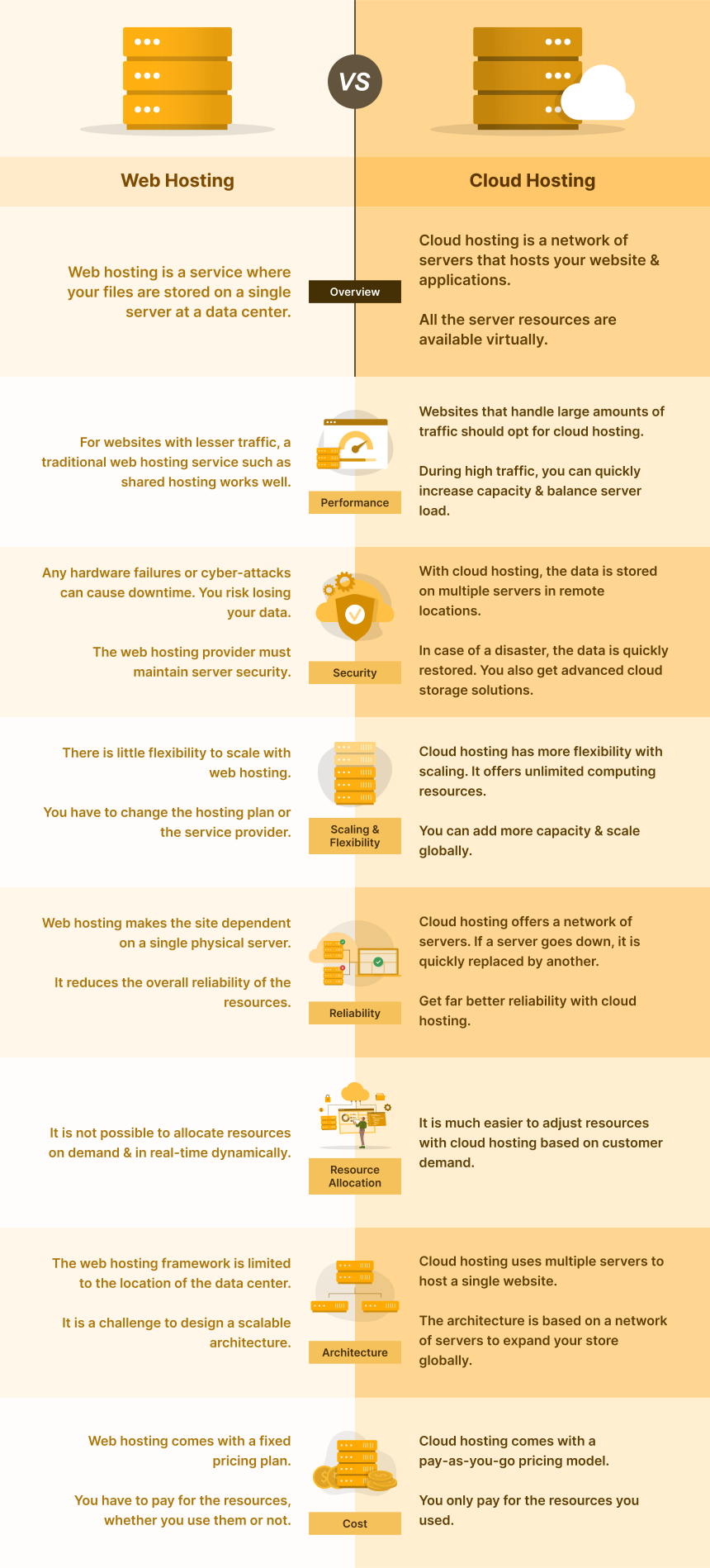
There are various types of hosting available. Shared hosting is where multiple sites share one server. It is budget-friendly but has limited resources. VPS hosting provides more control and resources. It is like a private space on a shared server. Dedicated hosting offers an entire server for one site. This gives maximum performance and security. Cloud hosting uses multiple servers for flexibility. It adapts to traffic changes easily. Choosing the right type depends on website needs.
Core Differences
Web servers and hosts serve different roles in web technology. A web server stores, processes, and delivers web pages to users. Meanwhile, a host provides storage space for websites on the internet. Understanding these roles helps in managing web resources effectively.
Purpose And Functionality
Web servers store and deliver web pages. They handle requests from users. Web servers run websites smoothly. They manage data and traffic. Hosts are different. They provide space for websites. Hosts keep websites online. They offer storage and bandwidth. Hosts ensure sites are accessible. Both are crucial. They work together. Servers deliver content, hosts support it.
Resource Management
Web servers manage resources efficiently. They handle requests swiftly. They ensure data flows smoothly. Servers optimize speed. They balance load to prevent crashes. They are vital for website performance. Hosts manage different resources. They allocate space on their servers. Hosts provide storage for websites. They ensure enough bandwidth. Hosts support website growth. Both manage resources well. They keep websites running effectively.

Credit: www.hostinger.com
Technical Components
Web servers are mostly software programs. They run on a computer. This computer is the hardware. It stores and delivers websites. Hosting is the service that provides space on a server. It is like renting a room on the internet. Web servers need powerful computers. Hosting can use different computers based on need.
Setting up a web server involves installing software. This software manages website requests. Hosting setup is about allocating resources. It ensures websites have enough space and power. Web servers often need technical skills. Hosting setup can be simpler. Many hosts offer tools to make it easy.
Performance And Scalability
Web servers and hosts handle traffic differently. Web servers manage requests from browsers. They store and send website files. Hosts provide space for these files. Hosts also manage resources like bandwidth and storage.
Web servers need to handle many requests. They must be fast and efficient. Hosts must be able to scale resources. More traffic means more resources needed. Hosts must be ready for this.
Handling Traffic Loads
Web servers must process many requests quickly. Slow servers can make sites lag. Hosts must offer enough resources. This includes RAM, CPU, and bandwidth. Without these, websites can crash. Both need to handle high traffic.
Impact On User Experience
Web server speed affects user experience. Slow servers lead to slow sites. Hosts affect site stability. A stable host means a stable site. Both impact how users see your website. Fast, stable sites keep users happy.
Security Considerations
Understanding the difference between a web server and a host is crucial for security. A web server delivers web pages, while a host provides space to store them. Security considerations ensure these components work safely, protecting data from cyber threats.
Common Threats
Web servers face many threats. Hackers often use malware to attack them. DDoS attacks can slow down servers. This stops people from visiting websites. Phishing is another threat. It tricks users into giving their personal data. Web hosts also face threats. They can be targets of hacking attempts. This can lead to data breaches and loss of user information.
Protective Measures
Strong security measures are needed. Firewalls help block harmful traffic. Regular software updates fix security holes. Encryption keeps data safe from bad people. Web hosts often use backups. This helps recover data if there is an attack. Educating users about threats is also key. It helps them spot phishing attempts.
Cost Implications
Understanding cost implications involves comparing web servers and hosts. Web servers manage online content, while hosts provide storage and internet access. Different functions lead to varying costs.
Pricing Models
Web servers often have fixed costs. You pay monthly or yearly. Hosting services use different pricing models. Some charge based on usage. Others have packages for different needs.
With hosting, you might pay more for extra features. Think about storage and bandwidth. Web servers may need maintenance. This can add to the cost.
Investment Vs Return
Web servers can be a big investment. You need to buy and maintain them. Hosting is often cheaper upfront. You share the server with others.
Consider the return on investment. A web server might give you more control. Hosting can be more cost-effective. It depends on your needs and budget. Weigh the pros and cons carefully.
Future Trends
Web servers manage and deliver website content, while hosts provide the physical space where websites reside. Understanding their roles helps in managing websites effectively.
Emerging Technologies
New technologies are changing the internet. Cloud computing allows data to be stored online. This means less hardware is needed. Artificial Intelligence helps in managing servers. It can fix problems faster than humans. Edge computing brings data processing closer to users. This makes websites faster.
Impact On Web And Hosting
The internet is growing. More people are going online. This creates a need for better servers. Web hosts must handle more traffic. They must ensure websites run smoothly. Security is also very important. Hackers are always looking for weak spots. Web hosts must protect data from them. Scalability is key too. Websites need to grow with their users. Web hosts must be ready to help them expand.
Credit: www.cloudpanel.io
Frequently Asked Questions
Is A Web Server The Same As Hosting?
A web server handles requests and serves content, while hosting provides the infrastructure for websites. Hosting involves storing website files, ensuring accessibility online. Both are essential for a website’s functionality but serve different roles in web management.
What Is The Difference Between A Server And A Host?
A server provides resources and services, while a host is a device connected to a network. Servers manage data; hosts access it. Servers run software applications; hosts can be computers, phones, or devices. Servers often perform hosting functions, but hosts may not serve resources.
Can A Host Also Be A Server?
Yes, a host can also function as a server. It provides resources or services to other devices. A server manages network resources, while a host can be any device on a network. Both can coexist in one machine, offering flexibility and efficiency.
Is Every Website Hosted On A Server?
Yes, every website is hosted on a server. Servers store website files and make them accessible online. Hosting providers offer server space, ensuring websites are available to users 24/7. Without a server, a website cannot be accessed via the internet.
Choose reliable hosting for optimal performance.
Conclusion
Understanding web servers and hosts is crucial for website management. A web server stores and delivers website content. A host provides the space for websites on the internet. These components work together to make websites accessible. Each serves a different role but is essential for online presence.
Knowing their functions can help manage a website better. It ensures smooth operation and availability. So, next time you work on a website, remember their unique roles. This knowledge can improve your website’s performance. Stay informed and keep learning for better results.


