
Are you puzzled by the difference between files and databases in WordPress? You’re not alone.
Understanding how WordPress stores and manages your data is crucial for optimizing your website’s performance and ensuring its security. Imagine your WordPress site as a bustling library. Files are like the books on the shelves—visible, tangible, and easy to browse.
Databases, on the other hand, are the librarians—the unseen force that organizes and retrieves information quickly and efficiently. Knowing how these elements work together can unlock the true potential of your WordPress site, making it faster, more secure, and easier to manage. Dive into this article to discover the key differences between files and databases in WordPress, and learn how mastering this knowledge can empower you to take control of your website like never before.
Files In WordPress
WordPress runs on core files. These files make WordPress work. They contain the code for WordPress functions. Never change these files. Updates can overwrite changes.
Theme files change how a site looks. They define layout, colors, and fonts. You can choose different themes. Themes can be free or paid. Changing themes is easy.
Plugin files add features to WordPress. They make your site do more. Want a contact form? Use a plugin. Always check for plugin updates. Updates fix bugs and add features.
Media files are pictures, videos, and audio. They make your site fun. Upload them to the media library. Use them in posts and pages. Media files need space. Keep your files organized.

Credit: www.malcare.com
Database In WordPress
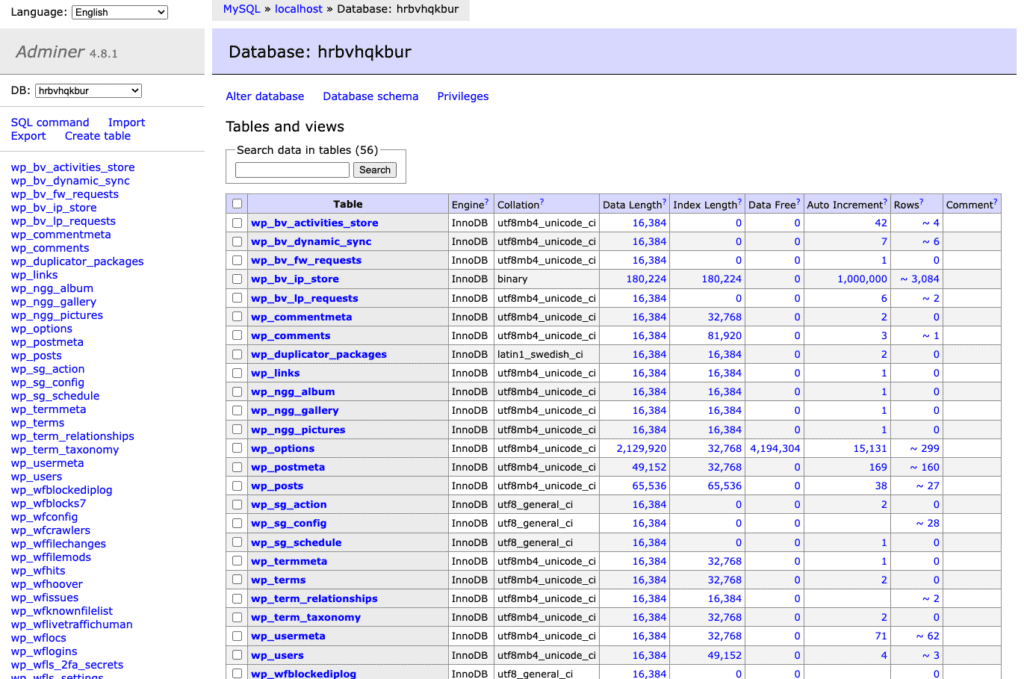
WordPress uses a database to store important data. This includes user details, posts, and settings. The database is organized using tables. Each table has a specific role. For example, the wp_users table stores user info.
Tables have different jobs. The wp_posts table keeps all blog posts. The wp_comments table holds comments from readers. Tables help keep data sorted and easy to find.
Data in a database is stored in a special way. This makes it quick to access. The database ensures data is safe and organized. This is important for a busy website. Without a database, finding data would be slow and hard.
File Storage Vs. Database Storage
File storage saves data in folders. Each file has its own location. It uses a simple structure. Database storage, on the other hand, keeps data in tables. This is more structured. Data can be sorted and searched easily in a database. Files are better for simple documents. Databases are good for complex data.
Files are quick for small data. They need less power. Databases perform well with large data. They can handle many users at once. File storage may slow down with many files. Databases can organize and retrieve data faster. This makes them ideal for busy websites.
File storage is easy to set up. It works well for small sites. Databases can grow with your website. Adding new data is simple. Databases can handle more users as they grow. Files might need more space. Databases can expand without much trouble. They are perfect for growing businesses.
Security Implications
Understanding the security implications in WordPress involves knowing the difference between files and databases. Files store themes and plugins, which can be vulnerable to hacking. Databases hold user information and content, requiring strong protection measures. Both need regular updates and strong passwords to ensure safety.
File Security
Files need strong passwords to stay safe. They can be easy to steal. Hackers often target files. Keeping them safe is important. Files should have limited access. Only trusted people should see them. Updates are important. They fix security holes. Without updates, files can be at risk. Always have a backup plan. Backups save your data if files get lost.
Database Security
Databases store lots of information. They need strong encryption. This keeps data private. Only a few should access them. Use strong passwords and change them often. Security patches are crucial. They protect databases from attacks. Regular checks are needed. They ensure everything is safe. Monitoring systems help detect problems fast.
Backup And Recovery
Backups protect from data loss. Always keep them updated. Use both file and database backups. Store them in different places. This ensures data safety. Recovery plans are vital. They help get data back quickly. Test recovery often. Make sure it works well. This way, data is never lost for long.
Use Cases For Files
Files hold images, documents, and videos. This is great for static content. Websites with fixed information need files. They are easy to manage. Files are simple to upload and download. This makes them very handy.
Custom themes use files. Designers save styles in CSS files. These files control the look of the site. Each file adds a new layer of design. Changes can be made quickly. This helps in personalizing the website.
Plugins add features to websites. They come in file form. Files hold the plugin code. This code gives extra powers to WordPress. Installing a file is easy. Just click and upload. It’s done!

Credit: deliciousbrains.com
Use Cases For Database
A database helps with dynamic content on websites. It stores and delivers information quickly. Users see fresh data every time they visit. This is important for news sites and blogs. They need to update content often. A database ensures this happens smoothly.
Databases keep user information safe and organized. They store usernames, passwords, and email addresses. With this data, websites can offer personalized experiences. Users log in and see content meant just for them. This helps build a connection.
Online stores use databases for transactions. They track sales, payments, and inventory. This information is crucial for smooth operations. Databases ensure that every transaction is accurate. This keeps both buyers and sellers happy.
Best Practices
Use files for images and videos. Avoid storing them in the database. Files take up less space this way. This helps your WordPress site to run faster. Organize files in folders. Name them clearly. This keeps things tidy.
Back up your database regularly. This keeps your data safe. Use plugins to help with backups. Clean up old data. Delete unused content. This keeps the database lean. A smaller database runs faster.
Both files and databases are important. Use them wisely. Keep files and database separate. This ensures better performance. Divide large files into smaller ones. This helps with easy access. Your WordPress site will thank you.
Credit: www.malcare.com
Frequently Asked Questions
What Is A WordPress File Structure?
WordPress file structure includes core files, themes, plugins, and uploads. Core files manage WordPress operations. Themes define design, while plugins extend functionality. Uploads store media files. This structure helps in organizing and managing WordPress content efficiently.
How Do WordPress Databases Work?
WordPress databases store site data like posts, pages, and user information. They use MySQL to manage data. Databases allow dynamic content retrieval and storage, enabling efficient content management. This setup helps in quick data access and site performance.
Why Choose Databases Over Files In WordPress?
Databases provide structured data storage and faster retrieval. They allow dynamic content management and scalability. Unlike files, databases support complex queries and relationships. This makes them ideal for large, dynamic websites requiring efficient data handling.
Can Files And Databases Be Integrated In WordPress?
Yes, files and databases work together in WordPress. Files manage the structure and appearance, while databases handle content. This integration allows seamless content management and efficient site operations, enhancing user experience.
Conclusion
Understanding the difference helps in managing WordPress effectively. Files store content like themes, plugins, and media. Databases store dynamic content, like posts and user data. Both are crucial for WordPress functionality. Knowing their roles aids in troubleshooting issues. It also enhances your site’s performance and security.
A balanced approach ensures smooth operation. Regular backups of both files and databases are essential. This protects your site from data loss. With this knowledge, you can maintain your WordPress site with confidence. Keep learning and exploring for better site management.


