
Are you thinking about launching your own WordPress website but wondering how much it will cost? You’re not alone.
Understanding the expenses involved in creating a WordPress site is crucial for making informed decisions. Whether you’re a small business owner, a blogger, or just curious, knowing the costs can help you budget effectively and avoid surprises. Imagine having a clear roadmap of expenses, from the domain name to hosting and premium themes.
Wouldn’t it be great to have control over your spending and ensure you get the best value for your investment? You’ll discover the key factors that influence the cost of a WordPress website and learn how to tailor them to suit your needs. Stay with us, and you’ll gain insights that could save you time, money, and headaches.
Factors Influencing WordPress Costs
WordPress website costs depend on several factors. Hosting and domain fees are basic expenses. Custom themes and plugins can increase costs. Developer fees vary based on complexity and expertise. Regular maintenance and updates also affect the total cost. Understanding these factors helps in budgeting effectively.
Domain And Hosting Fees
Starting a website needs a domain name. This is your website’s address. Domains usually cost $10 to $20 yearly. Hosting is important too. It keeps your site online. Hosting fees can range from $3 to $10 monthly. Some services offer deals for beginners. Always check what is included. Look for uptime guarantees and support.
Theme Selection And Purchase
Themes give your site its look. Free themes exist but may lack features. Paid themes often offer more design options. Costs for themes vary. Most range from $20 to $100. Consider buying a theme that suits your brand. This can affect your site’s appeal.
Plugin Investments
Plugins add features to your site. Some plugins are free. Premium plugins might cost extra. They can improve security, SEO, and more. Budget for plugins can vary. Expect to spend $5 to $50 for some. Choose plugins wisely to meet your needs.
Custom Design And Development
Custom designs make your site unique. Designers charge different rates. Simple changes might cost less. Complex designs can be expensive. Developers help with site functions. Costs depend on project size. Custom work can range from $100 to thousands. Decide based on your budget and goals.
Credit: www.elegantthemes.com
Initial Setup Expenses
A domain is your website’s name. It’s like your home’s address. Domains usually cost $10 to $15 per year. Prices can vary based on the name. Short names may cost more. But they are easier to remember.
Hosting is where your website lives. It is like renting space. Hosting costs can start from $3 to $10 per month. Some providers offer discounts for the first year. Consider choosing one that fits your needs.
WordPress is free to use. It is easy to install. Most hosting services offer a one-click install feature. You don’t need to be an expert. Just follow the steps provided.
Design And Theme Costs
Estimating the cost of a WordPress website requires considering design and theme expenses. Custom themes range from free options to premium ones costing hundreds of dollars. Investing in a unique design can enhance user experience and brand identity, impacting overall budget.
Free Vs Premium Themes
Free themes are budget-friendly. They offer basic designs. Premium themes cost money. They have more features. They offer better designs and support. Free themes may have limited options. Premium themes allow more customization. They are better for unique sites. Choosing a theme impacts your site’s look. It also affects its function. Consider your needs. Think about your budget. Pick a theme that matches your goals.
Customization Fees
Customizing a theme can cost extra. Basic tweaks may be free. Advanced changes need expert help. Experts charge fees. Fees depend on complexity. Simple changes are cheaper. Complex changes cost more. Customization improves your site. It makes your site unique. It boosts user experience. Plan your budget. Decide what you need. Hire help if necessary. Customization should fit your budget.
Credit: webappick.com
Plugin And Extension Expenses
Many plugins on WordPress are free. These plugins help your site. You can find plugins for forms, galleries, and social media. Free plugins often have basic features. They are good for starters.
Some plugins need payment. They offer more features than free ones. Premium plugins can cost from $10 to $100. The price depends on the plugin’s features. Licenses often need renewal every year.
Keeping your site safe is important. Security plugins help with that. Many security tools are free. Some need payment for advanced features. SEO tools make your site visible. They help it rank better. Some SEO tools are free. Others require a paid plan.
Ongoing Maintenance Costs
Regular updates keep your WordPress website running smoothly. These updates fix bugs. They also add new features. Regular updates protect your site from hackers. Failing to update can lead to security risks. Updates may involve plugins, themes, or WordPress itself. Each update might take time. You may need professional help for complex updates.
Backup services are crucial for website safety. They save copies of your site. This helps recover lost data. Backups can be daily or weekly. Many services offer automatic backups. Backup plans can vary in cost. Some plugins provide free backups. Others charge a fee for extra features.
Technical support resolves issues quickly. It helps when your site has problems. Support can be via email or chat. Some providers offer 24/7 help. Support plans vary in price. Free support may be limited. Paid plans offer more features. Choose a plan based on your needs.
Hidden Expenses
Building a WordPress website involves more than just hosting and domain costs. Expenses like premium themes, plugins, and ongoing maintenance can add up quickly. These hidden costs can significantly impact your budget if not carefully managed.
Unexpected Development Fees
Unexpected fees can pop up during development. Some plugins require extra payments. Developers might charge for special features. This increases your costs. Themes can also have hidden charges. These fees surprise many website owners. It’s important to plan for these expenses early.
Emergency Troubleshooting
Emergencies happen. Your site might break. Fixing issues can be costly. Experts charge for emergency help. Night-time fees can be higher. Such costs are often unplanned. This can affect your budget. Regular maintenance helps avoid emergencies.
Scalability Considerations
Websites grow. Traffic increases over time. Your site needs more power. This means extra costs. Hosting can become expensive. Upgrading servers is often needed. Planning for growth is smart. This helps save money in the long run.
Budget-friendly Tips
Many free tools can help build a WordPress site. Free plugins add features without extra cost. Free themes give your site a nice look. Community forums provide support and advice. These resources save money and offer great value. Using them wisely can keep your budget low.
Picking affordable hosting plans reduces expenses. Shared hosting offers good performance at a low price. Some providers give discounts for long-term plans. Buying plugins and themes in bundles is cheaper. Avoiding fancy features cuts down costs. Simplicity often works best.
Doing it yourself saves money but takes time. Learning through online tutorials is helpful. Professionals build sites quickly but cost more. Choose based on your skills and budget. DIY is good for simple sites. Complex sites may need expert help. Weigh the pros and cons before deciding.
Credit: kinsta.com
Frequently Asked Questions
What Factors Influence WordPress Website Costs?
The cost of a WordPress website depends on several factors. These include hosting, domain name, themes, plugins, and developer fees. Custom designs and complex functionalities can increase the price. Maintenance and updates are also additional costs. Evaluating your specific needs can help determine a more accurate budget.
How Much Does Hosting A WordPress Site Cost?
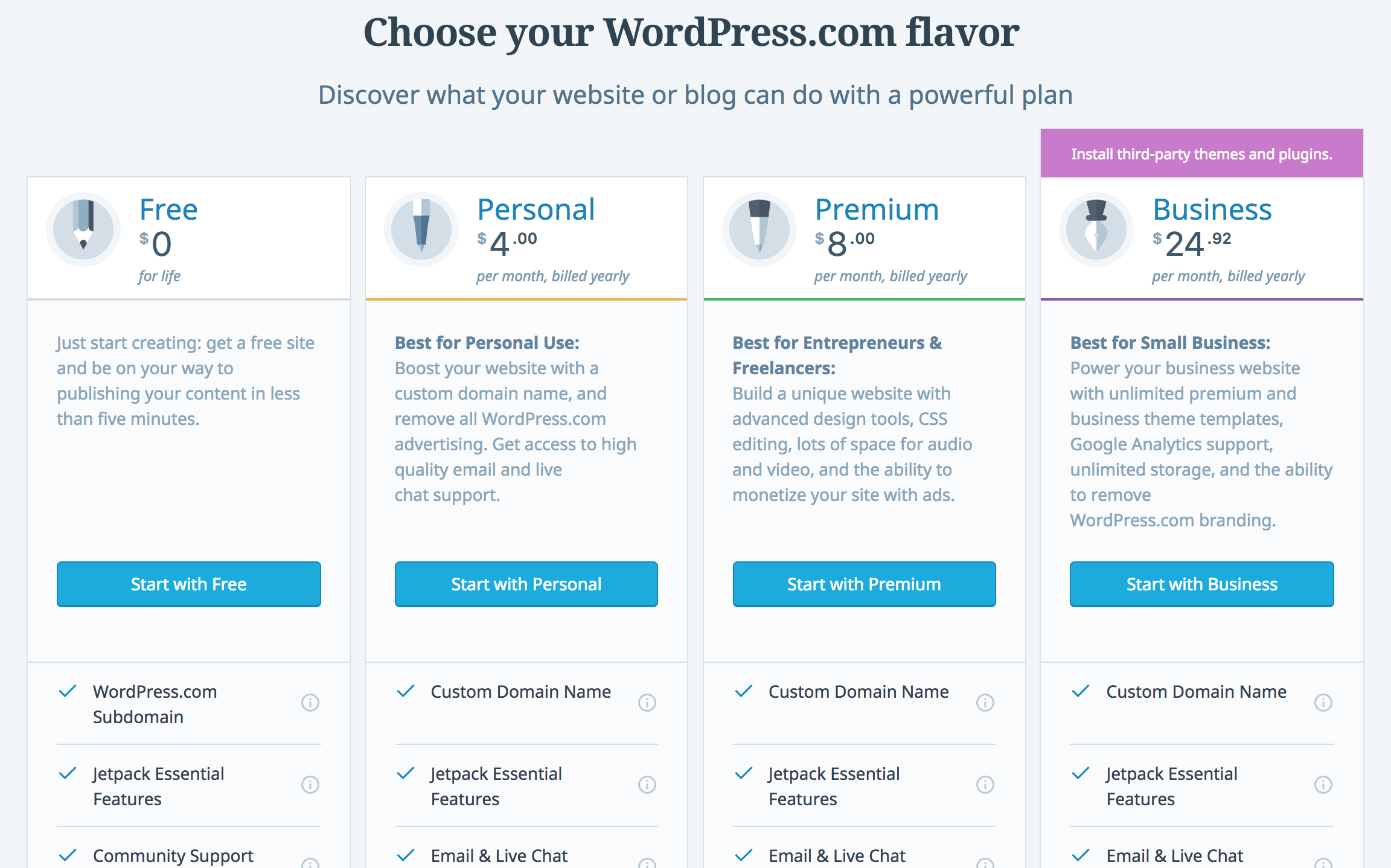
Hosting costs for a WordPress site vary widely. They typically range from $3 to $30 per month. Shared hosting is cheaper, while managed WordPress hosting is more expensive. Costs increase with additional features like enhanced security and support. Choosing the right hosting depends on your site’s needs and traffic.
Are Premium WordPress Themes Worth The Cost?
Premium WordPress themes offer more features and customization. They often include better support and regular updates. These themes can enhance website performance and security. While they cost between $30 and $100, the investment can be worthwhile for a professional-looking website.
Consider your specific requirements before purchasing.
How Much Do WordPress Plugins Cost?
WordPress plugins can be free or paid. Premium plugins usually cost between $15 and $200. They offer advanced features and regular updates. Prices vary based on functionality and developer support. Choosing the right plugins can improve your site’s functionality and user experience.
Evaluate your needs to make cost-effective choices.
Conclusion
Creating a WordPress website involves various costs. Themes, plugins, and hosting add up. Choose free or premium options based on your needs. Budget carefully to avoid surprises. Remember, maintenance is crucial for success. Regular updates keep your site secure and fast.
DIY options can save money. Hiring professionals can ease complex tasks. Consider your skills and time before deciding. Investing wisely can lead to a smooth experience. A well-planned budget ensures your site meets goals. With thought and effort, your WordPress site can thrive.


