
Have you ever wondered what a table prefix is in WordPress and why it’s important for your website? Understanding this seemingly small detail can actually play a significant role in your site’s security and organization.
Imagine your website as a bustling city, with each database table acting as a vital building. The table prefix is like the street name that keeps everything organized and easy to navigate. It helps protect your site from potential threats while ensuring that everything runs smoothly behind the scenes.
By grasping the concept of table prefixes, you can take control of your WordPress site, enhancing both its security and performance. Curious to learn more? Let’s dive deeper into how this simple component can make a big difference for your website.
Credit: wpengine.com
Table Prefix Basics
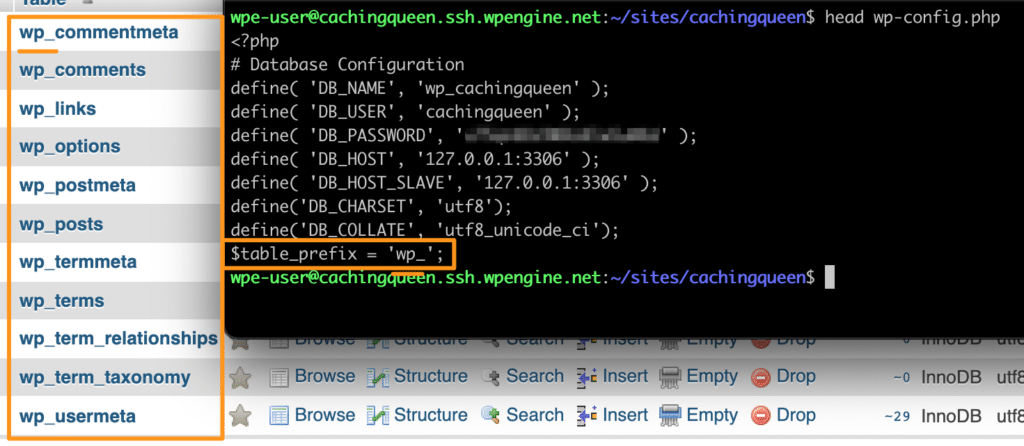
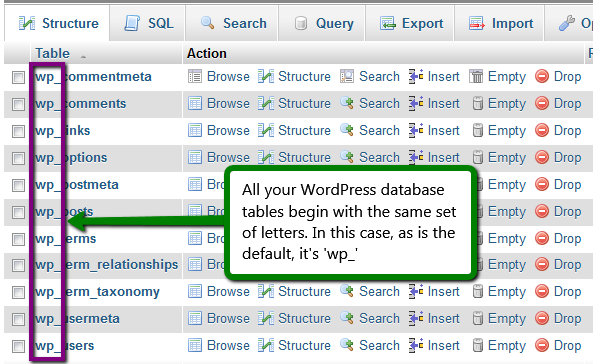
A table prefix is a short word or letters. It is added before database table names. This helps to identify tables easily. In WordPress, the default prefix is wp_. You can change it during installation. This adds an extra layer of security. It makes it harder for hackers. They will not know the exact table names. Changing the prefix can protect your site. It is a simple but effective step.
Using a unique table prefix is important. It can help prevent database attacks. Hackers often target default prefixes. So, a custom prefix keeps your data safer. It is also easier to manage multiple WordPress sites. Each site can have its own prefix. This avoids confusion in the database. Your website runs smoothly and securely with it.
Default Table Prefix In WordPress
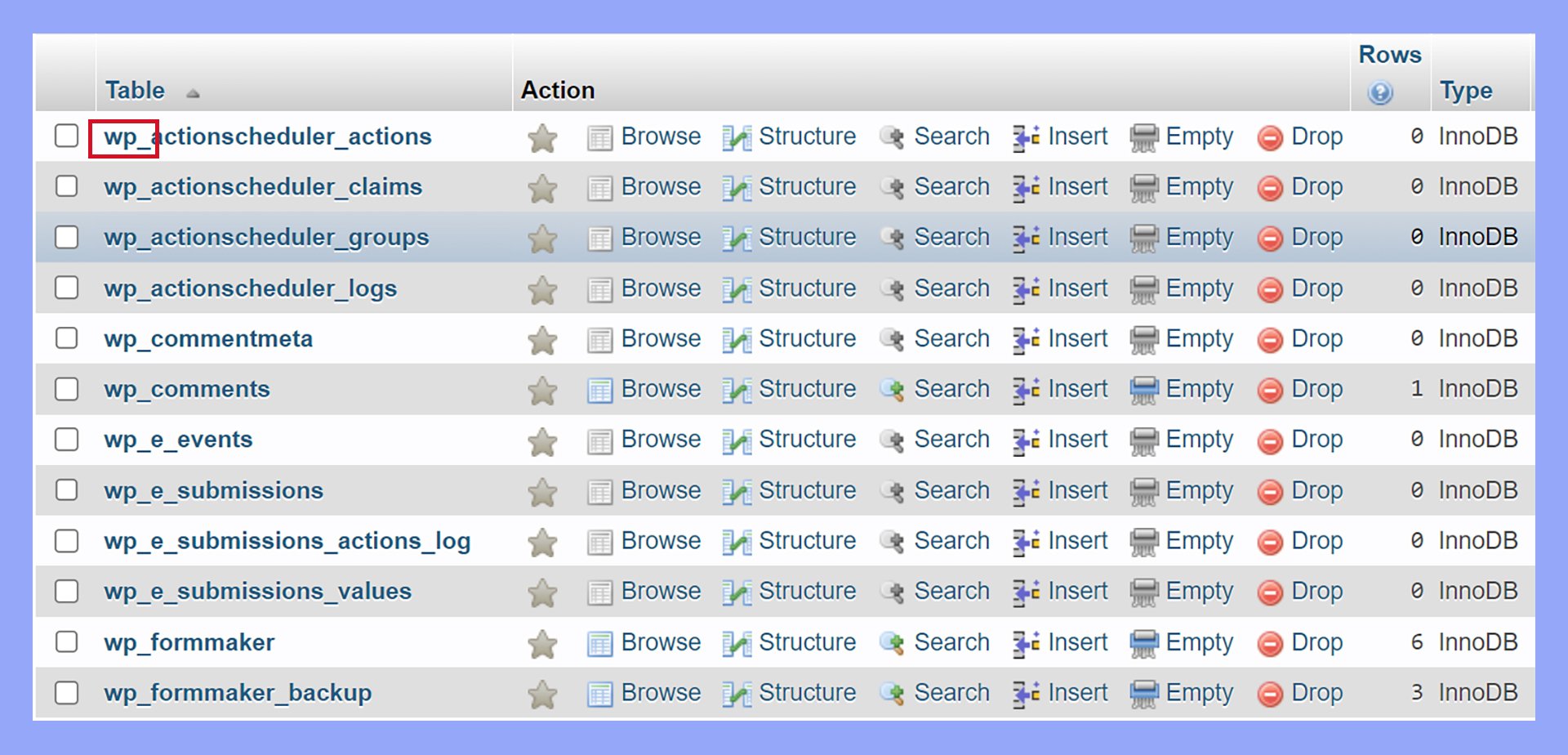
WordPress uses a default table prefix called wp_. This prefix is like a label. It goes before each database table name. For example, wp_users is a table for users. This makes it easy to know which tables belong to WordPress.
The table prefix helps organize and manage your data. It keeps WordPress tables separate from others. If you have more than one website, it prevents confusion. Changing the prefix can also add security. It makes it harder for hackers to guess your table names.
Benefits Of Changing Table Prefix
Table prefix in WordPress enhances security and organization. Changing it helps prevent unauthorized access and minimizes risk. Custom prefixes add an extra layer of protection against database attacks.
Enhanced Security
Changing the table prefix can make your WordPress site safer. Hackers often target the default prefix. By using a unique prefix, you make it harder for them. This adds an extra layer of security to your site. It’s like having a unique key for your door. So, even if they know the lock, they can’t enter.
Reduced Risk Of Sql Injections
Using a different table prefix reduces the risk of SQL injections. These attacks happen when hackers insert harmful code into your database. By changing the prefix, you confuse these attacks. It’s like speaking in a secret code. This makes your website much safer from bad guys.
How To Change Table Prefix
Table prefixes in WordPress help distinguish database tables. Changing them can enhance security by preventing SQL injection attacks. To update the table prefix, modify the ‘wp-config. php’ file and rename each table in your database, ensuring they match the new prefix.
Backup Your Database
Before making changes, create a backup of your database. This is very important. Use a tool like phpMyAdmin. Export the database as an SQL file. Save the file to your computer. This backup will help if things go wrong.
Modify Wp-config.php
Open the wp-config.php file. It is in your WordPress folder. Find the line that starts with $table_prefix. Change the prefix to a new name. Make sure the new name is short. Save the changes. Close the file.
Update Table Prefix In Database
Access your database using phpMyAdmin. Look for tables with the old prefix. Rename each table with the new prefix. There are many tables to rename. Take your time. Check each table carefully. After renaming, review all changes. Ensure everything looks correct.
Common Mistakes And Solutions
Incorrect database changes can cause trouble. Many people change table prefixes without knowing. This can break connections. Always check the database before changes. Use a backup to save your data. A wrong change can lead to lost data. Be careful with each step.
Fixing access issues is important. Sometimes, you lose access to your site. This happens after changing prefixes. Check your login credentials. Ensure they match the new prefix. If access is still a problem, look at your database settings. Fixing these can restore access.
Credit: 10web.io
Tools And Plugins
Table prefix in WordPress is a label added to database tables. It enhances security by protecting data from potential threats. Changing the default prefix can help prevent SQL injection attacks.
Plugins For Changing Prefix
Plugins can help change the table prefix in WordPress easily. They save time and reduce errors. One popular plugin is Change DB Prefix. It allows users to change prefixes with a click. Another good option is iThemes Security. It offers many security features, including prefix change. These plugins guide users step-by-step. They make the process simple and safe.
Automated Solutions
Automated tools help manage WordPress databases. They can change table prefixes quickly. One such tool is WP-CLI. It’s a command-line tool for WordPress management. WP-CLI can change prefixes without logging into the dashboard. It performs tasks fast and efficiently. Another tool is Adminer. This database manager works like phpMyAdmin. It lets users change prefixes with a few clicks. These automated solutions make prefix changes easy and quick.
Best Practices
Regular checks keep your WordPress site safe. Look for unusual changes or errors. Security audits help find weak spots. Fix these quickly. Update plugins and themes often. This stops hackers. Use tools for scanning. They help spot problems. Keep your site secure and running well.
Backups are copies of your site. They are important. If something breaks, backups help. You can restore your site. Keep backups in a safe place. Use cloud storage or external drives. Make backups often. Weekly is a good idea. This keeps your data safe. Always have a recent backup ready.
Credit: www.icontrolwp.com
Frequently Asked Questions
What Is The Purpose Of A Table Prefix In WordPress?
A table prefix in WordPress helps to identify tables in your database. It adds an extra layer of security by making it harder for hackers to guess your database structure. Using a unique table prefix can also prevent conflicts when multiple WordPress installations share a single database.
How Do I Change The WordPress Table Prefix?
To change the WordPress table prefix, edit the `wp-config. php` file. Find the line that defines `$table_prefix` and replace it with your new prefix. Ensure all your database table names are updated accordingly. Always back up your database before making these changes to avoid data loss.
Is It Safe To Modify The Table Prefix?
Yes, modifying the table prefix is generally safe if done correctly. It can improve your site’s security by making it harder for malicious users to predict your table names. Always back up your database before making any changes and ensure all references to the prefix are updated.
Can Changing The Table Prefix Improve Security?
Yes, changing the table prefix can enhance security. Default prefixes like “wp_” are commonly targeted by hackers. By using a unique prefix, you reduce the risk of automated attacks. Always ensure you update all references to the old prefix in your database.
Conclusion
Understanding table prefixes in WordPress is important. They enhance your site’s security. A unique prefix protects against SQL injections. Setting it up is simple. Just change the default during installation. Or, update it later with a plugin. This small step can make a difference.
It keeps your data safer. Always remember to back up your database first. It’s crucial. With these tips, managing WordPress becomes easier. You gain more control over your website. Keep your site secure and efficient. Table prefixes play a key role.
Now, you’re ready to implement them confidently.


