
Have you ever wondered how your personal information stays safe while surfing the web? When you shop online, fill out forms, or access sensitive accounts, you want to ensure your data is protected.
This is where SSL in web hosting comes into play. SSL, short for Secure Socket Layer, acts as a shield for your online activities, ensuring that your information remains private and secure. Imagine browsing the internet without worrying about hackers or data breaches.
SSL not only protects your data but also builds trust with your visitors. When you see that little padlock icon in your browser’s address bar, you know your connection is safe. But how does SSL actually work? And why is it crucial for your website’s success? Dive into this article to uncover the secrets behind SSL in web hosting. You’ll discover how it can enhance your site’s security, boost your credibility, and even improve your search engine rankings. Don’t miss out on learning how SSL can transform your online presence and give you peace of mind.

Credit: www.godaddy.com
Ssl Basics
SSL stands for Secure Sockets Layer. It is a technology that keeps internet connections safe. SSL encrypts data sent between computers. This stops others from seeing or changing it. SSL is vital for protecting sensitive information. Websites use SSL to protect passwords and personal details. When a site has SSL, it shows a padlock icon in the browser. This means the site is secure.
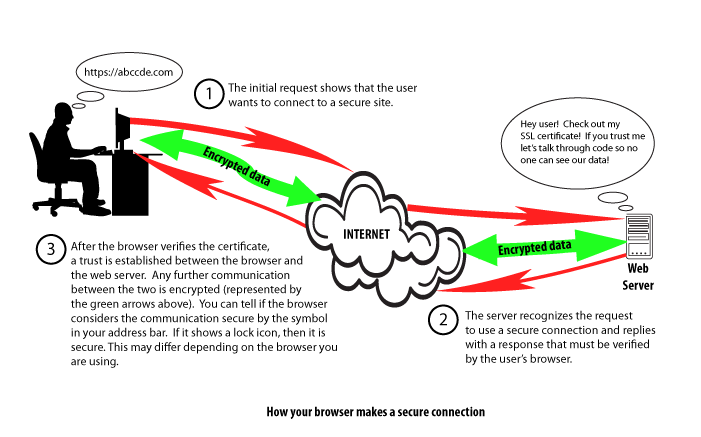
SSL uses encryption to protect data. It creates a secure link between servers and browsers. First, a website needs an SSL certificate. This certificate confirms the site’s identity. When you visit a site, your browser checks this certificate. If all is good, the browser starts an encrypted session. This keeps your data safe as you browse. SSL helps keep your privacy intact.
Importance Of Ssl
SSL means Secure Socket Layer. It keeps data safe. Hackers find it hard to steal information. SSL encrypts data. Only the right person can read the data. Safety is very important. Websites need SSL to protect users. Users feel safe when data is secure.
SSL makes users trust websites more. People look for the padlock sign. It shows the site is secure. Trust leads to more visitors. More visitors help the website grow. Credibility increases with SSL. Websites without SSL seem risky. Users avoid risky sites.
SSL helps improve SEO ranking. Search engines prefer secure sites. Higher rankings bring more traffic. More traffic means more success. SSL is important for visibility. Websites with SSL rank better. Better ranking means more people find the site.
Types Of Ssl Certificates
Domain Validated SSL certificates are basic. They are easy to get. The verification process is simple. Only domain ownership is checked. These certificates are quick to issue. They are often used by small websites. They offer basic encryption. They do not check the identity of the owner. They are affordable and accessible.
Organization Validated SSL certificates offer more security than DV. They check organization details. The process is more thorough. They confirm the identity and domain ownership. OV certificates give users more trust. They are used by business websites. They are stronger than DV certificates.
Extended Validation SSL certificates offer the highest level of security. They have strict checks. The process is detailed. EV certificates verify the legal identity of the website owner. They show a green bar in browsers. This gives users confidence. They are used by large companies. They are trusted and provide maximum assurance.
Credit: www.hostingadvice.com
Ssl Installation Process
First, select a trusted SSL provider. Many options exist, like Let’s Encrypt or Comodo. Prices and features vary. Make sure your choice fits your needs. Check if your web host supports it. A good provider ensures website safety. This builds trust with visitors. Safety is important.
A CSR stands for Certificate Signing Request. It is a small file. You need this to get an SSL certificate. Your web server can create it. It contains your website’s information. This includes the domain name. Also, your company’s details. Make sure details are correct. Incorrect information causes issues.
Once you have your certificate, install it on your server. This step depends on your hosting type. Many hosts offer simple tools for this. Follow their instructions carefully. Installation completes the SSL process. After this, your site is secure. Visitors see a lock icon in their browser. This means safe browsing.
Common Ssl Issues
Mixed content warnings happen when a website has both secure and non-secure items. This can make pages look unsafe to visitors. Browsers show warnings to protect users. Fixing mixed content helps keep sites fully secure. You should replace non-secure links with secure ones. This ensures the best safety for users. Always check links and resources on your site.
A certificate mismatch occurs when the SSL certificate does not match the domain. This can confuse visitors and may lead to trust issues. Make sure your certificate matches the domain name. This helps build visitor confidence. Always verify domain and SSL certificate details. Mismatches can be avoided with careful checks.
Expired certificates can make your website look unsafe. Visitors might see warning messages. Renew certificates on time to avoid this issue. Always keep an eye on expiration dates. Renewing SSL certificates keeps your website secure. Set reminders for renewals to stay on track.
Credit: www.inmotionhosting.com
Ssl Best Practices
Keeping your SSL certificates updated is very important. New threats appear all the time. Updates fix these problems. They make your site safer. Always check for new updates. Apply them quickly. This keeps your site secure.
Use strong encryption for SSL. This protects data better. Choose the highest level available. This makes it hard for hackers to read data. Strong encryption keeps information safe. It builds trust with users.
Regularly monitor your SSL certificates. Look for any problems. Fix them fast. Keep an eye on expiry dates. Renew before they expire. This ensures continuous protection. Always maintain your SSL. It keeps your website secure and trustworthy.
Frequently Asked Questions
Why Do I Need Ssl For My Website?
SSL secures data transfer between your website and visitors. It boosts trust, enhances SEO, and protects sensitive information. Search engines prefer sites with SSL, improving your rankings. Ensure your website’s credibility and security by implementing SSL.
What Is The Difference Between Https And Ssl?
HTTPS is a secure version of HTTP, using SSL/TLS encryption. SSL (Secure Sockets Layer) is a protocol for encrypting internet connections.
What Is Ssl Web Hosting?
SSL web hosting provides secure connections by encrypting data between the server and client. It protects sensitive information. Websites with SSL display a padlock icon and use “https” in their URL, boosting user trust and SEO rankings. This hosting ensures data privacy and security for online transactions.
Why Is Ssl No Longer Used?
SSL is outdated due to security vulnerabilities. Experts recommend using TLS instead for better encryption. TLS provides improved data protection and privacy. SSL is prone to attacks, while TLS offers stronger security protocols. Transitioning to TLS ensures safer online transactions and communications.
Conclusion
SSL secures websites and protects user data. It builds trust. Visitors feel safe sharing information. Search engines favor secure sites, boosting rankings. SSL is vital for online success. Without it, sensitive data risks exposure. Customers might hesitate to engage. Investing in SSL enhances credibility.
It’s a small step with big benefits. Secure your site. Protect your users. Improve your site’s visibility. Embrace SSL for a safer web experience. It’s essential in today’s digital world. Don’t overlook its importance. Make your website secure and trustworthy.
Your users will appreciate it. Your business will grow.


