
Are you struggling with email delivery issues on your WordPress site? You’re not alone.
Many website owners face the challenge of ensuring their emails actually reach the intended inbox, instead of disappearing into the dreaded spam folder. The solution? Sending mail via SMTP in WordPress. But what does that mean, and how can it transform your email reliability?
You’ll discover the secrets behind SMTP (Simple Mail Transfer Protocol) and why it’s the gold standard for email communication. Dive in, and learn how you can take control of your site’s email delivery, ensuring your messages land exactly where you want them to. Your website’s communication depends on it!
Credit: www.greengeeks.com
Understanding Smtp In WordPress
SMTP is a way to send emails from your website. It stands for Simple Mail Transfer Protocol. WordPress uses SMTP to send emails like notifications. Without it, emails might not reach users. SMTP ensures emails are sent through a proper server. This helps them avoid spam folders.
Emails are crucial for WordPress websites. They inform users about new posts and comments. Using SMTP improves email delivery. It makes sure users get important messages. SMTP helps in managing email queues. This ensures timely delivery of emails. It also provides better security for email transactions.
Credit: wpmailsmtp.com
Benefits Of Smtp For WordPress Emails
SMTP makes email delivery more reliable. Emails reach the inbox. No more lost messages. You send emails with confidence. SMTP is like a strong bridge. It connects your WordPress to email servers. Your emails get delivered safely.
Spam folders can be a problem. SMTP helps avoid them. It uses the right path. Your emails look trusted. They pass spam checks. This keeps emails out of the spam box. Users see your messages.
Security is important. SMTP offers good security. It encrypts emails. Your data stays safe. No one can steal it. This is crucial for privacy. Your WordPress emails are protected with SMTP.
Setting Up Smtp In WordPress
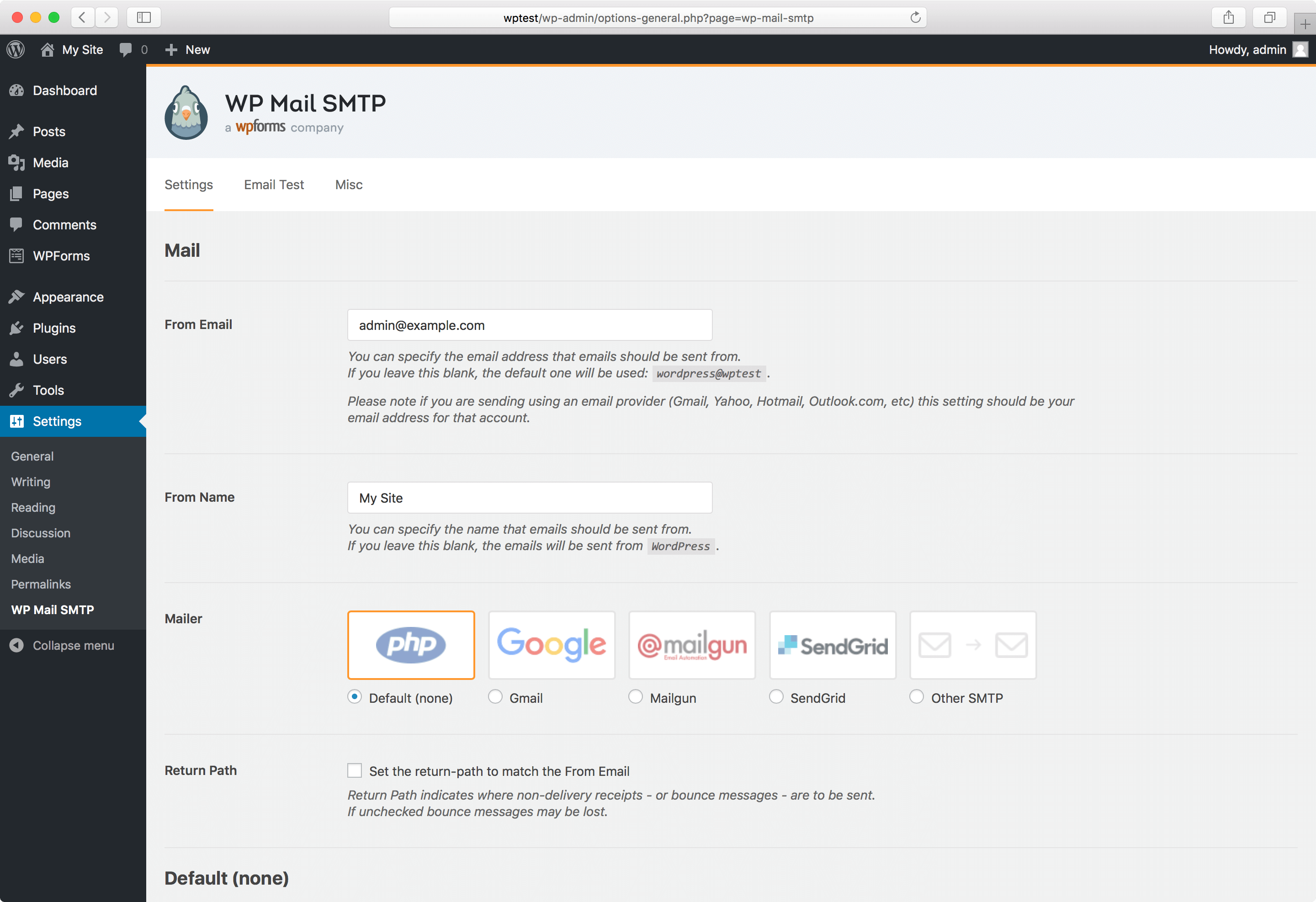
Pick an SMTP plugin for WordPress. WP Mail SMTP is popular. Easy WP SMTP is also good. These plugins help send emails. They make emails more reliable. Install and activate your chosen plugin. Find it in the WordPress dashboard.
Open the plugin settings. Enter your email and password. Use your email provider’s SMTP server. Add the SMTP port number. Enable encryption if needed. Save the changes. Your settings are now ready.
Send a test email. Check if it arrives. If not, recheck settings. Correct any mistakes. Ensure the SMTP details are right. Try sending again. A successful test means it’s working. Your WordPress emails are now sent securely.
Popular Smtp Plugins For WordPress
WP Mail SMTP makes sending emails easy. It fixes email delivery issues. Many websites use it. It is simple to set up. It helps emails reach the inbox. It uses SMTP to send emails. This plugin is trusted by many users.
Easy WP SMTP is another choice. It sends emails through SMTP servers. It helps avoid spam folders. Users find it easy to use. It works well with WordPress sites. It is a popular choice among website owners.
Post SMTP Mailer/Email Log tracks email logs. It helps fix delivery problems. This plugin uses SMTP servers. It checks if emails are sent. It is helpful for site managers. Many people trust this plugin.
Troubleshooting Common Smtp Issues
Sending mail via SMTP in WordPress involves configuring your website to send emails using an external email server. This method helps improve email deliverability and avoids common issues like emails landing in spam folders. Troubleshooting SMTP problems often includes checking server settings, authentication details, and network connectivity.
Authentication Errors
Authentication problems can stop emails. Check the username and password. Make sure they match your SMTP settings. Double-check spelling errors. Sometimes, changing your password helps. Remember, passwords are case-sensitive. Always use the right email address. Your email must be active. This prevents access issues.
Ssl/tls Configuration
SSL/TLS settings protect your emails. Use the correct security protocol. Choose either SSL or TLS. Your server must support these. Incorrect settings block emails. Check your port number. Common ports are 465 and 587. Ensure your server supports them. Misconfigured ports cause errors.
Connection Timeouts
Connection timeouts disrupt email sending. Check your internet speed. Slow speeds cause delays. Verify server settings. Sometimes, servers are busy. This leads to timeouts. Use a reliable network. Strong signals prevent timeout issues. Consider increasing timeout duration. This allows more time for connections.
Best Practices For Smtp Email
SMTP email needs regular checks. This ensures emails are sent. Test the email setup often. Use simple tools to check it works. Find issues quickly. Fix them fast. Keep email services running smoothly.
Email logs hold important data. Check these logs often. They show email problems. Look for errors in the logs. Fix errors when you find them. This helps keep emails flowing. Logs are your email’s storybook.
SMTP credentials need updates. Change passwords regularly. This keeps your account safe. Update other details if they change. Old credentials can cause issues. Keep information current. This ensures emails work right.
Advanced Smtp Configurations
Sometimes, email servers need special ports. This helps with security. Port 25 is common. But, some servers block it. So, use ports like 465 or 587. This helps emails send better. Always check server rules before changing ports.
Some people have many email accounts. It’s smart to use different accounts. This helps manage emails better. For each account, set up a new SMTP. Keep the settings clear. Use names to remember each account. This way, emails go to the right place.
Keeping emails safe is important. Encryption makes sure only the right person reads them. Use methods like SSL or TLS. These methods hide the message. So, hackers can’t read it. Always choose the best encryption for your needs. Safety first.
Credit: lifterlms.com
Frequently Asked Questions
How Do I Send Mail Via Smtp In WordPress?
To send mail via SMTP in WordPress, install a plugin like WP Mail SMTP. Configure it with your SMTP server details, including host, port, and authentication credentials. This improves email deliverability and ensures your messages don’t end up in spam folders.
Why Use Smtp For WordPress Emails?
Using SMTP for WordPress emails enhances security and reliability. It bypasses default PHP mail, reducing spam issues. SMTP authenticates outgoing emails, ensuring they reach recipients’ inboxes. This makes communication more effective and professional.
What Are The Benefits Of Smtp Plugins?
SMTP plugins offer improved deliverability and security. They help authenticate emails, reducing spam risks. These plugins provide easy configuration and debugging options. They ensure emails are correctly sent from your WordPress site, maintaining professional communication.
Can I Use Gmail Smtp For WordPress?
Yes, you can use Gmail SMTP for WordPress. Install an SMTP plugin and enter Gmail’s SMTP server settings. Authenticate using your Gmail account credentials. This setup ensures reliable email delivery from your WordPress site.
Conclusion
Using SMTP in WordPress simplifies email sending. It improves delivery rates. Emails reach inboxes reliably. No more lost messages. Setup is straightforward. Just configure SMTP settings. Choose a plugin, follow steps. It enhances communication. Users receive important updates. Your website gains trust.
Email marketing benefits too. More engagement, better results. SMTP offers a practical solution. Keep your WordPress emails efficient. Stay connected with your audience. It’s worth the effort. Your website will perform better. Enjoy smoother email interactions. Make the switch today.
Experience the difference with SMTP.


