
Have you ever wondered how to keep your WordPress site fresh with dynamic content that draws visitors back time and time again? Enter the RSS Widget.
This nifty tool is your gateway to effortlessly bringing in content from other sources, ensuring your website stays relevant and engaging without the heavy lifting. Imagine transforming your site into a hub of curated information, tailored specifically for your audience’s interests.
Intrigued? You’re about to discover how the RSS Widget can become a game-changer for your WordPress experience. Keep reading to unlock the secrets of this powerful feature and how it can elevate your site’s content strategy.
What Is An Rss Widget
An RSS Widget in WordPress helps you show updates. It can display the latest posts from different sites. This is useful for sharing news or blog updates. Readers see fresh content without leaving your site. Easy to add and manage, it keeps your website lively.
The widget fetches data using RSS feeds. You just paste the feed URL in settings. It automatically updates the content. No extra work needed. Your readers always see the latest information. It’s a great tool for keeping your audience engaged.
Benefits Of Using Rss Widgets
RSS Widgets in WordPress help display the latest updates from other websites directly on your site. They keep content fresh and engaging by providing real-time information. With RSS widgets, users can easily follow news, blogs, and updates without leaving your website.
Enhancing Content Distribution
RSS widgets help share your blog with others. They send your posts to many places. This is good for reaching new readers. Your blog can be seen on other websites. It is like sharing your blog with many friends. More people can find it and read it. This helps your blog grow.
Increasing Reader Engagement
RSS widgets make reading easy. They show new posts quickly. Readers love fresh content. They keep coming back for more. Engaged readers are happy readers. They talk about your blog with friends. This creates a community around your blog. It helps your blog become popular.
Streamlining Content Updates
Updating content becomes simple with RSS widgets. They show new posts automatically. No need to update everything by hand. This saves time and effort. Effortless updates mean more time for writing. It makes managing a blog easy. Keep your blog fresh and up-to-date.
Setting Up Rss Widgets In WordPress
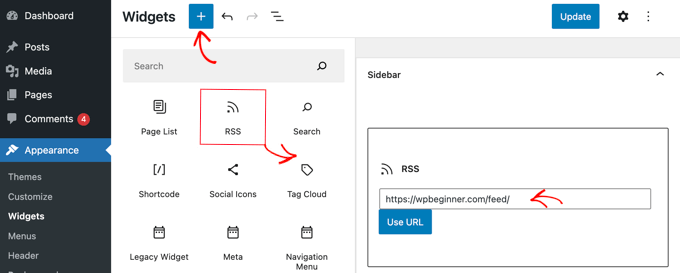
Find the RSS widget in your WordPress dashboard. Click on Appearance, then Widgets. The RSS widget will be in the list. Drag it to a sidebar or footer area. This is where your feed will show.
After placing the widget, you need to add a feed URL. This URL tells where to fetch the feed from. Enter the URL in the given space. You can also set the number of items to show. Choose how many titles you want to display.
You can change how the widget looks. Add a title to your widget. This title will appear above the feed. You may also choose to show the author’s name or date. Check the boxes to add these details. Save your changes to see them live.

Credit: wordpress.org
Integrating Rss Feeds From Other Blogs
Choosing relevant feeds is important for your blog. It brings fresh content to your site. First, find blogs with topics similar to yours. This keeps your audience interested. Use tools like Feedly or RSS.com to discover feeds. Always check the quality of the blog’s content. It should be accurate and engaging.
Adding external RSS feeds is simple. Copy the feed URL from the blog you like. Paste it into your WordPress RSS widget. This will pull content automatically. Your readers will see new articles from other blogs. It saves time and keeps your site updated.
Managing feed display is crucial. You want it to look neat. Use WordPress settings to choose how many items to show. You can also decide whether to show full articles or excerpts. This keeps your blog organized and easy to read. A clean display makes your site more attractive.
Maximizing Blog Traffic With Rss
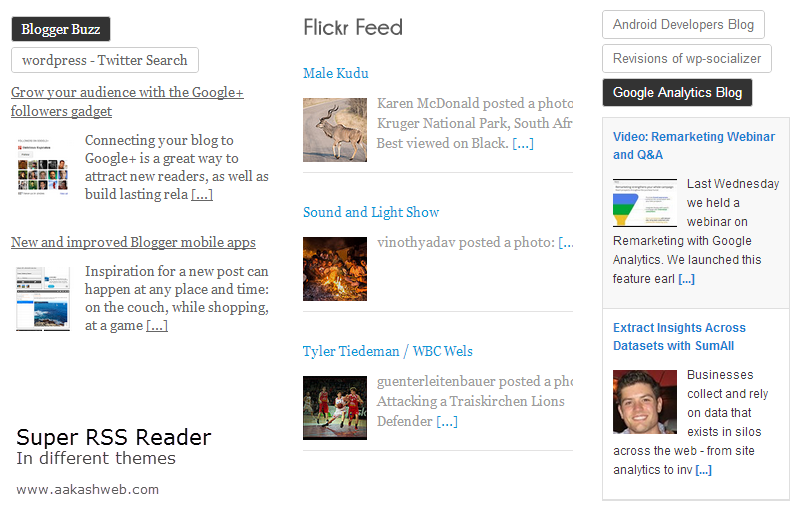
Promoting Your RSS Feed is a key step for bloggers. An RSS feed shares updates with your readers. It’s a simple way to keep them engaged. Share your feed link on your website. Display it clearly so visitors can find it. Encourage subscribers by offering valuable content. This builds a loyal audience.
Leveraging Social Media helps increase your blog’s reach. Share RSS feed updates on platforms like Facebook and Twitter. Engage with followers by posting regularly. Use catchy headlines to grab attention. Social media can boost your blog traffic. It’s a powerful tool for bloggers.
Collaborating with Other Bloggers can grow your audience. Connect with bloggers in your niche. Exchange RSS feed links to share audiences. Guest posts are a great way to collaborate. This builds relationships and increases exposure. New audiences will discover your blog.
Credit: wordpress.org
Troubleshooting Common Issues
Struggling with an RSS widget in WordPress? This tool helps display RSS feeds on your site, enhancing content updates. Common issues include incorrect URLs or display errors, often resolved by checking feed settings or updating the widget plugin.
Resolving Feed Errors
Feed errors can disrupt your RSS widget. First, check the feed URL. It must be correct. Sometimes, feeds don’t update because of cache. Clear the cache to refresh it. Check if the feed source is active. A down source can cause errors. Use an online validator to test the feed. Fix any reported issues.
Ensuring Compatibility
Compatibility is key for smooth RSS widget operation. Update WordPress to the latest version. Ensure your theme supports RSS widgets. Some themes might block them. Check plugin settings. Some plugins conflict with RSS widgets. Disable them one by one to find the culprit.
Optimizing Performance
Performance boosts user experience. Optimize it by reducing feed items. Too many items slow down loading. Set a refresh interval. Frequent updates can overload servers. Use a caching plugin. It saves resources and speeds up loading. Monitor performance regularly.
Credit: support.vendasta.com
Frequently Asked Questions
What Is An Rss Widget In WordPress?
An RSS widget in WordPress allows you to display content from an external RSS feed on your site. It helps keep your website updated with fresh content without manual input. By using an RSS widget, you can automatically showcase news, blog posts, or other updates from relevant sources.
How Do I Add An Rss Widget In WordPress?
To add an RSS widget, navigate to the WordPress dashboard. Go to Appearance > Widgets. Drag the RSS widget to your desired widget area. Enter the RSS feed URL and customize the settings. Save the changes to display the feed on your WordPress site.
Why Use An Rss Widget On My Site?
Using an RSS widget keeps your site updated with fresh content. It enhances user engagement by providing relevant, timely information. Additionally, it can boost your site’s SEO by consistently adding new content from trusted sources.
Can I Customize The Rss Widget Appearance?
Yes, you can customize the RSS widget’s appearance in WordPress. Most themes allow styling through the Customizer or using custom CSS. You can adjust the widget’s title, number of items displayed, and display options for the content, author, and date.
Conclusion
Rss widgets in WordPress simplify content sharing. They keep sites updated easily. Users access fresh news without much effort. This boosts visitor engagement. Setting up an RSS widget is quick. No technical skills needed. Just a few clicks. WordPress makes it user-friendly.
Helps bloggers share content widely. Saves time for site owners. RSS widgets enhance the user experience. Keeps content fresh and timely. A must-have tool for effective blogging.


