
Ever been frustrated by your WordPress site not showing the latest updates or changes? You’re not alone.
This is where understanding the concept of “purge from cache” comes in handy. Imagine clicking “refresh” and seeing your recent edits appear instantly. Sounds great, right? This is exactly what purging cache can do for you. By learning how to effectively manage your cache, you can ensure your visitors always see the most up-to-date version of your site.
Dive into this guide to discover how you can take control of your website’s performance and keep your audience engaged with every visit. Stay with us, and you’ll find out just how simple it can be to keep your website fresh and fast.
Credit: www.ionos.com
Understanding Cache In WordPress
Cache means storing data for quick use. It helps websites load faster. When data is cached, it saves time. WordPress uses cache to improve speed. Cached data can be images, scripts, or pages. This stored data loads fast when needed. Without cache, sites become slow.
There are different caches in WordPress. Browser cache stores files on your computer. Server cache keeps data on the server. Object cache saves database queries. Each type helps speed up site performance. Page cache stores entire pages. These caches reduce load times. They improve user experience.
Credit: www.hostpapa.com
Importance Of Cache In Website Performance
Cache makes websites fast. It stores data for quick access. This means pages load in seconds, not minutes. Faster sites keep users happy. They don’t leave. They stay and explore.
Fast load times improve user experience. Users enjoy browsing when pages load quickly. A slow site frustrates users. It can lead to lost visitors. Fast sites are also favored by search engines. They rank higher in search results.
In a nutshell, cache boosts performance. It speeds up websites. Users love speedy sites. They return often.
What Does Purge Cache Mean?
Definition of Purge: Purge means to clear out or remove. In WordPress, purging the cache means deleting stored files. These files help websites load faster. But sometimes, the stored files are old. This makes the website show outdated content.
Purpose of Purging Cache: Purging cache is important. It helps show fresh content. When changes are made, purging updates the site. This keeps the website accurate and up-to-date. It also helps improve the user experience. Visitors see the latest version of the site. This is why purging is necessary.
When To Purge Cache
Clearing cache in WordPress refreshes stored data, ensuring updated content displays correctly. This process is crucial after plugin updates, theme changes, or content modifications. Regular cache purging helps maintain site performance and provides visitors with the latest information.
Common Scenarios
Cache stores data for quick loading. Sometimes, this stored data becomes old. This can cause problems on your site. New updates don’t show up. Changes you make stay hidden. Visitors see the old version of your site. Purging cache solves this issue. It clears out the old data. Then, new data loads instead. It helps keep your site fresh. Keep it updated for users.
Signs You Need To Purge
Certain signs show it’s time to purge cache. Content changes don’t appear. Images look wrong or missing. Visitors report loading issues. Site speed feels slow. Comments or forms fail to update. These signs mean cache is likely old. Purging helps fix these problems. It clears stored data. New content appears instead. This improves site function and speed.
How To Purge Cache In WordPress
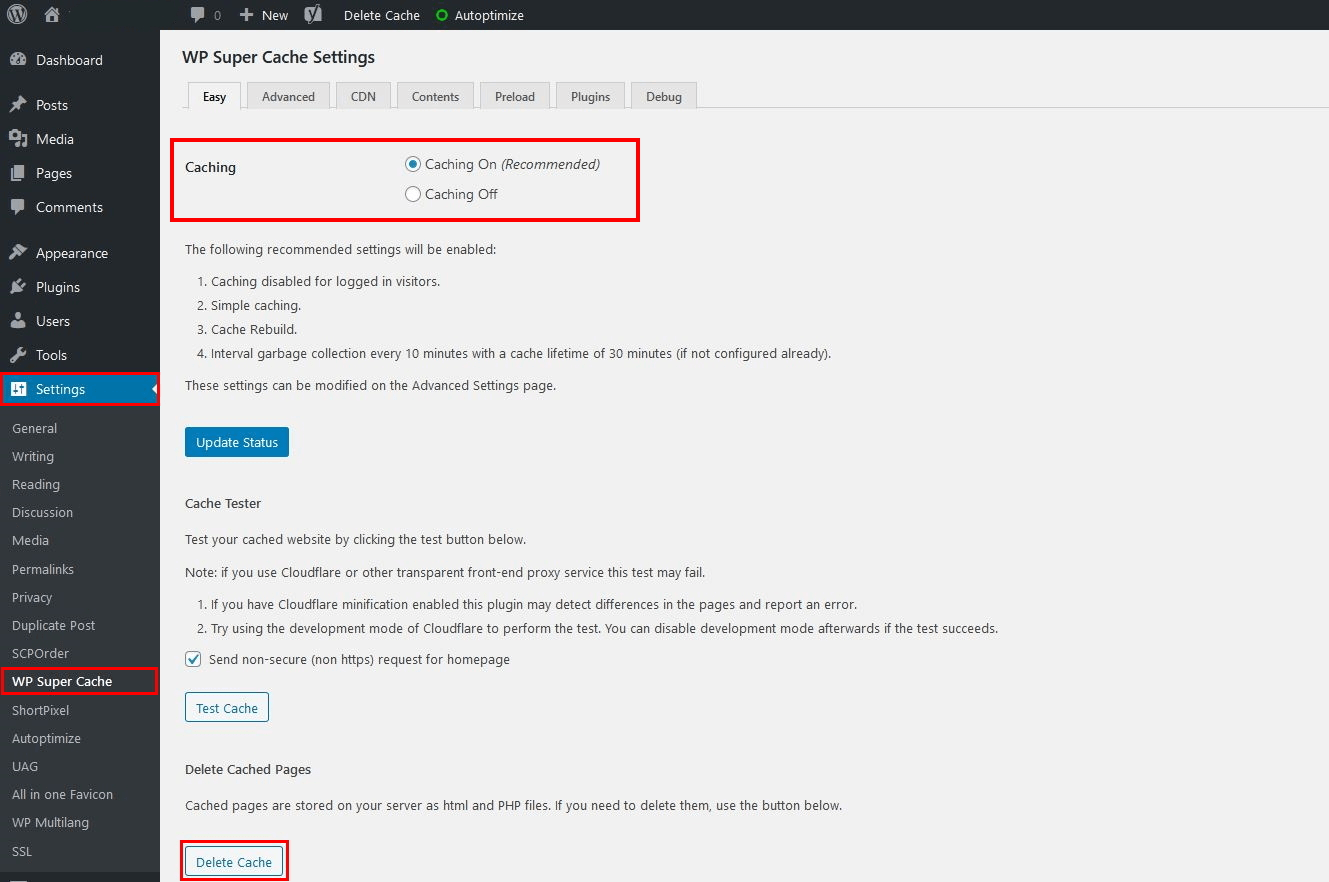
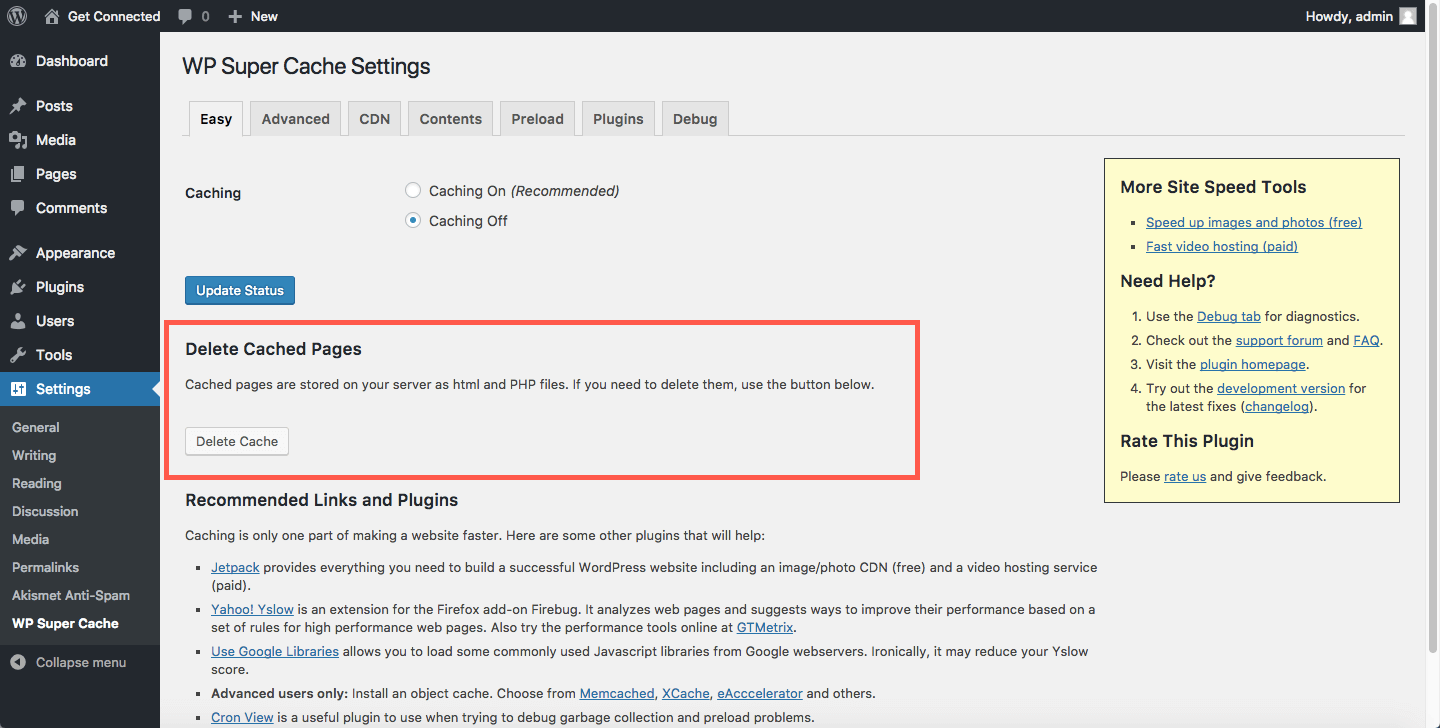
WordPress plugins are tools to clear cache. They make the process easy and fast. Popular plugins include WP Super Cache and W3 Total Cache. These plugins have simple settings. Just install and activate them. Find the purge cache button in the plugin settings. Click it to clear the cache. This removes old data and improves site speed. Check settings for automatic purge options. Set these options for regular cache clearing.
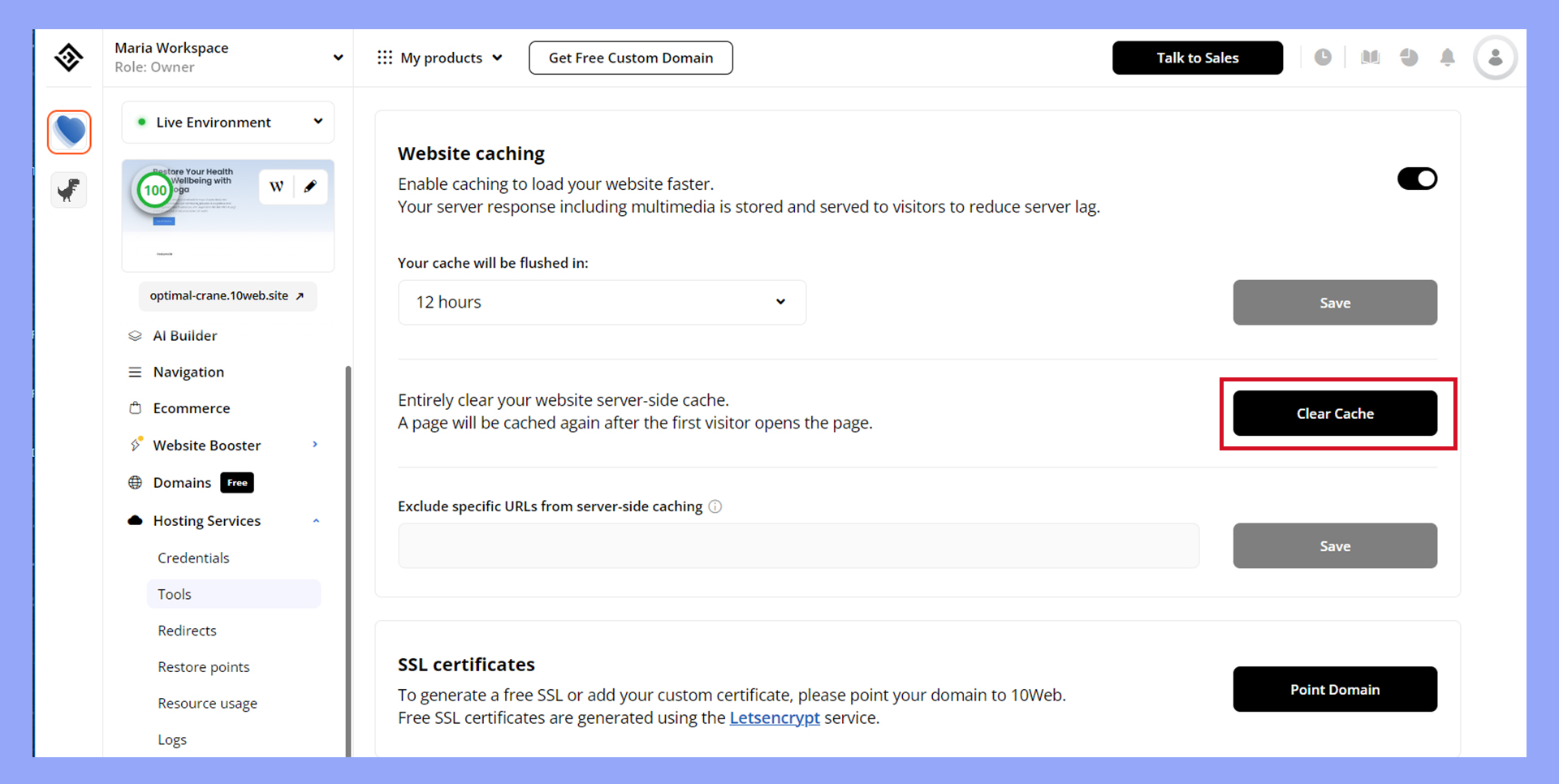
Sometimes, plugins are not available. Manual methods are useful then. First, log in to your WordPress dashboard. Go to the settings section. Find the option for cache clearing. Click it to remove stored data. Some sites have server-side caching. Ask your host for instructions to purge this cache. Regular cache cleaning keeps the site fast. It helps in loading new content quickly.
Credit: 10web.io
Popular WordPress Cache Plugins
WordPress cache plugins enhance website speed by storing data for quick access. “Purge from Cache” clears stored content, ensuring visitors see the latest updates. Regular purging prevents outdated information from displaying, maintaining accuracy and performance.
Features Of Top Plugins
WordPress cache plugins are tools to speed up websites. They store copies of web pages. This makes sites load fast. Many plugins have unique features.
Some plugins offer automatic cache clearing. Others allow manual clearing. Look for plugins that support mobile caching. This ensures mobile users have a fast experience.
Plugins vary in compatibility with other tools. Some work well with other plugins. Others may cause issues.
Comparison Of Popular Plugins
| Plugin Name | Automatic Cache Clearing | Mobile Caching | Compatibility |
|---|---|---|---|
| Plugin A | Yes | Yes | High |
| Plugin B | No | Yes | Medium |
| Plugin C | Yes | No | Low |
Choose plugins based on your site’s needs. Consider features and compatibility.
Benefits Of Regular Cache Purging
Clearing cache in WordPress boosts website speed and performance. It removes outdated data, ensuring visitors see fresh content. Regular cache purging enhances user experience and can improve search engine rankings. It also reduces server load, which helps prevent website crashes during high traffic periods.
Improved Site Performance
Cache purging makes websites faster. Old files get cleared. New content loads quickly. Users see updates right away. Slow sites can lose visitors. Fast sites keep them happy. Regular purging is like a cleanup. It helps the site run smoothly.
Enhanced Security
Security improves with cache purging. Old data may have risks. Clearing cache removes these risks. It stops hackers from getting old files. New security updates work better. This keeps the site safe for everyone. Regular purging protects user information.
Potential Downsides Of Cache Purging
Purging cache in WordPress can lead to potential downsides. It might slow down your website temporarily. Users may experience longer load times until the cache rebuilds. This could affect the user experience negatively.
Temporary Load Times
Cache purging can cause slow page loads. After clearing, the server must rebuild the cache. During this time, users might notice a delay. Pages take longer to appear. The initial load can be frustrating for visitors.
Impact On Server Resources
Purging cache affects server performance. It demands extra processing power. Servers work hard to recreate cached data. This can lead to increased resource usage. High demand can slow down other tasks. Servers might struggle with heavy traffic.
Frequently Asked Questions
What Does Purge Cache Mean In WordPress?
Purge cache in WordPress means clearing stored data to force a refresh. This process ensures visitors see the latest updates. It’s useful after making changes to your site, like updating content or design. Purging cache helps improve performance and eliminate display errors caused by outdated cached files.
Why Should I Purge Cache Regularly?
Regularly purging cache ensures your website displays the latest content. It prevents issues with outdated information and improves user experience. Frequent cache purging can also enhance site performance by freeing up storage space. Additionally, it helps resolve potential conflicts with plugins or themes that may arise from cached files.
How Do I Purge Cache In WordPress?
To purge cache in WordPress, use a caching plugin. Popular plugins include W3 Total Cache and WP Super Cache. Navigate to your plugin’s settings and select the option to clear cache. This will remove stored data and allow your site to load fresh content for visitors.
Can Purging Cache Improve Site Speed?
Yes, purging cache can improve site speed by removing outdated files. This process ensures that your website loads the latest content efficiently. By clearing cache, you free up server resources, which can enhance loading times. Regular cache purging helps maintain optimal performance and a smooth user experience.
Conclusion
Clearing cache helps speed up your WordPress site. It removes old data, making way for fresh updates. Regular cache purges keep your site running smoothly. Visitors enjoy faster load times. It also fixes display issues caused by outdated information. Remember to clear cache after making big changes.
This ensures everyone sees the latest version. Tools and plugins make cache management easy. They automate the process, saving you time. Stay proactive with cache maintenance. Your site remains efficient and user-friendly. Reliable performance builds trust with your audience. Keep your WordPress site optimized.
Regular cache purges are key.


