
Have you ever found yourself tangled in the complexities of web hosting? If so, you’re not alone.
Many people struggle to find a straightforward solution for managing their websites efficiently. Enter Plesk Web Host Edition—a powerful tool that simplifies web hosting like never before. Imagine having the control to manage multiple websites, automate tasks, and enhance security all from one intuitive platform.
Sounds appealing, right? By understanding what Plesk Web Host Edition offers, you can transform your web management experience and focus on what truly matters: growing your online presence. Stick around, and you’ll discover how this game-changing software can become your secret weapon in the digital world.
Plesk Web Host Edition Overview
Plesk Web Host Edition is a tool for web hosting. It helps manage websites and servers. Many people use it every day. It offers control over hosting tasks. Users can easily create and manage domains. Security is a top feature. It protects data and websites. Plesk supports multiple languages. This makes it user-friendly for many. It offers flexibility with extensions and tools. Hosting becomes simple and efficient.
Easy installation is another benefit. Users can set it up in minutes. It provides automatic updates. This ensures the system is always current. Plesk is ideal for both beginners and experts. It provides a clean and simple interface. Many businesses trust Plesk for their hosting needs.

Credit: www.plesk.com
Key Features
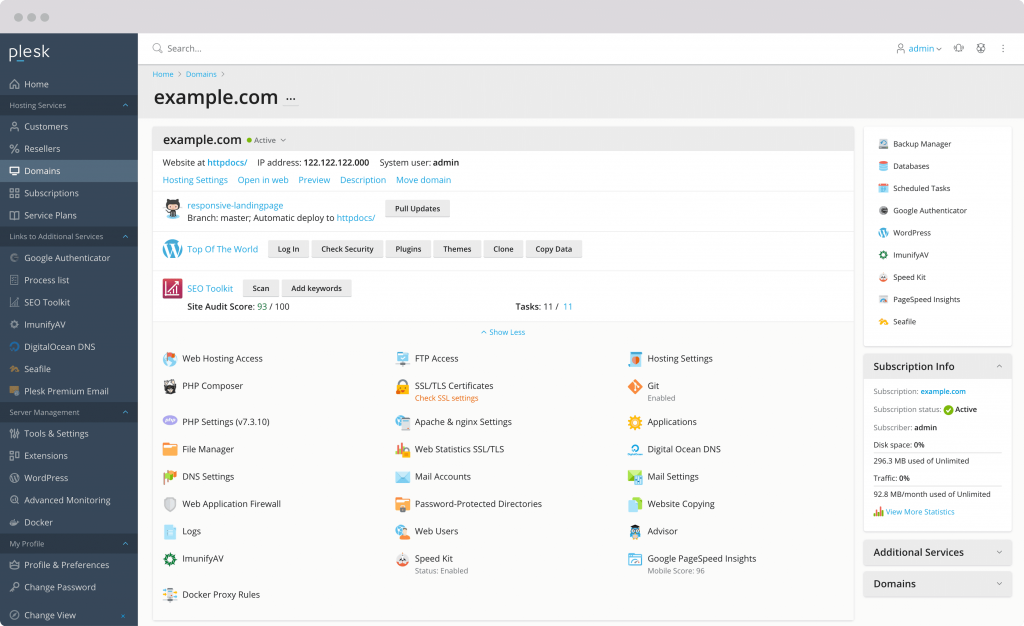
Plesk has a simple interface. Even beginners find it easy to use. You can manage websites with just a few clicks. The dashboard is clean and organized. Tasks like adding a new domain are quick. No need for technical skills.
Security is important. Plesk offers strong protection for your websites. It has tools to block threats. You can set up firewalls easily. It also helps with SSL certificates. Your data stays safe.
Manage many servers from one place. Plesk supports multi-server management. You can control all servers together. This saves time. You don’t need to log into each server separately.
Plesk offers many useful tools. Tools for backups, email, and more. Extensions make Plesk even better. They add new features. You can customize your setup easily. Choose what you need.
Benefits For Web Hosts
Plesk helps make tasks easy for web hosts. It offers a simple dashboard. This dashboard saves time and effort. Web hosts can manage many websites from one place. They can update software with a few clicks. It also helps in fixing problems fast. Less time spent on small tasks means more time for important work.
Security is important for web hosts. Plesk provides strong security tools. It protects websites from hackers. Web hosts can set up firewalls easily. Regular updates keep the system safe. Users feel safe knowing their data is protected. A secure site builds trust with visitors.
Plesk grows with your needs. It handles small and big tasks well. Web hosts can add more websites as needed. The system is flexible. It supports different kinds of websites. This means more options for users. Web hosts can serve many customers without problems.
System Requirements
Plesk Web Host Edition needs specific system requirements to work well. A server with a minimum of 1 GB RAM is essential. But for better performance, 2 GB RAM or more is recommended. The server must have a CPU with at least a 1.4 GHz processor. This helps in smooth operations.
Storage is another key factor. A minimum of 20 GB of disk space is necessary. This is for storing website files and databases. It is crucial to have a server with a 64-bit OS. Popular OS choices include Windows and Linux. Make sure the server has a stable network connection. A good connection ensures website availability.
Installation And Setup
Ensure your server meets all hardware requirements. Check the operating system compatibility. Update your system packages for smooth installation. Backup any important data before starting. Verify internet connection stability. Prepare credentials for server access.
Download the Plesk installer from the official site. Run the installer with admin privileges. Follow the on-screen instructions carefully. Choose components you need for your hosting environment. Wait for the installation to complete. Reboot the server if prompted.
Log in to the Plesk dashboard. Configure your hosting settings. Set up user accounts and permissions. Install necessary extensions for additional features. Check the security settings to protect your server. Make sure to test the server functionality after setup.
Managing Websites With Plesk
Plesk makes website creation easy. Choose a template or start from scratch. Add your website files with a simple upload. Use the drag-and-drop builder for a custom look. Plesk also helps in managing server settings easily. You can control site performance. This keeps your website running smoothly.
Managing domains is simple with Plesk. You can add a new domain with just a few clicks. Subdomains are easy to create too. They help in organizing content. Each subdomain can have its own website. Plesk supports multiple domains and subdomains. This is great for businesses with many sites. You can manage DNS settings directly in Plesk. This ensures your domains point to the correct location.
Security And Backup Solutions
SSL Certificates keep websites safe. They protect data. Hackers can’t steal it. Websites with SSL are secure. Users trust them more. Browsers show a padlock icon. This means safety. No SSL is risky. Visitors get a warning. They might leave. SSL is a must for all sites.
Automated Backups save time. They run daily. Important files are safe. No worries about data loss. Restore files easily. Mistakes happen. Backups fix them fast. Automated systems work without help. Peace of mind for website owners. Backup settings are adjustable. Choose what suits best.
Credit: www.plesk.com
Troubleshooting Common Issues
Plesk Web Host Edition offers several tools to fix errors. Error logs are useful to find out what went wrong. Access these logs from your Plesk dashboard. Logs show detailed information about errors. Use this info to solve problems.
Some errors require server restarts. Restarting can often solve minor issues. Always check your server status before restarting. Make sure server is online and working.
Backup your data regularly. Backups help recover lost data during errors. Keep several copies of your data. Store them in different locations. This ensures safety of your information.
Plesk provides many support options. Use the Plesk Help Center for guides and tutorials. These guides explain how to fix common issues. Community forums are also helpful. Users share tips and solutions.
Contact support for complex problems. Experts are ready to assist you. Live chat and email support are available. Use these resources to keep your website running smoothly.
Comparing Plesk With Other Control Panels
Plesk Web Host Edition offers a user-friendly interface for managing websites, applications, and servers. It stands out for its compatibility with various operating systems and supports multiple languages, making it a versatile choice. Compared to other control panels, Plesk provides seamless integration with popular tools and platforms.
Plesk Vs Cpanel
Plesk and cPanel are popular web hosting control panels. Plesk has a simple interface. It works on both Windows and Linux. cPanel is mainly for Linux. Plesk offers better security options. Many users find Plesk easier to learn. cPanel has more features. But it can be confusing. Both panels help manage websites. They provide tools for email, databases, and domains.
Plesk Vs Directadmin
DirectAdmin is another control panel. It is fast and lightweight. Plesk has a more modern look. It provides more extensions. DirectAdmin is cheaper than Plesk. But Plesk offers better user support. Both have basic features. They include file management and email setup. DirectAdmin is best for simple tasks. Plesk is good for complex sites. Both are reliable for web hosting.

Credit: www.plesk.com
Future Developments
Plesk Web Host Edition offers a comprehensive platform for web hosting management. Future developments may include enhanced security features and improved user interfaces. These updates aim to simplify web hosting tasks and boost efficiency for users.
Upcoming Features
Plesk Web Host Edition is always growing. Developers plan new features. These features will help users manage websites better. Expect better security tools. These tools protect sites from hackers. New templates will come for easy site design. Users can pick a design and apply it quickly.
Improved backups will soon be available. Backups save website data safely. Users can restore lost files easily. User-friendly interfaces will make tasks simple. Interfaces will be clearer and faster. Plesk wants users to have a smooth experience.
Industry Trends
Web hosting trends change often. Automation is becoming popular. It saves time and effort. More hosts use cloud technology. It offers flexibility and reliability. Eco-friendly hosting is important now. Hosts seek ways to use less energy.
Security is a top concern. Hosts add stronger firewalls and checks. Users want fast websites. Speed is key for good user experience. Hosts focus on improving speed. Mobile-friendliness is crucial. Websites need to work well on phones. Hosts support mobile-ready designs.
Frequently Asked Questions
What Is Plesk Hosting?
Plesk hosting provides a user-friendly control panel for managing websites, domains, and emails. It supports multiple operating systems. With Plesk, you can automate tasks, enhance security, and install applications easily. Ideal for beginners and professionals, Plesk simplifies server management, offering a comprehensive solution for web hosting needs.
Do I Need Plesk?
Plesk simplifies server management for web hosting and developers. It’s ideal for managing multiple websites efficiently. Consider Plesk if you need user-friendly control panels, automated updates, and enhanced security features. It’s especially useful for those handling complex hosting environments or seeking streamlined web operations.
What Is Plesk Web Pro Edition?
Plesk Web Pro Edition is a hosting control panel designed for web professionals. It offers features for managing websites, email, databases, and applications efficiently. It includes tools for developers, automatic updates, and security features, enhancing productivity and security for small businesses and developers.
Is Plesk Free Or Paid?
Plesk is primarily a paid service, offering different pricing plans. They provide a free trial for users to explore features. Users can choose plans based on their needs, with options for monthly or annual billing. Some hosting providers may include Plesk in their hosting packages at no extra cost.
Conclusion
Plesk Web Host Edition offers a user-friendly interface for web hosting. It simplifies server management tasks. Website owners can manage their sites easily. Security features ensure your data stays protected. Plesk supports various programming languages. This flexibility helps in diverse project needs.
Its integration with third-party apps adds more functionality. Plesk also provides great support and resources. This makes it a solid choice for hosting solutions. Users can rely on Plesk for efficient operations. It helps manage your hosting needs smoothly and effectively.


