

If you’re running a WordPress website, understanding what a permalink is can change the way you manage your content—and how visitors find it. Simply put, a permalink is the permanent web address of your posts or pages.
But why does that matter to you? Because a clear, well-structured permalink makes your site easier to navigate, improves your SEO rankings, and helps your audience remember and share your content effortlessly. You’ll discover exactly what a permalink in WordPress is, why it’s crucial for your site’s success, and how you can set it up to get the most out of every link you create.
Ready to make your URLs work smarter for you? Let’s dive in.

Credit: kinsta.com
Permalinks In WordPress
Permalinks play a key role in WordPress websites. They create permanent, easy-to-read links for posts and pages. These links help visitors and search engines find and remember content easily. Understanding permalinks improves site navigation and SEO performance.
Definition And Purpose
A permalink is a permanent URL for a specific WordPress post or page. It stays the same even if the content is updated. This stability allows users to bookmark or share links without worrying about changes. Permalinks also improve search engine ranking by providing clear, descriptive URLs. They make your website look professional and organized.
Permalink Vs Url
A URL is any web address that points to a resource on the internet. This can be a webpage, image, or file. URLs can sometimes change or expire, especially in dynamic websites or session-based systems. A permalink is a special type of URL designed to remain constant over time. It points directly to a specific piece of content and is often simple and readable. This makes permalinks ideal for blog posts, articles, and important pages.

Credit: www.geeksforgeeks.org
Why Permalinks Matter For Seo
Permalinks play a crucial role in SEO. They help search engines understand and index your content better. A clear and consistent permalink structure makes your website more visible online. It also guides users and search engines to your pages with ease.
Improved Search Rankings
Search engines favor URLs that clearly describe the page content. A well-structured permalink includes keywords relevant to the topic. This helps search engines rank your pages higher. Clean URLs without unnecessary numbers or symbols perform better in search results. They also appear more trustworthy to both users and search engines.
User Experience Benefits
Permalinks that are easy to read improve user experience. Visitors can guess the content of a page by looking at the URL. This clarity encourages more clicks and longer visits. Simple URLs are easier to remember and share. Confusing or long URLs can discourage users from revisiting your site.
Link Sharing And Bookmarking
Permanent links make sharing content straightforward. Users trust links that look neat and professional. These links are less likely to break over time. Bookmarking pages with clear URLs helps users return easily. Social media and email shares benefit from readable permalinks. They increase the chances of your content being spread widely.
Default Permalink Structures
Default permalink structures in WordPress determine how URLs appear on your site. These structures set the format for links to posts, pages, and other content. Choosing the right structure affects readability, SEO, and user experience. WordPress offers several built-in options to suit different needs.
Common WordPress Options
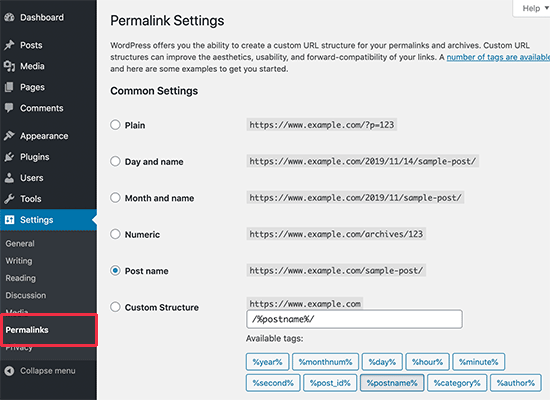
WordPress provides multiple default permalink formats. The simplest is the Plain structure, which uses query strings like ?p=123. Another popular option is Day and Name, showing the date and post title, such as /2024/06/15/sample-post/. Month and Name is similar but shows only the month and year. The Numeric structure uses an ID number, like /archives/123. Finally, the Post Name structure displays only the post title, for example, /sample-post/.
Pros And Cons Of Each Structure
The Plain structure is easy to use but not SEO-friendly. It lacks keywords and looks less readable. Day and Name adds useful date information, helping users know when content was published. This can be good for news sites but may make URLs longer. Month and Name reduces URL length but still provides date context.
The Numeric structure is simple but hard to remember. It does not convey any content information, which can hurt SEO. Post Name is clean and SEO-friendly. It helps users and search engines understand the page topic quickly. However, it may cause conflicts if multiple posts share similar titles.
Customizing Permalink Settings
Customizing permalink settings in WordPress allows you to control how your website URLs appear. Clear and meaningful URLs improve user experience and help search engines understand your content better. Adjusting these settings is simple and can boost your site’s SEO performance significantly.
Accessing Permalink Settings
To change permalink settings, start by logging into your WordPress dashboard. From the left menu, select “Settings” and then click “Permalinks.” This page shows different permalink structure options. You can select a preset or create a custom structure that fits your needs. After making changes, remember to save them by clicking the “Save Changes” button at the bottom of the page.
Best Practices For Seo-friendly Urls
Keep URLs short and descriptive. Use keywords related to your content to improve search engine ranking. Avoid using unnecessary words, numbers, or special characters. Use hyphens to separate words for better readability. Stick to lowercase letters to avoid confusion. Ensure URLs are easy to remember and share.
Using Categories And Tags In Urls
Including categories in URLs helps organize content logically. It shows the topic hierarchy and improves navigation. Tags can also be added but should be used carefully to avoid long URLs. Use category names that clearly describe your content. This structure helps both users and search engines understand your site better.
Editing Permalinks For Existing Content
Editing permalinks for existing content in WordPress improves your site’s URL structure. It helps keep links neat and user-friendly. Changing URLs can boost SEO and make sharing easier. But altering permalinks requires care to avoid broken links. Proper steps ensure smooth updates without losing traffic.
Step-by-step Post Url Changes
Log in to your WordPress dashboard first. Go to the Posts section and select the post to edit. Click the ‘Edit’ button near the permalink below the post title. Change the URL slug to a new, clear name. Keep it short and relevant to the content.
After editing, click the ‘OK’ button to save changes. Then update the post to apply the new permalink. Review the post URL to confirm the change worked correctly. Repeat for other posts needing updated permalinks.
Handling Redirects To Avoid Broken Links
Old URLs can cause 404 errors if not redirected. Use a redirection plugin to manage URL changes easily. Set up a 301 redirect from the old URL to the new one. This tells search engines and browsers the page moved permanently.
Redirects keep visitors from hitting broken pages. They also preserve your SEO rankings and link value. Test redirects after setup to ensure they work properly. Fix any errors to maintain a smooth user experience.
Credit: www.24x7serversupport.com
Plugins To Enhance Permalink Management
Plugins play a key role in managing permalinks on WordPress sites. They simplify URL customization and improve SEO. These tools help control link structure without deep coding knowledge. Using the right plugins can fix broken links and create friendly URLs. This leads to better user experience and higher search rankings.
Popular Seo Plugins
SEO plugins often include permalink management features. They allow easy editing of URL slugs for posts and pages. Plugins like Yoast SEO and Rank Math offer clear options to customize permalinks. They also create automatic redirects when URLs change. This keeps your site free from dead links. These tools help optimize your permalink structure for search engines.
Redirect Management Tools
Redirect tools are essential for handling changed permalinks. They prevent visitors from landing on error pages. Plugins such as Redirection and Simple 301 Redirects manage URL changes smoothly. These tools track URL history and create proper 301 redirects. They ensure link authority passes to new URLs. Redirect management improves site health and user retention.
Common Mistakes To Avoid
Permalinks help people and search engines find your content easily. Avoiding common mistakes keeps your links clean and effective. Poor permalink choices can hurt user experience and SEO. Follow best practices to keep your URLs clear and stable.
Changing Permalinks Frequently
Changing permalinks too often confuses visitors and search engines. Old links may break, causing 404 errors. This damages your site’s reputation and lowers ranking. Choose a good structure early and stick with it.
Using Complex Or Long Urls
Long and complex URLs are hard to read and share. They may contain unnecessary words or symbols. Simple, short URLs improve user trust and click rates. Use keywords but keep URLs neat and direct.
Ignoring Redirects
Ignoring redirects after changing permalinks loses your existing traffic. Visitors clicking old links land on error pages. Set up proper 301 redirects to guide users to new URLs. This protects SEO value and keeps your audience.
Tips For Quick Seo Boost With Permalinks
Permalinks play a crucial role in SEO for WordPress sites. Simple changes to permalink settings can improve search rankings fast. Using the right structure helps search engines and users understand your content better. Below are key tips to boost SEO quickly with permalinks.
Keeping Urls Simple And Relevant
Use short URLs that clearly describe the page content. Avoid long strings of numbers or random characters. A clean URL looks trustworthy and is easier to share. Keep the URL focused on the main topic of the page.
Including Target Keywords
Include important keywords in the permalink to signal the page’s subject. Keywords help search engines rank the page for related searches. Place the primary keyword near the start of the URL. This small step can increase your page’s visibility.
Avoiding Stop Words
Stop words like “and,” “or,” “but,” and “the” add no SEO value. Removing them keeps URLs shorter and cleaner. Search engines often ignore these words anyway. Focus on meaningful words that describe the content clearly.
Frequently Asked Questions
What Is A Permalink In WordPress?
A permalink in WordPress is a permanent URL linking to a specific post or page. It stays unchanged for easy sharing and SEO.
What Is A Permalink Vs. Url?
A permalink is a stable, permanent URL designed for consistent access to specific content. A URL is any web address, temporary or permanent.
What Does A Permalink Do?
A permalink creates a stable, permanent URL for specific web content. It ensures easy sharing and consistent access over time.
How To Find A Permalink In WordPress?
Find a permalink in WordPress by opening the post or page editor. The permalink appears below the title or in the URL bar. You can also check or edit permalinks under Settings > Permalinks in the WordPress dashboard. Save changes to update the permalink structure.
Conclusion
Permalinks in WordPress create stable, clear links for your content. They help users and search engines find posts easily. Choosing the right permalink structure improves website navigation and SEO. Changing permalinks is simple and can boost your site’s visibility. Remember to keep URLs short and relevant for best results.
Overall, understanding permalinks makes managing your WordPress site easier. Use them wisely to keep your links consistent and user-friendly.


