
Have you ever wondered how your WordPress site manages its web addresses so seamlessly? That’s where permalinks come into play.
Understanding permalinks is like unlocking a secret door to better site organization and improved user experience. You might think of them as the permanent URLs that lead straight to your content. They’re crucial for SEO, ensuring your pages rank well on search engines while making it easier for visitors to navigate your site.
Imagine the frustration of a visitor lost in a maze of confusing links—permalinks are your way out. In this post, you’ll discover the power of permalinks in WordPress, how they work, and why they are essential for your website’s success. Dive in to learn how to make the most of them!
Credit: www.24x7serversupport.com
Permalink Basics
A permalink is a permanent link to a webpage or blog post. It stays the same even if you update the content. Permalinks help users find your content easily. They are like an address for your webpage.
These links are important because they make sharing easy. People can share and bookmark your page with the permalink. It helps keep your page popular and visible.
Permalinks play a key role in SEO. Search engines use them to find your content. A good permalink is simple and clear. It can improve your site’s ranking in search results.
Using keywords in your permalink helps search engines understand your page. It can attract more visitors. This makes your site more successful.

Credit: kinsta.com
Permalink Structure
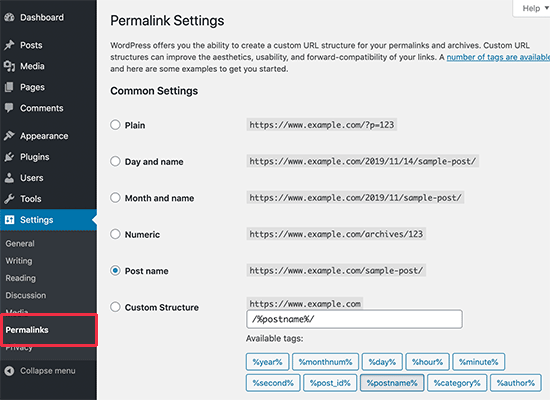
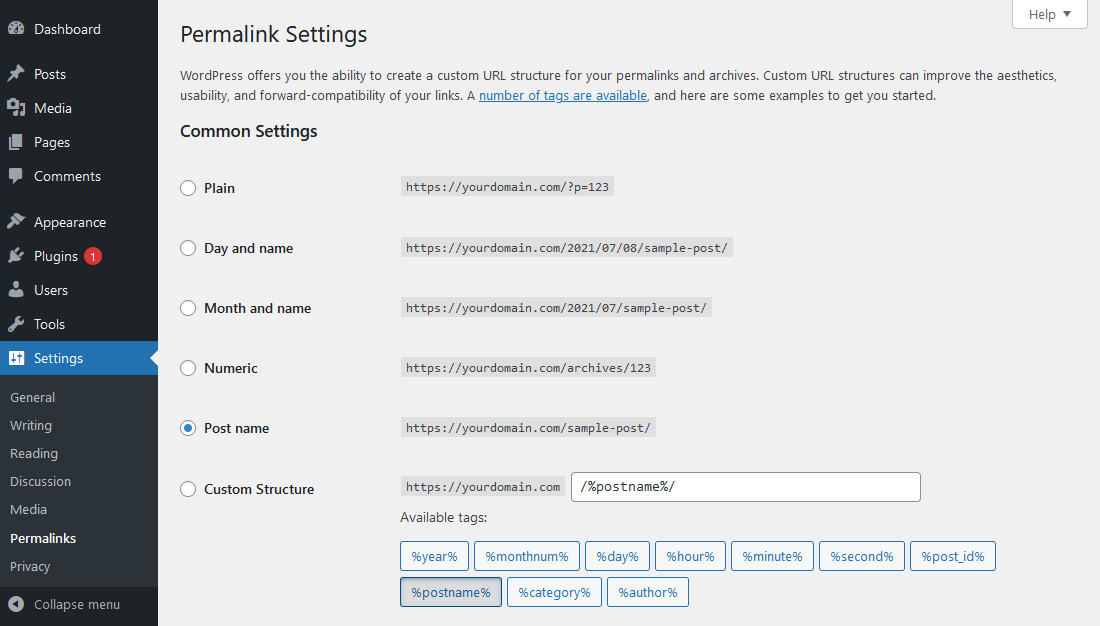
WordPress uses default permalink settings. These settings are simple. They include numbers and symbols. This is not user-friendly. It looks like www.example.com/?p=123. This does not help with search engines.
Users can change permalinks. This is possible in the settings panel. Custom permalinks are better for SEO. They include words that describe the page. This helps readers understand the content. It also helps search engines find your site.
| Structure | Description |
|---|---|
| Post Name | Uses the post title in URL |
| Day and Name | Includes date and post title |
| Month and Name | Includes month and post title |
Managing Permalinks
Accessing Permalink Settings is easy in WordPress. Go to your dashboard. Find “Settings” on the left menu. Click on “Permalinks.” Here, you can manage how your links look. Choose a style that suits your site.
Changing Permalinks affects your website’s structure. You can change them anytime. Always save your changes. This keeps your links updated. Remember, some links might break.
The Impact on Existing Links is crucial. Old links might not work after changes. Use tools to redirect them. This helps visitors find your content. Keep your links healthy and active.
Best Practices
User-friendly URLs are easy to read. They help visitors understand what a page is about. Keep URLs short and simple. Use keywords that describe the content. Avoid using too many words. Use hyphens to separate words. Hyphens make URLs easy to read. Avoid using underscores. Underscores are hard to see.
Avoid using numbers in URLs. Numbers do not tell what the content is about. Avoid using special characters. Special characters make URLs confusing. Stick to lowercase letters. Uppercase letters can cause errors.
Troubleshooting Issues
Permalinks in WordPress are permanent URLs used to link posts and pages. These links help users navigate websites easily. Troubleshooting permalink issues often involves checking settings or refreshing the permalink structure.
Resolving Broken Links
Broken links can affect user experience. They can hurt SEO too. Check all links on your site. Use tools like Broken Link Checker. Fix links that lead nowhere. Update URLs to current ones. Ensure links point to the right pages. Broken links can confuse visitors. They can lead to lost traffic. Regular checks can prevent issues. Monitor links often for changes.
Fixing 404 Errors
404 errors show when pages are missing. They can frustrate users. Google Search Console can help find them. Correct these errors quickly. Redirect old URLs to new ones. Use 301 redirects for permanent moves. Ensure your website has a custom 404 page. This can guide users to the right place. It helps retain traffic on your site. Regular updates can reduce 404 errors. Keep your website fresh and accurate.
Advanced Tips
Permalinks in WordPress are permanent URLs for your blog posts or pages. They help readers find your content easily. Adjust them in your WordPress settings for better SEO and user experience.
Using Plugins For Optimization
Plugins can help make permalinks better. They offer many tools. Use them to change links easily. Yoast SEO is a popular plugin. It helps with permalink settings. Another option is All in One SEO Pack. This plugin is also useful. These tools guide you in making links short and clear. Plugins often come with simple guides. They help you set up in minutes. Always check for updates. Keep plugins updated for best results.
Understanding Slug Customization
Slugs are the part of the URL after the domain. They tell what the page is about. It’s good to keep slugs short. Use keywords in slugs. This helps with search engines. Short slugs are easy to remember. They look neat and clean. Avoid using numbers or special symbols. Keep them simple and direct. Slug customization makes URLs more user-friendly. It also helps with SEO.
Credit: www.boldgrid.com
Frequently Asked Questions
What Is A Permalink In WordPress?
A permalink in WordPress is a URL structure that links to your content. It is essential for SEO and user experience. By default, WordPress generates permalinks, but you can customize them for better readability and search engine optimization.
How Do I Change Permalinks In WordPress?
To change permalinks, go to your WordPress dashboard. Navigate to Settings, then Permalinks. Choose the structure that fits your needs and save changes. Remember, changing permalinks may affect your site’s traffic if not redirected properly.
Why Are Permalinks Important For Seo?
Permalinks are crucial for SEO because they help search engines understand your content. A clean and descriptive URL improves click-through rates. It also enhances user experience by providing clear navigation cues to both users and search engines.
Can Permalinks Affect Site Performance?
Yes, permalinks can affect site performance. A well-structured permalink boosts SEO and improves site visibility. However, complex structures can slow down site speed and confuse users. Ensure your permalinks are simple and relevant to maintain optimal site performance.
Conclusion
Permalinks in WordPress are crucial for your website’s success. They help users find your content easily. Search engines also benefit from clear permalinks. Good permalinks improve your site’s ranking. They make your site more organized. Users appreciate readable URLs. WordPress offers various permalink settings.
Choose the one that suits your needs best. Regularly review and update your permalinks. Keep them simple and descriptive. A well-structured permalink enhances user experience. It also boosts your site’s visibility online. Always ensure your permalinks are correctly set. This small detail can make a big difference.


