
Are you trying to navigate the intricate world of web hosting and stumbled upon the term “Namecheap Web Hosting DNS”? You’re not alone.
Understanding this concept is crucial for anyone looking to establish a strong online presence. Imagine having the power to control how your domain connects with the internet, ensuring that your website is always accessible to your audience. This is where Namecheap Web Hosting DNS comes into play.
It’s more than just a technical term; it’s the backbone that ensures your website runs smoothly and efficiently. Dive into this article to uncover what Namecheap Web Hosting DNS is all about and how it can be a game-changer for your online endeavors. Whether you’re a seasoned pro or a curious beginner, this guide is tailored just for you, offering clarity and insights that can make all the difference.
Credit: hostarmada.com
Overview Of Namecheap Web Hosting
Namecheap offers reliable web hosting services. Many users trust it for its affordable plans and user-friendly interface. It provides tools to help websites run smoothly. Hosting with Namecheap means getting good speed and security. Websites load fast and stay safe from threats. Easy to use for beginners and experts alike.
Namecheap web hosting includes free domain for the first year. It has unmetered bandwidth for most plans. Users can manage their sites easily. It supports WordPress, which is popular. There are backup options to keep data safe. Security features protect your website data.
| Plan Type | Price per Month | Features |
|---|---|---|
| Starter | $1.44 | 1 Website, Unmetered Bandwidth, Free SSL |
| Professional | $3.88 | Up to 3 Websites, Unmetered Bandwidth |
| Ultimate | $4.88 | Unlimited Websites, Unmetered Bandwidth |
Namecheap offers 24/7 support. Help is available via live chat and email. The support team is friendly and helpful. Users get answers quickly. They solve problems fast. Guides and FAQs are on the website. These help users learn more. Support is always ready to assist.
Understanding Dns
DNS stands for Domain Name System. It is like a phone book for the internet. It helps find websites using names instead of numbers. Each website has a special number called an IP address. But, names are easier for us to remember. DNS changes names to IP addresses.
Imagine you want to visit a website. You type the name in your browser. DNS checks its list to find the IP address. It sends the IP address back to your browser. Now, your browser can find the website. The process is quick and happens in seconds.
Namecheap Dns Services
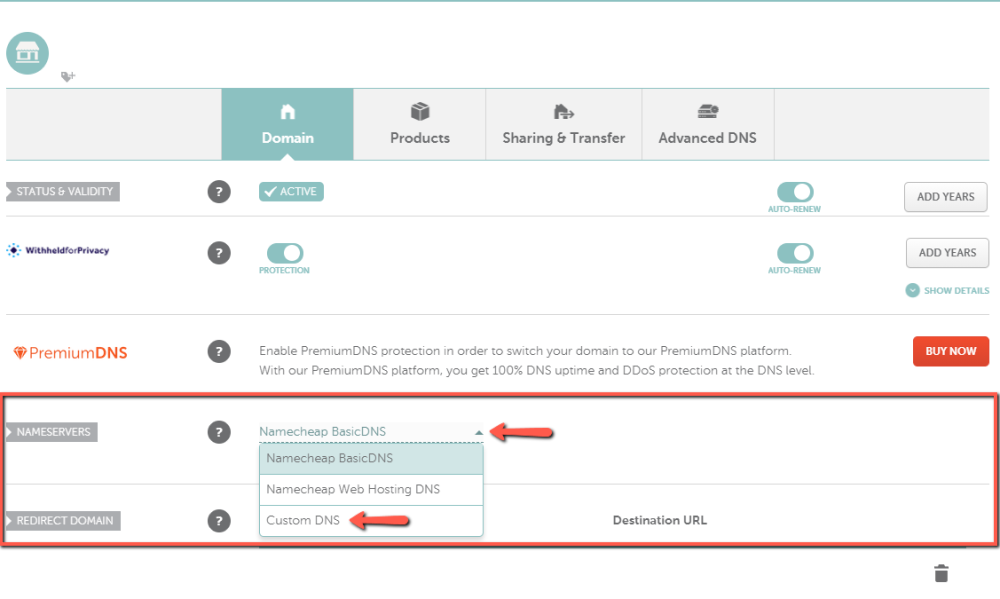
Namecheap offers easy-to-use DNS management tools. They help to control your domain settings. Users can quickly change IP addresses. This helps direct traffic to the right place. The platform has a simple interface. It is easy to understand. Even beginners can use it without trouble. These tools are important for website performance. They ensure your site runs smoothly. Namecheap’s services are reliable and trusted.
Namecheap provides custom DNS options for more control. Users can set their own DNS records. This includes adding CNAME or A records. Customization helps in specific needs. It allows for better website management. Users can create subdomains easily. These features support advanced users too. Namecheap ensures flexibility and ease of use. It helps meet various requirements. Custom DNS enhances website functionality.
Configuring Dns With Namecheap
Setting up DNS on Namecheap is simple. First, log into your Namecheap account. Go to the dashboard. Find your domain name. Click on “Manage”. Now, look for the “Advanced DNS” tab. Click on it. You will see a list of DNS records. These are important. To change a record, click the edit button. Enter new information. Save changes. Your DNS is now configured.
Sometimes DNS changes take time. This is called propagation. It can take 48 hours. If your site is down, check your records. Make sure they are correct. Look for typos. Another issue is wrong record type. Ensure you select the right one, like A or CNAME. If unsure, ask for help. Namecheap support is available.
Comparing Namecheap Dns
Namecheap DNS is known for its speed. It is quick and reliable. Web pages load fast. This is important for users. Speed matters a lot for websites. Websites need to be fast. Namecheap DNS helps with this. It ensures smooth browsing.
Many companies offer DNS services. Some competitors are GoDaddy, Bluehost, and HostGator. Each has its strengths. Namecheap is often cheaper. It is also user-friendly. GoDaddy has more features. Bluehost offers good support. HostGator is also reliable. Users should pick based on their needs. Compare features and prices. Make a smart choice. Choose what suits you best.

Credit: www.youtube.com
Security Features
Namecheap provides strong protection against DNS attacks. This is crucial for keeping your website safe. DNS attacks can cause big problems. They can make your website unavailable. Namecheap uses advanced tools to stop these attacks. They monitor your site constantly. This helps keep your site running smoothly.
Secure Sockets Layer (SSL) is very important. It keeps data safe as it moves. Encryption changes your data into code. This makes it hard for others to read. Namecheap offers SSL certificates. These keep your data secure. Visitors to your site feel safe. They see a secure connection. This builds trust.
User Feedback
Customers praise Namecheap for its easy-to-use interface. Many find it simple to navigate. They enjoy the affordable prices for hosting services. Several users mention the fast support they receive. Quick answers to their questions are appreciated. Some think the features are good for beginners. Others love the reliable uptime of their websites.
Experts say Namecheap offers strong DNS management. They highlight the security features provided. SSL certificates and privacy protection are noted. Many experts find the performance satisfactory. They often recommend it for small businesses. The cost-effective packages are praised. Tech analysts note the user-friendly setup. They believe it fits well for personal websites.
Credit: www.namecheap.com
Frequently Asked Questions
What Is The Dns Of Namecheap Hosting?
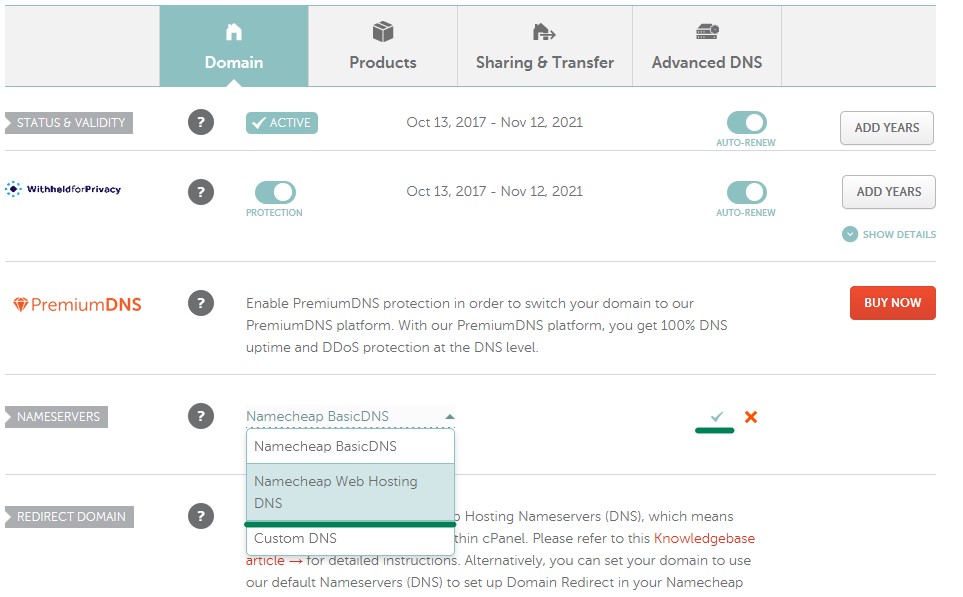
Namecheap’s DNS for hosting typically includes ns1. namecheaphosting. com and ns2. namecheaphosting. com. These are the primary nameservers. Always verify in your Namecheap account for any updates or changes.
What Is The Difference Between Basic Dns And Web Hosting Dns?
Basic DNS handles domain name resolution, converting domain names to IP addresses. Web hosting DNS includes additional settings for hosting services, managing website traffic, and ensuring site accessibility. Each serves distinct functions within internet operations.
What Is Web Hosting Dns?
Web hosting DNS translates domain names into IP addresses, allowing users to access websites. It manages the domain’s records, including email, subdomains, and other services. DNS ensures your site is reachable online, functioning as the internet’s address book. Proper DNS configuration boosts website performance and security.
Should I Get Premium Dns On Namecheap?
Premium DNS on Namecheap enhances site speed, security, and reliability. It offers superior uptime and DDoS protection. If your website is crucial, consider upgrading to ensure optimal performance and safeguard against cyber threats. For advanced needs, premium DNS provides better control and management of your domain’s DNS settings.
Conclusion
Namecheap Web Hosting DNS simplifies managing your domain settings. It offers reliable and fast DNS services. This ensures your website runs smoothly. Easy-to-use tools make setup quick. Even beginners can handle it. Affordable pricing adds extra value. With Namecheap, enjoy peace of mind.
Your website stays accessible and secure. Need help? Their support team is ready to assist. Choosing Namecheap means opting for quality DNS services. Ideal for both small and large websites. Perfect for those seeking efficient hosting solutions.


