
Imagine visiting a website and instantly finding what you need with just a few clicks. Sounds ideal, right?
This seamless experience is what a Mega Menu in WordPress offers. If you’ve ever felt frustrated by cluttered navigation menus that leave you lost and overwhelmed, you’re not alone. A Mega Menu is your ticket to a streamlined, user-friendly website experience.
You’re about to discover how a Mega Menu can transform your WordPress site. By organizing complex information into an intuitive layout, it not only enhances your visitors’ experience but also keeps them coming back for more. Whether you’re running an online store or a blog, a well-structured Mega Menu can make all the difference. Read on to learn how you can implement this powerful tool and take your website to the next level.
Mega Menu Basics
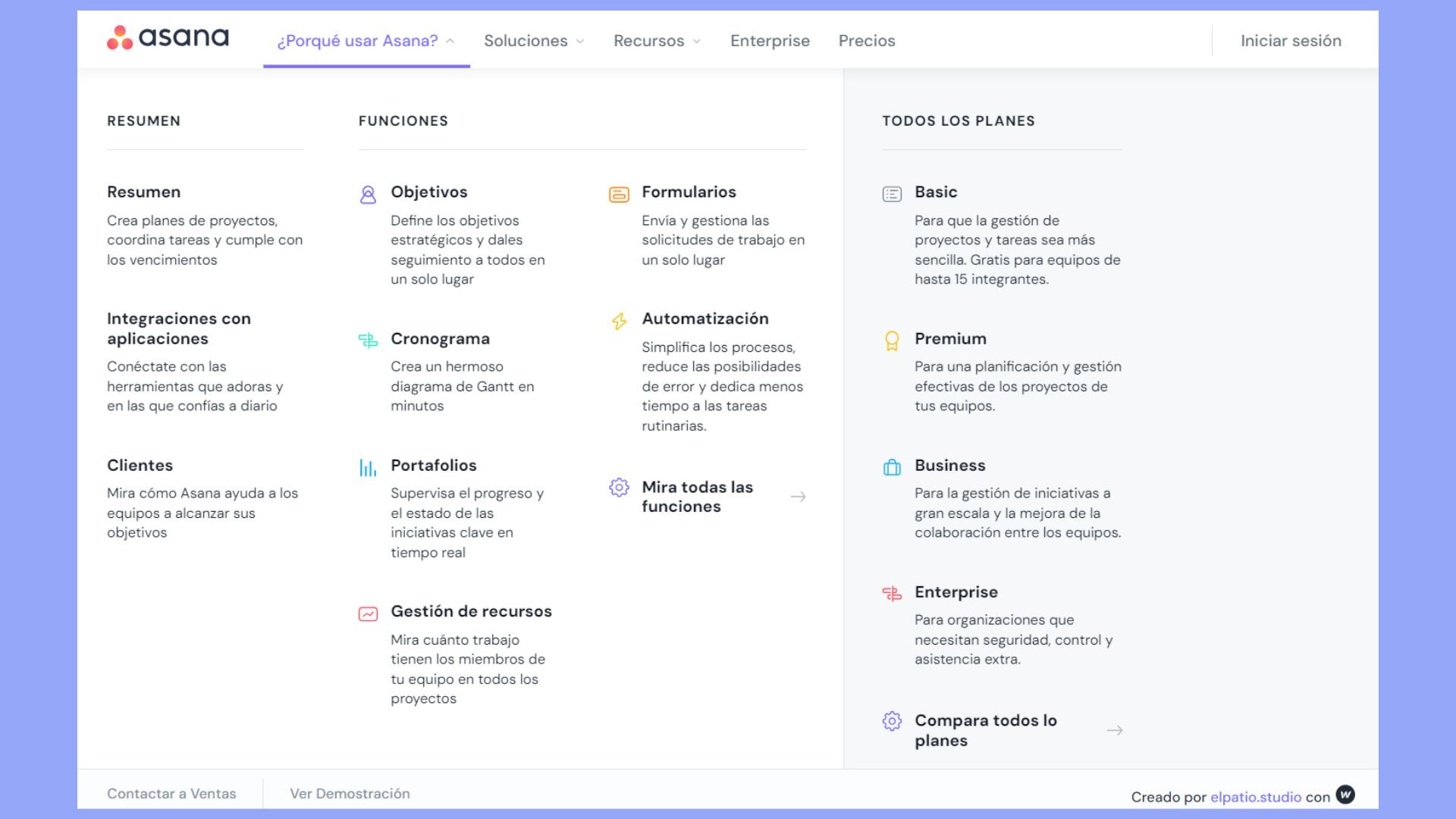
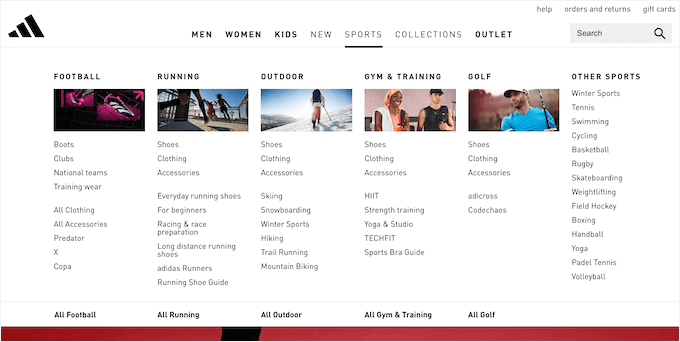
A mega menu is a type of menu on websites. It shows many options. Users can see everything at once. It is easy to navigate. Mega menus organize links well. They help users find pages quickly. Each section can have its own title. This makes it clear for everyone.
Mega menus are crucial in web design. They make websites easy to use. Visitors find what they need fast. Websites look tidy and neat. Designers use mega menus for big sites. They help display many categories. Users see more choices at a glance. This boosts user satisfaction.
Features Of Mega Menu
Mega Menu helps users find things quickly. It shows many options at once. Users don’t need to click many times. This makes browsing faster. Finding what you need is easier. Users enjoy using websites with Mega Menus. It makes the experience better.
Mega Menus can change how they look. Users can choose colors and styles. Layouts can fit different websites. This makes each menu unique. Customization allows creativity. Websites can look special. Users can make menus match their brand.
Mega Menus work on all devices. They adjust to fit screens. Mobile users can use them easily. Menus look good on phones and computers. Responsive design ensures usability everywhere. Users enjoy using sites with flexible menus.
Setting Up Mega Menu In WordPress
Mega Menu in WordPress enhances site navigation by displaying multiple options in a structured layout. Users enjoy easy access to categories, links, and content, making browsing efficient. Ideal for complex websites, it organizes information neatly.
Installing Mega Menu Plugins
Begin by searching for Mega Menu plugins in your WordPress dashboard. Popular options include Max Mega Menu and WP Mega Menu. Click on ‘Install Now’ and then ‘Activate’. The plugin is now ready. Navigate to the plugin settings. Configure the options as needed. Each plugin might have different features. Explore to find what suits your site best. Some plugins offer drag-and-drop builders. Others have pre-designed templates.
Configuring Menu Settings
Access the menu settings in your WordPress dashboard. Find the ‘Appearance’ section, then click on ‘Menus’. Select the menu you want to change. Enable the Mega Menu option for that menu. Customize the menu items. Add images or icons if necessary. Ensure it looks appealing and is easy to navigate. Save your changes. Preview your site to see the Mega Menu live. Adjust settings if needed for better user experience.
Benefits Of Using Mega Menu
Mega menus make websites easy to explore. Users find what they need fast. They don’t need to click through many pages. This saves time. Mega menus show lots of choices in one spot. People like this. It feels nice to use a site with a mega menu.
Search engines love organized sites. A mega menu helps with this. It shows all pages clearly. Search engines can find pages easily. This helps in ranking better. More people might find your site with a good mega menu.
Mega menus keep content tidy. Everything has a place. It’s easy to see all sections. Visitors like well-arranged sites. They can find topics they enjoy. Content looks neat and easy to read. This makes websites more user-friendly.
Challenges And Considerations
Mega menus can display lots of information. They may confuse visitors if not organized well. Users might find it hard to locate what they need. Keep it simple. Group items logically. Use clear labels. This helps users navigate easily. Avoid clutter. Too much detail can overwhelm. Aim for clarity and simplicity.
Not all WordPress themes support mega menus. Some themes may limit their functionality. Check your theme’s compatibility first. Ensure smooth integration. Some themes require adjustments for mega menus. Consider theme customization options. Read theme documentation carefully. Compatibility is key for a seamless experience. Test the menu on different devices. Make sure it works well everywhere.
Credit: 10web.io
Popular Mega Menu Plugins
Mega Menu plugins for WordPress transform basic navigation into interactive, user-friendly menus. These plugins offer multi-column layouts, customizable styles, and responsive designs, enhancing website functionality and user experience. Ideal for sites with extensive content, Mega Menus help visitors find information quickly and easily.
Max Mega Menu
Max Mega Menu is a free plugin for WordPress. It helps you create a mega menu easily. You can add widgets and other elements. This plugin has a drag-and-drop feature. It is very easy to use. You can change colors, fonts, and more. It works well with many themes. It also has a pro version with more features.
Wp Mega Menu
WP Mega Menu offers a user-friendly interface. It helps create stylish menus. You can include icons and images. The plugin has ready-made templates. It allows for customization. You can arrange menu items easily. WP Mega Menu supports mobile devices too. It is a good choice for beginners.
Customizing Mega Menu Design
Mega menus can have different colors and fonts. You can choose from a variety of options. Bright colors make menus stand out. Soft colors give a calm look. Fonts can be big or small. Bold fonts are easy to read. Fancy fonts look stylish. Choose colors and fonts that match your website. This helps keep the design nice.
Images and icons make mega menus interesting. They help people find information quickly. Icons are small pictures. They show what each menu item is about. Images can be big or small. Use images that fit the menu style. Adding icons makes the menu look neat. Choose icons that are simple and clear. Icons help users understand the menu better.

Credit: wordpress.org
Credit: www.wpbeginner.com
Frequently Asked Questions
What Is A Mega Menu In WordPress?
A Mega Menu is a feature in WordPress that enhances navigation. It displays multiple links and content in dropdowns. This tool improves site organization and user experience. It is ideal for complex sites with many categories. Mega Menus can be customized for better visual appeal and functionality.
How To Add A Mega Menu In WordPress?
To add a Mega Menu, you can use plugins like Max Mega Menu or UberMenu. Install and activate the plugin through your WordPress dashboard. Configure the menu settings as per your site’s requirements. Customize the layout, colors, and content to enhance usability and aesthetics.
Why Use Mega Menus On WordPress Sites?
Mega Menus improve navigation and user experience by organizing complex site structures. They allow easy access to various categories and subcategories. This reduces search time for users and helps in showcasing featured content. Mega Menus enhance the visual appeal, making the site more engaging.
Are Mega Menus Mobile-friendly?
Yes, most Mega Menu plugins are responsive and mobile-friendly. They adapt to different screen sizes, ensuring optimal user experience. Customize settings to enhance mobile navigation. A well-implemented Mega Menu helps users access content efficiently on smartphones and tablets.
Conclusion
Mega menus enhance website navigation. They simplify access to important pages. Visitors find content faster. This boosts user satisfaction. Mega menus reduce clutter. They organize information neatly. Easy for developers to customize. Users appreciate intuitive design. Mega menus suit websites with lots of content.
They improve user engagement. A valuable tool for WordPress sites. Help create an efficient browsing experience. Consider integrating a mega menu today. Enhance your website’s functionality. Make navigation a breeze for your visitors. Transform their browsing experience. With mega menus, your site becomes user-friendly.
A smart choice for modern web design.


